What is a editing and proofreading agreement?
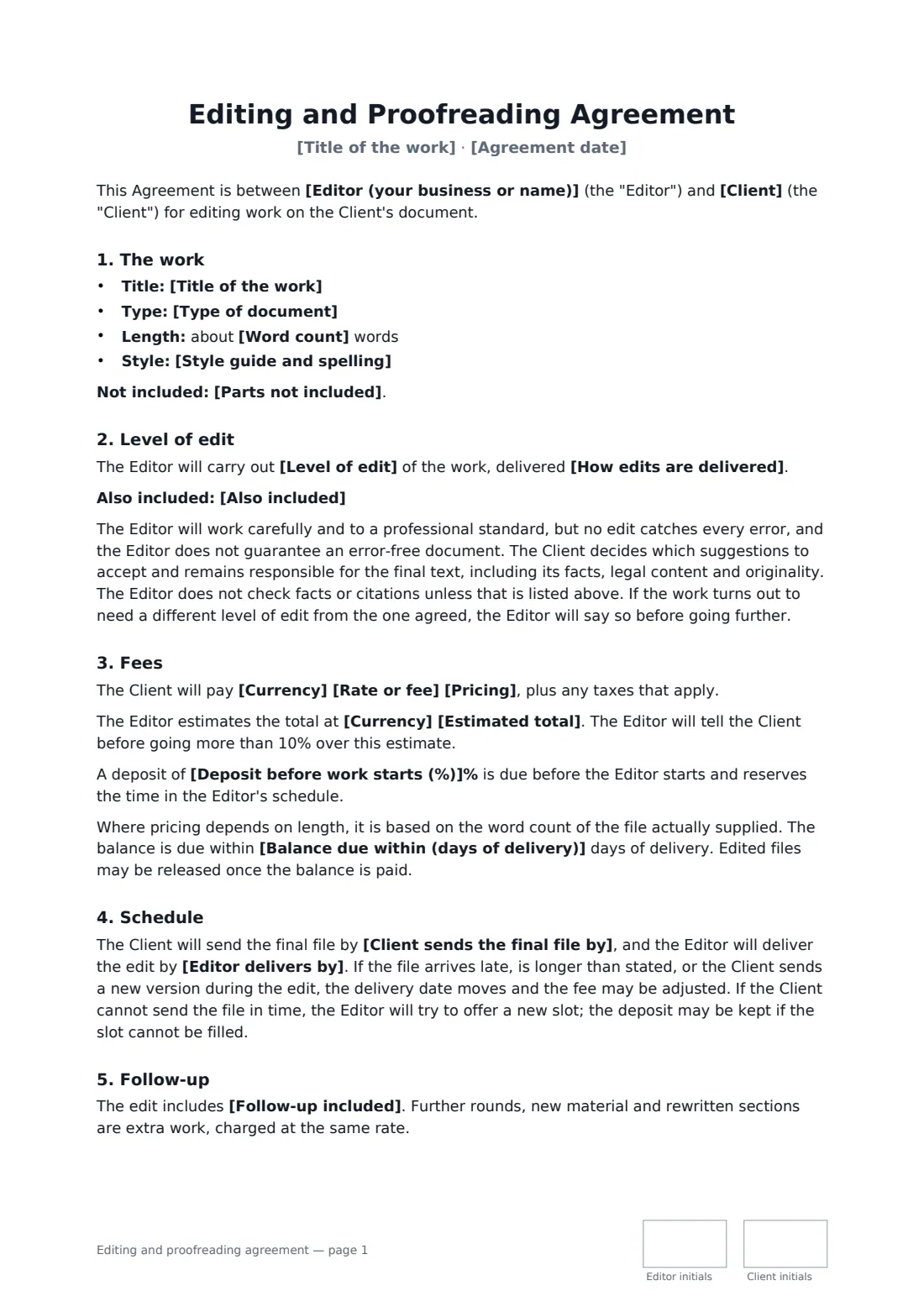
"Editing" means very different things to different clients. One author expects comments on plot and pacing, another expects every comma fixed, and a third expects both for the price of a proofread. An editing and proofreading agreement names the level of edit, explains in plain words what that level does and doesn't include, and ties the price to the word count of the file actually sent.
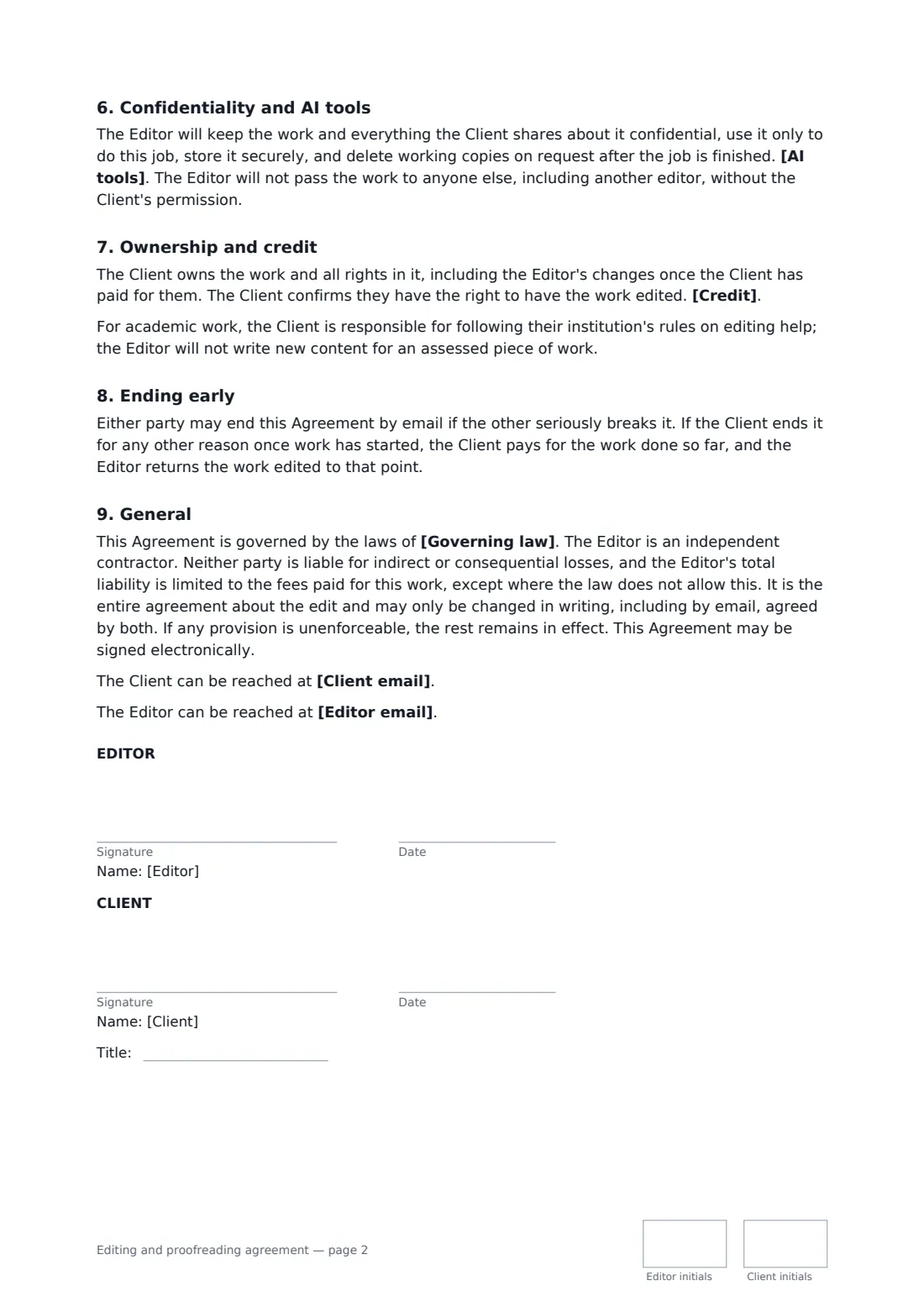
This template covers the title, type and length of the work, parts left out, the style guide and spelling, four levels of edit each with its own description, how edits are delivered, extras such as a style sheet or reference check, pricing per 1,000 words, per word, per hour or fixed fee with an optional estimate and deposit, file and delivery dates, follow-up rounds, no guarantee of an error-free text, confidentiality, a choice on AI tools, the client's ownership, a credit choice, academic integrity, ending early and a liability cap.
- Best for
- Freelance editors, proofreaders and editing services
- Signed by
- The editor and the client (author or business), with job title
- Levels
- Developmental edit, line edit, copyedit or proofread
- Length
- About 3 pages, initialled on every page
When to use a editing and proofreading agreement
- A copyedit of a debut novel before it goes to agents
- A developmental edit with an editorial letter for a non-fiction proposal
- A final proofread of a company's annual report PDF
- Language editing of a thesis within university rules
- Ongoing proofreading of blog posts at a per-word rate
What you fill in
25 blanks, then the name and email of each person who signs: editor, client.
1 The parties
- Editor (your business or name)*
- Editor email
- Client*
- Client email*
- Agreement date*
2 The work
- Title of the work*
- Type of document*
- Word count*
- Parts not included
- Style guide and spelling*
3 Scope
- Level of edit* a developmental edit · a line edit · a copyedit · a proofread
- How edits are delivered* as tracked changes and comments in a Word document · as suggestions in a shared Google Doc · as marked-up comments on the PDF proofs · as an editorial letter with notes on the manuscript
- Also included
4 Fees
- Pricing* per 1,000 words · per word · per hour · as a fixed fee for the work
- Currency*
- Rate or fee*
- Estimated total
- Deposit before work starts (%)
- Balance due within (days of delivery)*
5 Schedule
- Client sends the final file by*
- Editor delivers by*
- Follow-up included* no follow-up review · one review of the Client's responses to queries, within 30 days of delivery · two rounds of review of the revised text, within 60 days of delivery
6 Other terms
- AI tools* The Editor will not put the Client's text into generative AI tools · The Editor may use spelling, grammar and consistency checkers, but will not put the Client's text into generative AI tools that keep or learn from it
- Credit* The Editor may be credited only if the Client chooses · The Editor may list the work, by title, in their portfolio once it is published · The Editor will not be credited or name the work
- Governing law*
7 Who signs
- Editor signature and date, initials on every page · The freelance editor, proofreader or editing service.
- Client signature and date, job title, initials on every page · The author, or the business or person who owns the document.
What the editing and proofreading agreement covers
- The work
- Level of edit
- Fees
- Schedule
- Follow-up
- Confidentiality and AI tools
- Ownership and credit
- Ending early
- General
Using the editing and proofreading agreement, step by step
1 Describe the work
Enter the title, the type of document, the word count and any parts not included, such as references. Adjust the style guide and spelling line.
2 Pick the level and format
Choose the level of edit — its description prints automatically — and how edits come back: tracked changes, Google Docs suggestions, PDF mark-up or an editorial letter. List any extras.
3 Price and schedule
Choose the pricing basis, enter the rate, an optional estimate and deposit, and the payment terms. Set the date the file arrives and the delivery date, and the follow-up included.
4 Confidentiality, credit and send
Choose the AI tools policy and the credit option, add the client as a signer and send.
Tips before you send it
- Ask for a sample chapter before quoting, and confirm the level of edit the text really needs.
- Book the slot with a deposit — late manuscripts are the biggest cause of lost income for editors.
- Say clearly whether you use AI tools. Many authors and publishers now ask before they send a manuscript.
- For student work, check the institution's rules on proofreading help before you agree the scope.
Sign it online in minutes
- Fill in the blanks. Names, dates and amounts go straight into the agreement — the preview shows exactly where.
- Name who signs. Tick “This is me” for your own part. FileIt builds the PDF with every signature, date and initials box on the right line, and you can check or move anything before sending.
- Send it. Each signer gets a secure link and signs from any device — no account needed. The signed PDF, with an audit trail and a Certificate of Completion, is filed in your vault and emailed to everyone.
Editing and proofreading agreement: frequently asked questions
What's the difference between a copyedit and a proofread?
A copyedit corrects spelling, grammar, punctuation and consistency and queries unclear passages. A proofread is a last check of finished text or layout for remaining errors and layout faults. The template prints a short description of whichever level you choose.
Does the editor guarantee an error-free document?
No. The editor works to a professional standard, but the template says no edit catches every error, and the client decides which changes to accept and stays responsible for the final text.
Who owns the edited text?
The client owns the work and, once they've paid, the editor's changes too. Credit is your choice: only if the client wants it, a portfolio listing after publication, or none.
Is an editing agreement signed online valid?
In most countries, including the US (ESIGN Act and UETA), the UK, the EU (eIDAS) and Canada, an electronic signature is generally valid for an ordinary services contract like this one. FileIt keeps an audit trail and a Certificate of Completion with the signed PDF as evidence of who signed and when.
Can I change the wording?
You fill in the blanks and choose the options on the setup page; optional clauses appear only when you fill them in. If you need different clauses, draft your own document and upload it to FileIt eSignature instead — you can still place the signature boxes in the editor.
Is this template free?
Yes. The template is free to use with the eSignature app in FileIt. Your client doesn't need a FileIt account to sign.