What is Form W-12?
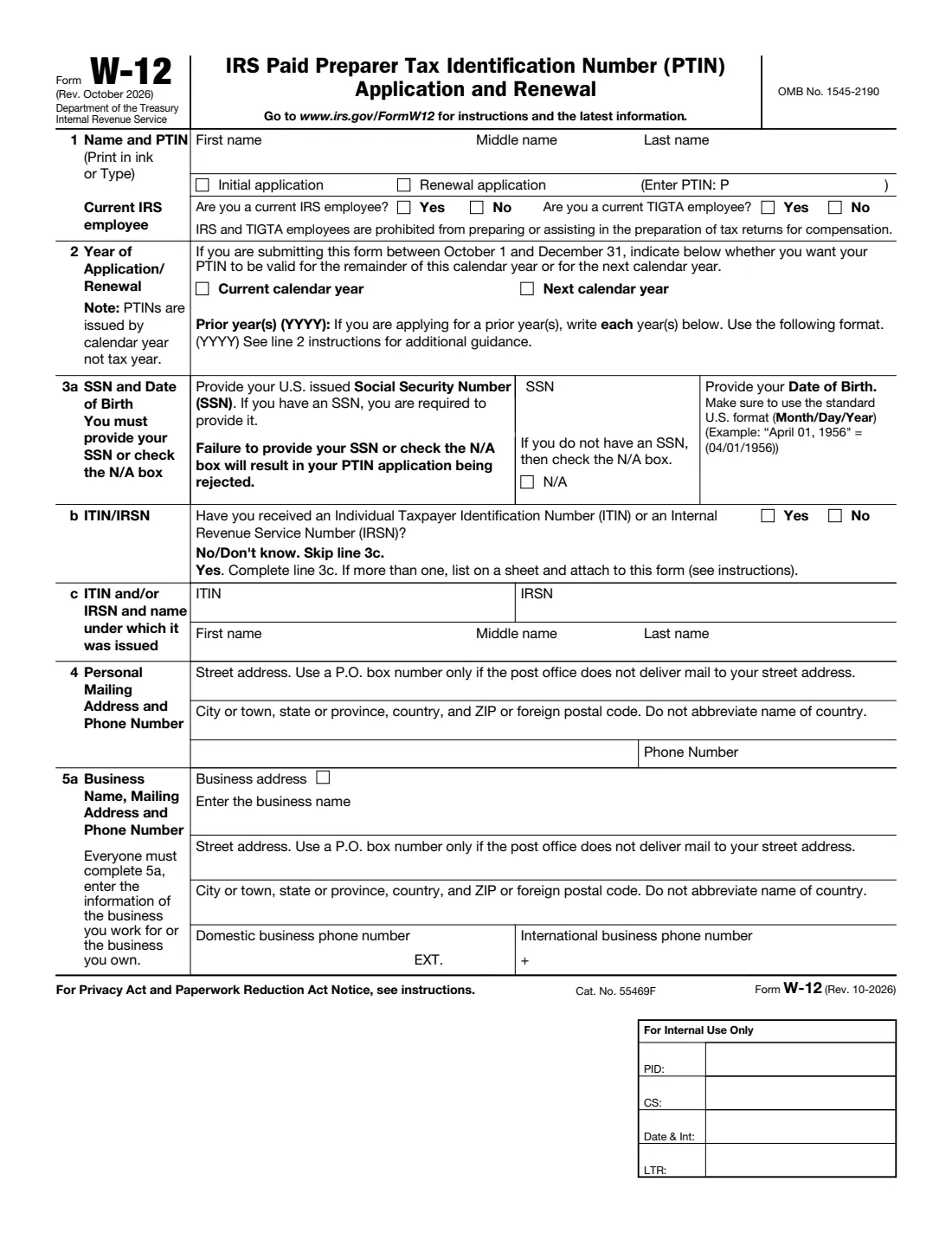
Form W-12, IRS Paid Preparer Tax Identification Number (PTIN) Application and Renewal, is the paper way to apply for or renew a PTIN. Anyone who is paid to prepare, or assist in preparing, all or substantially all of a federal tax return or claim for refund must have a PTIN, and enrolled agents must have one too. PTINs are issued by calendar year and must be renewed each year.
Most preparers apply online at IRS.gov/PTIN, where a PTIN is generally issued immediately. By mail, the IRS asks you to allow 6 weeks. The form asks about your SSN, past felony convictions, your last tax return, federal tax compliance and professional credentials, and the name, business details and credentials you give may be made public. The current revision is Rev. October 2026.
FileIt asks every line in plain language, shows only the follow-up questions that apply, prints your answers into the IRS's own PDF (including names with letters such as ł, ś or ș), and keeps a copy in your vault. You then sign it in ink and mail it with the fee.
- Who files
- Paid tax return preparers, including enrolled agents, applying for or renewing a PTIN.
- Fee
- $18.75 per year for 2026 and 2027 (as printed on the form), by a separate check or money order for each calendar year, payable to IRS Tax Pro PTIN Fee. Nonrefundable.
- Where
- IRS Tax Professional PTIN Processing Center, PO Box 380638, San Antonio, TX 78268, or online at IRS.gov/PTIN.
- Signature
- Signed and dated by the applicant in blue or black ink.
- Edition
- Rev. October 2026
- Agency
- Internal Revenue Service (IRS), Department of the Treasury
Who needs to fill out Form W-12?
- Anyone paid to prepare, or help prepare, all or substantially all of a federal tax return or refund claim.
- Enrolled agents, who must keep a current PTIN to keep the credential.
- Preparers renewing for the coming year, or for prior years in which they prepared returns for pay without an active PTIN.
- Preparers without a U.S. SSN also complete Form 8945 (U.S. citizens with a conscientious religious objection) or Form 8946 (foreign persons).
When to use Form W-12
- Before you prepare any federal return for compensation.
- Every year to renew: PTINs are issued by calendar year, not tax year.
- Between October 1 and December 31, choose whether a new PTIN should be valid for the rest of this year or for next year.
What you need before you start
- Your legal name as on your last filed federal return, and your PTIN if renewing.
- Your SSN (or N/A), date of birth, and any ITIN or IRSN.
- Your personal mailing address and phone, and your business's name, address and phone.
- Your EFIN, EIN, CAF number and website if you are self-employed or own a preparation business.
- Details of any felony conviction in the past 10 years, the address, filing status and year of your last federal return, and your tax compliance status.
- Your professional credentials with jurisdiction, number and expiration date.
- A check or money order for each calendar year's fee.
What’s on Form W-12
The 2026 edition has 3 pages. FileIt asks for it in 6 parts:
- Line 1: Name, PTIN and IRS / TIGTA employmentApplicant (the tax return preparer)
- Line 2: Year of application or renewalApplicant (the tax return preparer)
- Line 3: SSN, date of birth, ITIN / IRSNApplicant (the tax return preparer)
- Lines 4-6: Personal address, business details and emailApplicant (the tax return preparer)
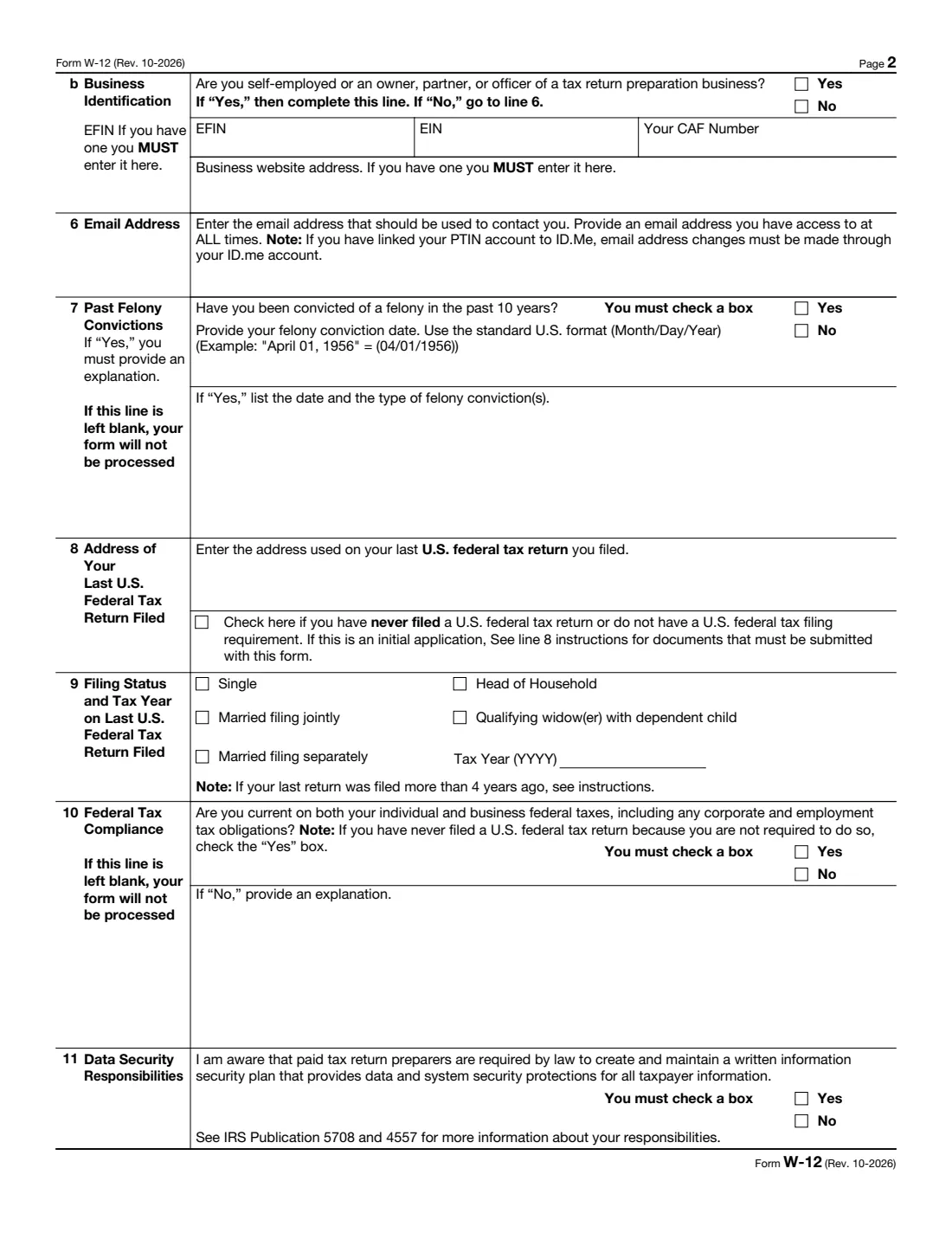
- Lines 7-10: Felony convictions, last return and tax complianceApplicant (the tax return preparer)
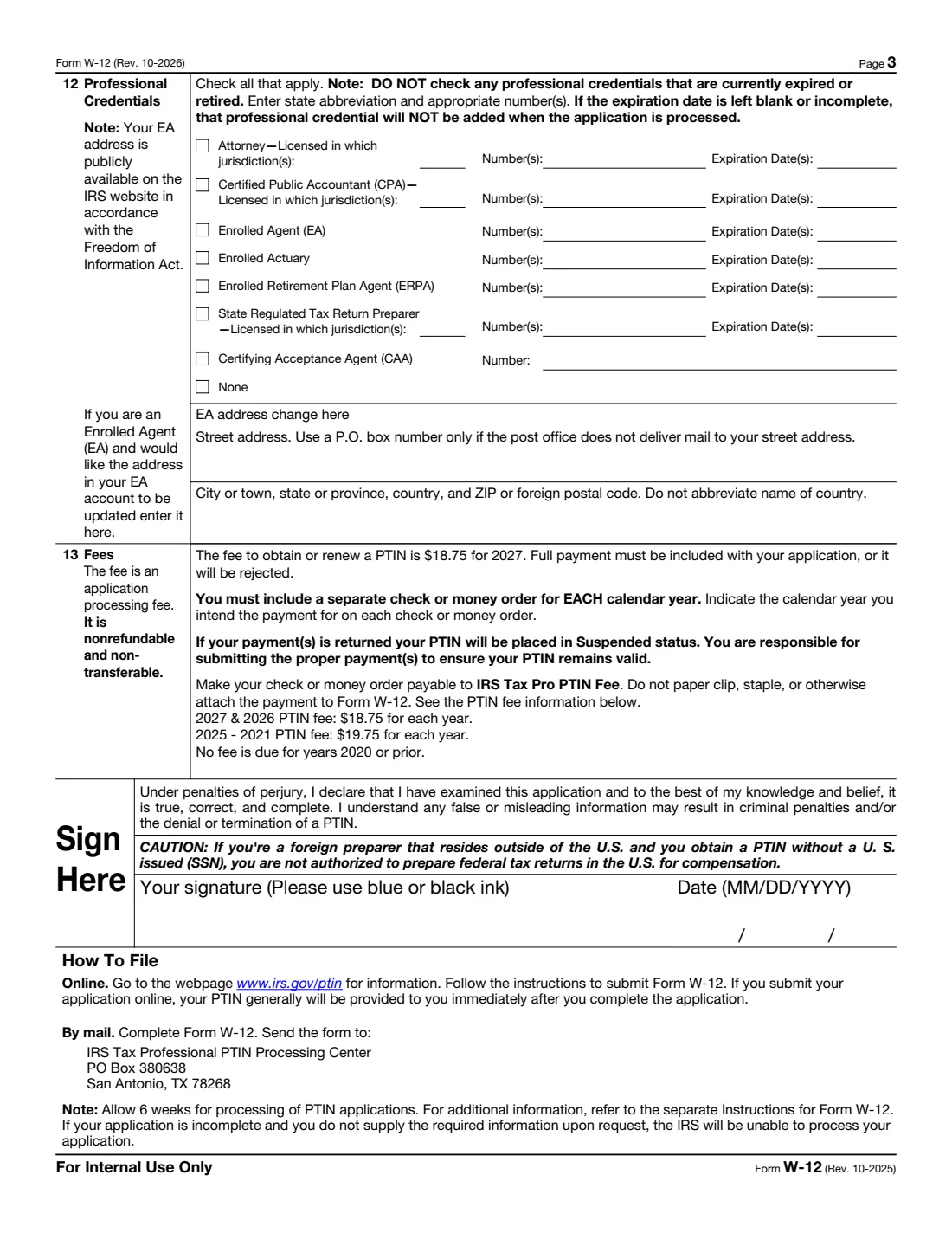
- Line 12: Professional credentialsApplicant (the tax return preparer)
How to fill out Form W-12, step by step
1 Line 1: Name and PTIN
Enter your legal name, choose initial application or renewal (with your PTIN), and answer whether you are a current IRS or TIGTA employee; they may not prepare returns for pay.
2 Line 2: Year
Between October 1 and December 31, choose the current or next calendar year. When renewing for past years, list each year as YYYY.
3 Line 3: SSN, date of birth, ITIN/IRSN
Give your U.S. SSN or check N/A (otherwise the application is rejected), your date of birth (MM/DD/YYYY; you must be at least 18), and any ITIN or IRSN with the name it was issued under.
4 Lines 4-6: Addresses and email
Enter your personal mailing address and phone, the business you work for or own (everyone completes 5a), business identification numbers if self-employed, and an email you can always reach.
5 Lines 7-10: Background and compliance
Answer the felony question (and explain any conviction), give the address, filing status and year of your last federal return or check that you never filed, and say whether you are current on your federal taxes, explaining if not. Lines 7 and 10 must be answered or the form isn't processed.
6 Lines 11-12: Data security and credentials
Confirm you know preparers must keep a written information security plan, then check each current credential with its jurisdiction, number and expiration date, or None.
7 Line 13 and signature
Include the fee for each calendar year as a separate check or money order, then sign and date in blue or black ink.
Common mistakes to avoid
- Leaving the SSN blank without checking N/A: the application is rejected.
- Leaving line 7 or line 10 blank: the form isn't processed.
- Listing a credential that has expired, or leaving its expiration date blank (it won't be added).
- Sending one check for several years instead of a separate check or money order for each calendar year.
- Stapling or clipping the payment to the form.
- Not sending the identity documents required when you have an SSN but have never filed, or not in the past 4 years.
After you fill it out
Sign and date the form in blue or black ink, and mail it with the fee to the IRS Tax Professional PTIN Processing Center, PO Box 380638, San Antonio, TX 78268.
Allow 6 weeks for processing. Applying online at IRS.gov/PTIN is faster.
Keep a copy in your FileIt vault and renew your PTIN every year.
Fill out Form W-12 online with FileIt
- Pick the person. Choose someone from People and FileIt fills in their name, date of birth, address and other details it already knows.
- Answer plain-language questions. One part of the form at a time, with the official help text beside each question — 69 fields in all. Your answers save as you go.
- Check the live preview. Watch your answers land on the real Internal Revenue Service (IRS) form, and let FileIt do any worksheet arithmetic.
- Generate the official PDF. FileIt prints your answers into the agency’s own PDF and files it in that person’s folder in your vault.
FileIt fills the form — it never files or submits anything for you. Deliver the finished form to whoever asked for it, the way the form’s instructions say.
Start Form W-12 now — it’s freeForm W-12: frequently asked questions
Can I fill out Form W-12 online?
Yes. FileIt prints your answers into the official IRS PDF to sign and mail. You can also apply or renew directly online at IRS.gov/PTIN.
How much does a PTIN cost?
The form says $18.75 for each year for 2026 and 2027, $19.75 for each year from 2021 to 2025, and no fee for 2020 or earlier. The fee is nonrefundable.
How long does a paper W-12 take?
The IRS says to allow 6 weeks. Online, a PTIN is generally issued immediately.
Can I sign Form W-12 electronically?
Not the paper form: the instructions say it must be signed and dated by the applicant in black or blue ink.
Do I need a PTIN if I only prepare my own return?
No. A PTIN is for preparers who are compensated for preparing, or assisting in preparing, all or substantially all of a return or claim for refund.
I am a foreign preparer without an SSN. Can I get a PTIN?
Yes, by also completing Form 8946 (or applying online). The form warns that a foreign preparer outside the U.S. who obtains a PTIN without a U.S. SSN isn't authorized to prepare federal returns in the U.S. for compensation.
Official sources
- Blank form (PDF), published by Internal Revenue Service (IRS): https://www.irs.gov/pub/irs-pdf/fw12.pdf
- Official instructions and guidance: https://www.irs.gov/forms-pubs/about-form-w-12
- Edition shown on this page: Rev. October 2026 (checked 2026-10-25).
FileIt is not affiliated with or endorsed by Internal Revenue Service (IRS) or any government. This page explains the form in general terms and is not legal, tax or immigration advice. Always read the official instructions, and check that you are using the edition the recipient accepts. Page last reviewed 2026-10-25.