What is Form TC-737?
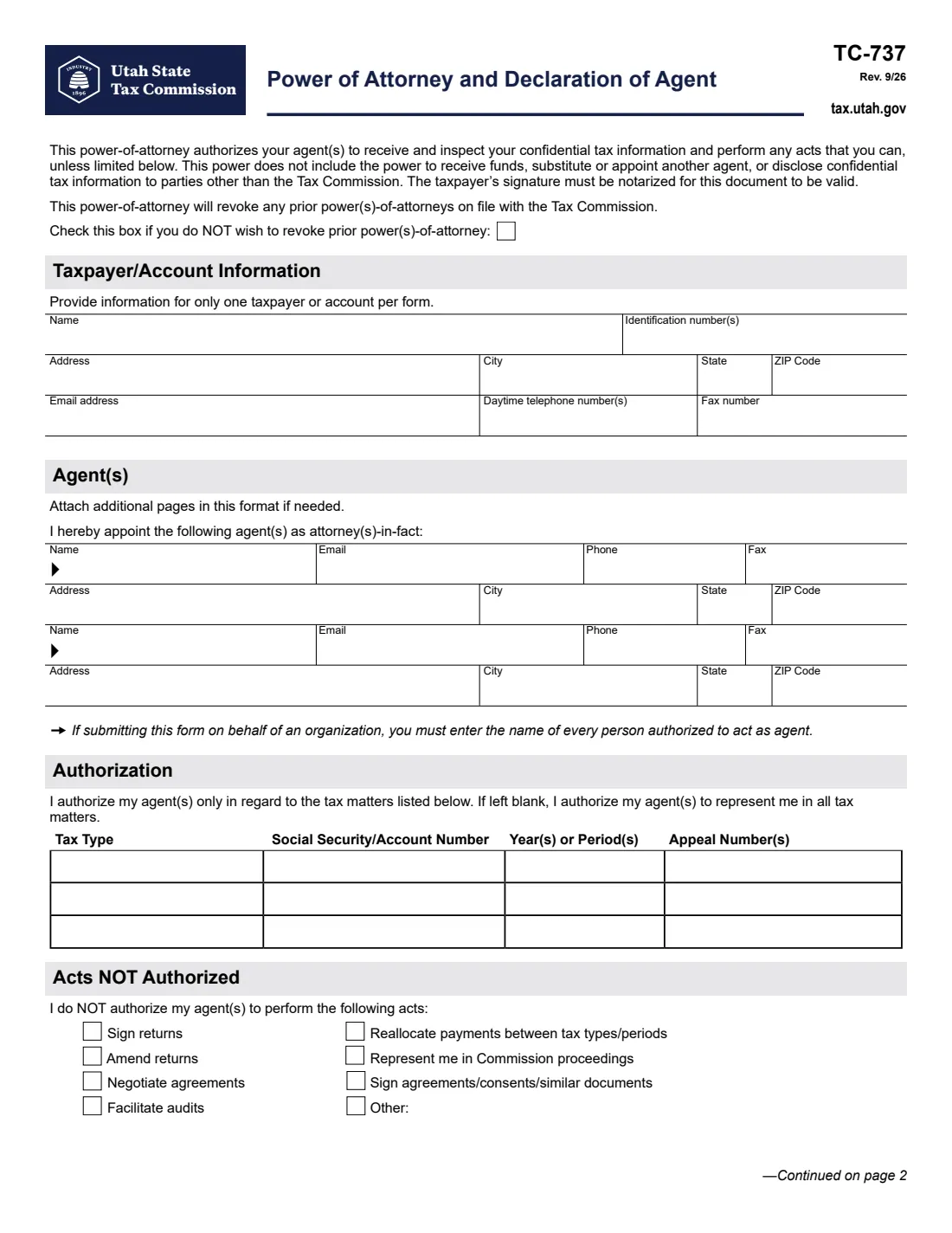
Form TC-737 is the Utah State Tax Commission's power of attorney. It lets the agents you name receive and inspect your confidential Utah tax information and do anything you could do with the Commission, unless you limit them. It never lets them receive your funds, appoint someone else in their place, or share your information with anyone other than the Commission.
You can keep it broad, or narrow it two ways: list up to three tax matters (tax type, account number, years and any appeal number), and tick acts your agents may not perform, such as signing returns or negotiating agreements. Filing it revokes any earlier power of attorney you have on file, unless you tick the box near the top to keep them.
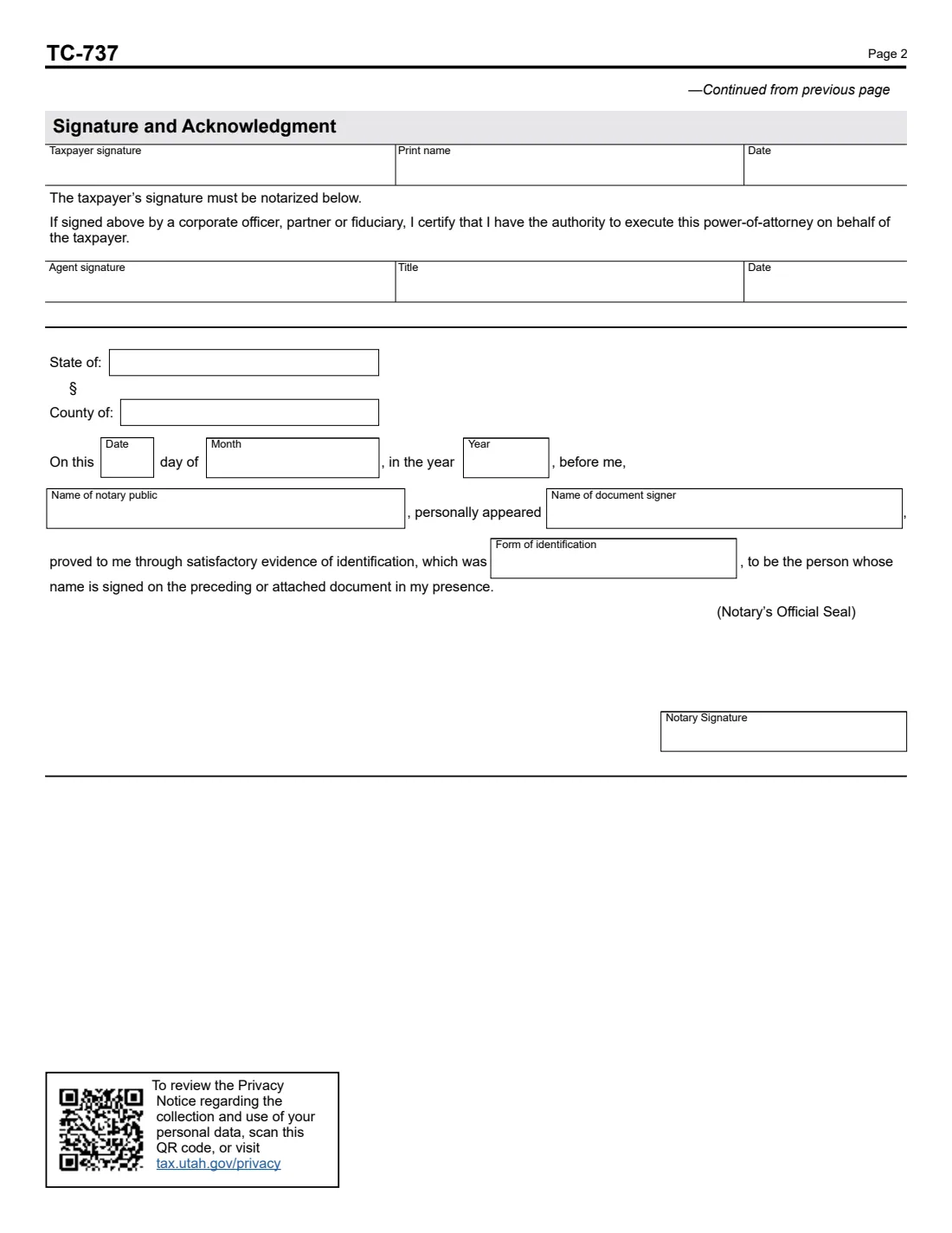
FileIt pre-fills your name and email from your vault, prints your answers onto the Commission's own PDF (Rev. 9/26) and saves the finished form in your vault folder. Your signature must be notarized for the form to be valid, so you print it and sign in front of a notary, who completes the acknowledgment on page 2.
- Who signs
- The taxpayer, or a corporate officer, partner or fiduciary for a business or estate, in front of a notary.
- Agents
- Two on the form; attach a page in the same format for more.
- Scope
- All Utah tax matters, or up to three you list; any acts you tick are held back.
- Earlier POAs
- Revoked automatically unless you tick the box to keep them.
- Edition
- TC-737, Rev. 9/26
Who needs to fill out Form TC-737?
- Utah taxpayers who want a CPA, enrolled agent, attorney or bookkeeper to talk to the Tax Commission for them.
- Adult children or relatives helping a parent sort out a Utah tax notice or payment plan.
- Businesses that want named employees or advisers to handle sales, withholding or other Utah tax accounts.
- Taxpayers with an appeal before the Commission who want a representative on the case.
When to use Form TC-737
- Before your agent calls or writes to the Tax Commission about your account.
- When you change advisers: a new TC-737 revokes the earlier one unless you choose to keep it.
- When you want someone to help with only one tax type, a few years or one appeal.
What you need before you start
- Your name, SSN or Utah account number, address and contact details.
- Each agent's name, email, phone, fax and address.
- For a limited power: each tax type, the account number, the years or periods, and any appeal number.
- A notary public, and photo ID to show them when you sign.
What’s on Form TC-737
The 2026 edition has 2 pages. FileIt asks for it in 5 parts:
- Taxpayer / account informationTaxpayer
- Agent(s)Taxpayer
- AuthorizationTaxpayer
- Acts NOT authorizedTaxpayer
- Signature and acknowledgmentTaxpayer
How to fill out Form TC-737, step by step
1 Revoke or keep earlier POAs
The form revokes every earlier power of attorney on file with the Commission. Tick the box at the top only if you want the old ones to stay in force.
2 Taxpayer / account information
One taxpayer or account per form: name, identification number, address, email, daytime phone and fax.
3 Agent(s)
Up to two agents with their contact details. If you're submitting for an organization, you must list every person authorized to act.
4 Authorization
Leave the table blank to cover all tax matters, or list up to three tax types with the account number, years or periods and appeal numbers to limit the power.
5 Acts not authorized
Tick anything your agents may not do: sign or amend returns, negotiate or sign agreements, reallocate payments, represent you in Commission proceedings, facilitate audits, or another act you describe.
6 Signature and acknowledgment
Print your name and sign in front of a notary. A corporate officer, partner or fiduciary also signs the certification line with their title. The notary completes the acknowledgment and seal.
Common mistakes to avoid
- Signing before you reach the notary: the signature must be notarized, so sign in their presence.
- Forgetting that a new TC-737 revokes your earlier powers of attorney.
- Putting two taxpayers on one form, such as both spouses: each needs their own.
- Naming only a firm: for an organization, every person who will act must be listed by name.
- Leaving out the title line when you sign for a business or estate.
After you fill it out
Print the form and sign it in front of a notary public, who fills in the acknowledgment and adds their seal.
Send it to the Utah State Tax Commission as its instructions on tax.utah.gov describe, and give your agents a copy.
Keep the notarized original with your records. FileIt keeps the filled PDF in your vault folder.
Fill out Form TC-737 online with FileIt
- Pick the person. Choose someone from People and FileIt fills in their name, date of birth, address and other details it already knows.
- Answer plain-language questions. One part of the form at a time, with the official help text beside each question — 53 fields in all. Your answers save as you go.
- Check the live preview. Watch your answers land on the real Utah State Tax Commission form, and let FileIt do any worksheet arithmetic.
- Generate the official PDF. FileIt prints your answers into the agency’s own PDF and files it in that person’s folder in your vault.
FileIt fills the form — it never files or submits anything for you. Deliver the finished form to whoever asked for it, the way the form’s instructions say.
Start Form TC-737 now — it’s freeForm TC-737: frequently asked questions
Does TC-737 have to be notarized?
Yes. The form says the taxpayer's signature must be notarized for the document to be valid.
Will it cancel the power of attorney I already have?
It revokes any earlier powers of attorney on file with the Tax Commission, unless you tick the box saying you don't want to revoke them.
Can my agent receive my refund?
No. The form states that the power doesn't include receiving funds, appointing a substitute agent, or disclosing your information to anyone other than the Commission.
What if I leave the tax matters table blank?
Then your agents may represent you in all Utah tax matters, minus any acts you tick as not authorized.
Can I name more than two agents?
Yes. Attach additional pages in the same format as the form's Agent(s) section.
Is this the same as IRS Form 2848?
No. TC-737 covers Utah state taxes only. For federal tax matters the IRS uses Form 2848.
Official sources
- Blank form (PDF), published by Utah State Tax Commission: https://tax.utah.gov/forms/current/tc-737.pdf
- Official instructions and guidance: https://tax.utah.gov/forms/current/tc-737.pdf
- Edition shown on this page: TC-737, Rev. 9/26 (checked 2026-10-19).
FileIt is not affiliated with or endorsed by Utah State Tax Commission or any government. This page explains the form in general terms and is not legal, tax or immigration advice. Always read the official instructions, and check that you are using the edition the recipient accepts. Page last reviewed 2026-10-19.