What is Form 01-137?
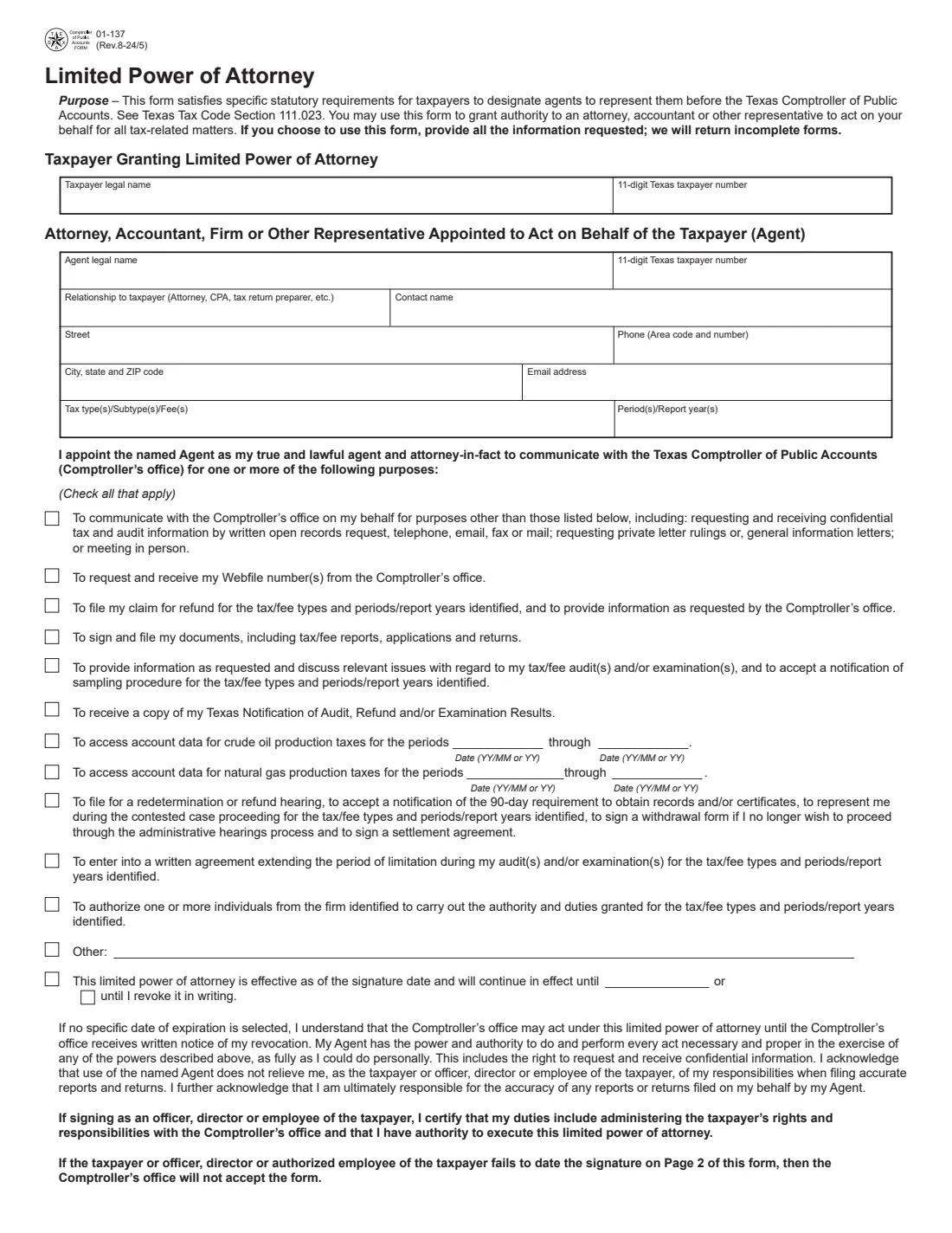
Form 01-137, Limited Power of Attorney, satisfies the statutory requirements for a taxpayer to designate an agent to represent them before the Texas Comptroller of Public Accounts (Texas Tax Code Section 111.023). You can use it to give an attorney, accountant or other representative authority for your Texas tax matters, such as sales and use tax or franchise tax.
You tick exactly what the agent may do: communicate with the Comptroller's office and receive confidential tax and audit information, request your Webfile number, file refund claims, sign and file reports and returns, handle audits and examinations, access crude oil and natural gas production tax account data, request a redetermination or refund hearing, extend the period of limitation, and more. It lasts until a date you choose or until you revoke it in writing. The form says the Comptroller returns incomplete forms and will not accept one whose signature isn't dated. The current edition is 01-137 (Rev.8-24/5).
FileIt asks each question in plain English, prints your answers into the agency's own official PDF, keeps the finished PDF in your vault, and can send it for e-signature. You then file or deliver it yourself: FileIt never submits anything for you.
- Who fills it
- The taxpayer, or an officer, director or authorized employee of the taxpayer.
- Given to
- The Texas Comptroller of Public Accounts.
- Lasts
- Until the end date you choose, or until the Comptroller's office receives your written revocation.
- Signatures
- The taxpayer or an officer, director or authorized employee signs and dates page 2.
- Edition
- 01-137 (Rev.8-24/5)
- Agency
- Texas Comptroller of Public Accounts
Who needs to fill out Form 01-137?
- Texas businesses that want their CPA, attorney or bookkeeper to speak to the Comptroller about sales tax, franchise tax or other Texas taxes.
- Taxpayers going through a Comptroller audit or examination who want a representative to provide information and discuss the issues.
- Taxpayers who want a representative to file a refund claim or request a redetermination or refund hearing.
- Crude oil and natural gas tax account holders granting access to their account data for set periods.
When to use Form 01-137
- Before your representative calls or writes to the Comptroller's office about your confidential tax information.
- When an audit, examination or refund claim starts and you want someone else to handle it.
- When your agent needs your Webfile number or will sign and file reports and returns for you.
- When you change representatives: complete a new form for the new agent.
What you need before you start
- Your legal name and your 11-digit Texas taxpayer number.
- The agent's legal name, their Texas taxpayer number if they have one, relationship to you (for example CPA), contact name, address, phone and email.
- The tax types, subtypes or fees, and the periods or report years the authority covers.
- For crude oil or natural gas account data, the first and last periods as YY/MM (monthly filers) or YY (annual filers).
- The signer's name, title, phone, address and email.
What’s on Form 01-137
The 2024 edition has 2 pages. FileIt asks for it in 5 parts, and it is signed by Taxpayer:
- Taxpayer granting the limited power of attorneyTaxpayer
- Agent: attorney, accountant, firm or other representativeTaxpayer
- What the agent may doTaxpayer
- How long it lastsTaxpayer
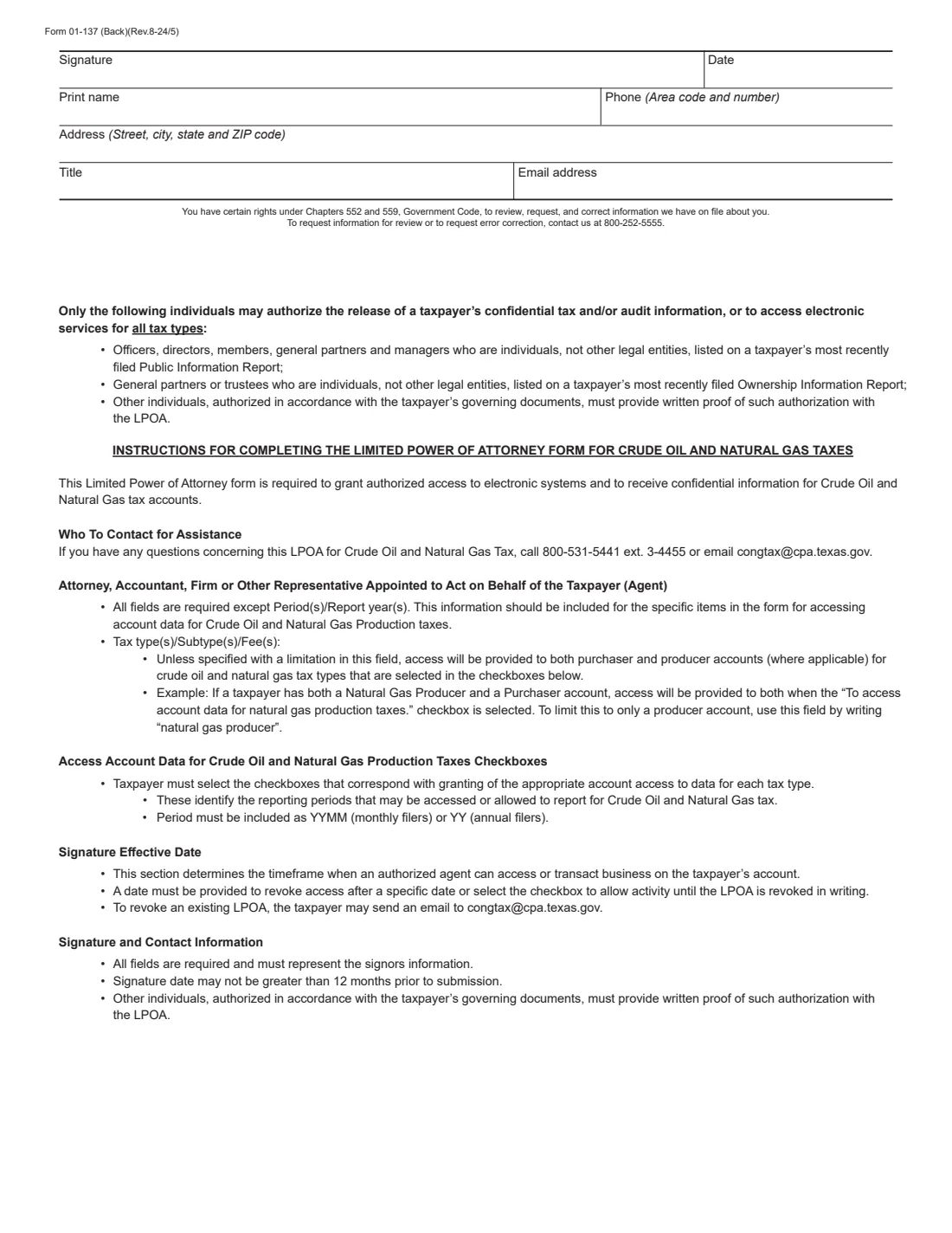
- Signature and contact information (page 2)Taxpayer
How to fill out Form 01-137, step by step
1 Taxpayer
Enter the taxpayer's legal name and 11-digit Texas taxpayer number exactly as the Comptroller has them.
2 Agent
Enter the attorney, accountant, firm or other representative: legal name, Texas taxpayer number, relationship to you, contact name, street, city, state and ZIP, phone and email. Then list the tax types and the periods or report years. For crude oil and natural gas, access covers both purchaser and producer accounts unless you limit it in the tax type box, for example "natural gas producer".
3 Purposes
Tick every purpose the agent may act for: communicating with the Comptroller's office, Webfile numbers, refund claims, signing and filing documents, audits and examinations, audit results, crude oil and natural gas account data, redetermination or refund hearings, extending the period of limitation, authorizing other individuals from the firm, or an other purpose you describe.
4 How long it lasts
Choose an end date, or leave it in effect until you revoke it in writing. With no end date, the Comptroller's office may act on it until it receives written notice of your revocation.
5 Signature and contact information
The taxpayer, or an officer, director or employee whose duties include the taxpayer's rights and responsibilities with the Comptroller, signs and dates page 2 and gives their name, title, phone, address and email. The page 2 instructions say the signature date may not be more than 12 months before you send it.
Common mistakes to avoid
- Leaving boxes blank: the form says the Comptroller returns incomplete forms.
- Forgetting to date the signature on page 2, which the form says makes it unacceptable.
- Giving a taxpayer number that isn't 11 digits.
- Ticking crude oil or natural gas access without the from and through periods.
- Signing as an employee whose duties don't include the taxpayer's dealings with the Comptroller.
After you fill it out
Sign and date page 2, by hand or with FileIt's optional e-signature, and send the form to the Comptroller's office. For crude oil and natural gas tax questions the form gives 800-531-5441 ext. 3-4455 and [email protected].
Keep the PDF FileIt saves in your vault. If you chose an end date, add it as the document's expiry date in FileIt to get a reminder before it lapses.
To end it early, revoke it in writing; for crude oil and natural gas accounts the form says you can email [email protected].
Fill out Form 01-137 online with FileIt
- Pick the person. Choose someone from People and FileIt fills in their name, date of birth, address and other details it already knows.
- Answer plain-language questions. One part of the form at a time, with the official help text beside each question — 42 fields in all. Your answers save as you go.
- Check the live preview. Watch your answers land on the real Texas Comptroller of Public Accounts form, and let FileIt do any worksheet arithmetic.
- Generate the official PDF. FileIt prints your answers into the agency’s own PDF and files it in that person’s folder in your vault. Sign it, or send it for e-signature.
FileIt fills the form — it never files or submits anything for you. Deliver the finished form to whoever asked for it, the way the form’s instructions say.
Start Form 01-137 now — it’s freeForm 01-137: frequently asked questions
What is Texas Form 01-137?
It is the Texas Comptroller's Limited Power of Attorney, which lets you designate an agent to represent you before the Comptroller of Public Accounts under Texas Tax Code Section 111.023.
Is IRS Form 2848 enough for Texas taxes?
No. Form 2848 is for the IRS. For the Texas Comptroller, use Form 01-137.
Does it have to be notarized?
The form has no notary or witness section. The taxpayer, or an officer, director or authorized employee, signs and dates it.
How long does it last?
Until the date you choose, or, if you choose none, until the Comptroller's office receives your written revocation.
Who can sign it for a business?
An officer, director or employee whose duties include administering the taxpayer's rights and responsibilities with the Comptroller and who has authority to sign it. Page 2 adds that other individuals authorized by the governing documents must provide written proof of that authorization.
Can I fill it out online?
Yes. FileIt prints your answers into the Comptroller's official PDF, which you sign and send yourself.
Official sources
- Blank form (PDF), published by Texas Comptroller of Public Accounts: https://comptroller.texas.gov/forms/01-137.pdf
- Official instructions and guidance: https://comptroller.texas.gov/taxes/forms/power-of-attorney.php
- Edition shown on this page: 01-137 (Rev.8-24/5) (checked 2026-10-25).
FileIt is not affiliated with or endorsed by Texas Comptroller of Public Accounts or any government. This page explains the form in general terms and is not legal, tax or immigration advice. Always read the official instructions, and check that you are using the edition the recipient accepts. Page last reviewed 2026-10-25.