What is Form 15397?
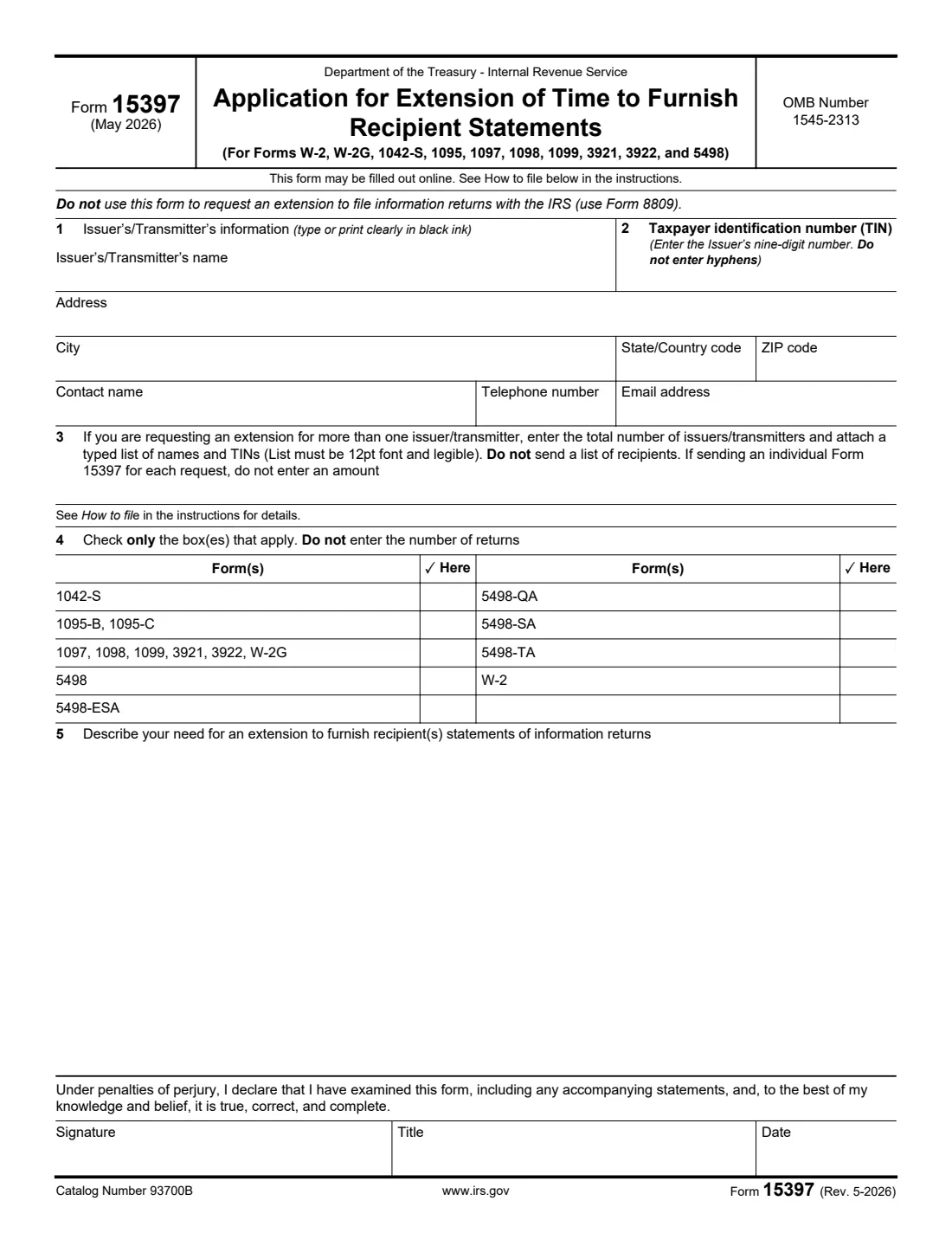
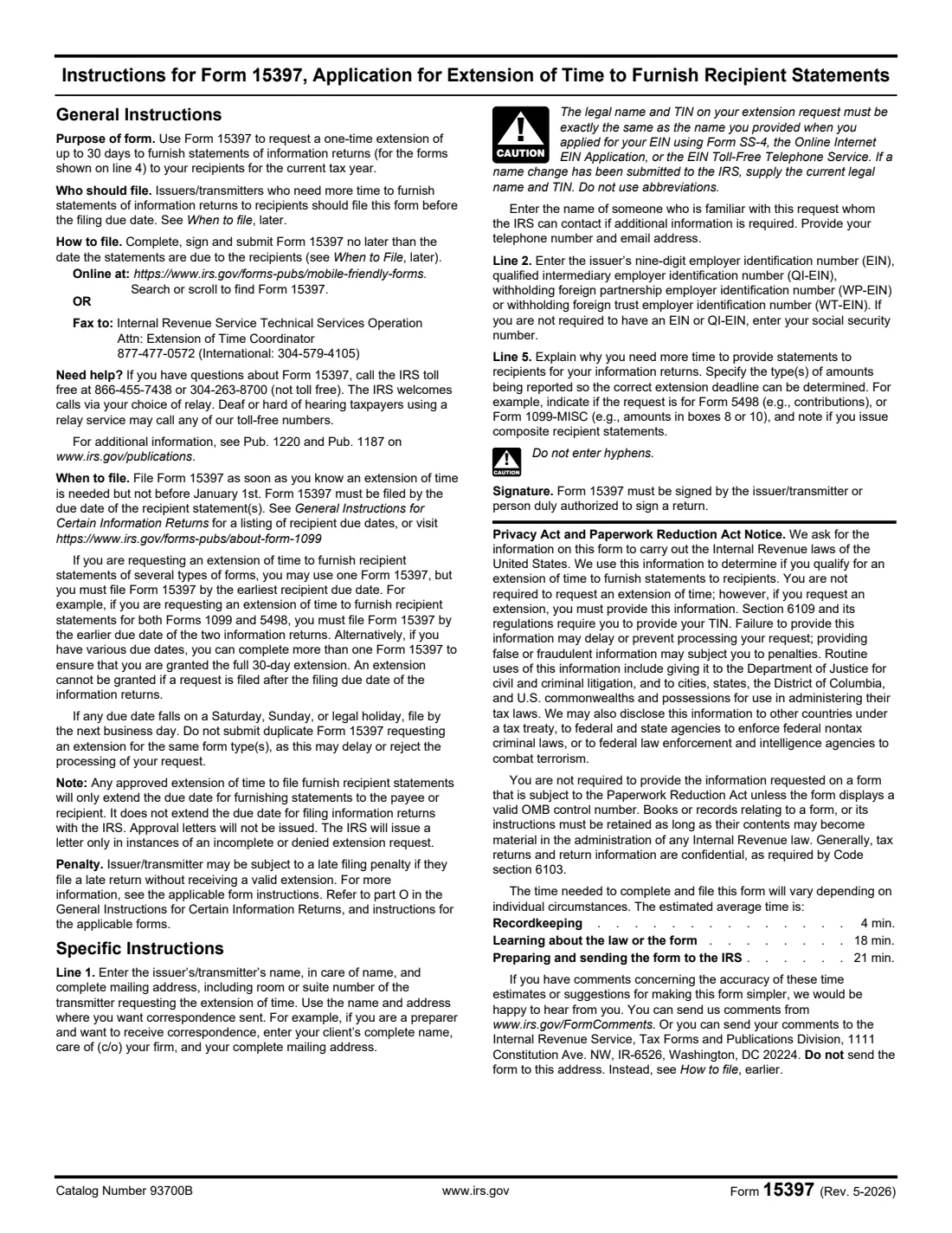
Form 15397 asks the IRS for a one-time extension of up to 30 days to furnish recipient statements: the copies of Forms W-2, W-2G, 1042-S, 1095, 1097, 1098, 1099, 3921, 3922 and 5498 that go to employees, contractors, account holders and other recipients. You tick the forms, explain why you need more time, and sign.
It doesn't change when the returns are due at the IRS: that extension is Form 8809. The IRS doesn't send approval letters; it writes only if a request is incomplete or denied. Don't send duplicate requests for the same form types, which the instructions say may delay or reject the processing of your request.
FileIt walks you through each line, prints the TIN without hyphens as the form asks, fits your explanation into the line 5 box, and saves the IRS's official PDF in your vault, ready to sign with FileIt eSignature. You fax it to the IRS yourself (or use the IRS's online version); FileIt never submits anything.
- Who fills it
- Issuers and transmitters of information returns (employers, payers, financial institutions, filing agents).
- Sent to
- IRS Technical Services Operation, Attn: Extension of Time Coordinator, by fax to 877-477-0572 (international 304-579-4105), or online.
- When
- After January 1 and no later than the date the recipient statements are due.
- Signatures
- The issuer/transmitter or a person duly authorized to sign a return.
- Edition
- Rev. May 2026
- Agency
- Internal Revenue Service (IRS), Department of the Treasury
Who needs to fill out Form 15397?
- Employers who need more time to give employees their Forms W-2.
- Businesses and payers who need more time to send Forms 1099, 1098, 1097, 3921, 3922 or W-2G to recipients.
- Brokers and banks that issue composite recipient statements.
- Withholding agents furnishing Form 1042-S, and employers or insurers furnishing Forms 1095-B or 1095-C.
- IRA, HSA, Coverdell and other trustees furnishing Forms 5498, 5498-ESA, 5498-QA, 5498-SA or 5498-TA.
- Transmitters asking for several issuers at once, with a typed list of names and TINs.
When to use Form 15397
- As soon as you know you need more time, but not before January 1, and by the due date of the recipient statements.
- If the statements have different due dates, by the earliest one, or with a separate Form 15397 for each due date.
- Once per form type: it's a one-time extension, and duplicate requests can delay or reject processing.
What you need before you start
- The issuer's legal name and TIN exactly as when the EIN was assigned, and a mailing address.
- A contact person with telephone number and email address.
- The forms you need more time for.
- An explanation of why, naming the types of amounts being reported (for example Form 5498 contributions, or Form 1099-MISC box 8 or 10 amounts) and whether you issue composite statements.
- For several issuers, the total number and a typed list of their names and TINs in 12-point font.
- Someone authorized to sign a return for the issuer.
What’s on Form 15397
The 2026 edition has 2 pages. FileIt asks for it in 5 parts, and it is signed by Issuer / transmitter:
- Lines 1–2: Issuer's/transmitter's informationIssuer / transmitter
- Line 3: More than one issuer/transmitterIssuer / transmitter
- Line 4: The forms you need more time to furnishIssuer / transmitter
- Line 5: Why you need more timeIssuer / transmitter
- SignatureIssuer / transmitter
How to fill out Form 15397, step by step
1 Line 1: Issuer's/transmitter's information
Enter the name, in-care-of name and complete mailing address where you want correspondence sent, plus the contact person's name, telephone number and email address. The legal name and TIN must exactly match what was given when the EIN was assigned, with no abbreviations. A preparer can enter the client's name, care of the firm, and the firm's address.
2 Line 2: Taxpayer identification number
Enter the issuer's nine-digit EIN, QI-EIN, WP-EIN or WT-EIN, or an SSN if the issuer isn't required to have an EIN. Don't enter hyphens.
3 Line 3: More than one issuer
If the request is for more than one issuer or transmitter, enter the total number and attach a typed list of names and TINs in 12-point font. Don't send a list of recipients. Leave it blank for a single issuer.
4 Line 4: Forms
Check only the boxes for the forms that apply. Don't enter the number of returns.
5 Line 5: Why you need more time
Explain why you need more time to provide the statements, and say which types of amounts are being reported, so the IRS can set the correct deadline: for example Form 5498 contributions, or Form 1099-MISC amounts in boxes 8 or 10. Say if you issue composite recipient statements.
6 Signature
The form is signed under penalties of perjury by the issuer/transmitter or a person duly authorized to sign a return, with title and date.
Common mistakes to avoid
- Using Form 15397 for more time to file with the IRS. That's Form 8809.
- Filing after the statements were due. An extension can't be granted after the due date.
- Sending duplicate requests for the same form types.
- Entering the TIN with hyphens, or a name that doesn't match the IRS records.
- Attaching a list of recipients instead of issuers.
- Not saying which types of amounts are reported, so the right deadline can't be determined.
- Forgetting to sign.
After you fill it out
Sign it, then fax it to the IRS Technical Services Operation, Attn: Extension of Time Coordinator, at 877-477-0572 (international 304-579-4105), or complete the IRS's mobile-friendly online version instead, no later than the date the statements are due.
The IRS sends a letter only if the request is incomplete or denied; no approval letter is issued. Furnish the statements within the extended time, and remember the IRS filing deadline hasn't moved.
FileIt keeps the signed PDF in your vault as your record of the request. Questions go to the IRS at 866-455-7438 (toll free) or 304-263-8700.
Fill out Form 15397 online with FileIt
- Pick the person. Choose someone from People and FileIt fills in their name, date of birth, address and other details it already knows.
- Answer plain-language questions. One part of the form at a time, with the official help text beside each question — 24 fields in all. Your answers save as you go.
- Check the live preview. Watch your answers land on the real Internal Revenue Service (IRS) form, and let FileIt do any worksheet arithmetic.
- Generate the official PDF. FileIt prints your answers into the agency’s own PDF and files it in that person’s folder in your vault. Sign it, or send it for e-signature.
FileIt fills the form — it never files or submits anything for you. Deliver the finished form to whoever asked for it, the way the form’s instructions say.
Start Form 15397 now — it’s freeForm 15397: frequently asked questions
How long is the extension?
A one-time extension of up to 30 days to furnish the statements for the forms shown on line 4.
What's the difference between Form 15397 and Form 8809?
Form 15397 extends the time to give recipients their copies. Form 8809 extends the time to file the returns with the IRS. Each extends only its own deadline.
How do I send Form 15397?
By fax to the IRS Technical Services Operation, Attn: Extension of Time Coordinator, at 877-477-0572 (international 304-579-4105), or online through the IRS's mobile-friendly forms page.
Will the IRS approve it in writing?
No. Approval letters aren't issued; the IRS writes only when a request is incomplete or denied.
Does it need a signature?
Yes. It must be signed by the issuer/transmitter or a person duly authorized to sign a return.
Can one form cover several kinds of statements?
Yes, but file it by the earliest recipient due date of those forms, or use more than one Form 15397 to get the full 30 days for each due date.
Can I fill out Form 15397 with FileIt?
Yes. FileIt prints your answers into the official IRS PDF and saves it in your vault, ready to sign. You send it to the IRS yourself.
Official sources
- Blank form (PDF), published by Internal Revenue Service (IRS): https://www.irs.gov/pub/irs-pdf/f15397.pdf
- Official instructions and guidance: https://www.irs.gov/forms-pubs/about-form-15397
- Edition shown on this page: Rev. May 2026 (Rev. 5-2026) (checked 2026-10-25).
FileIt is not affiliated with or endorsed by Internal Revenue Service (IRS) or any government. This page explains the form in general terms and is not legal, tax or immigration advice. Always read the official instructions, and check that you are using the edition the recipient accepts. Page last reviewed 2026-10-25.