What is PhilHealth Claim Signature Form?
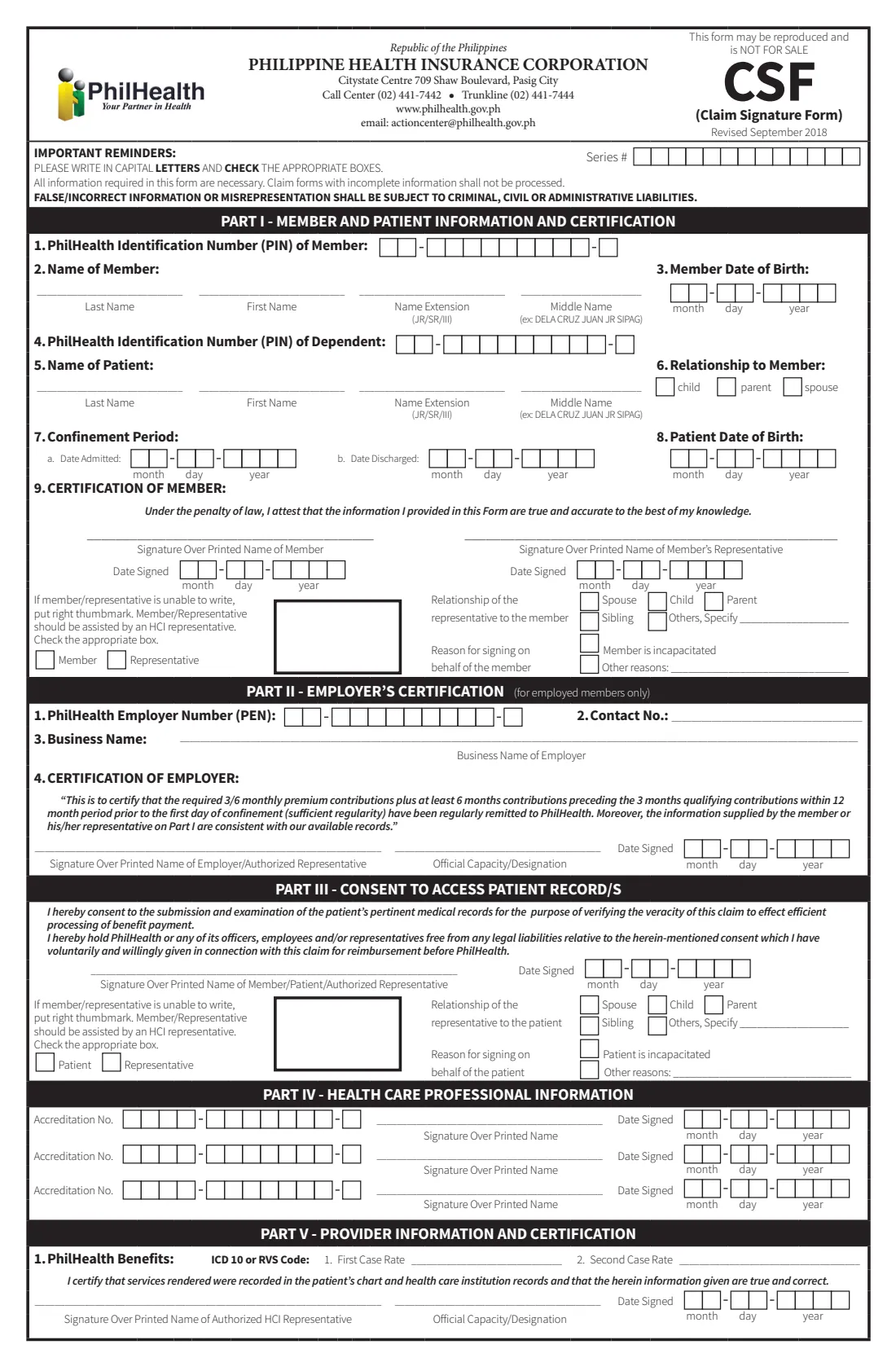
The Claim Signature Form, or CSF, is one of the PhilHealth claim forms a hospital asks the patient's side to complete when PhilHealth benefits are used for a confinement. It identifies the member and the patient and carries the signatures PhilHealth needs: the member's certification, the employer's certification for employed members, and the consent to PhilHealth examining the patient's medical records.
The current edition is marked 'Revised September 2018'. Part I is the member's and patient's information and the member's certification, Part II the employer's certification, and Part III the consent to access patient records. Parts IV and V are completed by the doctors and the hospital.
FileIt asks the questions in order, prints the PIN, PEN and dates one digit per box in capital letters, and fills PhilHealth's own CSF PDF. You print it, sign it (or thumbmark it) and give it to the hospital.
- Who fills it
- The member or their representative, the employer for Part II, and the patient or representative for Part III
- Given to
- The hospital or health care institution (HCI), which files the claim
- Hospital parts
- Parts IV and V are completed by the doctors and the hospital
- Signatures
- Signature over printed name, or a right thumbmark with an HCI representative assisting
- Edition
- Revised September 2018
- Pages
- 1
Who needs to fill out PhilHealth Claim Signature Form?
- PhilHealth members who are confined in a hospital and using their benefits.
- Members whose dependent (child, parent or spouse) is the patient.
- Representatives signing for a member or patient who cannot sign.
- Employers certifying contributions for an employed member's claim.
When to use PhilHealth Claim Signature Form
- During or after a hospital confinement, when the hospital asks for the PhilHealth claim forms.
- Each time a confinement is claimed: each claim has its own CSF.
- Together with Claim Form 1 (CF-1) and the other documents the hospital asks for.
What you need before you start
- The member's 12-digit PhilHealth Identification Number (PIN), full name and date of birth.
- If the patient is a dependent: their PIN (if they have one), name, date of birth and relationship to the member.
- The dates of admission and, if known, discharge.
- If a representative signs: their name, relationship and the reason they sign.
- For employed members: the PhilHealth Employer Number (PEN), business name and contact number, and the name and position of the person who certifies.
What’s on PhilHealth Claim Signature Form
The 2018 edition has 1 page. FileIt asks for it in 4 parts:
- Part I — Member and patientMember
- Part I, item 9 — Certification of memberMember
- Part II — Employer's certificationEmployer
- Part III — Consent to access patient recordsMember
How to fill out PhilHealth Claim Signature Form, step by step
1 Part I — Member and patient
Enter the member's PIN, name (last name, first name, extension, middle name) and date of birth in month-day-year boxes. Say whether the patient is the member: if so, FileIt copies the member's name and date of birth into the patient items; if the patient is a dependent, give their PIN, name, date of birth and relationship. Then enter the confinement dates.
2 Item 9 — Certification of member
Choose who signs. FileIt prints the member's name on the member's signature line, or the representative's on theirs, and the date in that signer's boxes. A representative also ticks their relationship to the member and the reason for signing. If the signer cannot write, the thumbmark box is ticked and they put a right thumbmark, assisted by a hospital representative.
3 Part II — Employer's certification
For employed members only. The employer enters its PEN, contact number and business name, and certifies that the required premium contributions were remitted. The authorised representative prints their name and position, signs and dates it.
4 Part III — Consent to access patient records
The patient, or an authorised representative such as the member for a child, consents to PhilHealth examining the patient's medical records to verify the claim. A representative gives their relationship to the patient and the reason they sign.
Common mistakes to avoid
- Leaving the patient's name blank when the member is the patient: item 5 names the patient either way.
- Writing the PIN with a digit missing: the PIN has 12 digits in 2-9-1 boxes.
- Filling in both signature lines in item 9: only the person who signs completes theirs.
- Forgetting the employer's certification for an employed member.
- Filling in Parts IV and V, which belong to the doctors and the hospital.
After you fill it out
Print the CSF from your FileIt vault. Each signer signs over their printed name, or puts a right thumbmark with a hospital representative assisting.
Give it to the hospital with the other PhilHealth claim forms. The doctors and the hospital complete Parts IV and V, and the hospital files the claim. FileIt does not file it.
Keep the PDF in the patient's folder in your vault, alongside the hospital bills and discharge papers.
Fill out PhilHealth Claim Signature Form online with FileIt
- Pick the person. Choose someone from People and FileIt fills in their name, date of birth, address and other details it already knows.
- Answer plain-language questions. One part of the form at a time, with the official help text beside each question — 42 fields in all. Your answers save as you go.
- Check the live preview. Watch your answers land on the real Philippine Health Insurance Corporation (PhilHealth) form, and let FileIt do any worksheet arithmetic.
- Generate the official PDF. FileIt prints your answers into the agency’s own PDF and files it in that person’s folder in your vault.
FileIt fills the form — it never files or submits anything for you. Deliver the finished form to whoever asked for it, the way the form’s instructions say.
Start PhilHealth Claim Signature Form now — it’s freePhilHealth Claim Signature Form: frequently asked questions
What is the PhilHealth CSF?
The Claim Signature Form is the PhilHealth claim form that carries the member's certification, the employer's certification and the consent to access the patient's records, with the member's and patient's details.
Which parts do I fill in?
Parts I to III. Parts IV and V are for the health care professionals and the hospital.
Does the employer always sign?
Part II is marked 'for employed members only'.
Can someone else sign for the member or the patient?
Yes. Item 9 and Part III each have a representative's line, with boxes for the relationship and the reason for signing.
Can I sign the CSF electronically?
FileIt prints the names for you, but the CSF is signed by hand over the printed name or thumbmarked, so it has no e-signature step.
Official sources
- Blank form (PDF), published by Philippine Health Insurance Corporation (PhilHealth): https://www.philhealth.gov.ph/downloads/claim/ClaimSignatureForm_2018.pdf
- Official instructions and guidance: https://www.philhealth.gov.ph/downloads/
- Edition shown on this page: Revised September 2018 (checked 2026-10-25).
FileIt is not affiliated with or endorsed by Philippine Health Insurance Corporation (PhilHealth) or any government. This page explains the form in general terms and is not legal, tax or immigration advice. Always read the official instructions, and check that you are using the edition the recipient accepts. Page last reviewed 2026-10-25.