What is IR595D (statutory declaration for a child's IRD number)?
To get an IRD number for a child under 16, the adult applying on the IR595 has to show both the child's identity and their own link to the child. A birth certificate usually does that for a parent. When it doesn't, for example a grandparent, aunt, uncle or other caregiver raising the child, Inland Revenue accepts the IR595D statutory declaration as the linking document.
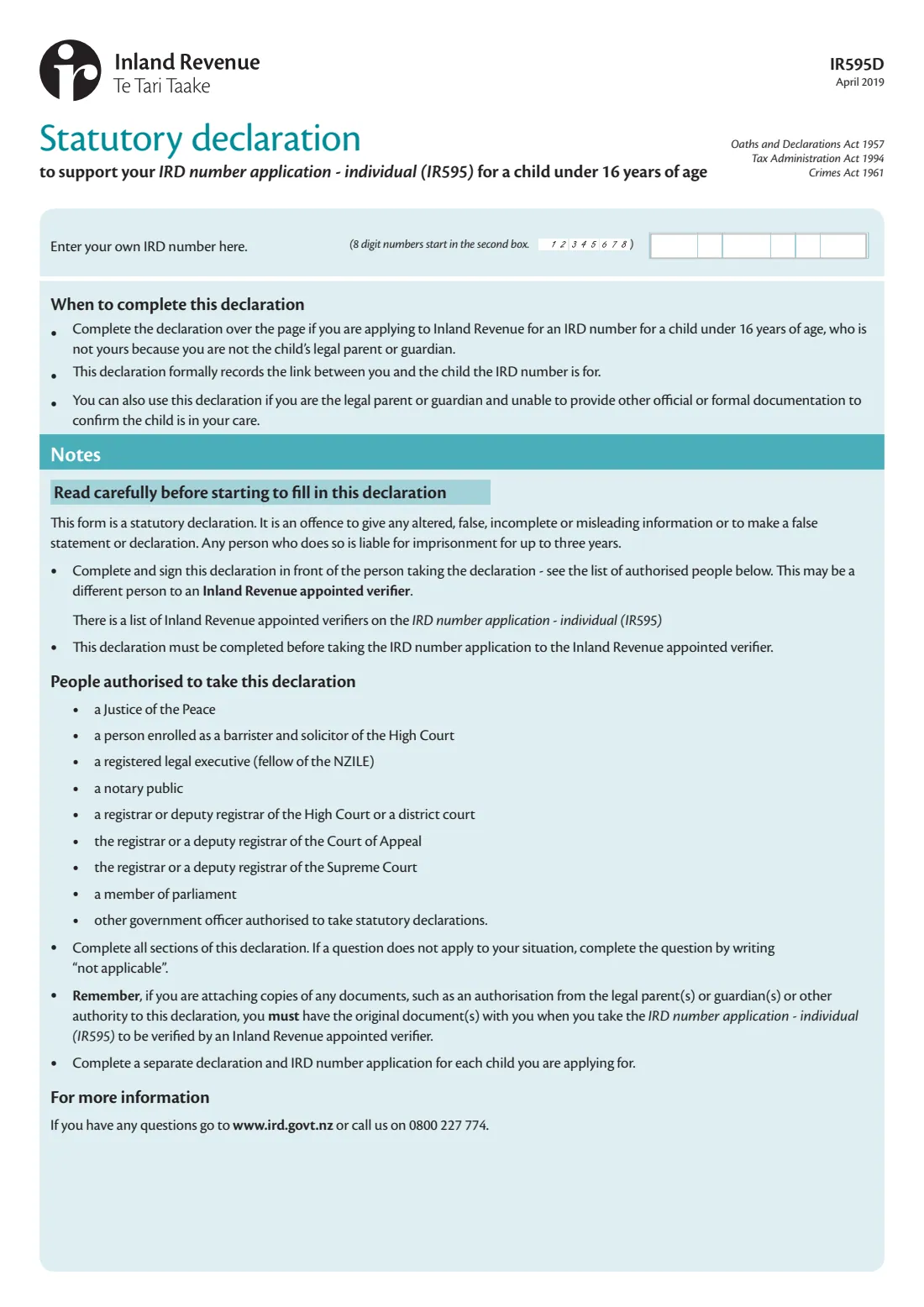
The form says to use it if the child isn't yours because you're not their legal parent or guardian, or if you are the legal parent or guardian but can't provide other official documents confirming the child is in your care. You declare which statements about your care of the child are true, explain why the child is in your care and since when, and list any supporting documents, such as a letter of authorisation from the parents. You then sign it in front of an authorised person such as a Justice of the Peace.
FileIt fills in the April 2019 edition of the IR595D for you. It crosses out the statements that don't apply to you, as the form asks, wraps your explanations onto the form's ruled lines, prints names with macrons correctly and puts your IRD number in the right boxes. The finished PDF is saved to your FileIt vault, ready to take to the person taking your declaration.
- Who fills it
- The adult applying for a child's IRD number on an IR595 who can't otherwise show the child is in their care
- Goes with
- The IR595 IRD number application, one declaration for each child
- Signed
- In ink, in front of a Justice of the Peace, lawyer or other authorised person
- When
- Before you take the IR595 to the Inland Revenue appointed verifier
- Law
- Oaths and Declarations Act 1957; a false declaration can mean up to 3 years' imprisonment
- Edition
- IR595D April 2019
Who needs to fill out IR595D (statutory declaration for a child's IRD number)?
- Grandparents, relatives and other caregivers raising a child under 16 who isn't legally theirs.
- Legal parents or guardians who can't provide other official documents confirming the child is in their care.
- Anyone applying on an IR595 whose identity documents don't show their relationship to the child.
When to use IR595D (statutory declaration for a child's IRD number)
- When you apply for an IRD number for a child under 16 on the IR595 and have no other linking document, such as adoption papers, parenting or guardianship orders or an overseas birth certificate.
- Before you go to the verifier: the form says the declaration must be completed before you take the IR595 to the Inland Revenue appointed verifier.
- Once for each child. The form asks for a separate declaration and IR595 for every child you're applying for.
What you need before you start
- Your own IRD number.
- Your full legal name, residential address, occupation, date of birth and a contact number.
- The child's full legal name and date of birth, and the parents' names if you know them.
- Why the child is in your care, your relationship to them, and the date they came into your care.
- Any supporting documents, such as an authorisation from the child's parents or guardians, with the originals to show the verifier. If you don't have any, an explanation of why and what you've done to get them.
- An authorised person to take the declaration, such as a Justice of the Peace, lawyer, notary public, court registrar or member of parliament.
What’s on IR595D (statutory declaration for a child's IRD number)
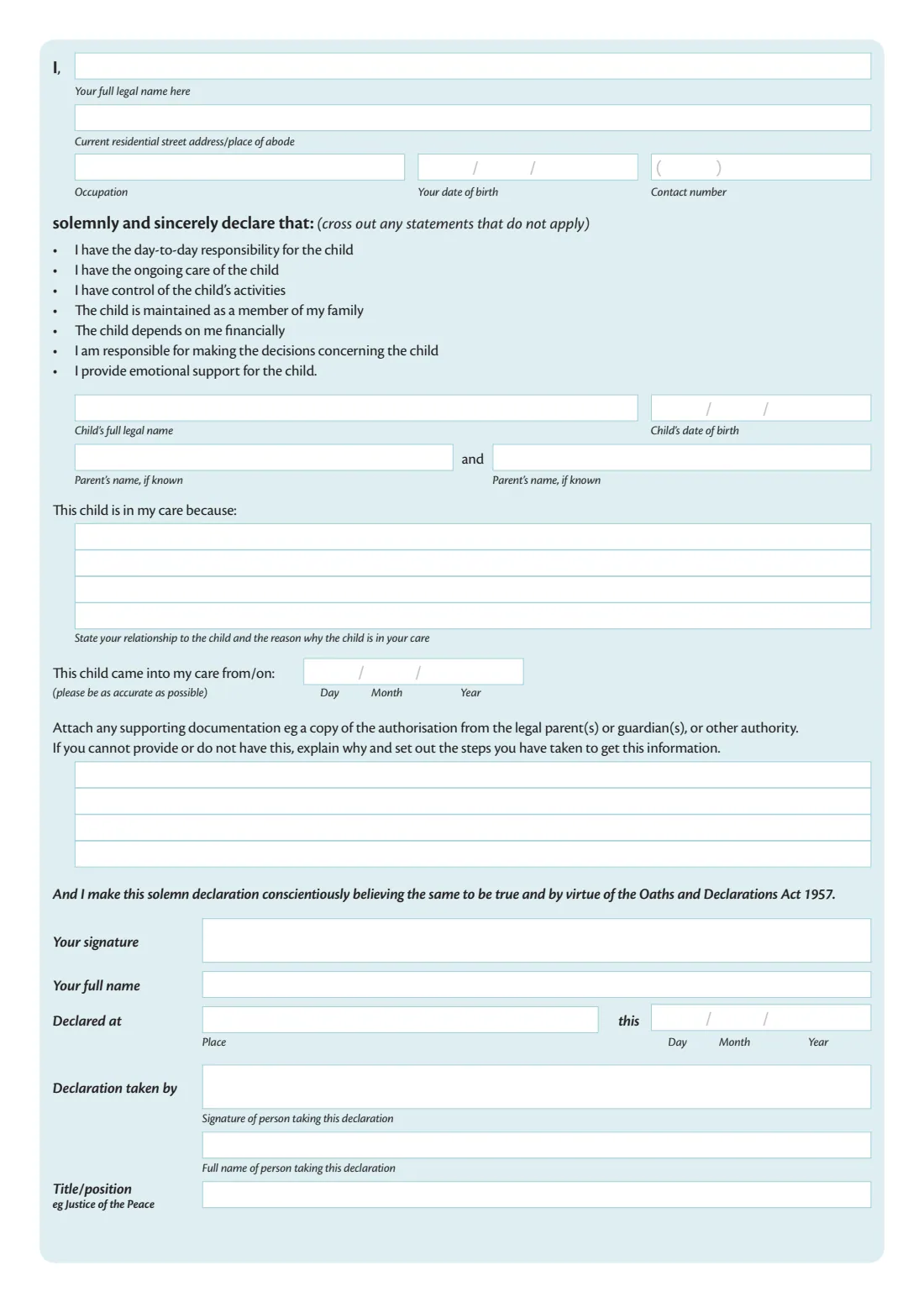
The 2019 edition has 2 pages. FileIt asks for it in 5 parts:
- About youDeclarant (the child's caregiver)
- What you declareDeclarant (the child's caregiver)
- The childDeclarant (the child's caregiver)
- Where you'll make the declarationDeclarant (the child's caregiver)
- Person taking the declarationPerson taking the declaration
How to fill out IR595D (statutory declaration for a child's IRD number), step by step
1 Your IRD number
Page 1 asks for your own IRD number, not the child's. The form notes that 8-digit numbers start in the second box; FileIt places them there for you.
2 About you
Give your full legal name, current residential address, occupation, date of birth and contact number.
3 The statements you declare
The form lists seven statements, for example that you have day-to-day responsibility for the child, that the child depends on you financially, and that you provide emotional support. Cross out any that don't apply. In FileIt you tick the ones that don't apply and they're crossed out on the form.
4 The child
Enter the child's full legal name and date of birth, and each parent's name if known. Then state your relationship to the child and why they're in your care, and the date they came into your care, as accurately as possible.
5 Supporting documents
List what you're attaching, such as a copy of an authorisation from the legal parents or guardians. If you can't provide it, explain why and the steps you've taken to get it. If a question doesn't apply, the form asks you to write "not applicable" rather than leave it blank.
6 Making the declaration
Sign in front of the person taking the declaration, who fills in and signs the bottom of the page with their name and title. Add the place and date you declared it.
Common mistakes to avoid
- Signing it before you meet the person taking the declaration. It must be signed in front of them.
- Leaving questions blank. The form asks you to write "not applicable" where a question doesn't apply.
- Using one declaration for several children. Complete one for each child.
- Attaching copies without bringing the originals to the IR595 verifier.
- Entering the child's IRD number in the box for your own.
- Taking the IR595 to the verifier before the declaration is completed.
After you fill it out
Print the declaration and sign it in ink in front of an authorised person, who completes the 'Declaration taken by' section.
Take it, with the child's IR595 application, your identity documents, the child's identity document and the originals of anything you attached, to an Inland Revenue appointed verifier.
Keep a copy in your FileIt vault with the child's records.
Fill out IR595D (statutory declaration for a child's IRD number) online with FileIt
- Pick the person. Choose someone from People and FileIt fills in their name, date of birth, address and other details it already knows.
- Answer plain-language questions. One part of the form at a time, with the official help text beside each question — 36 fields in all. Your answers save as you go.
- Check the live preview. Watch your answers land on the real Inland Revenue (Te Tari Taake) form, and let FileIt do any worksheet arithmetic.
- Generate the official PDF. FileIt prints your answers into the agency’s own PDF and files it in that person’s folder in your vault.
FileIt fills the form — it never files or submits anything for you. Deliver the finished form to whoever asked for it, the way the form’s instructions say.
Start IR595D (statutory declaration for a child's IRD number) now — it’s freeIR595D (statutory declaration for a child's IRD number): frequently asked questions
What is the IR595D?
It's Inland Revenue's statutory declaration that records the link between you and a child under 16 you're applying for an IRD number for, when you're not the child's legal parent or guardian, or can't otherwise prove the child is in your care.
Who can witness the IR595D?
The form lists a Justice of the Peace, a barrister and solicitor of the High Court, a registered legal executive (fellow of the NZILE), a notary public, a registrar or deputy registrar of the High Court, a district court, the Court of Appeal or the Supreme Court, a member of parliament, or another government officer authorised to take statutory declarations.
Do I post the IR595D to Inland Revenue?
No. You take it with the child's IR595 application and the original documents to an Inland Revenue appointed verifier.
What if some statements don't apply to me?
Cross them out. The form asks you to cross out any statements that don't apply. FileIt does this for the ones you tick.
What if I don't have a letter from the child's parents?
Explain why you can't provide it and the steps you've taken to get it, in the space the form gives for supporting documents.
Can I fill in the IR595D online?
Yes. FileIt's guided questions print your answers into Inland Revenue's official PDF, which is saved to your vault. You still sign it in ink in front of an authorised person.
Official sources
- Blank form (PDF), published by Inland Revenue (Te Tari Taake): https://www.ird.govt.nz/-/media/project/ir/home/documents/forms-and-guides/ir500---ir599/ir595d/ir595d-2019.pdf
- Official instructions and guidance: https://www.ird.govt.nz/managing-my-tax/ird-numbers/ird-numbers-for-individuals/living-and-new-zealand-and-not-a-new-arrival---ird-number-application
- Edition shown on this page: IR595D April 2019 (checked 2026-09-28).
FileIt is not affiliated with or endorsed by Inland Revenue (Te Tari Taake) or any government. This page explains the form in general terms and is not legal, tax or immigration advice. Always read the official instructions, and check that you are using the edition the recipient accepts. Page last reviewed 2026-09-28.