What is IR10 Financial statements summary?
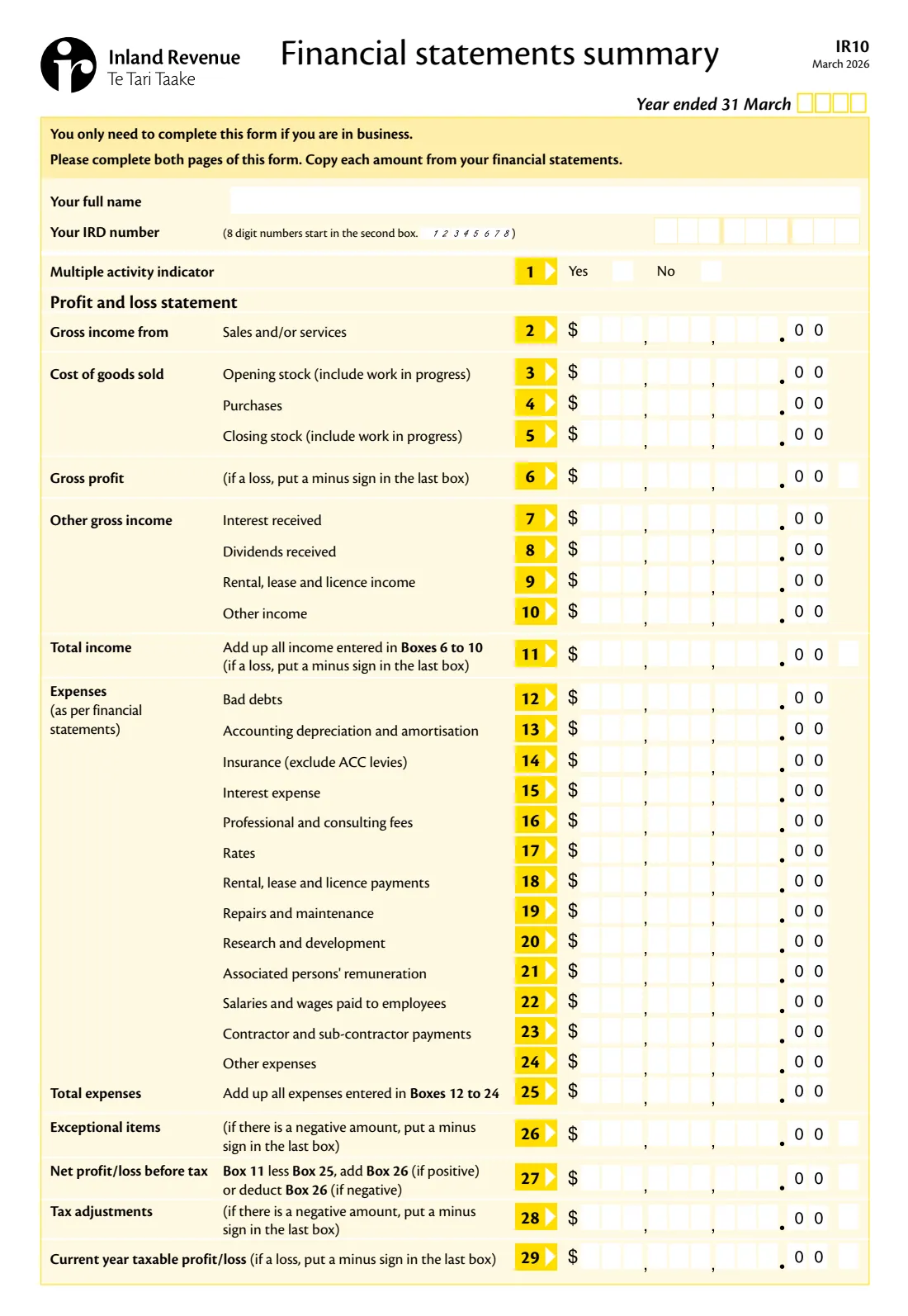
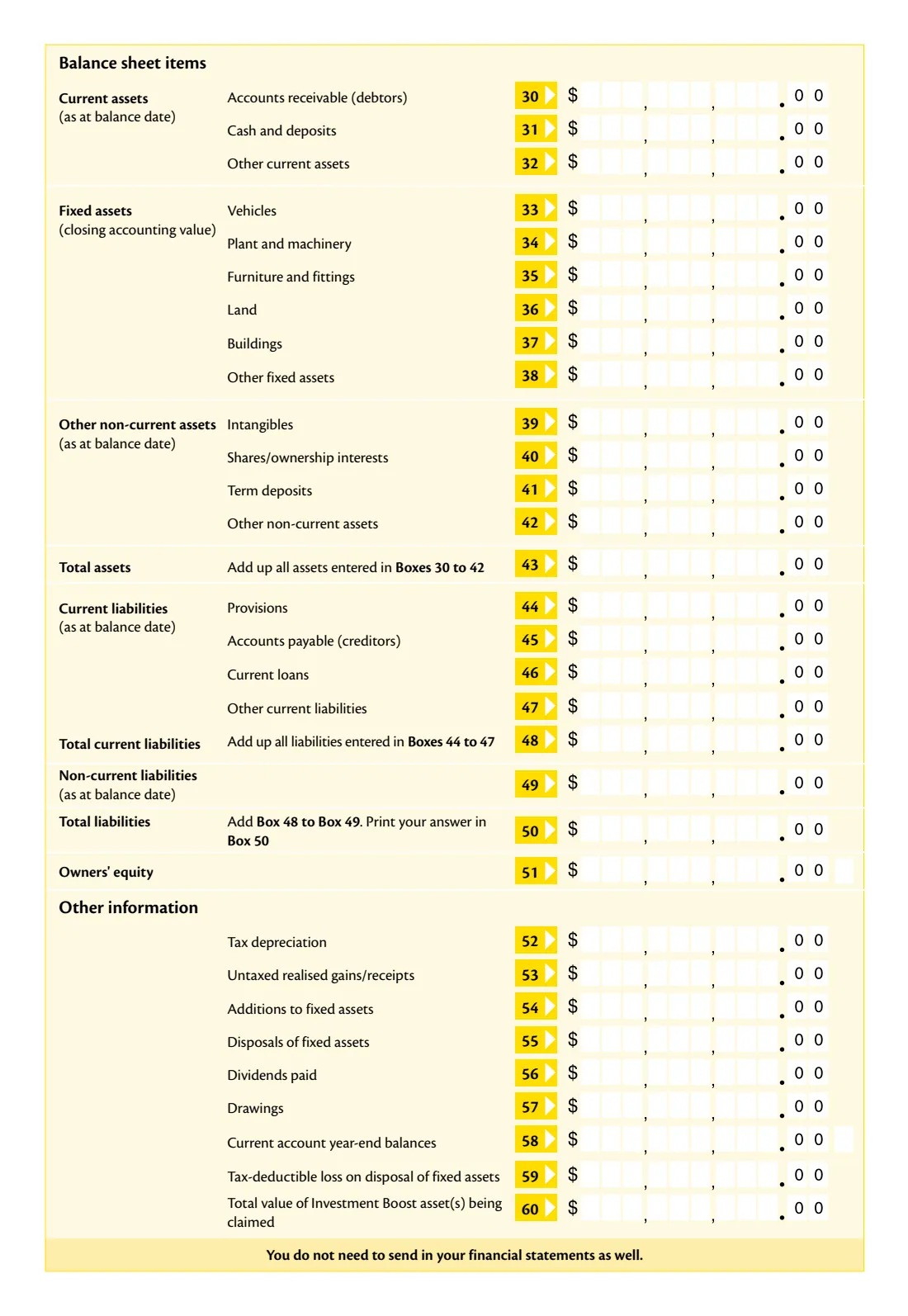
The IR10 is a standard summary of your business's financial statements for the tax year ended 31 March. Rather than posting a full set of accounts, you copy the key figures into its boxes: sales, cost of goods sold, other income, the main expense categories, the net and taxable profit, then your assets, liabilities and owners' equity, and a few extra items such as tax depreciation, drawings and the Investment Boost.
Inland Revenue says you only need to complete it if you are in business, and you don't need to send your financial statements as well. Box 60, on the current edition, asks for the total value of assets you are claiming under the Investment Boost.
FileIt lays the boxes out in the form's own order, puts every figure in the right cells, works out the totals the form asks you to add up (gross profit, total income, total expenses, net profit or loss, total assets and total liabilities), prints the minus sign for a loss, and checks your IRD number. The finished summary is kept in your FileIt vault. It is your accounts that decide the numbers: FileIt copies them across but doesn't prepare accounts or file anything.
- Who fills it
- People and entities in business, alongside their income tax return
- Period
- The tax year ended 31 March
- Amounts
- Whole dollars, copied from your financial statements
- Signatures
- None on the form itself
- Edition
- IR10 March 2026
Who needs to fill out IR10 Financial statements summary?
- Sole traders filing an IR3 with business income.
- Partnerships, companies, trusts and other entities in business that send a summary instead of full accounts.
- Landlords and other taxpayers whose activity counts as a business.
- Businesses claiming the Investment Boost on new assets.
When to use IR10 Financial statements summary
- Each year, with your income tax return, once your financial statements for the year ended 31 March are finished.
- Instead of sending a full set of financial statements to Inland Revenue.
What you need before you start
- Your profit and loss statement for the year.
- Your balance sheet as at balance date.
- Your fixed asset register, for depreciation, additions and disposals.
- Your IRD number.
- Tax adjustments and taxable profit, from your tax workings or your accountant.
What’s on IR10 Financial statements summary
The 2026 edition has 2 pages. FileIt asks for it in 4 parts:
- Your detailsBusiness owner
- Profit and loss statement (boxes 2-29)Business owner
- Balance sheet items (boxes 30-51)Business owner
- Other information (boxes 52-60)Business owner
How to fill out IR10 Financial statements summary, step by step
1 Your details
Give the year ended 31 March, your full name and your IRD number, and answer the multiple activity indicator: yes only if the figures combine more than one separate business.
2 Gross profit
Enter sales and/or services in box 2, then opening stock, purchases and closing stock. FileIt works out gross profit in box 6.
3 Income and expenses
Add interest, dividends, rental and other income (boxes 7 to 10) and each expense category (boxes 12 to 24). FileIt totals boxes 11 and 25.
4 Net and taxable profit
Enter any exceptional items in box 26. FileIt works out the net profit or loss before tax in box 27. Then copy your tax adjustments (box 28) and current year taxable profit or loss (box 29), ticking the negative box where needed.
5 Balance sheet
Enter current assets, fixed assets at their closing accounting value, other non-current assets, liabilities and owners' equity. FileIt adds up total assets (box 43), total current liabilities (box 48) and total liabilities (box 50).
6 Other information
Finish with tax depreciation, untaxed gains, additions and disposals of fixed assets, dividends paid, drawings, current account balances, any tax-deductible loss on disposals and the Investment Boost total.
Common mistakes to avoid
- Entering cents. The boxes take whole dollars, with .00 already printed.
- Typing a minus sign into an amount. Tick the negative box instead, and the minus prints in the form's last box.
- Including ACC levies in insurance (box 14). The form asks you to leave them out.
- Mixing accounting depreciation (box 13) with tax depreciation (box 52).
- Filling in only the first page. Inland Revenue asks for both pages.
After you fill it out
Download the PDF from FileIt and send it with your income tax return.
Keep your full financial statements: you don't send them, but Inland Revenue can ask for them.
The filled summary stays in your FileIt vault next to the year's return.
Fill out IR10 Financial statements summary online with FileIt
- Pick the person. Choose someone from People and FileIt fills in their name, date of birth, address and other details it already knows.
- Answer plain-language questions. One part of the form at a time, with the official help text beside each question — 71 fields in all. Your answers save as you go.
- Check the live preview. Watch your answers land on the real Inland Revenue (Te Tari Taake) form, and let FileIt do any worksheet arithmetic.
- Generate the official PDF. FileIt prints your answers into the agency’s own PDF and files it in that person’s folder in your vault.
FileIt fills the form — it never files or submits anything for you. Deliver the finished form to whoever asked for it, the way the form’s instructions say.
Start IR10 Financial statements summary now — it’s freeIR10 Financial statements summary: frequently asked questions
Do I have to send my full accounts with the IR10?
No. The form says you don't need to send in your financial statements as well.
Who needs to complete an IR10?
The form says you only need to complete it if you are in business.
What is the multiple activity indicator?
Box 1 asks whether the figures cover more than one separate business activity. Several departments of one business count as one activity.
How do I show a loss on the IR10?
The form asks for a minus sign in the last box. In FileIt you tick the negative box for that line, and the computed totals get their sign automatically.
What is box 60, Investment Boost?
It is the total value of the assets you are claiming the Investment Boost deduction for.
Does FileIt check my numbers?
FileIt adds up the totals the form asks for and checks your IRD number. The figures themselves come from your financial statements.
Official sources
- Blank form (PDF), published by Inland Revenue (Te Tari Taake): https://www.ird.govt.nz/-/media/project/ir/home/documents/forms-and-guides/ir1---ir99/ir10/ir10.pdf
- Official instructions and guidance: https://www.ird.govt.nz/income-tax/income-tax-for-businesses-and-organisations
- Edition shown on this page: IR10 March 2026 (checked 2026-10-19).
FileIt is not affiliated with or endorsed by Inland Revenue (Te Tari Taake) or any government. This page explains the form in general terms and is not legal, tax or immigration advice. Always read the official instructions, and check that you are using the edition the recipient accepts. Page last reviewed 2026-10-19.