What is 162 - Tax card for temporary-agency workers?
In Luxembourg, temporary-agency workers (salariés intérimaires) can be taxed at a flat rate under article 137, paragraph 5a of the income tax law (L.I.R.), without a tax card. The form's own note says that temporary workers paid more than 25 euros an hour fall outside that flat-rate system and must have a tax card (fiche de retenue d'impôt), which the Administration des contributions directes (ACD) issues on request.
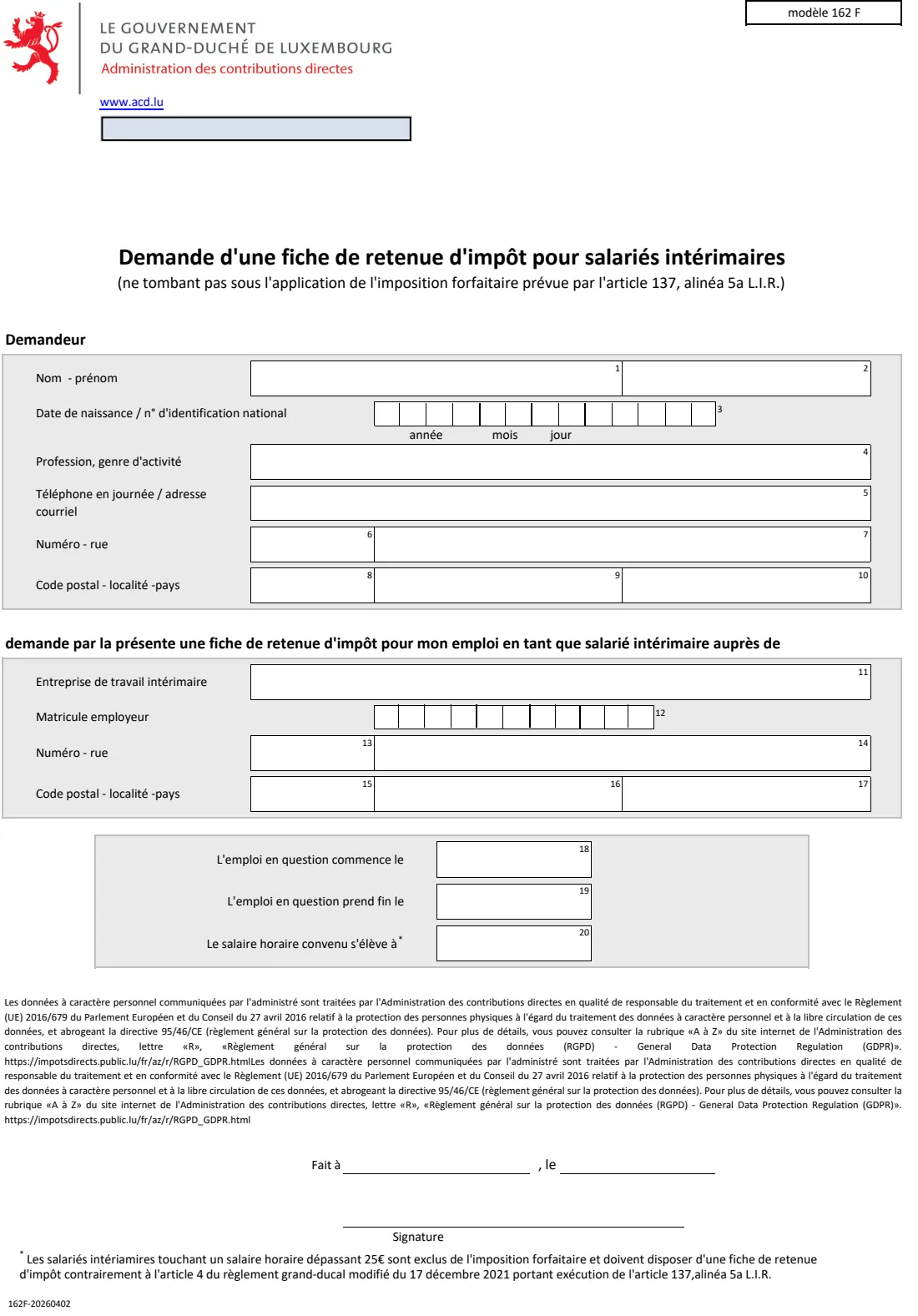
Modèle 162 F is that request. It asks for your name, date of birth or national identification number, profession, contact details and address, then the agency that employs you with its employer matricule and address, the start and end dates of the job, and the hourly wage agreed. You choose the RTS office it goes to, including the office for non-residents.
FileIt walks you through the form in English, prints your answers into the ACD's own PDF with the matricule digit by digit and the wage with a decimal comma, and keeps the PDF in your vault. You sign it and send it to the RTS office yourself. FileIt never submits anything.
- Who fills it
- A temporary-agency worker who needs a Luxembourg tax card
- Sent to
- The competent RTS office of the ACD (RTS 2, RTS 3, Esch-sur-Alzette, Ettelbruck or Non-résidents)
- Key threshold
- The form notes that an hourly wage above 25 euros is outside the flat-rate taxation
- Signatures
- The applicant
- Edition
- Modèle 162 F, multi-year, footer 162F-20260402, 1 page
Who needs to fill out 162 - Tax card for temporary-agency workers?
- Temporary-agency workers in Luxembourg whose hourly wage is above 25 euros.
- Cross-border temporary workers living in France, Belgium or Germany who work through a Luxembourg agency.
- Temporary workers who don't fall under the flat-rate taxation of article 137, paragraph 5a L.I.R. for another reason.
When to use 162 - Tax card for temporary-agency workers
- Before or at the start of a temporary assignment, so tax is withheld from the right tax card.
- When you start a new assignment with another agency.
- Not for a permanent job. Ask your employer or the ACD about the usual tax card instead.
What you need before you start
- Your national identification number (matricule), or your date of birth if you don't have one.
- Your profession, phone or email, and address.
- The agency's name, employer matricule and address.
- The start and end dates of the assignment and the hourly wage agreed.
What’s on 162 - Tax card for temporary-agency workers
The 2026 edition has 1 page. FileIt asks for it in 5 parts, and it is signed by Applicant:
- RTS office (bureau RTS)Applicant
- Demandeur - youApplicant
- Entreprise de travail intérimaire - the temporary-work agencyApplicant
- L'emploi - the assignmentApplicant
- Fait à, le, signature - place, date and signatureApplicant
How to fill out 162 - Tax card for temporary-agency workers, step by step
1 Bureau RTS
Choose the RTS office the form goes to; its address prints under it.
2 Demandeur
Name, date of birth or matricule, profession, daytime phone or email, and address.
3 Entreprise de travail intérimaire
The agency's name, employer matricule and address.
4 L'emploi
When the job starts and ends, and the hourly wage agreed.
5 Signature
Place and date, then sign under the line.
Common mistakes to avoid
- Giving a matricule that doesn't start with your date of birth.
- Writing the wage with a comma in FileIt. Type 27.50; it prints as 27,50.
- Leaving out the agency's employer matricule, which the ACD uses to link the tax card.
- Forgetting to sign before sending.
After you fill it out
Sign the form and send it to the RTS office you chose. FileIt does not send it for you.
Give the tax card to the agency once the ACD issues it, so it withholds tax from it.
Keep the filled PDF and the tax card in your FileIt vault.
Fill out 162 - Tax card for temporary-agency workers online with FileIt
- Pick the person. Choose someone from People and FileIt fills in their name, date of birth, address and other details it already knows.
- Answer plain-language questions. One part of the form at a time, with the official help text beside each question — 27 fields in all. Your answers save as you go.
- Check the live preview. Watch your answers land on the real Administration des contributions directes (ACD), Luxembourg - service RTS form, and let FileIt do any worksheet arithmetic.
- Generate the official PDF. FileIt prints your answers into the agency’s own PDF and files it in that person’s folder in your vault. Sign it, or send it for e-signature.
FileIt fills the form — it never files or submits anything for you. Deliver the finished form to whoever asked for it, the way the form’s instructions say.
Start 162 - Tax card for temporary-agency workers now — it’s free162 - Tax card for temporary-agency workers: frequently asked questions
What is modèle 162 F?
It is the ACD's request for a tax card (fiche de retenue d'impôt) for a temporary-agency worker who doesn't fall under the flat-rate taxation of article 137, paragraph 5a L.I.R.
Why does the hourly wage matter?
The form's note says temporary workers paid more than 25 euros an hour are excluded from the flat-rate taxation and must have a tax card.
Which RTS office do I choose?
The form lists RTS 2, RTS 3, Esch-sur-Alzette, Ettelbruck and Non-résidents. Non-residents usually depend on the non-residents office. Ask the ACD if you're unsure.
I don't have a matricule yet. What do I write?
Leave it blank. FileIt prints your date of birth in the first eight boxes, as the form's box 3 allows.
What if the assignment has no end date?
Leave the end date blank. Give the start date and the hourly wage agreed with the agency.
Can I fill in modèle 162 online with FileIt?
Yes. FileIt fills the ACD's PDF and saves it in your vault. You sign it and send it yourself.
Official sources
- Blank form (PDF), published by Administration des contributions directes (ACD), Luxembourg - service RTS: https://impotsdirects.public.lu/dam-assets/fr/formulaires/fiches_d_impot/pluriannuel/162f-2025.pdf
- Official instructions and guidance: https://impotsdirects.public.lu/fr/formulaires.html
- Edition shown on this page: Modèle 162 F, multi-year (162F-20260402) (checked 2026-10-19).
FileIt is not affiliated with or endorsed by Administration des contributions directes (ACD), Luxembourg - service RTS or any government. This page explains the form in general terms and is not legal, tax or immigration advice. Always read the official instructions, and check that you are using the edition the recipient accepts. Page last reviewed 2026-10-19.