What is 161 - National ID number for a non-resident flat-rate employee?
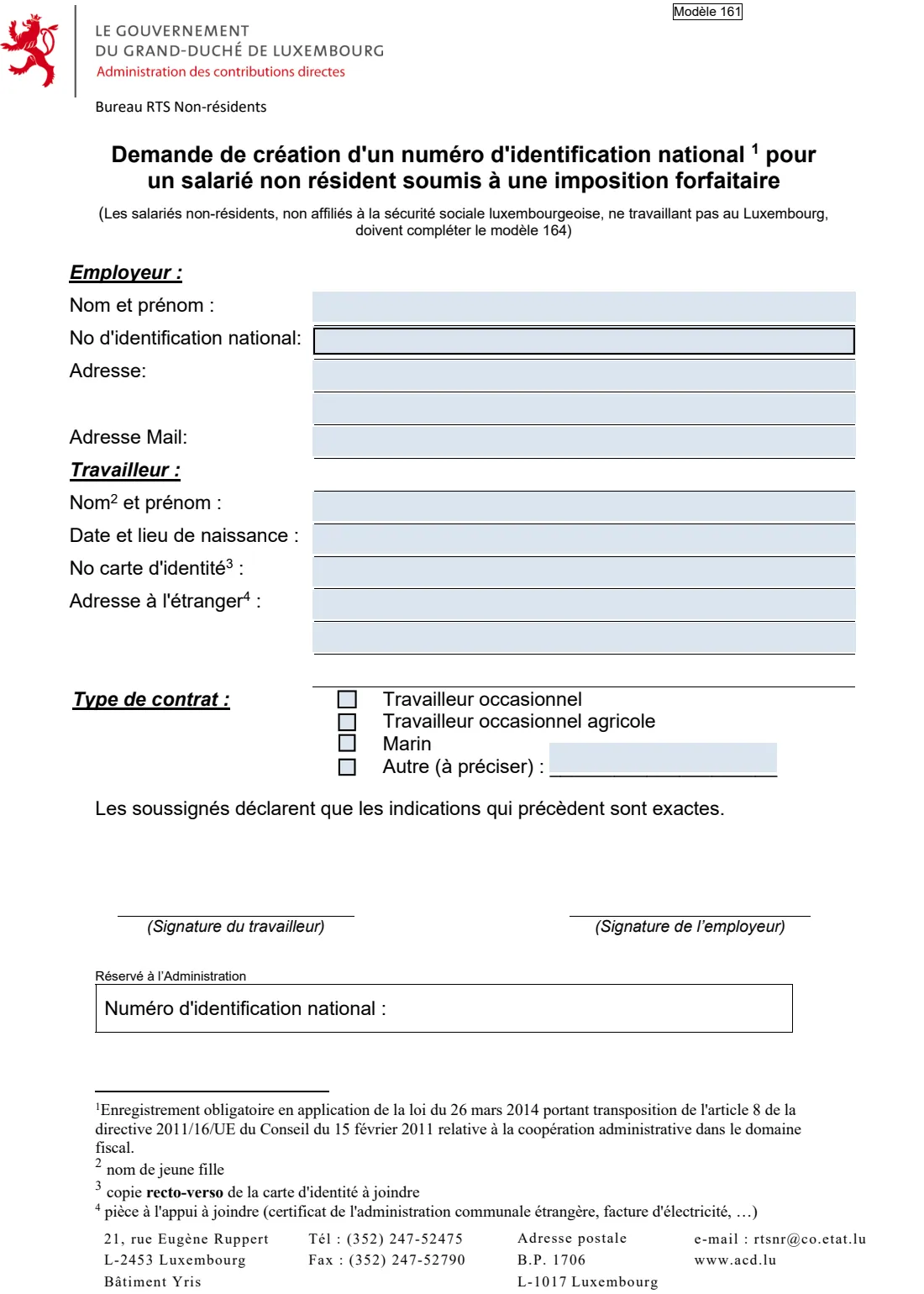
Model 161, 'Demande de création d'un numéro d'identification national pour un salarié non résident soumis à une imposition forfaitaire', is the Administration des contributions directes (ACD) form for asking the RTS Non-résidents office to create a Luxembourg national identification number (the matricule) for a non-resident employee.
Everyone paid a salary or pension from Luxembourg needs a matricule, among other things for the employer's electronic filing of salary statements. Most people get one from the Centre commun de la sécurité sociale, but non-resident employees taxed at the flat rate who are outside Luxembourg social security don't. The ACD names occasional non-resident farm workers ('Hierschtleit'), other occasional workers and non-resident sailors. For them, the ACD creates the number on this request.
FileIt walks the employer through the form in English, pre-fills the employee's name and date of birth from the People in your FileIt vault and the employer's details from its entity, and prints everything into the ACD's own PDF, accented and Polish, Romanian or other letters included. The finished form is saved in your vault, ready to sign by both parties.
- Who fills it
- The employer, with the non-resident employee
- Sent to
- ACD, bureau RTS Non-résidents: [email protected], or B.P. 1706, L-1017 Luxembourg
- Signatures
- Both the employee and the employer
- Attach
- A copy of both sides of the ID card, and proof of the foreign address
- Edition
- Modèle 161 F, 161f-2025 (multi-year)
- Language
- French (FileIt explains each part in English)
Who needs to fill out 161 - National ID number for a non-resident flat-rate employee?
- Luxembourg employers taking on non-resident occasional or seasonal farm workers, such as grape pickers ('Hierschtleit').
- Employers of other non-resident occasional workers taxed at the flat rate.
- Employers of non-resident sailors.
- The non-resident employee, who signs the request with the employer.
When to use 161 - National ID number for a non-resident flat-rate employee
- When a non-resident employee taxed at the flat rate has no Luxembourg national identification number, because they are not covered by Luxembourg social security.
- Not for other non-resident employees: the form says non-residents who are not in Luxembourg social security and don't work in Luxembourg complete model 164 instead.
- The ACD says the form is reserved exclusively for individuals in the category of non-resident employees taxed at the flat rate.
What you need before you start
- The employer's name, national ID number, postal address and email address.
- The employee's surname and first name (a married woman's maiden name), date and place of birth, and ID card number.
- The employee's address abroad.
- The type of contract: occasional worker, occasional farm worker, sailor, or other.
- A copy of both sides of the employee's ID card.
- Proof of the employee's address, such as a certificate from the foreign municipality or an electricity bill.
What’s on 161 - National ID number for a non-resident flat-rate employee
The 2025 edition has 1 page. FileIt asks for it in 3 parts, and it is signed by Employee and Employer:
- Employer (Employeur)Employer
- Employee (Travailleur)Employee
- Type of contract (Type de contrat)Employer
How to fill out 161 - National ID number for a non-resident flat-rate employee, step by step
1 Employeur — Employer
Name (Nom et prénom), national ID number (No d'identification national), address on two lines and email address (Adresse Mail).
2 Travailleur — Employee
Surname and first name; footnote 2 asks for a married woman's maiden name. Then date and place of birth, ID card number (footnote 3: attach a copy of both sides of the card) and the address abroad on three lines (footnote 4: attach proof, such as a certificate from the foreign municipality or an electricity bill).
3 Type de contrat — Type of contract
Tick one: Travailleur occasionnel (occasional worker), Travailleur occasionnel agricole (occasional farm worker), Marin (sailor), or Autre (other), saying what it is.
4 Declaration and signatures
'Les soussignés déclarent que les indications qui précèdent sont exactes': the employee and the employer sign to confirm the information is correct.
5 Réservé à l'Administration
The ACD writes the new national identification number here. Leave it empty.
Common mistakes to avoid
- Using model 161 for an employee who has, or can get, a matricule through Luxembourg social security.
- Using it instead of model 164 for a non-resident who doesn't work in Luxembourg.
- Leaving out the copy of both sides of the ID card or the proof of address. The ACD returns incomplete requests to the sender.
- Giving a married woman's married name instead of her maiden name.
- Forgetting one of the two signatures.
After you fill it out
Both the employee and the employer sign: by hand on the printed PDF, or through FileIt's eSignature.
Send the signed form with the copies of the ID card and proof of address to the RTS Non-résidents office, by email to [email protected] or by post to Bureau RTS Non-résidents, B.P. 1706, L-1017 Luxembourg. FileIt does not submit anything for you.
Keep the filled copy in your FileIt vault, filed under the employee, together with the matricule once the ACD sends it.
Fill out 161 - National ID number for a non-resident flat-rate employee online with FileIt
- Pick the person. Choose someone from People and FileIt fills in their name, date of birth, address and other details it already knows.
- Answer plain-language questions. One part of the form at a time, with the official help text beside each question — 14 fields in all. Your answers save as you go.
- Check the live preview. Watch your answers land on the real Administration des contributions directes (ACD), bureau RTS Non-résidents form, and let FileIt do any worksheet arithmetic.
- Generate the official PDF. FileIt prints your answers into the agency’s own PDF and files it in that person’s folder in your vault. Sign it, or send it for e-signature.
FileIt fills the form — it never files or submits anything for you. Deliver the finished form to whoever asked for it, the way the form’s instructions say.
Start 161 - National ID number for a non-resident flat-rate employee now — it’s free161 - National ID number for a non-resident flat-rate employee: frequently asked questions
Can I fill in model 161 online?
Yes. FileIt lets you fill in model 161 online for free and prints your answers into the ACD's official PDF, ready for both signatures.
What is a matricule in Luxembourg?
It is the national identification number (numéro d'identification national). The ACD says everyone receiving a salary or pension from Luxembourg must have one.
Who can use model 161?
Only non-resident employees taxed at the flat rate who have no matricule because they are outside Luxembourg social security, such as occasional farm workers, other occasional workers and sailors.
Where do I send model 161?
To the ACD's RTS Non-résidents office, by email to [email protected] or by post to B.P. 1706, L-1017 Luxembourg.
What documents go with it?
A copy of both sides of the employee's ID card and proof of the address entered, for example a certificate from the foreign municipality or an electricity bill.
Who signs model 161?
Both parties: the employee and the employer.
Official sources
- Blank form (PDF), published by Administration des contributions directes (ACD), bureau RTS Non-résidents: https://impotsdirects.public.lu/dam-assets/fr/formulaires/fiches_d_impot/pluriannuel/161f-2025.pdf
- Official instructions and guidance: https://impotsdirects.public.lu/fr/az/n/NumeroCreation.html
- Edition shown on this page: Modèle 161 F, 161f-2025 (multi-year) (checked 2026-10-25).
FileIt is not affiliated with or endorsed by Administration des contributions directes (ACD), bureau RTS Non-résidents or any government. This page explains the form in general terms and is not legal, tax or immigration advice. Always read the official instructions, and check that you are using the edition the recipient accepts. Page last reviewed 2026-10-25.