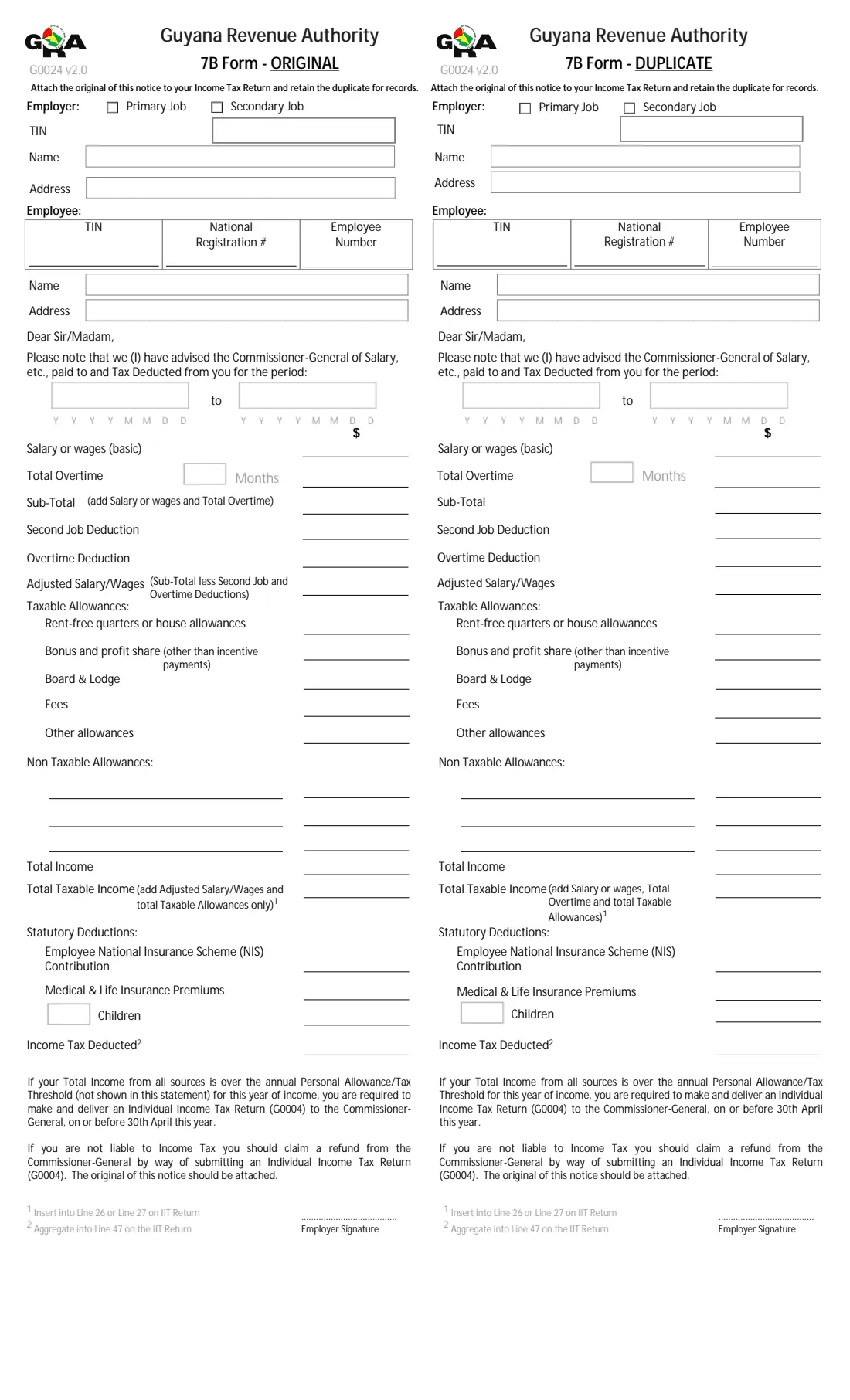
What is GRA 7B Form (emoluments and tax deducted)?
The 7B Form is how an employer in Guyana tells an employee, in writing, what it reported to the Commissioner-General: the salary or wages, overtime, allowances and statutory deductions for a period, and the income tax deducted under PAYE. The employee uses it to complete their Individual Income Tax Return (G0004).
The page has two identical halves. The ORIGINAL is attached to the employee's income tax return and the DUPLICATE is kept for their records. Footnotes on the form say where the figures go on the return: Total Taxable Income into line 26 or 27, and Income Tax Deducted into line 47.
FileIt asks for each figure once, works out the Sub-Total, Adjusted Salary/Wages, Total Income and Total Taxable Income, and prints everything on both halves of GRA's own PDF. The finished statement is saved in the employee's vault folder. FileIt doesn't send anything to GRA.
- Who fills it
- The employer, one form per employee
- Who gets it
- The employee, who attaches the ORIGINAL to their Individual Income Tax Return (G0004)
- Covers
- A period, usually the income year or the part of it worked
- Amounts
- Guyana dollars
- Signature
- The employer signs each half
- Edition
- G0024 v2.0, GRA's 7B Form for YA 2026 onward
Who needs to fill out GRA 7B Form (emoluments and tax deducted)?
- Employers in Guyana giving employees their annual statement of pay and PAYE tax deducted.
- Payroll staff and accountants preparing 7B Forms for a business's staff.
- Employers with staff for whom this is a second job, who tick Secondary Job.
- Employees who want a clean copy to check against their own records before filing their return.
When to use GRA 7B Form (emoluments and tax deducted)
- After the end of the income year, so employees have it before the return deadline of 30 April that the form mentions.
- When an employee leaves part way through the year and needs a statement for the months they worked.
- When an employee asks for a fresh statement because the original was lost.
What you need before you start
- Your GRA TIN, business name and address.
- The employee's TIN, national registration number, employee number (if you use one), name and address.
- The start and end dates of the period.
- Basic salary or wages, total overtime and the number of months with overtime, and any second job or overtime deductions you applied.
- Taxable allowances (rent-free quarters, bonus and profit share, board and lodge, fees, others) and up to three named non-taxable allowances.
- The employee's NIS contribution, medical and life insurance premiums, the children deduction and number of children, and the PAYE tax deducted.
What’s on GRA 7B Form (emoluments and tax deducted)
The 2025 edition has 1 page. FileIt asks for it in 6 parts, and it is signed by Employer:
- EmployerEmployer
- EmployeeEmployer
- Period coveredEmployer
- Salary, overtime and deductions from payEmployer
- AllowancesEmployer
- Statutory deductions and tax deductedEmployer
How to fill out GRA 7B Form (emoluments and tax deducted), step by step
1 Employer
Tick Primary Job or Secondary Job, then give your 9-digit TIN (one digit per box), name and address. FileIt prints the same details on the DUPLICATE half.
2 Employee and period
The employee's TIN, national registration number, employee number, name and address, then the period the statement covers. The dates print as YYYYMMDD in the comb boxes, as the form shows.
3 Salary, overtime and deductions
Enter basic salary or wages and total overtime, with the number of months overtime was paid. FileIt adds them into the Sub-Total. After any second job and overtime deductions from your payroll, it shows the Adjusted Salary/Wages.
4 Allowances and totals
List the taxable allowances, and name up to three non-taxable allowances with their amounts. Total Taxable Income is the Adjusted Salary/Wages plus the taxable allowances, as the ORIGINAL half's label describes. Total Income is the Sub-Total plus all the allowances.
5 Statutory deductions and tax
The employee's NIS contribution, medical and life insurance premiums, the number of children and the children deduction, and the income tax deducted for the period.
Common mistakes to avoid
- A TIN that isn't 9 digits. GRA TINs start with 0 or 1, and FileIt checks this.
- Dates written day first. The form's boxes take year, month and day (YYYYMMDD), and FileIt fills them that way.
- Overtime or second job deductions that don't match what you actually applied in payroll.
- A non-taxable amount with no description, or a description with no amount.
- Giving the employee only one half. The ORIGINAL goes with the return and the DUPLICATE stays with the employee.
After you fill it out
Print the PDF from FileIt, check the figures against your payroll, and sign the Employer Signature line on both halves.
Give the form to the employee. They attach the ORIGINAL to their Individual Income Tax Return (G0004) and keep the DUPLICATE.
Keep a copy in your FileIt vault with your payroll records for the year.
Fill out GRA 7B Form (emoluments and tax deducted) online with FileIt
- Pick the person. Choose someone from People and FileIt fills in their name, date of birth, address and other details it already knows.
- Answer plain-language questions. One part of the form at a time, with the official help text beside each question — 38 fields in all. Your answers save as you go.
- Check the live preview. Watch your answers land on the real Guyana Revenue Authority (GRA) form, and let FileIt do any worksheet arithmetic.
- Generate the official PDF. FileIt prints your answers into the agency’s own PDF and files it in that person’s folder in your vault. Sign it, or send it for e-signature.
FileIt fills the form — it never files or submits anything for you. Deliver the finished form to whoever asked for it, the way the form’s instructions say.
Start GRA 7B Form (emoluments and tax deducted) now — it’s freeGRA 7B Form (emoluments and tax deducted): frequently asked questions
What is a 7B Form in Guyana?
It is the Guyana Revenue Authority's statement of emoluments paid and tax deducted. An employer gives it to each employee to show what was paid and what PAYE tax was deducted for a period.
Which version of the 7B Form should I use?
GRA's forms page links version 2.0 for the 2026 year of assessment onward and keeps version 1.0 for 2021 to 2025. FileIt fills version 2.0, which adds the Sub-Total, the second job and overtime deductions and the children deduction to the earlier layout.
Why are there two copies on one page?
The left half is the ORIGINAL, which the employee attaches to their income tax return. The right half is the DUPLICATE, which they keep. FileIt prints the same answers on both.
Does FileIt work out the PAYE tax?
No. You enter the tax deducted and the deductions from your payroll. FileIt only adds up the totals the form describes.
Where do the figures go on the employee's return?
The form's footnotes say Total Taxable Income goes into line 26 or 27 of the IIT return, and Income Tax Deducted is added into line 47.
Does FileIt send the form to GRA?
No. FileIt fills GRA's PDF for you to print, sign and give to the employee.
Official sources
- Blank form (PDF), published by Guyana Revenue Authority (GRA): https://www.gra.gov.gy/storage/2025/12/G0024-7B-Form-v2.pdf
- Official instructions and guidance: https://www.gra.gov.gy/forms/
- Edition shown on this page: G0024 v2.0 (GRA's '7B Form: YA 2026 onward', December 2025) (checked 2026-10-19).
FileIt is not affiliated with or endorsed by Guyana Revenue Authority (GRA) or any government. This page explains the form in general terms and is not legal, tax or immigration advice. Always read the official instructions, and check that you are using the edition the recipient accepts. Page last reviewed 2026-10-19.