What is GRA DT 0107 monthly PAYE return?
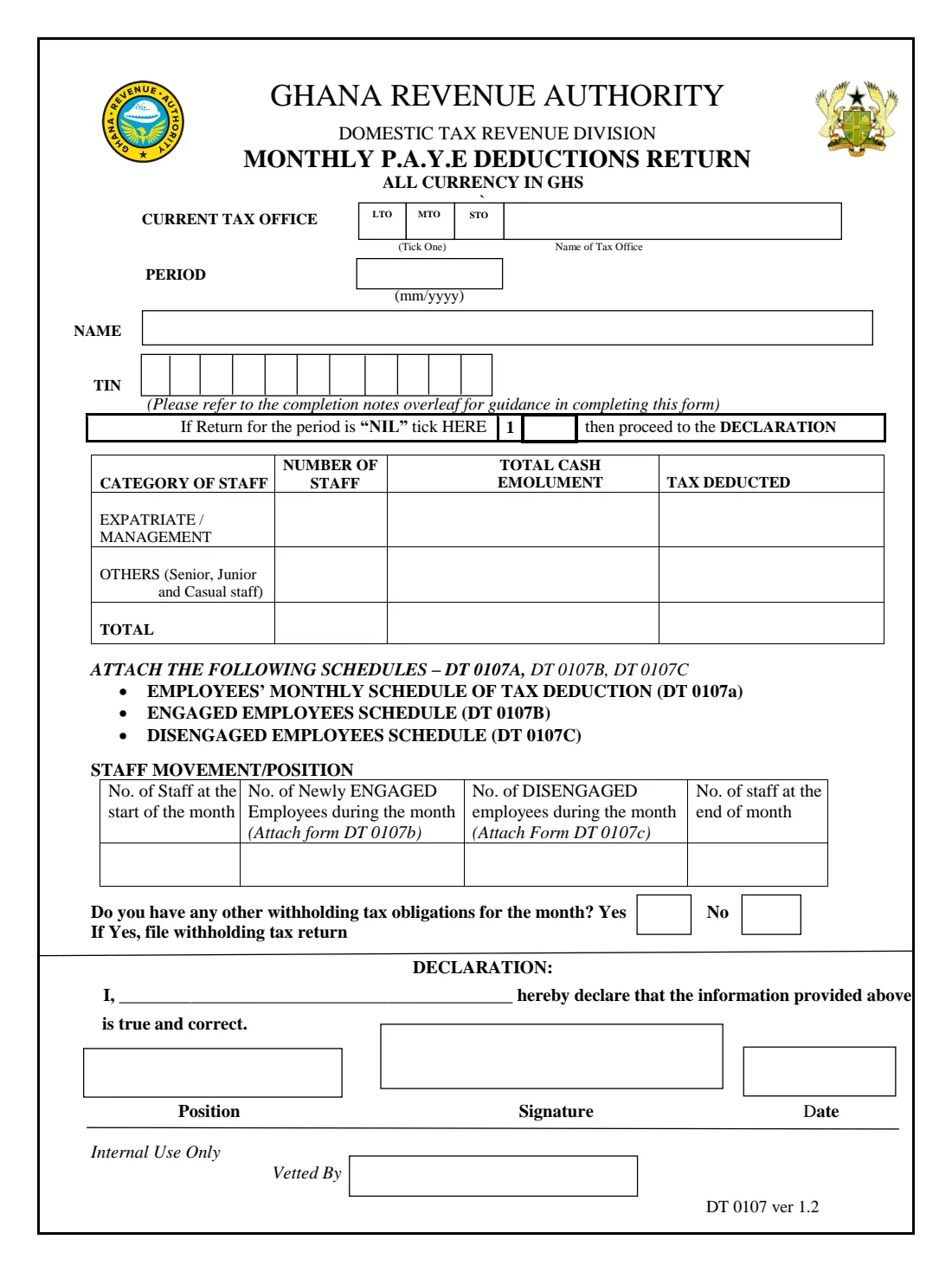
Employers in Ghana deduct income tax from their employees' pay under PAYE and account for it to the GRA every month. Form DT 0107 (ver 1.2) is the monthly summary: how many staff were paid, their total cash emoluments and the tax deducted, split between expatriate / management staff and everyone else, plus the staff who joined and left during the month.
A month with no transactions still needs a return, marked NIL. The employee-by-employee detail goes on the separate schedules DT 0107a, DT 0107b and DT 0107c, which are attached.
FileIt adds up the totals, works out the end-of-month headcount and prints everything on the GRA's own fillable PDF. You sign it and hand it in. FileIt never files anything with the GRA.
- Who fills it
- An employer, by a responsible officer or the sole proprietor
- Handed in to
- The employer's GRA tax office (LTO, MTO or STO)
- Covers
- One month (mm/yyyy); one return per employer
- Attach
- DT 0107a employee schedule, DT 0107b engaged and DT 0107c disengaged staff
- Edition
- DT 0107 ver 1.2
- Pages
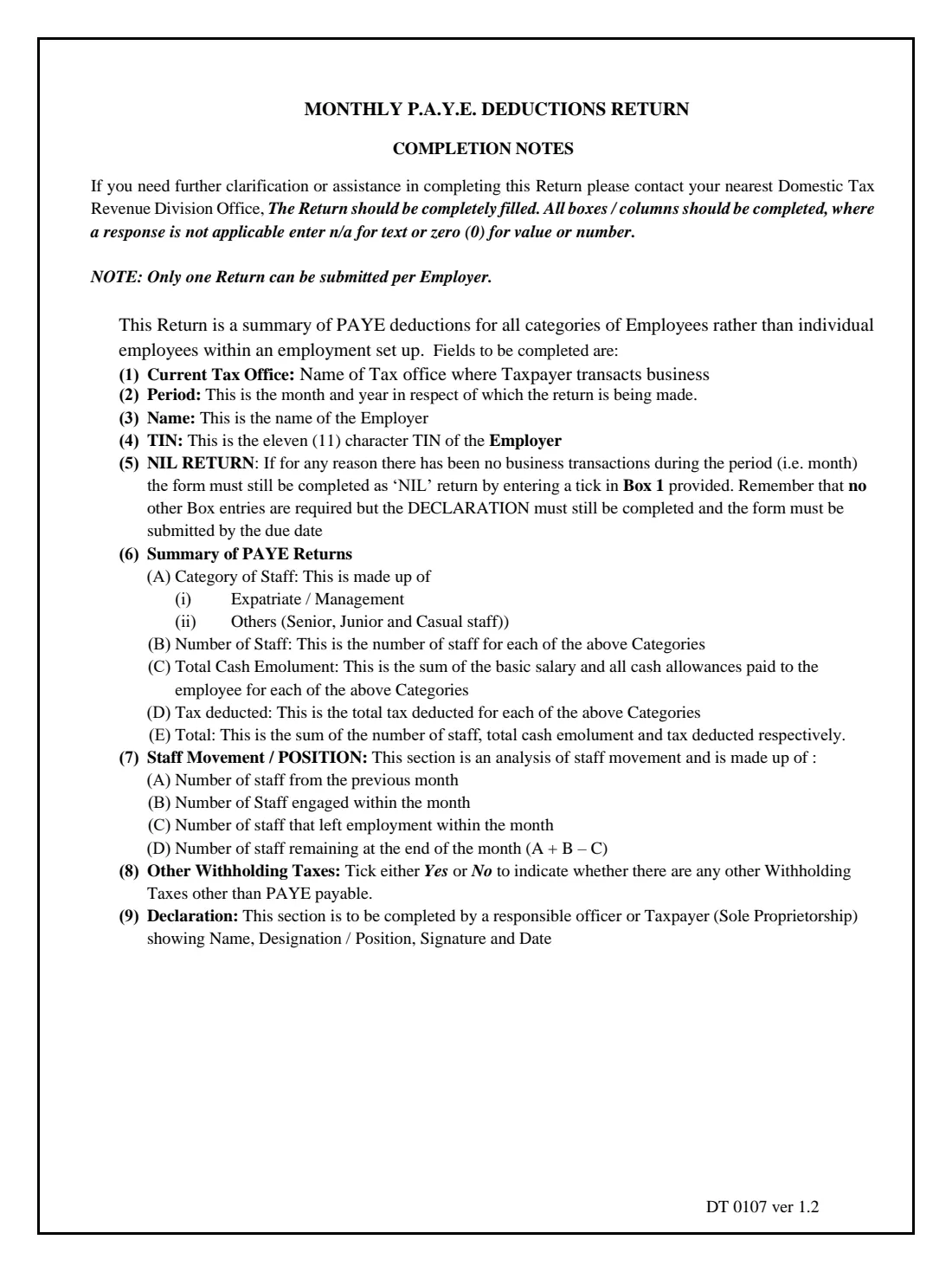
- 2 (return and completion notes)
Who needs to fill out GRA DT 0107 monthly PAYE return?
- Companies and organisations with employees in Ghana.
- Sole proprietors who employ staff.
- Payroll officers and accountants preparing the monthly PAYE return.
- Employers with no transactions in a month, who file a NIL return.
When to use GRA DT 0107 monthly PAYE return
- Every month, for the PAYE deducted from that month's pay.
- As a NIL return for a month with no business transactions.
What you need before you start
- The employer's TIN and the name of its GRA tax office.
- The month's payroll totals: staff numbers, total cash emoluments and tax deducted, for expatriate / management staff and for others.
- Headcounts at the start of the month, staff engaged and staff who left.
- Whether any other withholding taxes are due for the month.
What’s on GRA DT 0107 monthly PAYE return
The 2020 edition has 2 pages. FileIt asks for it in 4 parts:
- Tax office, period and employerEmployer
- Summary of PAYE deductionsEmployer
- Staff movement / positionEmployer
- DeclarationEmployer
How to fill out GRA DT 0107 monthly PAYE return, step by step
1 Office, period and employer
Tick LTO, MTO or STO, name the tax office, and give the month, the employer's name and TIN.
2 NIL return
If there were no transactions, tick Box 1 and go straight to the declaration.
3 Summary of PAYE deductions
Number of staff, total cash emoluments (basic salary plus all cash allowances) and tax deducted for each category. FileIt adds the totals row.
4 Staff movement
Staff at the start of the month, newly engaged and disengaged employees. FileIt works out the end-of-month figure (A + B - C).
5 Other withholding taxes and declaration
Say whether other withholding taxes are due (if so, file a withholding tax return too), then the declarant's name, position and date. Sign on paper.
Common mistakes to avoid
- Leaving boxes empty. The notes ask for 0 or n/a rather than blanks.
- Filing more than one return for the same employer and month.
- Forgetting the DT 0107a, 0107b and 0107c schedules.
- Missing a month with no payroll, which still needs a NIL return.
After you fill it out
Check the totals against the DT 0107a schedule, sign and hand in the return with the schedules.
Pay the PAYE deducted to the GRA. Your tax office can confirm the due date.
FileIt keeps each month's return in your vault, so a year's PAYE is easy to reconcile.
Fill out GRA DT 0107 monthly PAYE return online with FileIt
- Pick the person. Choose someone from People and FileIt fills in their name, date of birth, address and other details it already knows.
- Answer plain-language questions. One part of the form at a time, with the official help text beside each question — 27 fields in all. Your answers save as you go.
- Check the live preview. Watch your answers land on the real Ghana Revenue Authority (GRA) form, and let FileIt do any worksheet arithmetic.
- Generate the official PDF. FileIt prints your answers into the agency’s own PDF and files it in that person’s folder in your vault.
FileIt fills the form — it never files or submits anything for you. Deliver the finished form to whoever asked for it, the way the form’s instructions say.
Start GRA DT 0107 monthly PAYE return now — it’s freeGRA DT 0107 monthly PAYE return: frequently asked questions
What counts as cash emolument?
The basic salary and all cash allowances paid to employees in each category.
Do I need to file if I paid no salaries?
Yes. The notes say a month with no transactions is still returned, as NIL.
Can a sole proprietor use a Ghana Card PIN?
Yes. FileIt prints an 11-character TIN in the boxes, and a Ghana Card PIN in full across them.
Does FileIt file the return?
No. FileIt prepares the GRA's official PDF; you hand it in.
Official sources
- Blank form (PDF), published by Ghana Revenue Authority (GRA): https://gra.gov.gh/wp-content/uploads/2020/09/DT_0107_monthly_paye_deductions_Return_form_v1_2.pdf
- Official instructions and guidance: https://gra.gov.gh/forms/
- Edition shown on this page: DT 0107 ver 1.2 (GRA upload 2020/09) (checked 2026-10-25).
FileIt is not affiliated with or endorsed by Ghana Revenue Authority (GRA) or any government. This page explains the form in general terms and is not legal, tax or immigration advice. Always read the official instructions, and check that you are using the edition the recipient accepts. Page last reviewed 2026-10-25.