What is Individual TIN registration?
A Taxpayer Identification Number (TIN) is the number the Fiji Revenue and Customs Service (FRCS) uses to identify you. FRCS says every Fiji citizen, resident, or individual with a financial or business interest in Fiji must register for one, and you need it to use FRCS's tax services. The Individual TIN Registration form is FRCS's paper application for an individual's TIN, published on its Forms and Guides page.
FRCS points most people to register online through the Taxpayer Online Service (TPOS), and the form itself says TPOS gives a faster turnaround. The paper form is the alternative, for example if you are registering at an FRCS office or someone is lodging it on your behalf. It covers your personal details, residency, ID, occupation, references, mailing address and preferred FRCS branch, with a checklist of the documents to bring.
FileIt walks you through the form section by section, follows the form's own residency routing (which questions to answer, and whether to give a Fiji or an overseas address), and prints your answers into the boxes of FRCS's PDF. Your name, date of birth and email can be pre-filled from the People records in your FileIt vault, and the finished PDF is saved there. FileIt does not lodge anything: you print the form, sign it by hand and take it to FRCS.
- Who fills it
- An individual who needs a Fiji TIN (or someone lodging it on their behalf)
- Given to
- An FRCS office, with the documents on the form's checklist
- When
- Once, before you need to deal with FRCS; existing TINs stay in use
- Signatures
- Signed by hand in Section G when the form is lodged
- Online alternative
- Registration through FRCS's Taxpayer Online Service (TPOS)
- Processing
- The form states applications are processed in 3 working days
Who needs to fill out Individual TIN registration?
- Anyone starting work in Fiji who needs a TIN for their employer and for tax.
- Fiji citizens and residents who don't yet have a TIN, including young people starting their first job.
- Individuals living overseas with a financial or business interest in Fiji, who give an overseas address.
- Foreign nationals studying or working in Fiji. The checklist asks for a student offer letter or a certified passport copy where these apply.
- People who can't or don't want to use TPOS online, or who have a family member or agent lodge the form for them.
When to use Individual TIN registration
- When you first need a TIN, for example for a new job, a bank account or a business.
- When you would rather register in person at an FRCS office than online through TPOS.
- Not if you already have a TIN. FRCS says existing taxpayers keep their TIN and sign up to TPOS with a One Time Login Code instead.
- Not to update your details. FRCS has separate information-update forms for that.
What you need before you start
- Your full name, gender, email and mobile number.
- Your residency position: whether you live in Fiji, have a permanent home there, are a Fiji government official posted abroad, or spent at least 183 days in Fiji in the past 12 months.
- Your address in Fiji (region, province, island or town, village or suburb) or your overseas address, and your landlord's TIN if you rent.
- Your nationality, date of birth, Fiji birth registration number (if you have a Fiji birth certificate) and passport details.
- Your occupation and department if you're employed in Fiji, or your current status (student, retired, and so on).
- Details of a reference: under 18, your father (or mother or guardian); 18 or over, your spouse or an alternate contact.
- The documents on the checklist: a digital passport photo with a white background, your original birth certificate and photo ID, plus the other items where they apply.
What’s on Individual TIN registration
The 2026 edition has 3 pages. FileIt asks for it in 10 parts:
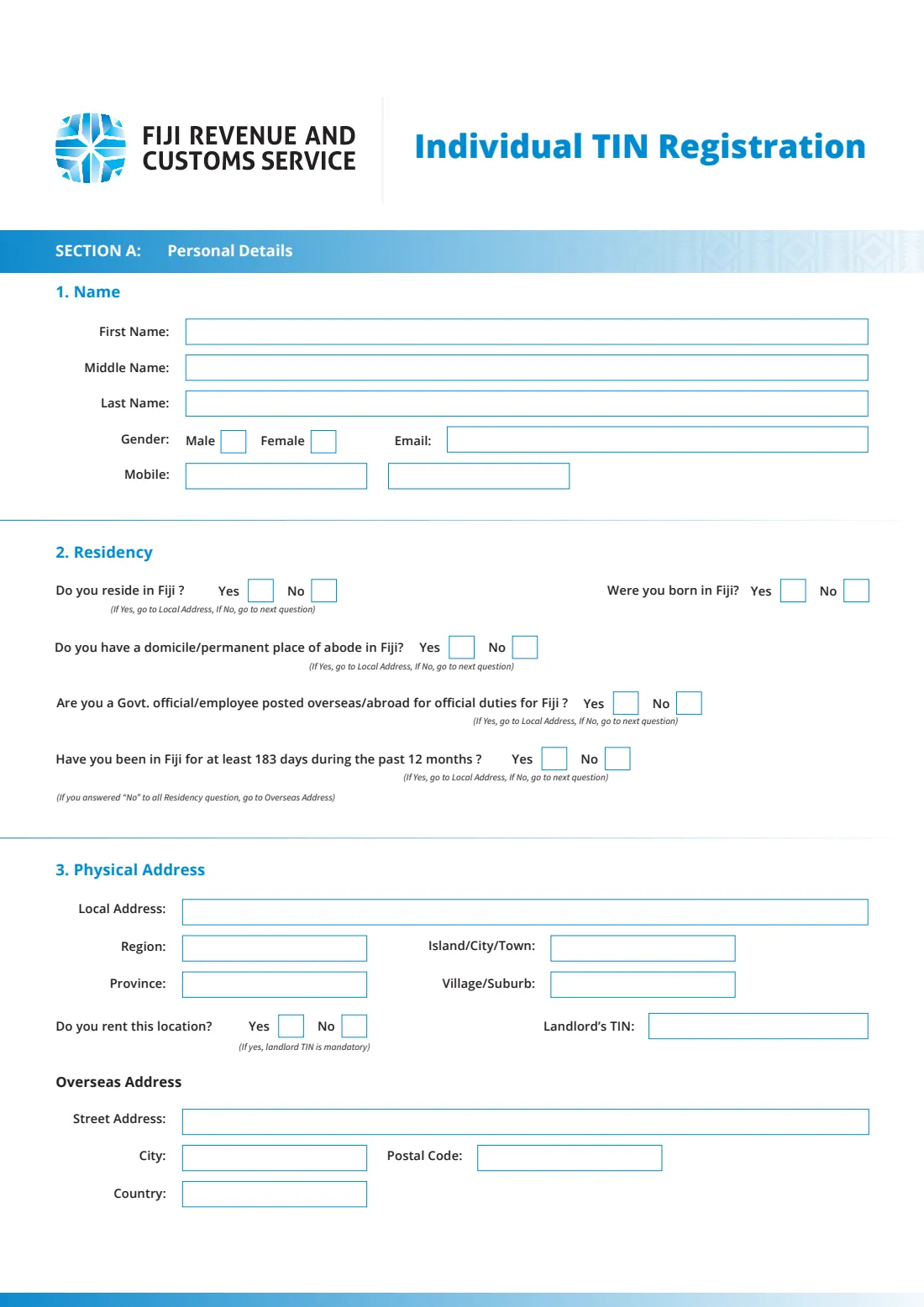
- Section A — 1. Name, gender and contactApplicant
- Section A — 2. ResidencyApplicant
- Section A — 3. Physical address in Fiji (local address)Applicant
- Section A — 3. Overseas addressApplicant
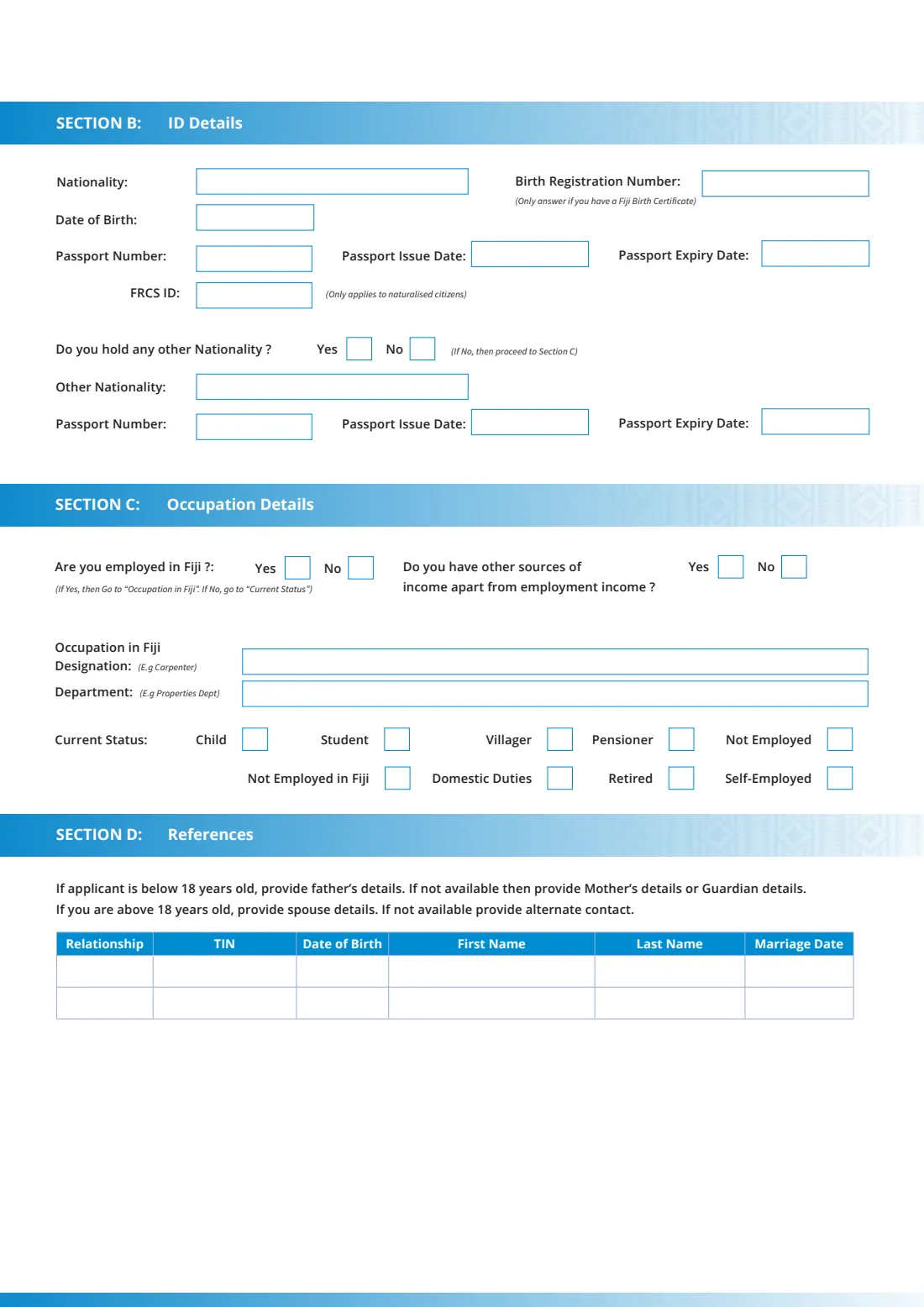
- Section B — ID detailsApplicant
- Section C — Occupation detailsApplicant
- Section D — ReferencesApplicant
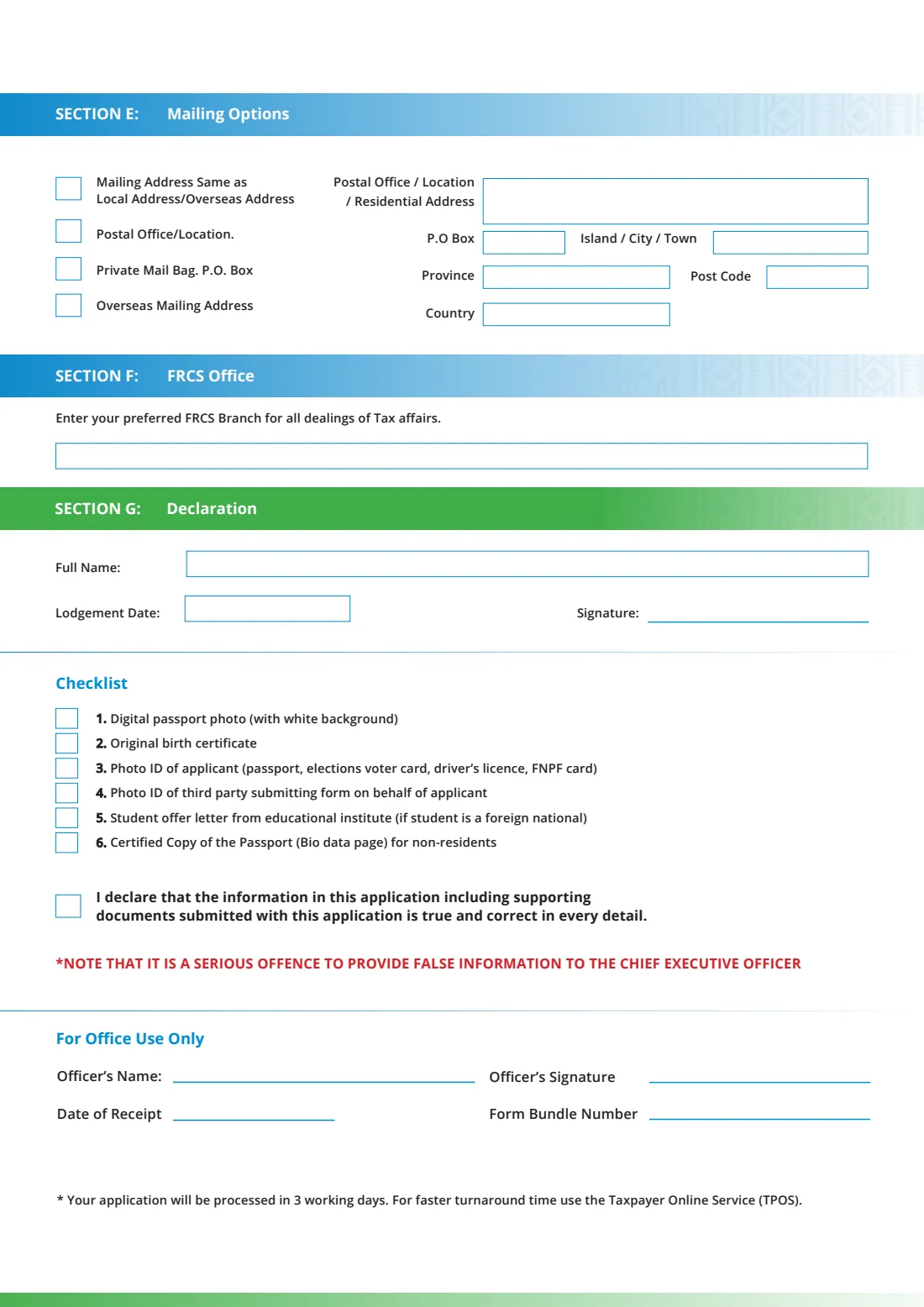
- Section E — Mailing optionsApplicant
- Section F — FRCS officeApplicant
- Section G — Declaration and checklistApplicant
How to fill out Individual TIN registration, step by step
1 Section A: 1. Name
First, middle and last name, gender, email and mobile. The form has two boxes after "Mobile", so you can give a second number.
2 Section A: 2. Residency
The residency questions run in order. Do you reside in Fiji? If not, do you have a domicile or permanent place of abode in Fiji? If not, are you a government official or employee posted overseas for Fiji? If not, have you been in Fiji for at least 183 days in the past 12 months? Stop at the first Yes. There is also a separate question on whether you were born in Fiji.
FileIt shows each question only when the one before is No, and then asks for the right address.
3 Section A: 3. Physical address
If you answered Yes to a residency question, give your local address in Fiji: street, region, province, island, city or town, and village or suburb. Say whether you rent, and if you do, give your landlord's TIN, which the form says is mandatory.
If you answered No to every residency question, give your overseas address instead.
4 Section B: ID details
Your nationality, date of birth, passport number with its issue and expiry dates, and your Fiji birth registration number if you have a Fiji birth certificate. The FRCS ID box applies only to naturalised citizens. If you hold another nationality, give it with the other passport's details.
5 Section C: Occupation details
Say whether you're employed in Fiji and whether you have other sources of income. If employed, give your designation (for example Carpenter) and department. If not, tick your current status: child, student, villager, pensioner, not employed, not employed in Fiji, domestic duties, retired or self-employed.
6 Section D: References
Two rows for the relationship, TIN, date of birth, first and last name, and marriage date of a reference. The form asks applicants under 18 for their father's details (or their mother's or guardian's if not available). Applicants 18 or over give their spouse's details, or an alternate contact. The marriage date only applies to a spouse.
7 Section E: Mailing options
Choose where FRCS should send mail: the same address as your local or overseas address, a postal office or location, a private mail bag or P.O. box, or an overseas mailing address. For anything but "same as", give the address, P.O. box, island, city or town, province, post code and country.
8 Section F: FRCS office
Name the FRCS branch you'd like to deal with for all your tax affairs.
9 Section G: Declaration and checklist
Your full name (FileIt fills this in from Section A), the lodgement date and your signature. Tick the checklist items you're bringing and the declaration that the information and documents are true and correct. The form warns that giving false information to the Chief Executive Officer is a serious offence.
Common mistakes to avoid
- Answering every residency question when the first one was already Yes. Stop at the first Yes and give your Fiji address.
- Leaving out the landlord's TIN when you rent. The form says it is mandatory.
- Giving a spouse as the reference for an applicant under 18. The form asks for the father's details first.
- Forgetting the documents on the checklist, especially the digital passport photo with a white background.
- Applying for a new TIN when you already have one. Existing taxpayers keep their TIN.
- Leaving the declaration box unticked or the signature line blank.
After you fill it out
Print the form, check it, and sign by hand at "Signature" in Section G. FileIt fills in the lodgement date and ticks the checklist items you selected.
Take the form and the documents on the checklist to an FRCS office. If someone lodges it for you, they bring their own photo ID (checklist item 4). The form states that applications are processed in 3 working days and suggests TPOS for a faster turnaround. FileIt does not lodge the form for you.
Once your TIN is issued, FRCS says you can download your TIN letter from the Correspondence section of TPOS after you sign up. Keep the filled PDF and your TIN letter in your FileIt vault, so the number is at hand for your employer and bank.
Fill out Individual TIN registration online with FileIt
- Pick the person. Choose someone from People and FileIt fills in their name, date of birth, address and other details it already knows.
- Answer plain-language questions. One part of the form at a time, with the official help text beside each question — 69 fields in all. Your answers save as you go.
- Check the live preview. Watch your answers land on the real Fiji Revenue and Customs Service (FRCS) form, and let FileIt do any worksheet arithmetic.
- Generate the official PDF. FileIt prints your answers into the agency’s own PDF and files it in that person’s folder in your vault.
FileIt fills the form — it never files or submits anything for you. Deliver the finished form to whoever asked for it, the way the form’s instructions say.
Start Individual TIN registration now — it’s freeIndividual TIN registration: frequently asked questions
What is a TIN in Fiji?
A Taxpayer Identification Number, a unique 9- or 10-digit number FRCS uses to identify a taxpayer. FRCS says TINs issued through TPOS start with 29 and have 10 digits.
Who must register for a TIN in Fiji?
FRCS says Fiji citizens, residents, and any individual or non-individual with a financial or business interest in Fiji must register for a TIN.
Can I apply for a Fiji TIN online instead?
Yes. FRCS encourages registration through its Taxpayer Online Service (TPOS), and the paper form itself says TPOS is faster. The paper form is for those who prefer to lodge at an FRCS office.
Where do I lodge the Individual TIN Registration form?
At an FRCS office, with the documents listed on the form's checklist. FileIt only prepares the form. You lodge it yourself, or someone lodges it for you with their own photo ID.
What documents do I need?
The checklist lists a digital passport photo with a white background, your original birth certificate, and photo ID (passport, elections voter card, driver's licence or FNPF card). Where they apply, it also lists the third party's photo ID, a student offer letter for foreign-national students, and a certified copy of the passport bio-data page for non-residents.
How long does it take?
The form states that applications are processed in 3 working days, and suggests TPOS for a faster turnaround.
Can I fill out the FRCS TIN form online with FileIt?
Yes. FileIt guides you through each section, follows the residency routing, and prints your answers into FRCS's PDF. You then print it, sign it by hand and lodge it at FRCS.
I already have a TIN from before. Do I need a new one?
No. FRCS says existing taxpayers (TINs issued before November 2019) keep their TIN and sign up to TPOS with a One Time Login Code.
Official sources
- Blank form (PDF), published by Fiji Revenue and Customs Service (FRCS): https://www.frcs.org.fj/wp-content/uploads/2022/09/NTIS_Individual-TIN-Registration.pdf
- Official instructions and guidance: https://frcs.org.fj/our-services/taxation-section/individuals/registrations/
- Edition shown on this page: NTIS Individual TIN Registration (published September 2022; no form number or date printed) (checked 2026-09-26).
FileIt is not affiliated with or endorsed by Fiji Revenue and Customs Service (FRCS) or any government. This page explains the form in general terms and is not legal, tax or immigration advice. Always read the official instructions, and check that you are using the edition the recipient accepts. Page last reviewed 2026-09-26.