What is DGT Modelo 01 — Vehicle procedures?
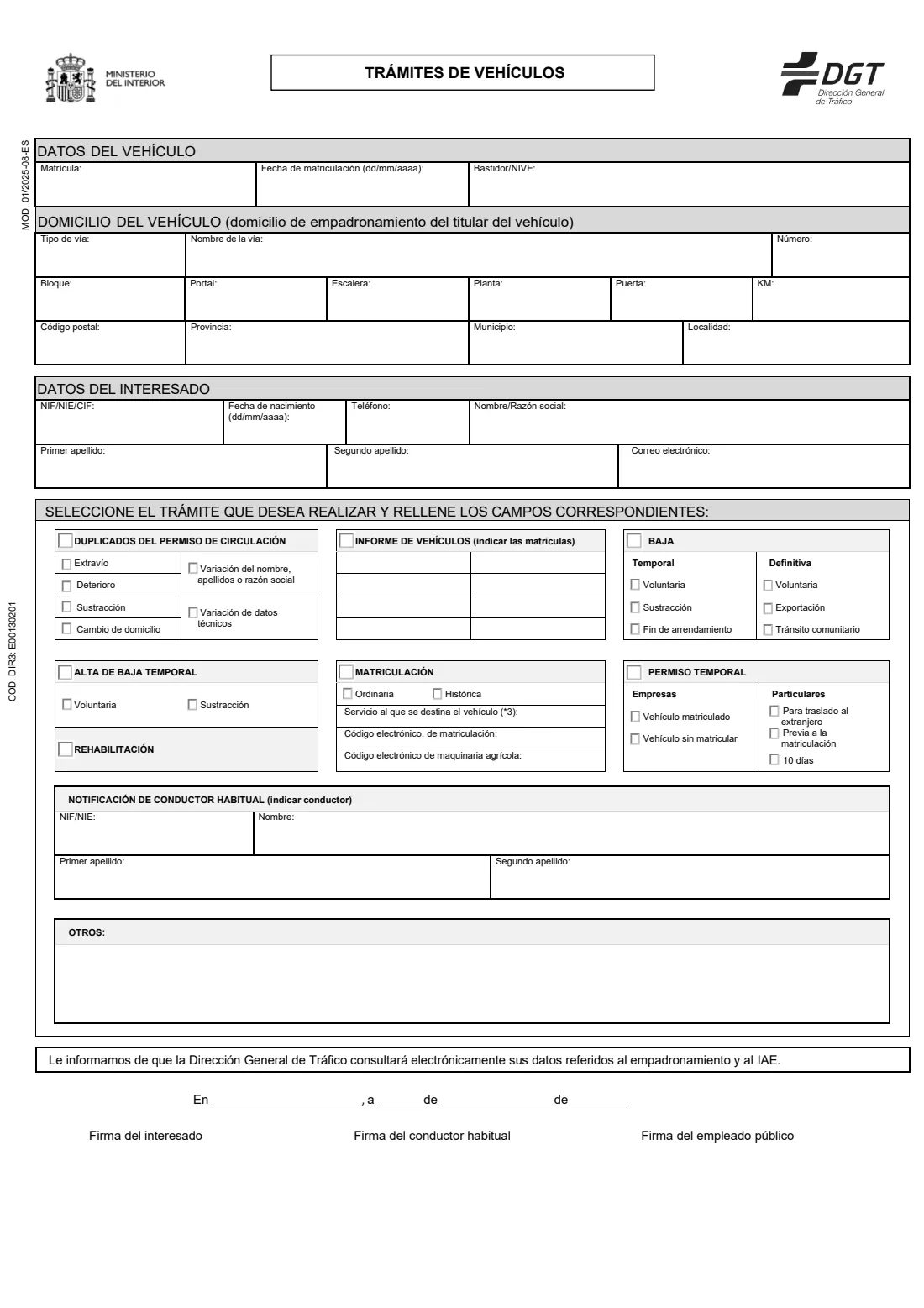
Modelo 01 (Trámites de vehículos) is the form the Spanish traffic authority, the Dirección General de Tráfico (DGT), uses at its offices for most procedures on a vehicle other than a change of owner. It covers a duplicate of the registration certificate (permiso de circulación) after loss, damage or theft, or because the address, the keeper's name or the technical data changed; a vehicle report (informe) for up to eight plates; temporary or final deregistration (baja); re-registration after a temporary baja; registration (ordinary or historic); a temporary permit; rehabilitation; and naming the vehicle's habitual driver. The current edition is MOD. 01/2025-08-ES.
It asks for the vehicle's plate, first registration date and chassis number, the vehicle's address (the keeper's padrón address), the applicant's details and the procedure. The form notes that the DGT checks your padrón registration and IAE electronically.
FileIt explains every box of Modelo 01 in English, checks NIF, NIE and CIF numbers, and prints your answers neatly onto the DGT's official PDF, including names with letters such as ł, ș or ü. The finished form is saved in your FileIt vault. FileIt does not submit anything to the DGT and does not pay the fee: you print the form and take it to a Jefatura de Tráfico, where you sign it.
- Who fills it
- The vehicle's keeper (titular), a person or a company
- Given to
- A DGT traffic office (Jefatura de Tráfico), with the fee (tasa) for the procedure
- One form per procedure
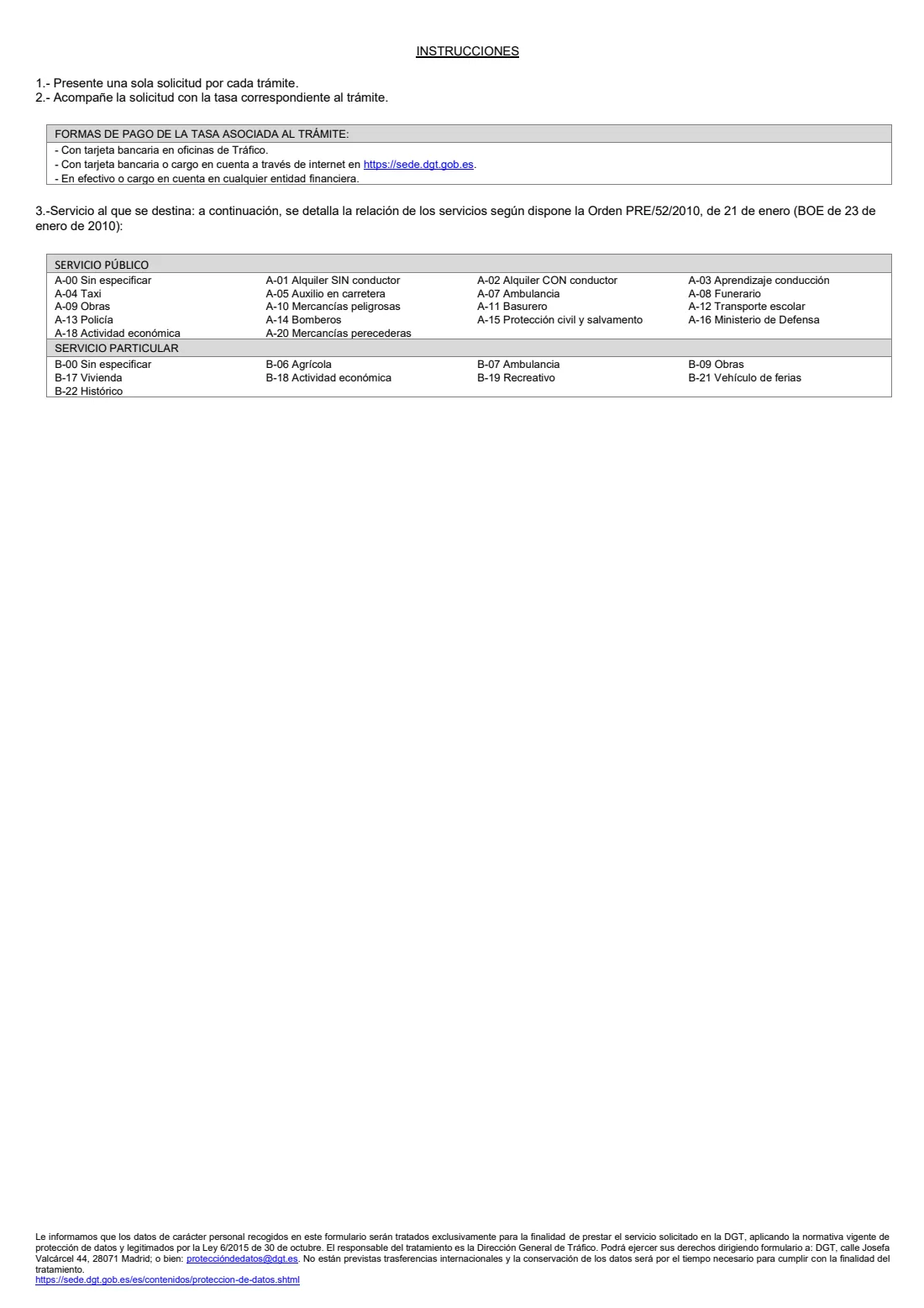
- As the instructions on page 2 say
- Signatures
- You sign by hand, and the habitual driver if one is named; a DGT employee also signs
- Edition
- MOD. 01/2025-08-ES
- Authority
- Dirección General de Tráfico (DGT), Ministerio del Interior
Who needs to fill out DGT Modelo 01 — Vehicle procedures?
- Vehicle keepers who lost the registration certificate, had it stolen or damaged, or changed address, name or technical data.
- Keepers taking a vehicle off the road for a while (temporary baja) or for good (final baja, export or transfer to another EU country), or putting it back on the road.
- Anyone who wants a DGT report on a vehicle before buying it.
- Keepers registering a vehicle (ordinary or historic), asking for a temporary permit, or telling the DGT who usually drives the vehicle.
When to use DGT Modelo 01 — Vehicle procedures
- When you need one of these procedures done at a traffic office rather than online.
- Before buying a used vehicle, if you want the DGT's report (informe) on it.
- When you stop using a vehicle and want a temporary or final baja, or when you take it abroad.
- Only one procedure per form: the instructions on page 2 ask for a separate application for each.
What you need before you start
- The vehicle's registration number, date of first registration and chassis number (VIN or NIVE).
- The keeper's padrón address, which is the vehicle's address.
- Your NIF, NIE or company CIF, name or company name, surnames, date of birth, phone and email.
- For a report: the plates of up to eight vehicles. For registration: the service code from page 2 and any electronic registration code (CEM) or agricultural machinery code (CEMA).
- For the habitual driver: their NIF or NIE and full name.
- The DGT fee (tasa) for the procedure, paid at the office by card, online at sede.dgt.gob.es, or at a bank, as page 2 explains.
What’s on DGT Modelo 01 — Vehicle procedures
The 2025 edition has 2 pages. FileIt asks for it in 6 parts:
- Vehicle (Datos del vehículo)Applicant
- Vehicle address (Domicilio del vehículo)Applicant
- Applicant (Datos del interesado)Applicant
- Procedure (Seleccione el trámite que desea realizar)Applicant
- Habitual driver (Notificación de conductor habitual)Habitual driver
- Other information, place and date (Otros · En ___, a __ de ___ de ___)Applicant
How to fill out DGT Modelo 01 — Vehicle procedures, step by step
1 Datos del vehículo (vehicle)
The registration number, the date of first registration (dd/mm/yyyy) and the chassis number or NIVE.
2 Domicilio del vehículo (vehicle address)
The address where the keeper is registered on the padrón: street type and name, number, block, entrance, staircase, floor, door, kilometre point, postcode, province, municipality and locality.
3 Datos del interesado (applicant)
Your NIF, NIE or CIF, date of birth, phone, name or company name, surnames and email. A company has no date of birth or surnames.
4 Seleccione el trámite (procedure)
Tick one procedure and its option: the reason for a duplicate; the plates for a report; the kind of baja (temporary: voluntary, theft, end of lease; final: voluntary, export, transfer to another EU country); the reason a temporary baja ends; ordinary or historic registration with the service code; the kind of temporary permit; or rehabilitation.
5 Notificación de conductor habitual (habitual driver)
Optional: the NIF or NIE and full name of the person who usually drives the vehicle. They sign the form too.
6 Otros, lugar y fecha (other, place and date)
Anything else the office should know, such as a police report number after a theft, then the place and date. You sign at the office.
Common mistakes to avoid
- Using Modelo 01 for a change of owner. That is Modelo 02.
- Putting two procedures on one form. The instructions ask for one application per procedure.
- Giving an address that isn't the keeper's padrón address.
- Forgetting the fee, or the habitual driver's signature when you name one.
After you fill it out
Print the PDF from your FileIt vault and take it to a Jefatura de Tráfico with your ID, the fee paid and the documents for your procedure.
Sign it there by hand, with the habitual driver if you named one.
Keep the form, the receipt and the new documents in your FileIt vault next to the vehicle.
Fill out DGT Modelo 01 — Vehicle procedures online with FileIt
- Pick the person. Choose someone from People and FileIt fills in their name, date of birth, address and other details it already knows.
- Answer plain-language questions. One part of the form at a time, with the official help text beside each question — 48 fields in all. Your answers save as you go.
- Check the live preview. Watch your answers land on the real Dirección General de Tráfico (DGT) form, and let FileIt do any worksheet arithmetic.
- Generate the official PDF. FileIt prints your answers into the agency’s own PDF and files it in that person’s folder in your vault.
FileIt fills the form — it never files or submits anything for you. Deliver the finished form to whoever asked for it, the way the form’s instructions say.
Start DGT Modelo 01 — Vehicle procedures now — it’s freeDGT Modelo 01 — Vehicle procedures: frequently asked questions
What is DGT Modelo 01?
It is the DGT's application form for vehicle procedures other than a change of owner: duplicate registration certificate, vehicle report, temporary or final baja, re-registration, registration, temporary permit, rehabilitation and habitual driver.
Can I fill in Modelo 01 online?
Yes. FileIt lets you fill it in online free and prints your answers into the DGT's official PDF. You still take it to a Jefatura de Tráfico and sign it there. Many vehicle procedures can also be done on the DGT's Sede Electrónica.
Which form do I use to sell a car?
A change of ownership or notice of sale uses Modelo 02, not Modelo 01.
What service code should I choose?
Page 2 of the form lists the codes of Orden PRE/52/2010. Most private cars are B-00 (private, not specified).
Is there an English version?
The form is in Spanish. FileIt shows every question in English with the Spanish term in brackets.
Official sources
- Blank form (PDF), published by Dirección General de Tráfico (DGT): https://sede.dgt.gob.es/export/sites/dgt/.galleries/modelos-solicitud/01/Mod.01-ES.pdf
- Official instructions and guidance: https://sede.dgt.gob.es/es/vehiculos/
- Edition shown on this page: MOD. 01/2025-08-ES (checked 2026-10-25).
FileIt is not affiliated with or endorsed by Dirección General de Tráfico (DGT) or any government. This page explains the form in general terms and is not legal, tax or immigration advice. Always read the official instructions, and check that you are using the edition the recipient accepts. Page last reviewed 2026-10-25.