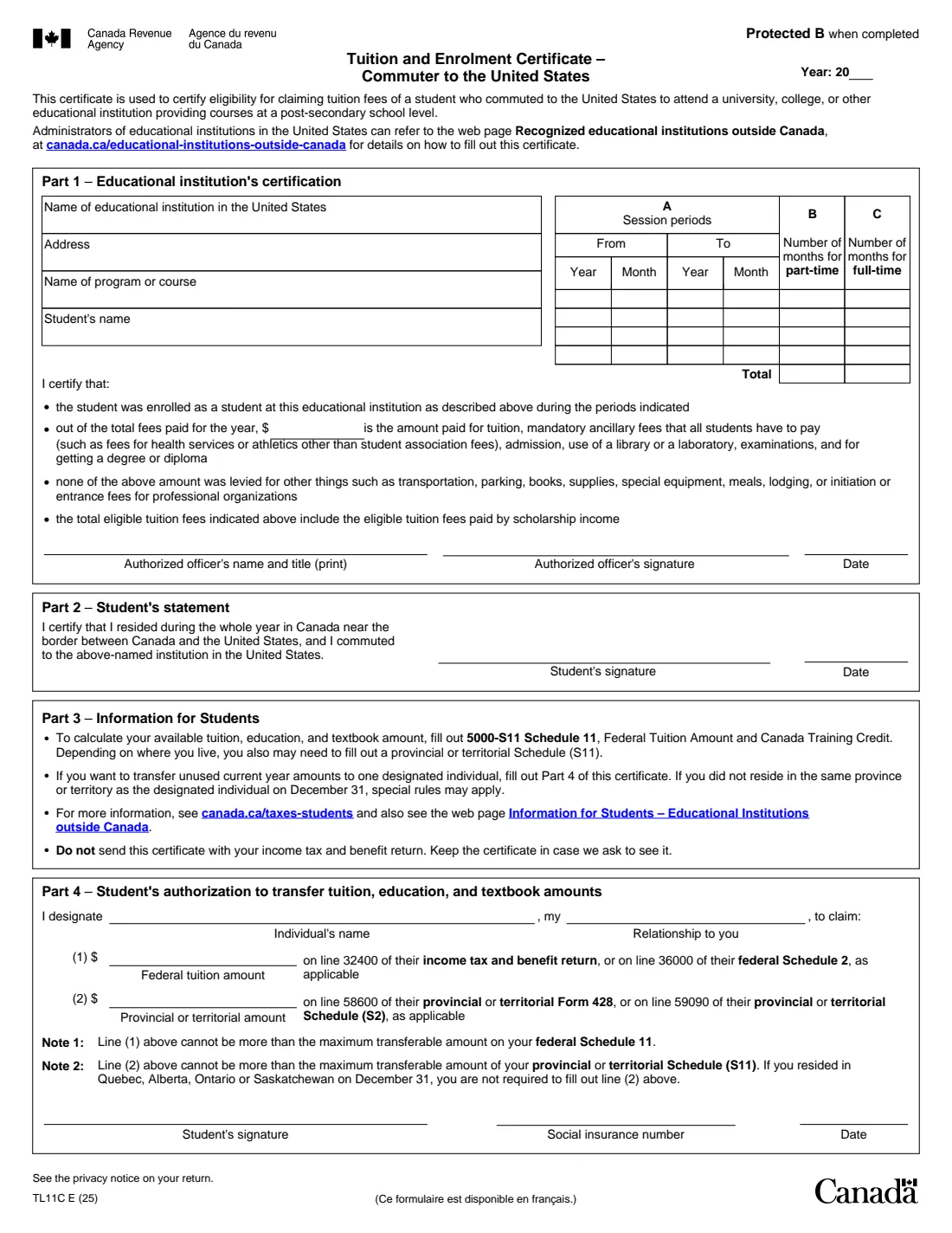
What is Form TL11C?
Form TL11C, Tuition and Enrolment Certificate – Commuter to the United States, is the Canada Revenue Agency (CRA) certificate for students who lived in Canada near the border and commuted to a university, college or other educational institution in the United States providing courses at a post-secondary school level.
The US institution certifies the program, each session the student was enrolled in, the part-time and full-time months and the eligible tuition paid. In Part 2 the student certifies they resided in Canada near the border during the whole year and commuted to that institution. In Part 4 the student can transfer unused current-year tuition, education and textbook amounts to one designated individual.
FileIt lets the student prepare the certificate for the institution to check and sign, totals the months, and prints everything into the CRA's fillable TL11C PDF (edition TL11C E (25)). Signatures are by hand. You keep the certificate; you don't send it with your return. FileIt doesn't file anything for you.
- Who fills it
- The US institution certifies Part 1; the student signs Part 2 and, for a transfer, Part 4
- Used for
- Claiming tuition on Schedule 11, and transferring unused amounts
- Signatures
- The institution's authorized officer and the student, by hand
- Sent to
- Nobody. Keep it in case the CRA asks to see it
- Edition
- TL11C E (25), 1 page
Who needs to fill out Form TL11C?
- Students who lived in Canada near the Canada–US border all year and commuted to a US post-secondary institution.
- The individual a student designates to receive unused tuition, education and textbook amounts.
- US registrars completing certificates for commuting Canadian students.
When to use Form TL11C
- After the year, once the year's tuition has been paid.
- Before the student or the person receiving a transfer files their return.
- Students attending a university outside Canada without commuting use Form TL11A instead.
What you need before you start
- The US institution's name and address, and the name of the program or course.
- The start and end month of each session in the year, and whether each was part-time or full-time.
- The eligible tuition paid for the year (tuition, mandatory ancillary fees, admission, library or laboratory use, examinations and getting a degree or diploma).
- For a transfer: the designated individual's name and relationship, the amounts from Schedule 11 (and S11), and your SIN.
What’s on Form TL11C
The 2025 edition has 1 page. FileIt asks for it in 4 parts:
- StudentStudent
- Part 1 – Educational institution's certificationEducational institution
- Part 2 – Student's statementStudent
- Part 4 – Your authorization to transfer tuition, education and textbook amountsStudent
How to fill out Form TL11C, step by step
1 Student
The tax year and the student's name, which prints in Part 1.
2 Part 1 – Institution's certification
The institution's name and address, the program, up to four sessions with part-time or full-time months, and the eligible tuition. FileIt totals columns B and C. The authorized officer's name, title and date print below the signature line.
3 Part 2 – Student's statement
The date of your statement that you lived in Canada near the border all year and commuted. You sign by hand.
4 Part 4 – Transfer (optional)
Switch this part on to transfer unused current-year amounts to one designated individual: their name, relationship, the federal and provincial or territorial amounts, your SIN and the date. You sign by hand.
Common mistakes to avoid
- Using TL11C when you didn't live near the border or commute; it's only for commuters.
- Including fees for transportation, parking, books, supplies, equipment, meals, lodging or professional initiation fees in the tuition amount.
- Transferring more than the maximum on Schedule 11 (note 1) or S11 (note 2).
- Forgetting to sign the Part 2 statement.
- Sending the certificate with the return instead of keeping it.
After you fill it out
Give the certificate to the institution to check, complete and sign Part 1, then sign Part 2 yourself.
Use it to fill out Schedule 11 (and S11), and give a copy to the person receiving a transfer.
Keep the signed certificate in case the CRA asks. FileIt saves it in your vault.
Fill out Form TL11C online with FileIt
- Pick the person. Choose someone from People and FileIt fills in their name, date of birth, address and other details it already knows.
- Answer plain-language questions. One part of the form at a time, with the official help text beside each question — 34 fields in all. Your answers save as you go.
- Check the live preview. Watch your answers land on the real Canada Revenue Agency (CRA) form, and let FileIt do any worksheet arithmetic.
- Generate the official PDF. FileIt prints your answers into the agency’s own PDF and files it in that person’s folder in your vault.
FileIt fills the form — it never files or submits anything for you. Deliver the finished form to whoever asked for it, the way the form’s instructions say.
Start Form TL11C now — it’s freeForm TL11C: frequently asked questions
Who can use Form TL11C?
A student who resided in Canada near the Canada–US border during the whole year and commuted to a university, college or other educational institution in the United States providing post-secondary courses.
Who signs it?
The institution's authorized officer signs Part 1, and the student signs the Part 2 statement and, for a transfer, Part 4. All by hand.
Do I send the TL11C with my return?
No. Part 3 of the form says to keep it in case the CRA asks to see it.
Can I fill out Form TL11C online?
Yes. FileIt prepares the certificate for the institution to check and sign and prints it into the CRA's fillable TL11C.
Official sources
- Blank form (PDF), published by Canada Revenue Agency (CRA): https://www.canada.ca/content/dam/cra-arc/formspubs/pbg/tl11c/tl11c-fill-25e.pdf
- Official instructions and guidance: https://www.canada.ca/en/revenue-agency/services/forms-publications/forms/tl11c.html
- Edition shown on this page: TL11C E (25) (checked 2026-10-25).
FileIt is not affiliated with or endorsed by Canada Revenue Agency (CRA) or any government. This page explains the form in general terms and is not legal, tax or immigration advice. Always read the official instructions, and check that you are using the edition the recipient accepts. Page last reviewed 2026-10-25.