What is Form TD1X?
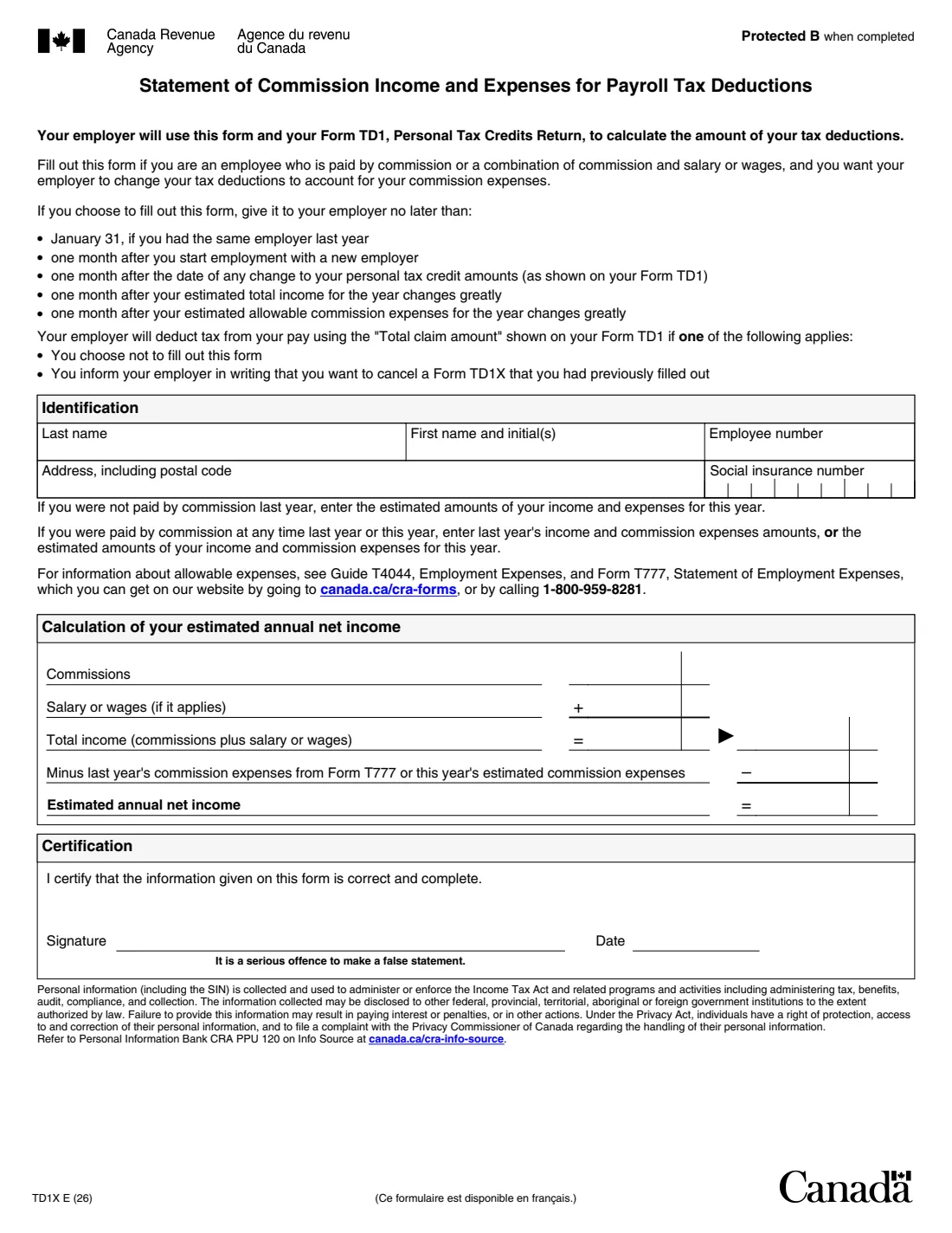
Form TD1X is the Canada Revenue Agency (CRA) statement that commission employees give their employer alongside their Form TD1, Personal Tax Credits Return. It sets out your commission income, any salary or wages, and your commission expenses, and ends with your estimated annual net income. Your employer uses that figure and the total claim amount on your TD1 to work out your tax deductions.
The form is optional. If you don't fill it out, or you tell your employer in writing that you are cancelling a TD1X you gave them earlier, your employer deducts tax using the total claim amount on your TD1 alone, without allowing for your expenses.
FileIt asks for your details and amounts in plain language, adds up your total income and works out the net income line, and prints everything into the CRA's own fillable PDF (edition TD1X E (26)). The finished PDF is saved in your vault. You sign it with FileIt's optional e-signature or by hand and give it to your employer yourself; FileIt never sends it anywhere.
- Who fills it
- Employees paid by commission, or by commission plus salary or wages
- Given to
- Your employer, with your Form TD1. Not the CRA
- Deadline
- January 31 if you had the same employer last year; otherwise within one month of the change
- Signatures
- You sign and date the Certification
- Edition
- TD1X E (26)
- Pages
- One
Who needs to fill out Form TD1X?
- Salespeople and other employees paid fully by commission who have deductible commission expenses.
- Employees paid a mix of salary or wages and commission who want those expenses taken into account at source.
- Commission employees who start with a new employer and want their expenses reflected from the first pay periods.
- Anyone who already gave a TD1X and whose income or expenses have changed a lot.
When to use Form TD1X
- By January 31, if you had the same employer last year.
- Within one month of starting with a new employer.
- Within one month of a change to the personal tax credit amounts on your Form TD1.
- Within one month of a big change in your estimated total income for the year.
- Within one month of a big change in your estimated allowable commission expenses.
What you need before you start
- Your name, address with postal code and social insurance number (SIN).
- Your employee number, if your employer gave you one.
- Your commission income: last year's, or an estimate for this year.
- Any salary or wages your employer pays you besides commission.
- Your commission expenses: last year's amount from Form T777, or an estimate for this year.
- Your Form TD1 for the same employer, which goes in together with the TD1X.
What’s on Form TD1X
The 2026 edition has 1 page. FileIt asks for it in 3 parts, and it is signed by Employee:
- IdentificationEmployee
- Calculation of your estimated annual net incomeEmployee
- CertificationEmployee
How to fill out Form TD1X, step by step
1 Identification
Enter your last name, first name and initials, employee number, address including postal code, and social insurance number. FileIt can take the name from the person's People record in your vault.
2 Which year's figures to use
If you weren't paid by commission last year, enter estimates for this year. If you were paid by commission at any time last year or this year, you can enter either last year's income and commission expenses or your estimates for this year.
3 Commissions and salary
Enter your commissions and, if it applies, your salary or wages. FileIt adds them together for the total income line and prints the total in both places the form shows it.
4 Commission expenses
Enter last year's commission expenses from Form T777, Statement of Employment Expenses, or this year's estimate. Guide T4044, Employment Expenses, explains which expenses you can deduct. FileIt subtracts them from total income to get your estimated annual net income.
5 Certification
Sign and date the form to certify that the information is correct and complete. The form warns that making a false statement is a serious offence.
Common mistakes to avoid
- Handing in the TD1X without an up-to-date Form TD1. Your employer needs both.
- Counting expenses that aren't allowable commission expenses. Check Guide T4044 and Form T777.
- Mixing years: using this year's income estimate with last year's expenses, or the other way round.
- Not updating the form when your income or expenses change a lot during the year.
- Sending the form to the CRA instead of giving it to your employer.
After you fill it out
Check the PDF, then sign and date it with FileIt's optional e-signature or by hand. Give it to your employer's payroll or HR team with your TD1. The CRA doesn't receive it, and FileIt doesn't send it for you.
Keep your records of commission expenses. You still claim them on your income tax and benefits return with Form T777, and you need a signed Form T2200 from your employer to claim employment expenses.
The filled TD1X stays in your FileIt vault. If you want to stop using it, tell your employer in writing that you are cancelling it.
Fill out Form TD1X online with FileIt
- Pick the person. Choose someone from People and FileIt fills in their name, date of birth, address and other details it already knows.
- Answer plain-language questions. One part of the form at a time, with the official help text beside each question — 14 fields in all. Your answers save as you go.
- Check the live preview. Watch your answers land on the real Canada Revenue Agency (CRA) form, and let FileIt do any worksheet arithmetic.
- Generate the official PDF. FileIt prints your answers into the agency’s own PDF and files it in that person’s folder in your vault. Sign it, or send it for e-signature.
FileIt fills the form — it never files or submits anything for you. Deliver the finished form to whoever asked for it, the way the form’s instructions say.
Start Form TD1X now — it’s freeForm TD1X: frequently asked questions
Do I have to fill out a TD1X?
No, it's optional. If you don't, your employer deducts tax based on the total claim amount on your Form TD1 without allowing for your commission expenses.
Where do I send the TD1X?
Give it to your employer, together with your Form TD1. It isn't sent to the CRA.
Can I use last year's figures?
Yes, if you were paid by commission at any time last year or this year: enter last year's income and commission expenses, or your estimates for this year. If you weren't paid by commission last year, use estimates for this year.
Where do I find last year's commission expenses?
On Form T777, Statement of Employment Expenses, which you filed with last year's return. Guide T4044 explains which expenses are allowable.
Why does FileIt ask for whole dollars?
The amount boxes on the PDF have a separate cents column. FileIt prints dollars only, so the figures line up in the dollar column. The amounts are estimates, so cents don't matter.
How do I cancel a TD1X?
Tell your employer in writing that you want to cancel the TD1X you gave them. They will then deduct tax using the total claim amount on your TD1.
Official sources
- Blank form (PDF), published by Canada Revenue Agency (CRA): https://www.canada.ca/content/dam/cra-arc/formspubs/pbg/td1x/td1x-fill-26e.pdf
- Official instructions and guidance: https://www.canada.ca/en/revenue-agency/services/forms-publications/forms/td1x.html
- Edition shown on this page: TD1X E (26) (checked 2026-09-28).
FileIt is not affiliated with or endorsed by Canada Revenue Agency (CRA) or any government. This page explains the form in general terms and is not legal, tax or immigration advice. Always read the official instructions, and check that you are using the edition the recipient accepts. Page last reviewed 2026-09-28.