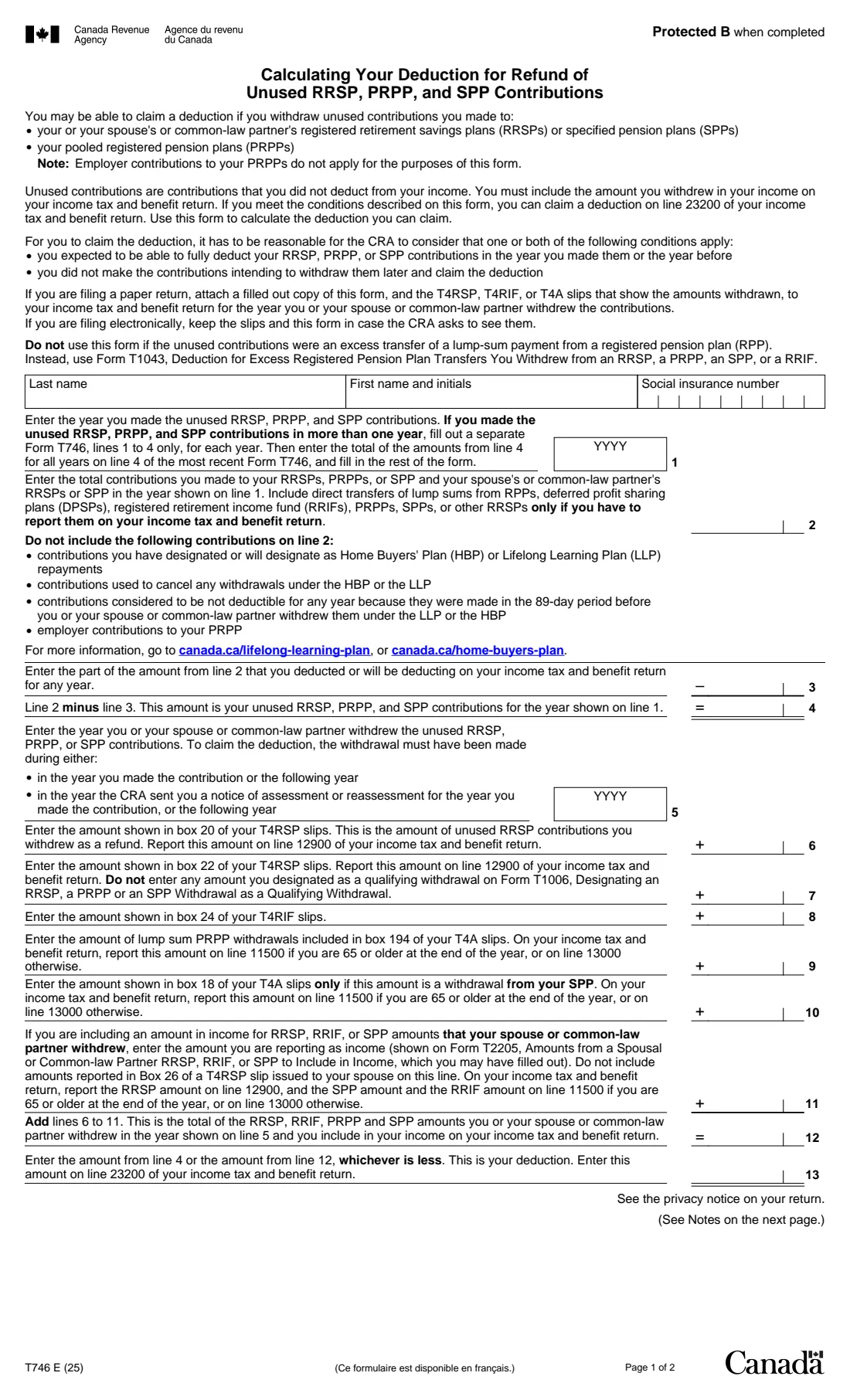

What is Form T746?
Form T746, Calculating Your Deduction for Refund of Unused RRSP, PRPP, and SPP Contributions, is the Canada Revenue Agency (CRA) worksheet for a common situation: you put money into a registered retirement savings plan (RRSP), a pooled registered pension plan (PRPP) or a specified pension plan (SPP), never deducted it, and later withdrew it. The withdrawal is reported as income on your return, and the T746 works out a matching deduction for line 23200 so you aren't taxed on contributions that were never deducted.
The form compares two figures: your unused contributions for the year you made them (what you contributed minus what you deducted, on lines 2 to 4) and what you, or your spouse or common-law partner, withdrew and are reporting as income (lines 6 to 12, from your T4RSP, T4RIF and T4A slips). Your deduction is whichever is less. The CRA has to find it reasonable that you expected to deduct the contributions, and that you didn't contribute intending to withdraw them and claim this deduction.
FileIt asks for each amount in plain language, adds up the withdrawals, compares the two totals and prints your answers into the CRA's own fillable T746 PDF (edition T746 E (25)). The finished form is saved in your vault. If the unused contributions were made over several years, you can add the other years' line 4 totals, as the form explains. FileIt doesn't file anything: you claim the deduction on your own return.
- Who fills it
- Anyone who withdrew unused RRSP, PRPP or SPP contributions, or whose spouse or partner did
- Result
- A deduction on line 23200 of your return
- Slips you need
- T4RSP (boxes 20 and 22), T4RIF (box 24), T4A (boxes 194 and 18)
- Signatures
- None. Attach it to a paper return, or keep it if you file online
- Pages
- 2 (the second is a note)
- Edition
- T746 E (25)
Who needs to fill out Form T746?
- People who over-contributed to an RRSP and had the excess refunded (box 20 of a T4RSP slip).
- Anyone who withdrew RRSP contributions they had never deducted, for example after contributing more than they could use.
- PRPP members who took a lump sum that included unused contributions (box 194 of a T4A slip).
- SPP members whose withdrawal includes unused contributions (box 18 of a T4A slip).
- Spouses or common-law partners reporting a withdrawal from a spousal plan as their own income (from Form T2205).
When to use Form T746
- When you file the return for the year the unused contributions were withdrawn.
- The withdrawal has to happen in the year you made the contribution or the year after, or in the year the CRA sent you a notice of assessment or reassessment for the contribution year, or the year after that.
- If the unused contributions were made over more than one year, fill out lines 1 to 4 for each year and bring the totals to your most recent T746.
What you need before you start
- The year you made the unused contributions.
- Your total RRSP, PRPP and SPP contributions for that year, including those to your spouse's or partner's plans.
- How much of those contributions you deducted, or will deduct, on any return.
- Your T4RSP, T4RIF and T4A slips for the year of the withdrawal.
- Form T2205, if you're reporting amounts your spouse or common-law partner withdrew.
- Your social insurance number.
What’s on Form T746
The 2025 edition has 2 pages. FileIt asks for it in 3 parts:
- IdentificationEmployee
- Unused contributions (lines 1 to 4)Employee
- Amounts withdrawn (lines 5 to 13)Employee
How to fill out Form T746, step by step
1 Lines 1 to 4: the unused contributions
Enter the year you made the contributions and the total you contributed that year (line 2). Leave out Home Buyers' Plan and Lifelong Learning Plan repayments, contributions used to cancel those withdrawals, contributions made in the 89 days before an HBP or LLP withdrawal, and your employer's PRPP contributions. Then enter the part you deducted or will deduct (line 3). FileIt subtracts it to get your unused contributions (line 4).
2 Several contribution years
If the unused contributions came from more than one year, the form asks for a separate T746 (lines 1 to 4 only) for each year. Enter the other years' line 4 totals in the extra box, and FileIt adds them to line 4 on this, your most recent form.
3 Lines 5 to 11: what was withdrawn
Enter the year of the withdrawal, then copy the amounts from your slips: box 20 and box 22 of your T4RSP slips, box 24 of your T4RIF slips, the lump-sum PRPP withdrawals in box 194 of your T4A slips, and box 18 of your T4A slips if it's an SPP withdrawal. Line 11 is for amounts your spouse or partner withdrew that you're reporting from Form T2205.
4 Lines 12 and 13: your deduction
FileIt adds lines 6 to 11 (line 12) and takes whichever is less of line 4 and line 12. That's your deduction, which goes on line 23200 of your return.
Common mistakes to avoid
- Counting Home Buyers' Plan or Lifelong Learning Plan repayments as contributions on line 2.
- Leaving out the part you already deducted on an earlier return (line 3).
- Using this form for an excess transfer of a lump sum from a registered pension plan. That's Form T1043.
- Withdrawing outside the time limits the form sets, which can mean no deduction.
- Reporting the withdrawal as income but forgetting the matching deduction, or claiming the deduction without reporting the income.
- Including amounts designated as qualifying withdrawals on Form T1006 on line 7.
After you fill it out
Claim the line 13 amount on line 23200 of your return for the year of the withdrawal, and report the withdrawals as income on the lines the form names (12900, 11500 or 13000).
With a paper return, attach the T746 and the slips that show the amounts withdrawn. If you file online, keep them in case the CRA asks.
Read the note on page 2: if you included these contributions on Schedule 7 in an earlier year, ask for an adjustment to that return, and don't enter them on Schedule 7 this year.
FileIt keeps the filled form in your vault next to your slips.
Fill out Form T746 online with FileIt
- Pick the person. Choose someone from People and FileIt fills in their name, date of birth, address and other details it already knows.
- Answer plain-language questions. One part of the form at a time, with the official help text beside each question — 17 fields in all. Your answers save as you go.
- Check the live preview. Watch your answers land on the real Canada Revenue Agency (CRA) form, and let FileIt do any worksheet arithmetic.
- Generate the official PDF. FileIt prints your answers into the agency’s own PDF and files it in that person’s folder in your vault.
FileIt fills the form — it never files or submits anything for you. Deliver the finished form to whoever asked for it, the way the form’s instructions say.
Start Form T746 now — it’s freeForm T746: frequently asked questions
What is Form T746 used for?
It works out a deduction for RRSP, PRPP or SPP contributions you never deducted and then withdrew. The withdrawal counts as income, and the T746 lets you deduct a matching amount on line 23200.
Can I fill out Form T746 online?
Yes. FileIt asks for each line, does the subtraction, the total and the comparison, and prints everything into the CRA's fillable T746 PDF.
My RRSP over-contribution was refunded. Do I need this form?
If the refund was of contributions you never deducted, the T746 is how you claim the offsetting deduction. The refund is usually shown in box 20 of your T4RSP slip.
Is there a time limit for the withdrawal?
Yes. The withdrawal must be made in the year you contributed or the year after, or in the year the CRA sent a notice of assessment or reassessment for the contribution year, or the year after that.
Do I send the form to the CRA?
Only with a paper return, together with the slips. If you file online, keep the form and slips in case the CRA asks to see them.
What if my unused contributions are more than $2,000?
The form's note says you may have to pay tax on the excess and points to Guide T4040 and Form T1-OVP. FileIt can fill in the T746 but doesn't work out that tax.
Official sources
- Blank form (PDF), published by Canada Revenue Agency (CRA): https://www.canada.ca/content/dam/cra-arc/formspubs/pbg/t746/t746-fill-25e.pdf
- Official instructions and guidance: https://www.canada.ca/en/revenue-agency/services/forms-publications/forms/t746.html
- Edition shown on this page: T746 E (25) (checked 2026-10-19).
FileIt is not affiliated with or endorsed by Canada Revenue Agency (CRA) or any government. This page explains the form in general terms and is not legal, tax or immigration advice. Always read the official instructions, and check that you are using the edition the recipient accepts. Page last reviewed 2026-10-19.