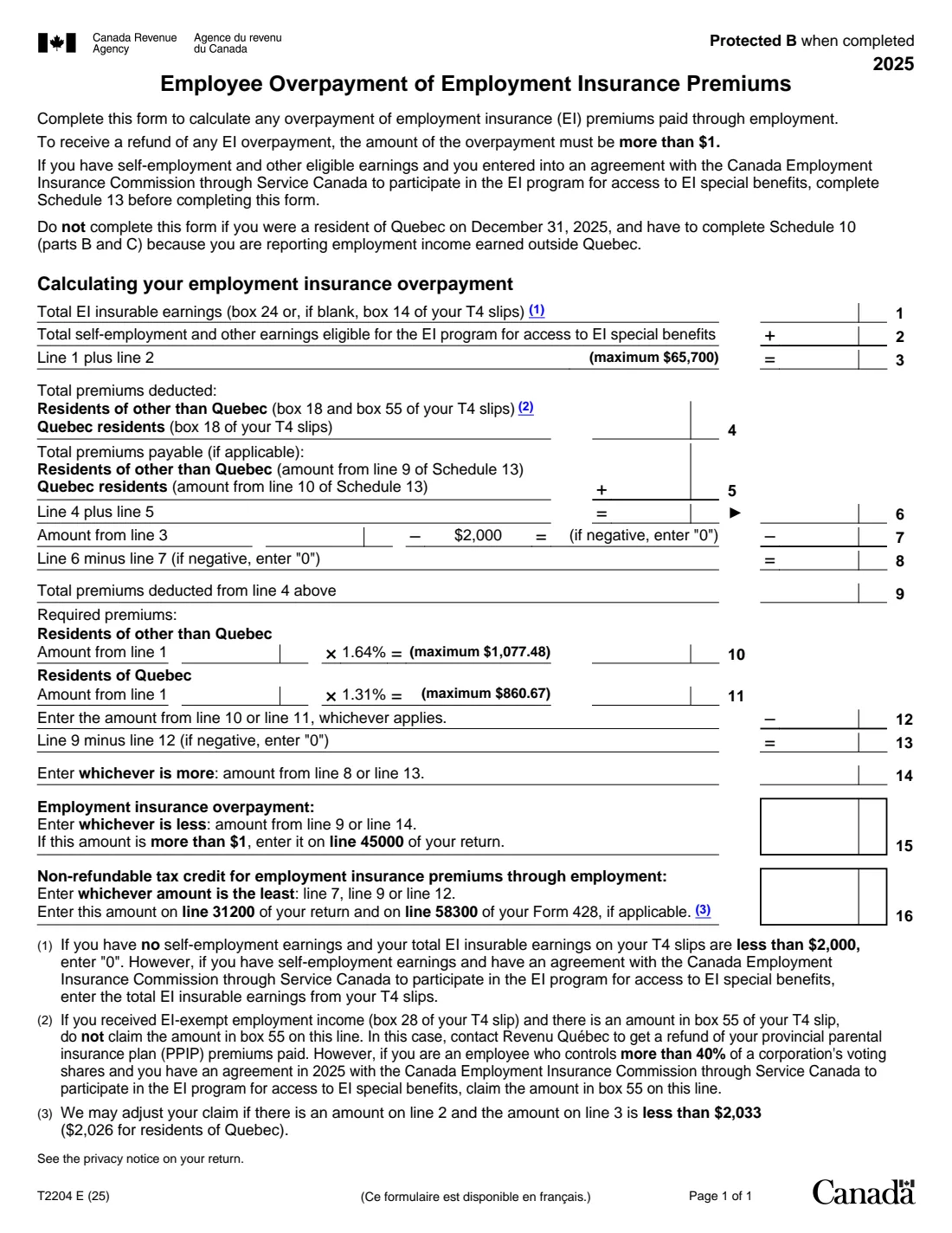
What is Form T2204?
Form T2204, Employee Overpayment of Employment Insurance Premiums, is the Canada Revenue Agency (CRA) calculation for getting back EI premiums you paid through your jobs that you didn't have to pay. It happens most often when you worked for more than one employer in the year, so each one deducted premiums up to its own maximum, or when your insurable earnings were too low for premiums to be required.
The form compares the premiums deducted (box 18 and box 55 of your T4 slips) with the premiums required on your insurable earnings: 1.64% up to a maximum of $1,077.48 outside Quebec, or 1.31% up to $860.67 for Quebec residents, on earnings up to $65,700. An overpayment of more than $1 goes on line 45000 of your return, and the EI premiums credit on line 31200.
FileIt asks for the totals from your T4 slips, does every line of the arithmetic, and prints it into the CRA's fillable T2204 PDF (edition T2204 E (25), for 2025). The finished form goes in your vault with your slips. FileIt doesn't file anything for you.
- Who fills it
- Employees who paid EI premiums through employment in 2025
- Result
- An EI overpayment for line 45000 and the EI credit for line 31200
- Refund threshold
- An overpayment is refunded only when it's more than $1
- 2025 maximums
- $65,700 of insurable earnings; $1,077.48 of premiums ($860.67 in Quebec)
- Signatures
- None. The form goes with your return
- Edition
- T2204 E (25), 2025 tax year, 1 page
Who needs to fill out Form T2204?
- People who had two or more employers in 2025 and paid EI premiums on more than the yearly maximum in total.
- People whose total EI insurable earnings were under $2,000, whose premiums are refundable.
- Self-employed people who opted into EI special benefits through Service Canada and also had employment income (complete Schedule 13 first).
- Quebec residents, who use the lower Quebec rate on line 11.
When to use Form T2204
- When you prepare your 2025 return and your T4 slips show EI premiums in box 18.
- When you changed jobs during the year and each employer deducted premiums.
- Not when you lived in Quebec on December 31, 2025 and have to complete Schedule 10 (parts B and C) for employment income earned outside Quebec: the form says not to use it then.
What you need before you start
- All your 2025 T4 slips: box 24 (EI insurable earnings, or box 14 where box 24 is blank), box 18 (EI premiums) and box 55 (PPIP premiums).
- Where you lived on December 31, 2025 (in Quebec or elsewhere).
- Schedule 13, if you have self-employment and other earnings eligible for EI special benefits.
What’s on Form T2204
The 2025 edition has 1 page. FileIt asks for it in 4 parts:
- Your provinceEmployee
- EI insurable earningsEmployee
- Premiums deducted and payableEmployee
- Required premiums, overpayment and creditEmployee
How to fill out Form T2204, step by step
1 Your province
Say whether you lived in Quebec on December 31, 2025. It decides the rate and maximum the form uses for required premiums.
2 Insurable earnings (lines 1 to 3)
Enter the total EI insurable earnings from your T4 slips, and any self-employment earnings from Schedule 13. FileIt adds them and caps line 3 at $65,700.
3 Premiums deducted (lines 4 to 9)
Enter the premiums deducted (box 18 plus box 55 outside Quebec, box 18 only in Quebec) and any premiums payable from Schedule 13. FileIt works out lines 6 to 9, including the $2,000 test on line 7.
4 Required premiums (lines 10 to 14)
FileIt multiplies line 1 by 1.64% (1.31% in Quebec), applies the maximum, and compares the result with what was deducted.
5 Overpayment and credit (lines 15 and 16)
Line 15 is your EI overpayment, for line 45000 of your return if it's more than $1. Line 16 is the non-refundable credit for EI premiums, for line 31200 and line 58300 of your Form 428 if it applies.
Common mistakes to avoid
- Using box 14 (employment income) when box 24 (EI insurable earnings) is filled in.
- Leaving out a T4 slip, so the totals don't match what was deducted.
- Adding box 55 on line 4 when you had EI-exempt employment income in box 28; note 2 says to ask Revenu Québec for the PPIP refund instead.
- Using the 1.64% rate as a Quebec resident, or the other way round.
- Claiming an overpayment of $1 or less, which isn't refunded.
After you fill it out
Enter line 15 on line 45000 and line 16 on line 31200 of your return (and line 58300 of your Form 428 if it applies).
Keep your T4 slips with the form. FileIt saves the T2204 in your vault, where your slips can go too.
The CRA may adjust the claim if there's an amount on line 2 and line 3 is less than $2,033 ($2,026 in Quebec), as note 3 says.
Fill out Form T2204 online with FileIt
- Pick the person. Choose someone from People and FileIt fills in their name, date of birth, address and other details it already knows.
- Answer plain-language questions. One part of the form at a time, with the official help text beside each question — 21 fields in all. Your answers save as you go.
- Check the live preview. Watch your answers land on the real Canada Revenue Agency (CRA) form, and let FileIt do any worksheet arithmetic.
- Generate the official PDF. FileIt prints your answers into the agency’s own PDF and files it in that person’s folder in your vault.
FileIt fills the form — it never files or submits anything for you. Deliver the finished form to whoever asked for it, the way the form’s instructions say.
Start Form T2204 now — it’s freeForm T2204: frequently asked questions
Why would I overpay EI premiums?
Each employer deducts premiums up to the yearly maximum without knowing what your other employers deducted, so two jobs can add up to more than the maximum. Premiums are also refundable when your insurable earnings were $2,000 or less.
Can I fill out Form T2204 online?
Yes. FileIt asks for the totals from your T4 slips, works out every line and prints them into the CRA's fillable T2204.
What are the 2025 EI maximums?
The form uses maximum insurable earnings of $65,700, with required premiums of 1.64% up to $1,077.48 outside Quebec and 1.31% up to $860.67 for Quebec residents.
Does the overpayment always come back?
Only an overpayment of more than $1 is refunded, through line 45000 of your return.
Do I need a signature?
No. The T2204 is a calculation that goes with your return; there's nothing to sign.
Official sources
- Blank form (PDF), published by Canada Revenue Agency (CRA): https://www.canada.ca/content/dam/cra-arc/formspubs/pbg/t2204/t2204-fill-25e.pdf
- Official instructions and guidance: https://www.canada.ca/en/revenue-agency/services/forms-publications/forms/t2204.html
- Edition shown on this page: T2204 E (25) (checked 2026-10-25).
FileIt is not affiliated with or endorsed by Canada Revenue Agency (CRA) or any government. This page explains the form in general terms and is not legal, tax or immigration advice. Always read the official instructions, and check that you are using the edition the recipient accepts. Page last reviewed 2026-10-25.