What is Form T1223?
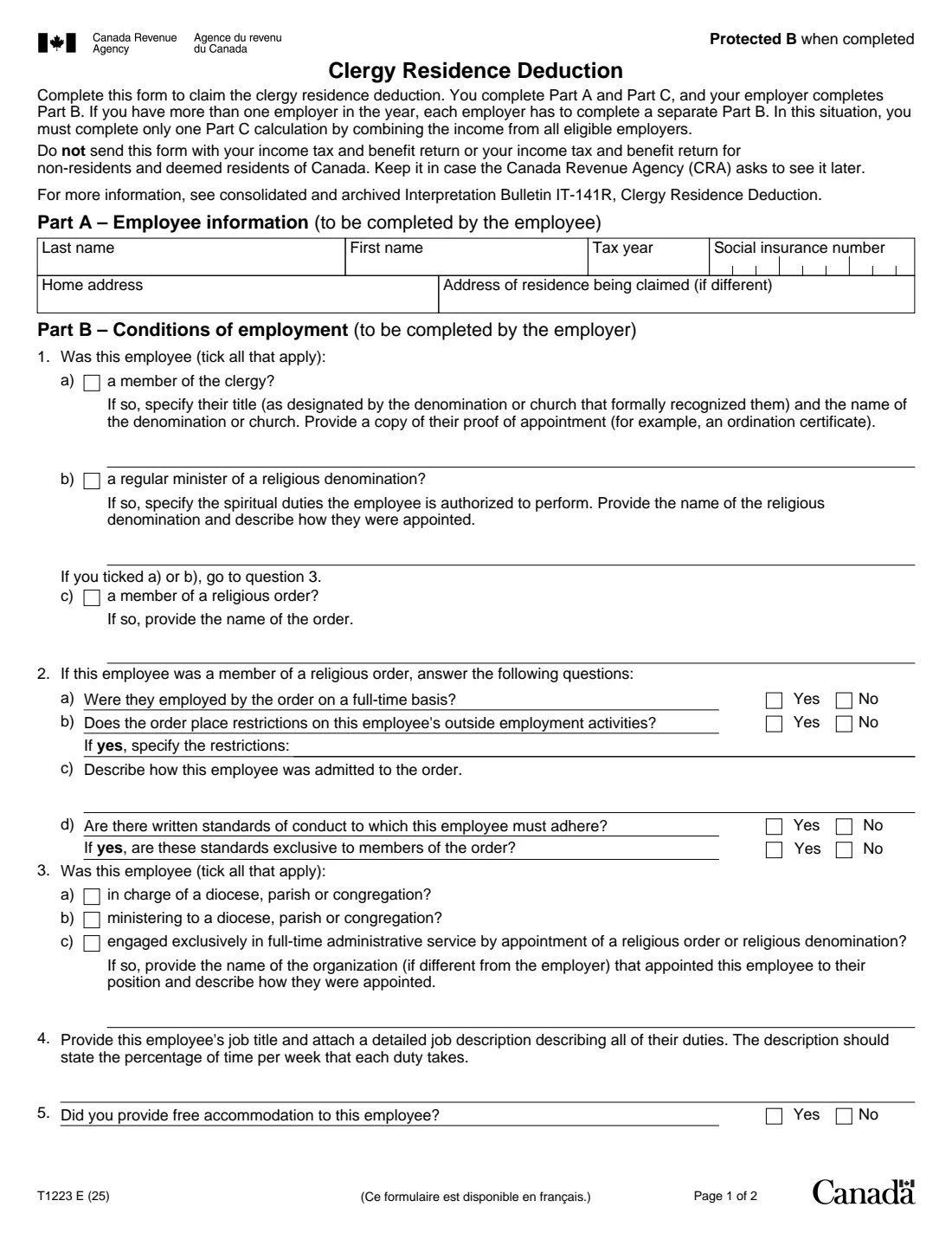
Form T1223, Clergy Residence Deduction, is the Canada Revenue Agency (CRA) form for claiming the clergy residence deduction on line 23100 of your return. You complete Part A (your details) and Part C (the calculation); your employer completes Part B on your status and duties and certifies it.
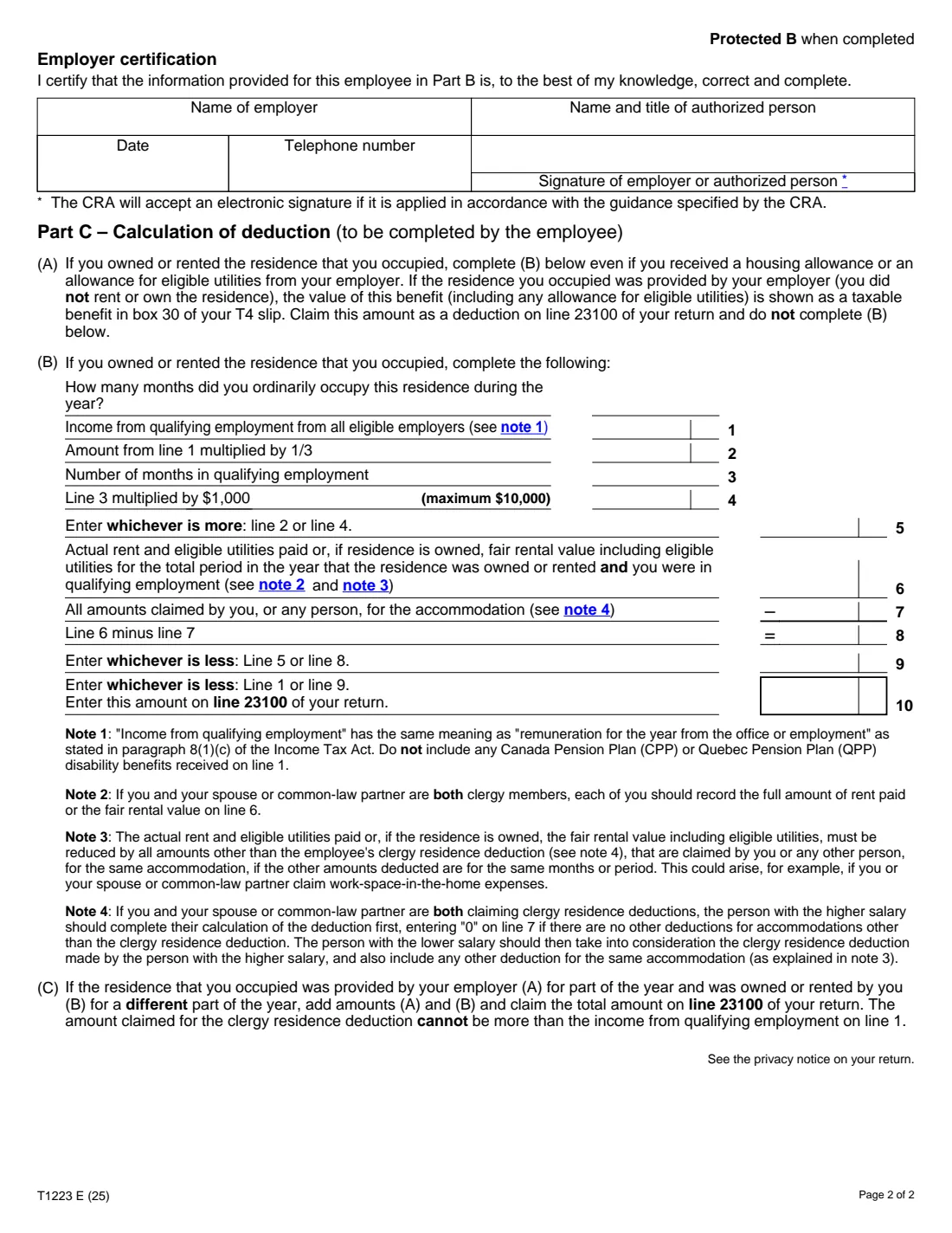
Part B asks whether you're a member of the clergy, a regular minister of a religious denomination or a member of a religious order, and whether you're in charge of or ministering to a diocese, parish or congregation, or engaged exclusively in full-time administrative service by appointment. Part C limits the deduction to the lesser of your income from qualifying employment, the rent and utilities (or fair rental value) less other claims for the same home, and the greater of one third of that income or $1,000 a month of qualifying employment (maximum $10,000).
FileIt guides you and your employer through each part, works out Part C, and prints everything into the CRA's fillable T1223 PDF (edition T1223 E (25)). The employer can sign electronically: the CRA lists T1223 among the forms where it accepts an electronic signature. You keep the form; you don't send it with your return. FileIt doesn't file anything for you.
- Who fills it
- You complete Parts A and C; your employer completes and certifies Part B
- Result
- The clergy residence deduction on line 23100 of your return
- More than one employer
- Each employer completes a separate Part B; you complete one Part C for all of them
- Signature
- The employer or an authorized person signs; the CRA accepts an electronic signature
- Sent to
- Nobody. Keep it in case the CRA asks to see it
- Edition
- T1223 E (25), 2 pages
Who needs to fill out Form T1223?
- Priests, ministers, pastors, rabbis, imams and other members of the clergy who own or rent their home.
- Regular ministers of a religious denomination authorized to perform spiritual duties.
- Members of a religious order employed by the order or ministering to a congregation.
- Employees engaged exclusively in full-time administrative service by appointment of a religious order or denomination.
When to use Form T1223
- When you prepare your return and you owned or rented the home you lived in while in qualifying employment.
- Each year you claim the deduction, with a Part B from each employer that year.
- If your employer provided the home, the benefit is in box 30 of your T4 slip and you claim that on line 23100 without completing Part C (B).
What you need before you start
- Your social insurance number and home address, and the address of the residence claimed if it's different.
- From your employer: your title and denomination, proof of appointment (such as an ordination certificate), your job title and a detailed job description with the share of time each duty takes.
- Your income from qualifying employment from all eligible employers for the year (not CPP or QPP disability benefits).
- The rent and eligible utilities you paid, or the fair rental value of a home you own, and any other amounts claimed by anyone for the same accommodation.
- The number of months you lived in the home and the number of months in qualifying employment.
What’s on Form T1223
The 2025 edition has 2 pages. FileIt asks for it in 4 parts, and it is signed by Employer:
- Part A – Employee informationEmployee
- Part B – Conditions of employmentEmployer
- Employer certificationEmployer
- Part C – Calculation of deduction (B): you owned or rented the residenceEmployee
How to fill out Form T1223, step by step
1 Part A – Employee information
Enter your name, tax year, SIN, home address and the address of the residence you're claiming if it's different.
2 Part B – Conditions of employment
Your employer ticks what applies in questions 1 and 3, answers the religious-order questions if they apply, gives your job title and says whether it provided free accommodation.
3 Employer certification
The employer's name, the authorized person's name and title, and a telephone number. The authorized person signs, which can be done electronically through FileIt's eSignature.
4 Part C – Calculation
Switch this part on if you owned or rented your home. Enter the months, your qualifying employment income, the months in qualifying employment, the rent and utilities or fair rental value, and other claims for the same home. FileIt works out lines 2, 4, 5 and 8 to 10.
Common mistakes to avoid
- Including CPP or QPP disability benefits in the income on line 1.
- Not reducing the rent or fair rental value by other claims for the same home, such as work-space-in-the-home expenses (note 3).
- Both spouses claiming without the higher earner calculating first and the lower earner taking that claim into account (note 4).
- Completing Part C (B) for a home your employer provided, instead of claiming the box 30 benefit.
- Sending the form with the return instead of keeping it.
After you fill it out
Enter line 10 on line 23100 of your return (plus the box 30 amount if the employer provided the home for a different part of the year).
Send it to your employer to review Part B and sign, then keep the signed form. FileIt saves it in your vault.
Keep receipts for rent and utilities, or support for the fair rental value, in case the CRA asks.
Fill out Form T1223 online with FileIt
- Pick the person. Choose someone from People and FileIt fills in their name, date of birth, address and other details it already knows.
- Answer plain-language questions. One part of the form at a time, with the official help text beside each question — 38 fields in all. Your answers save as you go.
- Check the live preview. Watch your answers land on the real Canada Revenue Agency (CRA) form, and let FileIt do any worksheet arithmetic.
- Generate the official PDF. FileIt prints your answers into the agency’s own PDF and files it in that person’s folder in your vault. Sign it, or send it for e-signature.
FileIt fills the form — it never files or submits anything for you. Deliver the finished form to whoever asked for it, the way the form’s instructions say.
Start Form T1223 now — it’s freeForm T1223: frequently asked questions
Who has to sign Form T1223?
Your employer or a person authorized by your employer signs the certification of Part B. The form's footnote says the CRA accepts an electronic signature applied under its guidance.
Do I send Form T1223 with my return?
No. The form says to keep it in case the CRA asks to see it later.
How much can I deduct?
The least of your income from qualifying employment, your rent and utilities (or fair rental value) less other claims for the same home, and the greater of one third of that income or $1,000 per month of qualifying employment up to $10,000.
I had two religious employers. How many forms?
Each employer completes a separate Part B, and you complete only one Part C combining the income from all eligible employers.
Can I fill out Form T1223 online?
Yes. FileIt walks you and your employer through the parts, works out Part C, and prints everything into the CRA's fillable T1223.
Official sources
- Blank form (PDF), published by Canada Revenue Agency (CRA): https://www.canada.ca/content/dam/cra-arc/formspubs/pbg/t1223/t1223-fill-25e.pdf
- Official instructions and guidance: https://www.canada.ca/en/revenue-agency/services/forms-publications/forms/t1223.html
- Edition shown on this page: T1223 E (25) (checked 2026-10-25).
FileIt is not affiliated with or endorsed by Canada Revenue Agency (CRA) or any government. This page explains the form in general terms and is not legal, tax or immigration advice. Always read the official instructions, and check that you are using the edition the recipient accepts. Page last reviewed 2026-10-25.