What is Form T183?
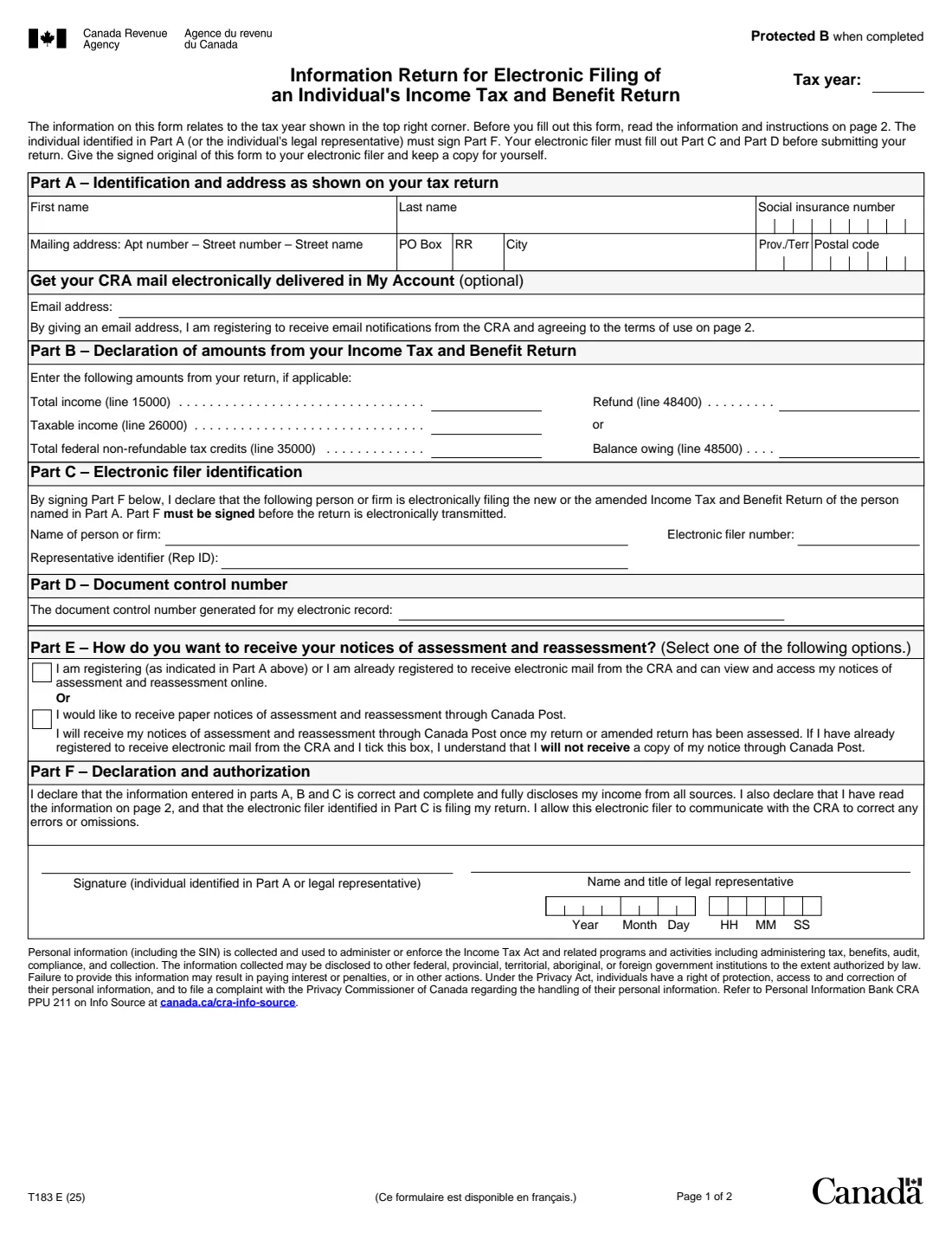
Form T183, Information Return for Electronic Filing of an Individual's Income Tax and Benefit Return, is the Canada Revenue Agency (CRA) form that lets an EFILE service provider, such as an accountant or tax preparation office, transmit your return for you. It records who you are, the key amounts from the return being filed, who is filing it, the document control number their software generates, and how you want to receive your notices of assessment.
By signing Part F, you declare that the information in Parts A, B and C is correct and complete and fully discloses your income from all sources, and you allow the filer to talk to the CRA to correct errors or omissions. The return can't be transmitted until the T183 is signed. You give the signed original to the filer, who keeps it, and you keep a copy.
FileIt fills the CRA's own T183 PDF (edition T183 E (25)) with your answers, then saves it in your vault. The T183 is one of the forms the CRA accepts with an electronic signature, so you can also send it for e-signature from FileIt. FileIt doesn't file the return: your electronic filer does that.
- Who fills it
- The taxpayer (or their legal representative), with Parts C and D from the electronic filer
- Who keeps it
- The electronic filer keeps the signed original; you keep a copy
- Signature
- Required in Part F before the return is sent. Electronic signatures are accepted for the T183
- Amounts
- Total income, taxable income, non-refundable credits, and refund or balance owing
- Pages
- 2 (the second is instructions and terms)
- Edition
- T183 E (25)
Who needs to fill out Form T183?
- Anyone whose income tax and benefit return is filed by a tax preparer, accountant or tax clinic using EFILE.
- Legal representatives, such as an executor or a person with power of attorney, authorizing the filing of someone else's return.
- People sending an amended return through the same electronic filer.
When to use Form T183
- Each time a filer is about to send your return electronically. Part F must be signed before transmission.
- When you want to choose between online and paper notices of assessment as part of filing.
- When the return is amended and refiled by the same preparer.
What you need before you start
- Your name, social insurance number and mailing address, as shown on the return.
- The return your filer prepared, for the amounts on lines 15000, 26000, 35000 and 48400 or 48500.
- The filer's name, EFILE number and, if they have one, their representative identifier (Rep ID).
- The document control number from the filer's software.
- An email address, if you want CRA mail delivered to My Account.
What’s on Form T183
The 2025 edition has 2 pages. FileIt asks for it in 5 parts, and it is signed by Employee:
- Part A – Identification and addressEmployee
- Part B – Amounts from your returnEmployee
- Parts C and D – Electronic filerEmployee
- Part E – Notices of assessmentEmployee
- Part F – Declaration and authorizationEmployee
How to fill out Form T183, step by step
1 Part A – You
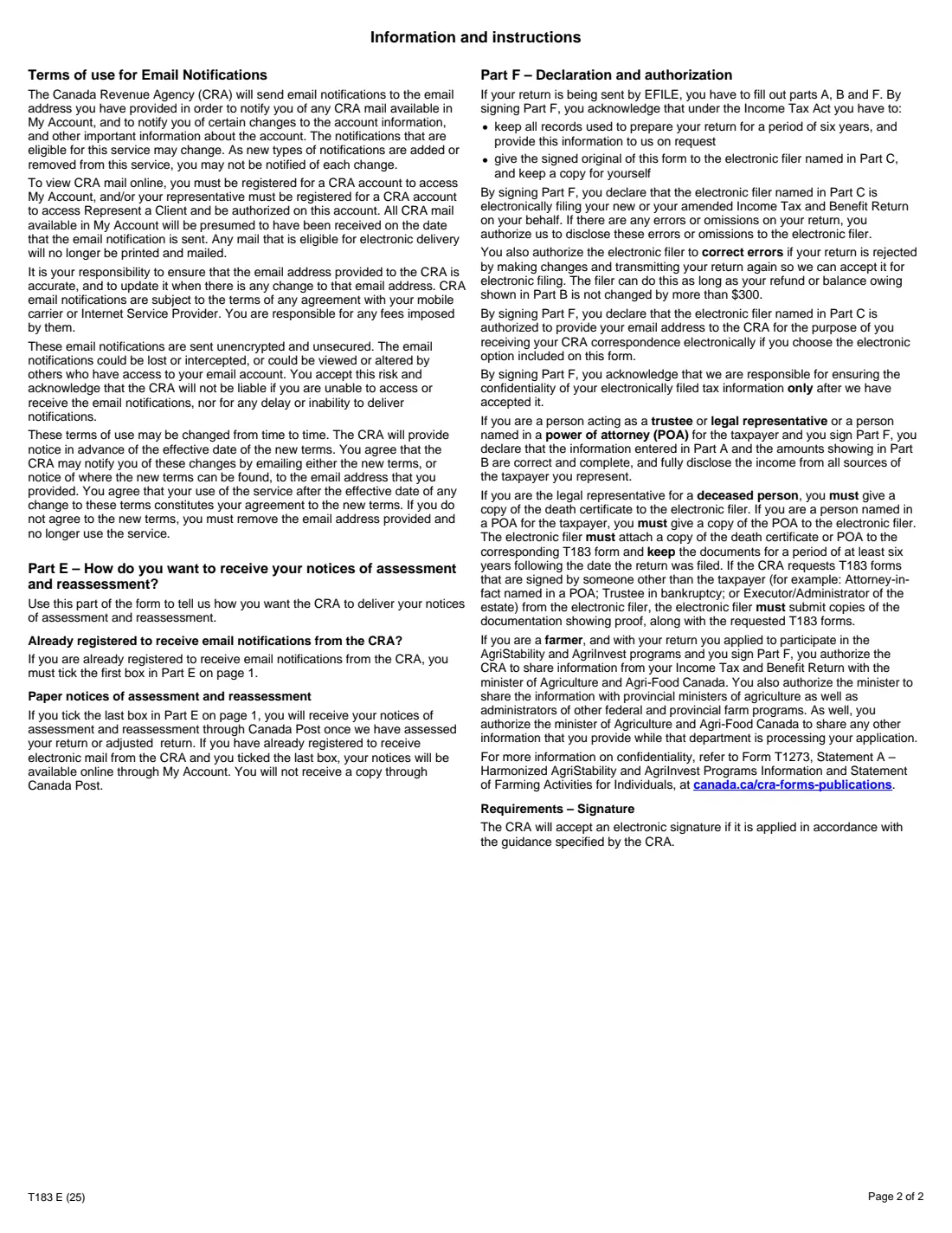
Enter the tax year, your name, SIN and mailing address exactly as they appear on the return. Adding an email address registers you for CRA email notifications and online mail in My Account, under the terms on page 2.
2 Part B – Amounts from your return
Copy total income (line 15000), taxable income (line 26000) and total federal non-refundable tax credits (line 35000), then either the refund (line 48400) or the balance owing (line 48500). FileIt flags it if you enter both.
3 Parts C and D – The filer
Your electronic filer gives you their name, electronic filer number, Rep ID and the document control number for your electronic record.
4 Part E – Your notices
Choose online notices of assessment through My Account, or paper notices by Canada Post. If you're registered for email and choose paper, you won't also get the notice by email.
5 Part F – Sign
Add the representative's name and title only if someone signs for you. Enter the date and, if you like, the time, then sign. FileIt places a signature box on the signature line when you send the form for e-signature.
Common mistakes to avoid
- Letting the return be transmitted before Part F is signed.
- Amounts in Part B that don't match the return actually filed, often after last-minute changes.
- Entering both a refund and a balance owing.
- A name or address different from the one on the return.
- Ticking both notice options in Part E.
After you fill it out
Sign Part F, or send it for e-signature from FileIt, and give the signed form to your electronic filer.
Keep a copy. FileIt saves the filled PDF in the person's vault folder.
The filer keeps the original and may have to show it to the CRA on request.
Fill out Form T183 online with FileIt
- Pick the person. Choose someone from People and FileIt fills in their name, date of birth, address and other details it already knows.
- Answer plain-language questions. One part of the form at a time, with the official help text beside each question — 24 fields in all. Your answers save as you go.
- Check the live preview. Watch your answers land on the real Canada Revenue Agency (CRA) form, and let FileIt do any worksheet arithmetic.
- Generate the official PDF. FileIt prints your answers into the agency’s own PDF and files it in that person’s folder in your vault. Sign it, or send it for e-signature.
FileIt fills the form — it never files or submits anything for you. Deliver the finished form to whoever asked for it, the way the form’s instructions say.
Start Form T183 now — it’s freeForm T183: frequently asked questions
What is Form T183?
It's the authorization that lets an EFILE service provider transmit your income tax and benefit return electronically. It confirms the main amounts on the return and your consent.
Can I sign Form T183 electronically?
Yes. The T183 is on the CRA's list of forms that accept electronic signatures. FileIt can send the filled form for e-signature.
Do I send the T183 to the CRA?
No. You give it to your electronic filer, who keeps it on file. The CRA may ask the filer for it later.
Do I need a new T183 for an amended return?
The filer needs your signed authorization for the new or amended return they transmit, so expect to sign one again.
What does adding my email address do?
It registers you to receive email notifications from the CRA and your CRA mail in My Account, instead of most paper mail.
Official sources
- Blank form (PDF), published by Canada Revenue Agency (CRA): https://www.canada.ca/content/dam/cra-arc/formspubs/pbg/t183/t183-fill-25e.pdf
- Official instructions and guidance: https://www.canada.ca/en/revenue-agency/services/forms-publications/forms/t183.html
- Edition shown on this page: T183 E (25) (checked 2026-10-19).
FileIt is not affiliated with or endorsed by Canada Revenue Agency (CRA) or any government. This page explains the form in general terms and is not legal, tax or immigration advice. Always read the official instructions, and check that you are using the edition the recipient accepts. Page last reviewed 2026-10-19.