What is Form T1-OVP-S?
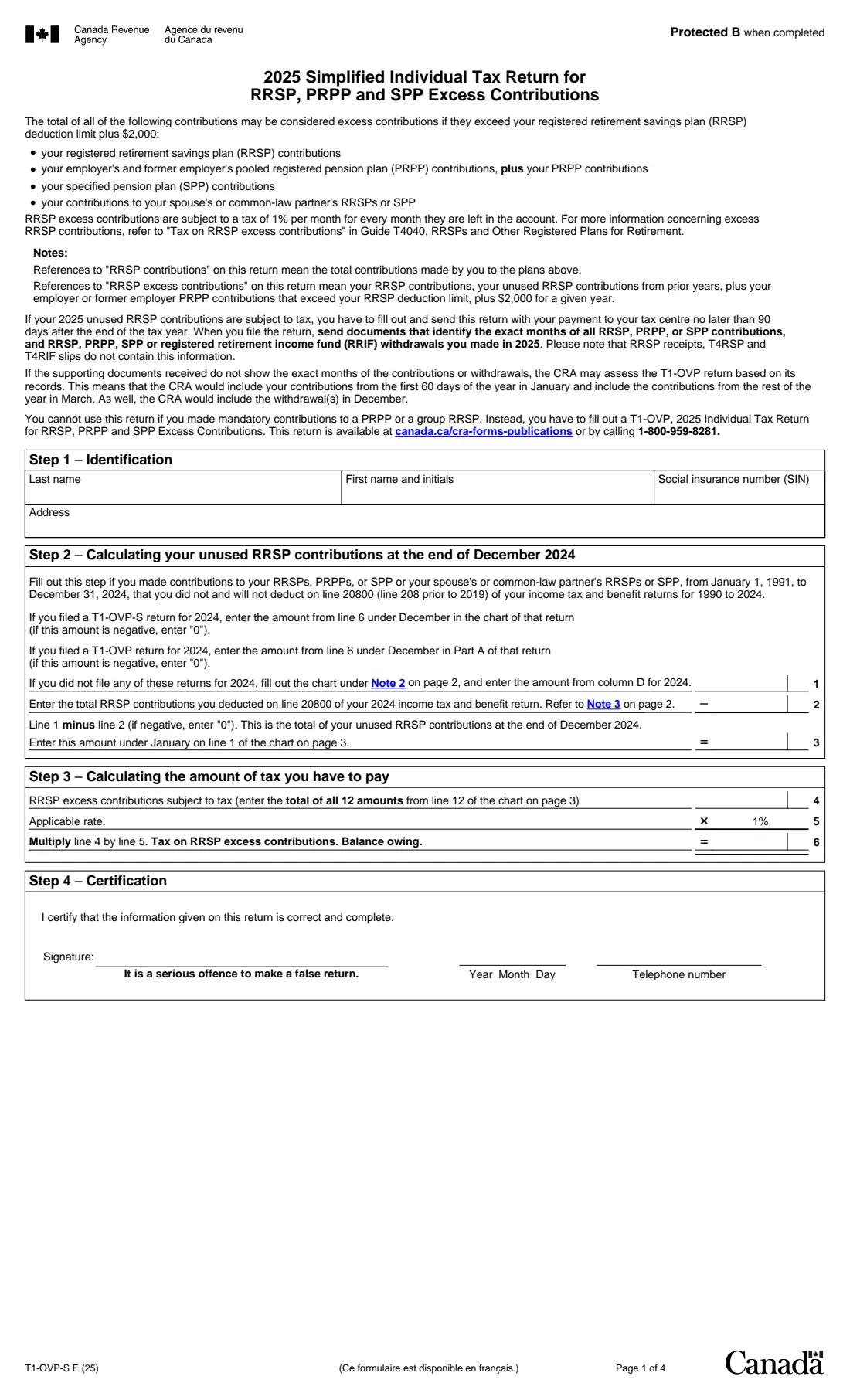
If your RRSP, PRPP and SPP contributions in 2025, plus any unused contributions from earlier years, went more than $2,000 over your RRSP deduction limit, the excess is taxed at 1% a month. The T1-OVP-S is the simplified version of the T1-OVP return for that tax. It drops the group-plan part, so it suits most people who simply put too much into their own or a spousal RRSP.
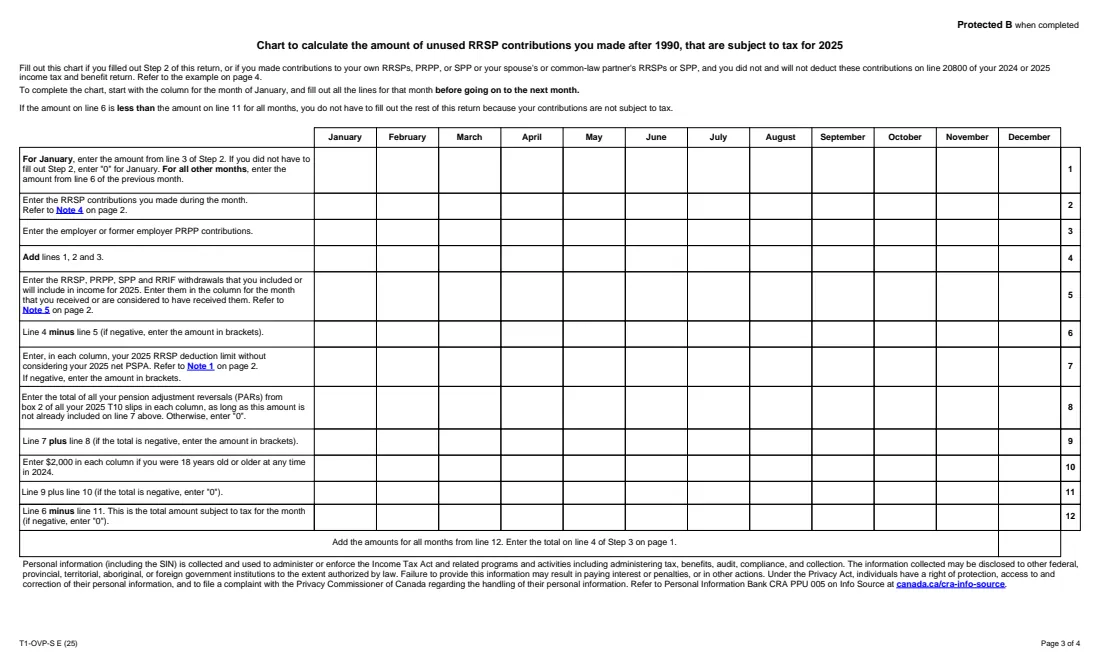
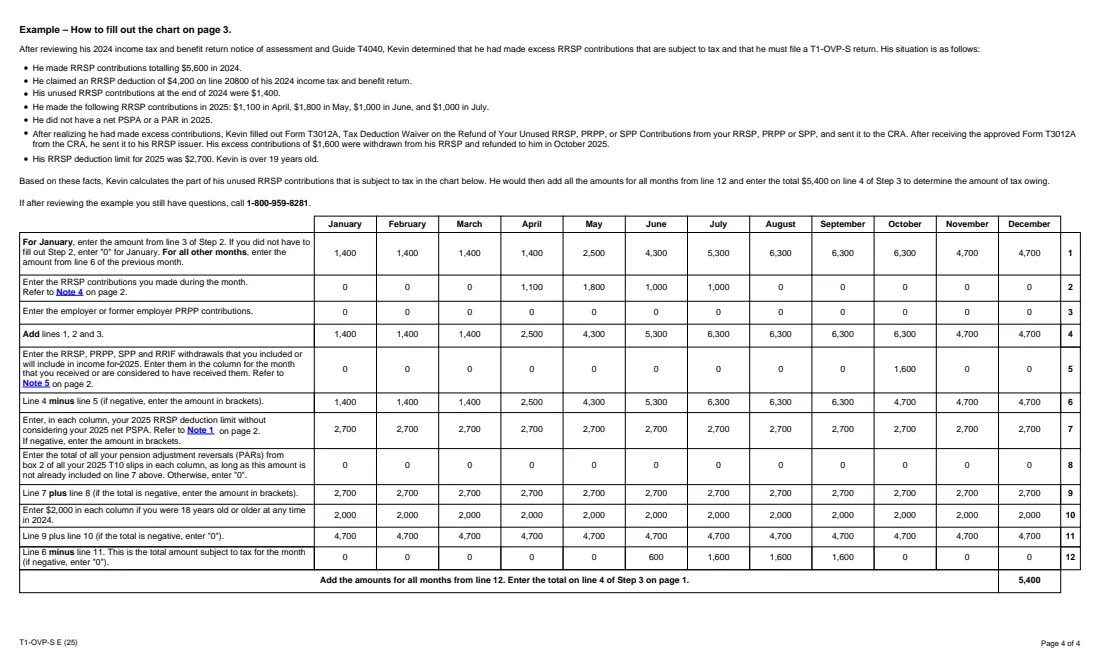
It has the same four steps: identification, unused contributions carried in from 2024, the tax, and your certification. The work happens in a 12-column chart: for each month, the balance carried in, new contributions, employer PRPP contributions, withdrawals included in income, your deduction limit, pension adjustment reversals and the $2,000 cushion. Line 12 is the amount subject to tax each month. Page 4 of the form has a worked example, and FileIt's results match it.
In FileIt you enter the month-by-month amounts once and answer a few questions; it fills in every cell of the CRA's own PDF (edition T1-OVP-S E (25)), adds up the 12 months and works out the 1% tax. The completed return goes into your vault folder. You sign it and send it with your payment; FileIt doesn't file it.
- Who fills it
- People with 2025 excess RRSP contributions and no mandatory PRPP or group RRSP contributions
- Sent to
- Your tax centre, with your payment and proof of the months of contributions and withdrawals
- When
- No later than 90 days after the end of 2025
- Signatures
- Yours, by hand
- Edition
- T1-OVP-S E (25)
Who needs to fill out Form T1-OVP-S?
- Anyone who contributed to their own or a spouse's or common-law partner's RRSP beyond their deduction limit plus $2,000.
- People whose room shrank after a pension adjustment and who now hold unused contributions above the cushion.
- Those who withdrew an excess during 2025 but still owe for the months it stayed in.
When to use Form T1-OVP-S
- Within 90 days after the end of 2025.
- Instead of the T1-OVP when no mandatory group RRSP or PRPP contributions were made.
- Each year an excess remains, carrying December's line 6 into next year's Step 2.
What you need before you start
- Your SIN and address.
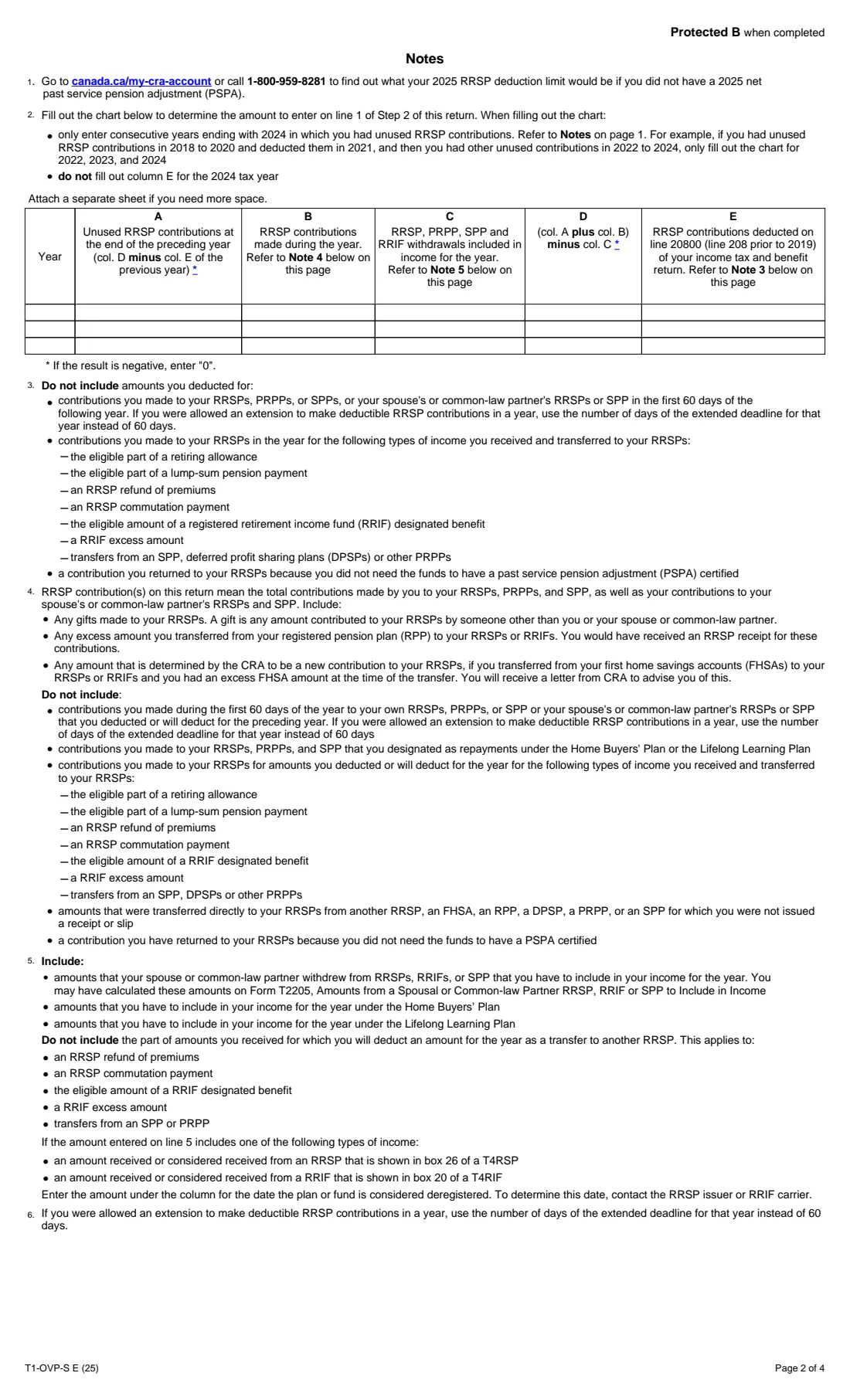
- Your 2024 T1-OVP-S or T1-OVP, or your yearly contributions, withdrawals and deductions for consecutive years ending with 2024.
- What you deducted on line 20800 of your 2024 return.
- The month and amount of each 2025 contribution and withdrawal.
- Your 2025 RRSP deduction limit without your net PSPA, and any PARs from 2025 T10 slips.
What’s on Form T1-OVP-S
The 2025 edition has 4 pages. FileIt asks for it in 8 parts:
- Step 1 – IdentificationEmployee
- Step 2 – Unused RRSP contributions at the end of December 2024Employee
- Note chart – unused RRSP contributions before 2025Employee
- Your 2025 limitsEmployee
- Contributions and withdrawals, month by monthEmployee
- The chart, worked outEmployee
- Step 3 – Tax you have to payEmployee
- Step 4 – CertificationEmployee
How to fill out Form T1-OVP-S, step by step
1 Step 2 – start of the year
Bring forward December's line 6 from your 2024 return, or let FileIt work it out from the Note 2 chart on page 2. Subtract what you deducted for 2024; line 3 becomes January's line 1.
2 The chart – contributions and withdrawals
Enter contributions, employer PRPP contributions and withdrawals in the month they happened. FileIt carries each month's line 6 into the next month's line 1.
3 The chart – your room
Your deduction limit, PARs and the $2,000 cushion (if you were 18 or older in 2024) go into every column. Line 12 is what's left over each month, never below zero.
4 Step 3 – the tax
The 12 monthly amounts add up to line 4, and line 6 is 1% of that. In the form's own example, $5,400 subject to tax gives $54 owing.
Common mistakes to avoid
- Using the simplified return despite mandatory group RRSP or PRPP contributions.
- Putting all contributions in one month instead of the months they were made.
- Leaving out the $2,000 cushion when you were 18 or older in 2024.
- Forgetting withdrawals, which reduce the balance from the month you received them.
- Not sending documents that show the months, so the CRA uses its own assumptions.
After you fill it out
Print the PDF from your FileIt vault, sign it, and send it with your payment to your tax centre, together with statements showing when each contribution and withdrawal happened. FileIt doesn't send it.
If excess contributions remain, consider withdrawing them; Form T3012A can let you do that without tax withheld once the CRA approves it. Keep the return for next year's Step 2.
Fill out Form T1-OVP-S online with FileIt
- Pick the person. Choose someone from People and FileIt fills in their name, date of birth, address and other details it already knows.
- Answer plain-language questions. One part of the form at a time, with the official help text beside each question — 178 fields in all. Your answers save as you go.
- Check the live preview. Watch your answers land on the real Canada Revenue Agency (CRA) form, and let FileIt do any worksheet arithmetic.
- Generate the official PDF. FileIt prints your answers into the agency’s own PDF and files it in that person’s folder in your vault.
FileIt fills the form — it never files or submits anything for you. Deliver the finished form to whoever asked for it, the way the form’s instructions say.
Start Form T1-OVP-S now — it’s freeForm T1-OVP-S: frequently asked questions
Who can't use the T1-OVP-S?
Anyone who made mandatory contributions to a PRPP or a group RRSP. They need the full T1-OVP.
What is the $2,000 cushion?
Line 10 adds $2,000 to your room in each month if you were 18 or older at any time in 2024. Only contributions above your limit plus that amount are taxed.
How is the tax worked out?
The amounts subject to tax for all 12 months are added up and multiplied by 1%.
What if my deduction limit is negative?
The form says to enter it in brackets. In FileIt, type it with a minus sign and it prints in brackets.
Official sources
- Blank form (PDF), published by Canada Revenue Agency (CRA): https://www.canada.ca/content/dam/cra-arc/formspubs/pbg/t1-ovp-s/t1-ovp-s-fill-25e.pdf
- Official instructions and guidance: https://www.canada.ca/en/revenue-agency/services/forms-publications/forms/t1-ovp-s.html
- Edition shown on this page: T1-OVP-S E (25) (checked 2026-10-19).
FileIt is not affiliated with or endorsed by Canada Revenue Agency (CRA) or any government. This page explains the form in general terms and is not legal, tax or immigration advice. Always read the official instructions, and check that you are using the edition the recipient accepts. Page last reviewed 2026-10-19.