What is T3012A?
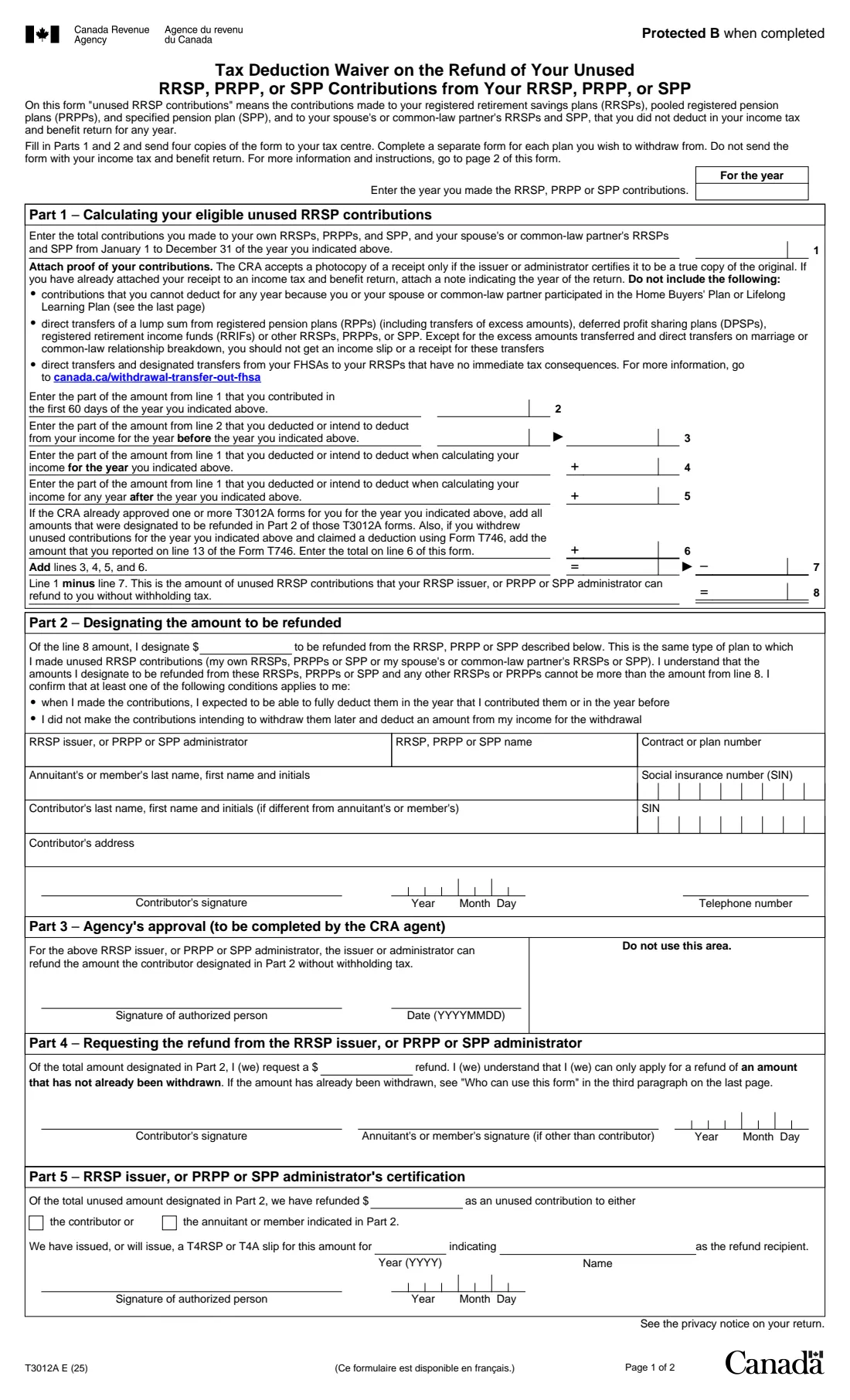
T3012A is the Canada Revenue Agency (CRA) form for asking the CRA to authorize your RRSP issuer, or PRPP or SPP administrator, to refund unused contributions without withholding tax. Unused contributions are ones you paid into your own plans, or your spouse's or common-law partner's RRSP or SPP, and never deducted on a return. The current edition is T3012A E (25).
Part 1 works out the unused amount for one year, and Part 2 designates how much to take out of one plan. You send four copies to your tax centre; the CRA approves Part 3 and returns three copies, you fill in Part 4 and give them to the plan issuer, who completes Part 5. When you file your return for the year you receive the refund, you report it and can claim the matching deduction on line 23200.
FileIt fills in T3012A from a guided web form, adds up lines 7 and 8, checks that you don't designate more than line 8, and prints your answers on the CRA's own PDF with the cents in the cents boxes. The finished PDF is filed in your vault. FileIt never sends anything to the CRA: you sign the form by hand and mail it yourself.
- Who fills it
- An individual with RRSP, PRPP or SPP contributions they did not deduct
- Given to
- Four copies to the Pension Workflow Team at your tax centre (Jonquière, Sudbury or Winnipeg), then the approved copies to the plan issuer
- When
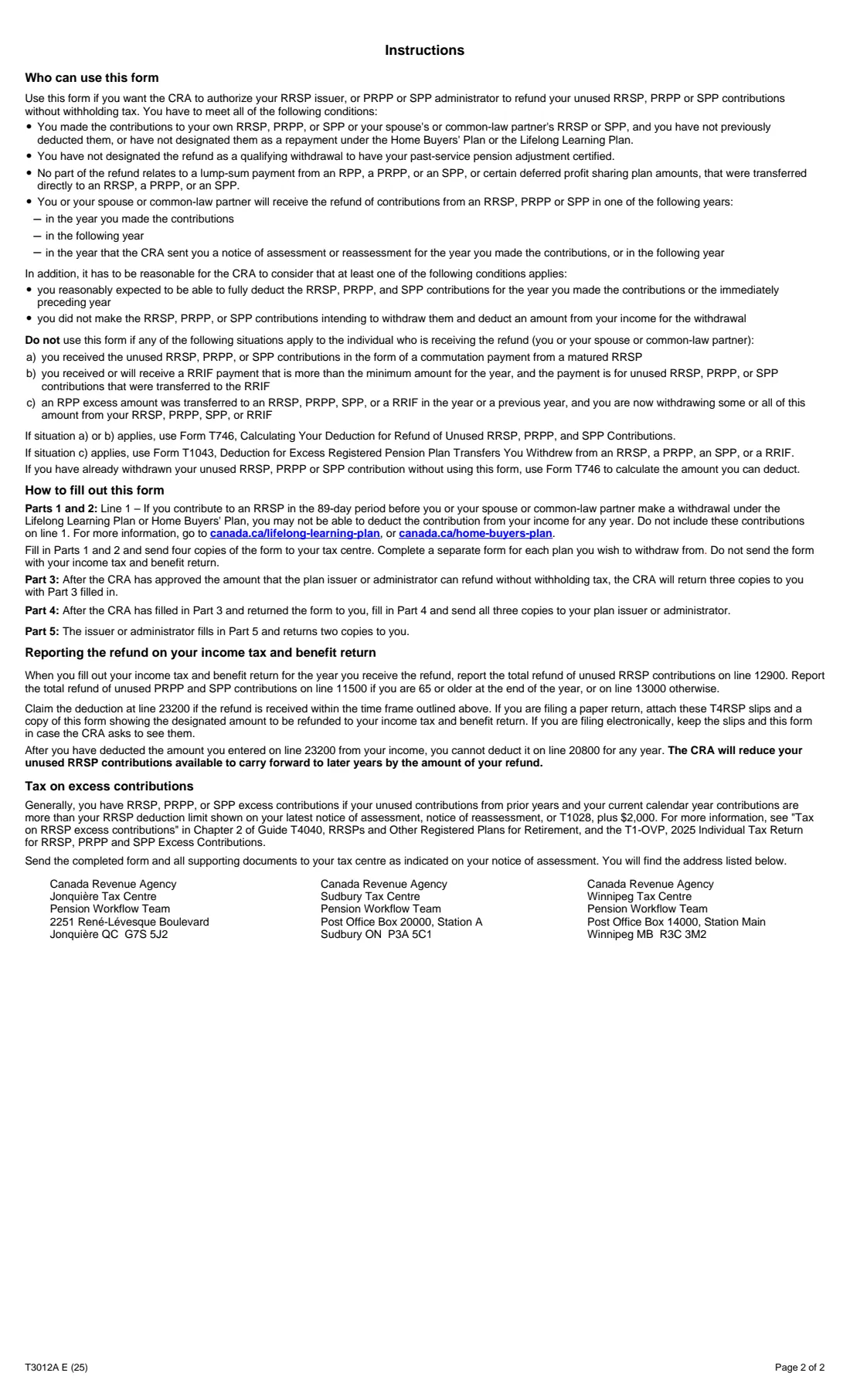
- Before withdrawing; the refund must come in the year you contributed, the next year, or the year of or after the notice of assessment for that year
- Signatures
- Signed by hand by the contributor (and, in Part 4, the annuitant if different)
- Edition
- T3012A E (25)
Who needs to fill out T3012A?
- People who contributed more to an RRSP, PRPP or SPP than they can or want to deduct and want the money back without tax withheld.
- Contributors to a spousal or common-law partner RRSP or SPP, where the plan holder (annuitant) is the other spouse.
- Not people who already withdrew the money (Form T746), who received it as a commutation payment or an excess RRIF payment (Form T746), or who are withdrawing an RPP excess transfer (Form T1043).
When to use T3012A
- Before you withdraw the unused contributions, so the issuer can pay them out without withholding tax.
- When the refund will be received in the year you contributed, the following year, or the year the CRA sent the notice of assessment or reassessment for that year or the following year.
- Use a separate form for each plan you withdraw from.
What you need before you start
- The year you made the contributions and the total for that year, with proof of the contributions (receipts).
- How much of it you contributed in the first 60 days of the year and how much you deducted, or will deduct, for the year before, that year and later years.
- Amounts on any T3012A the CRA already approved for that year, and line 13 of any Form T746 for that year.
- The plan issuer or administrator, the plan's name and contract number.
- The annuitant's name and SIN, and the contributor's name and SIN if different, with the contributor's address and phone number.
What’s on T3012A
The 2025 edition has 2 pages. FileIt asks for it in 4 parts:
- The yearContributor
- Part 1 – Calculating your eligible unused RRSP contributionsContributor
- Part 2 – Designating the amount to be refundedContributor
- Part 4 – Requesting the refund (after the CRA approves)Contributor
How to fill out T3012A, step by step
1 Part 1 – Calculating your eligible unused contributions
Line 1 is the year's total contributions; lines 2 to 6 subtract what you deducted or will deduct and what was already approved. Line 7 adds lines 3 to 6 and line 8 (line 1 minus line 7) is what can be refunded without withholding tax. FileIt calculates lines 7 and 8.
2 Part 2 – Designating the amount to be refunded
The amount to take from this plan (no more than line 8 across all plans), the plan's details, the annuitant and, for a spousal plan, the contributor, then the contributor's signature, date and telephone number.
3 Part 3 – Agency's approval
Filled in by the CRA. It returns three copies to you.
4 Part 4 – Requesting the refund
Once the form comes back, enter the refund you are asking for (no more than the designated amount and not already withdrawn), sign it, and send all three copies to the issuer or administrator. FileIt can fill this part when you switch it on.
5 Part 5 – Issuer's certification
Filled in by the plan issuer or administrator, who returns two copies to you and issues a T4RSP or T4A slip.
Common mistakes to avoid
- Using T3012A after the money is already withdrawn; use Form T746 instead.
- Including contributions you can't deduct because of the Home Buyers' Plan or Lifelong Learning Plan, or direct transfers from RPPs, DPSPs, RRIFs, other plans or an FHSA.
- Designating more than line 8.
- Sending the form with your income tax and benefit return instead of separately to the tax centre.
- Forgetting the proof of contributions, or sending one copy instead of four.
After you fill it out
Print four copies, sign Part 2 by hand, and mail them with proof of your contributions to the Pension Workflow Team at your tax centre listed on page 2. FileIt doesn't mail them.
When the CRA returns three approved copies, fill in and sign Part 4 and send all three to the plan issuer or administrator.
On your return for the year you get the refund, report it (line 12900 for an RRSP refund) and claim the deduction on line 23200, keeping the slips and this form.
Fill out T3012A online with FileIt
- Pick the person. Choose someone from People and FileIt fills in their name, date of birth, address and other details it already knows.
- Answer plain-language questions. One part of the form at a time, with the official help text beside each question — 37 fields in all. Your answers save as you go.
- Check the live preview. Watch your answers land on the real Canada Revenue Agency (CRA) form, and let FileIt do any worksheet arithmetic.
- Generate the official PDF. FileIt prints your answers into the agency’s own PDF and files it in that person’s folder in your vault.
FileIt fills the form — it never files or submits anything for you. Deliver the finished form to whoever asked for it, the way the form’s instructions say.
Start T3012A now — it’s freeT3012A: frequently asked questions
What are unused RRSP contributions?
Contributions to your own RRSPs, PRPPs and SPP, or to your spouse's or common-law partner's RRSPs and SPP, that you have not deducted on your income tax and benefit return for any year.
Where do I send T3012A?
Four copies to the Pension Workflow Team at your tax centre, as shown on your notice of assessment: Jonquière, Sudbury or Winnipeg. The addresses are on page 2 of the form.
I already took the money out. Can I still use T3012A?
No. The form says to use Form T746 to calculate the deduction if you withdrew the contributions without it.
How do I report the refund?
Report an RRSP refund on line 12900 (PRPP and SPP refunds on line 11500 if 65 or older, otherwise line 13000) and claim the deduction on line 23200 if you received it within the time limits.
Can I sign T3012A electronically?
T3012A is not on the CRA's list of forms that accept an electronic signature, so print it and sign by hand.
Official sources
- Blank form (PDF), published by Canada Revenue Agency (CRA): https://www.canada.ca/content/dam/cra-arc/formspubs/pbg/t3012a/t3012a-fill-25e.pdf
- Official instructions and guidance: https://www.canada.ca/en/revenue-agency/services/forms-publications/forms/t3012a.html
- Edition shown on this page: T3012A E (25) (checked 2026-10-01).
FileIt is not affiliated with or endorsed by Canada Revenue Agency (CRA) or any government. This page explains the form in general terms and is not legal, tax or immigration advice. Always read the official instructions, and check that you are using the edition the recipient accepts. Page last reviewed 2026-10-01.