What is ISP-1201 notice of death (CPP / OAS)?
When someone receiving a Canada Pension Plan (CPP) or Old Age Security (OAS) benefit dies, the payments need to stop to avoid an overpayment that the estate would have to repay. ISP-1201 is how a survivor or the funeral service provider tells Service Canada about the death.
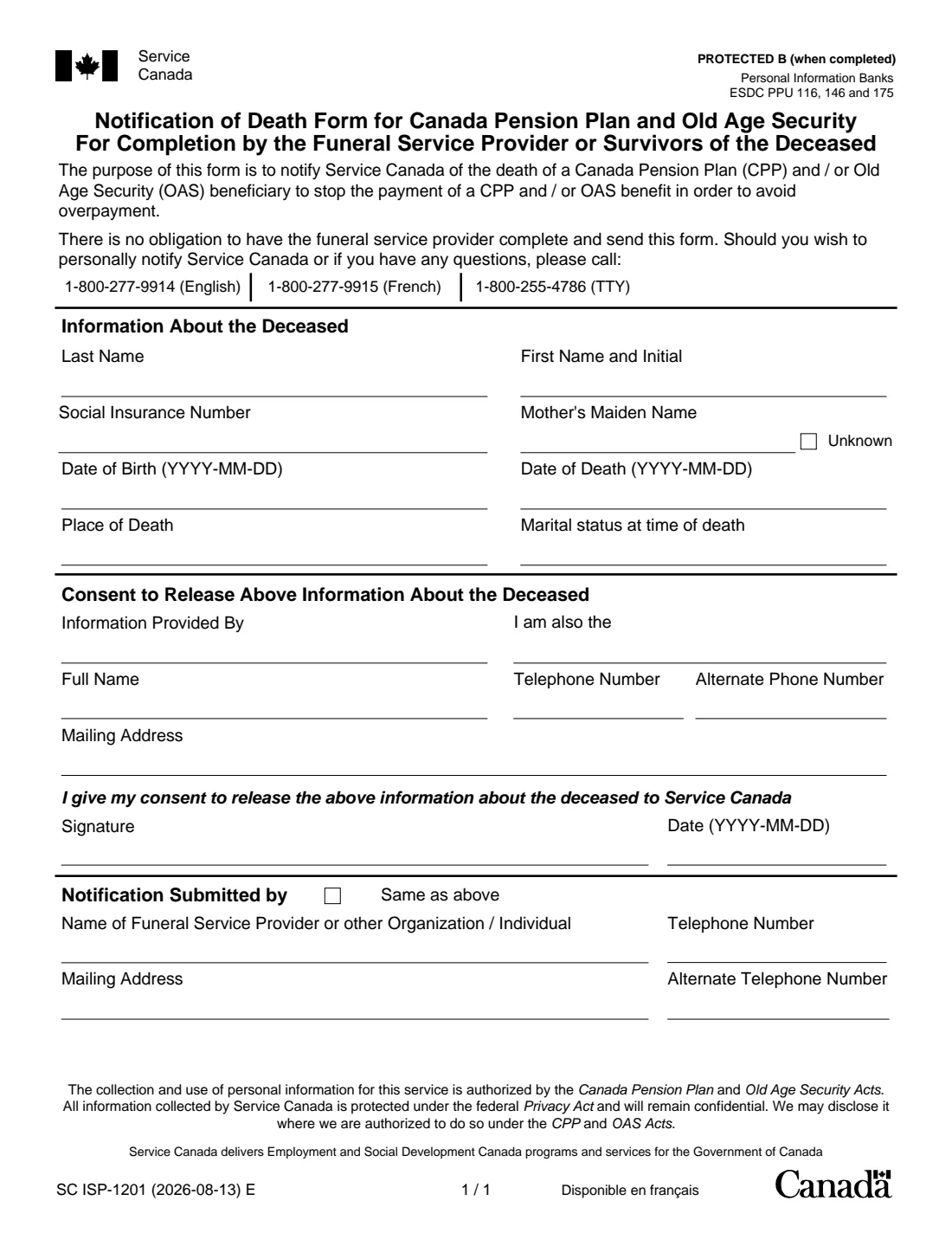
The form has three short parts: the deceased's details (name, Social Insurance Number, mother's maiden name, dates of birth and death, place of death and marital status), the informant's details and consent to release the information, and who is submitting the notice. The form says there is no obligation to have the funeral home send it; you can also call Service Canada.
FileIt fills in the official ISP-1201 PDF from your answers, with the deceased's name and date of birth pre-filled from their People record, and saves it in their vault folder. You then print and sign it. It does not apply for survivor's or death benefits, which have their own forms, and FileIt never submits anything for you.
- Who fills it
- A survivor, the executor, a family member or the funeral service provider
- Given to
- Service Canada
- Purpose
- Stops CPP and OAS payments after a death, to avoid an overpayment
- Pages
- 1
- Edition
- SC ISP-1201 (2026-08-13) E
- Phone instead
- 1-800-277-9914 (English), 1-800-277-9915 (French), 1-800-255-4786 (TTY)
Who needs to fill out ISP-1201 notice of death (CPP / OAS)?
- The spouse or common-law partner of someone who received CPP or OAS.
- The executor of the estate.
- A child or other relative handling the deceased's affairs.
- A funeral home completing the notice with the family.
When to use ISP-1201 notice of death (CPP / OAS)
- Soon after the death of a CPP or OAS beneficiary, so payments stop.
- When the funeral home offers to send the notice, or you prefer to send it yourself.
- Alongside, not instead of, any application for a CPP death benefit or survivor's pension.
- Not needed if you have already told Service Canada of the death by phone.
What you need before you start
- The deceased's full name and Social Insurance Number, if you have it.
- Their mother's maiden name, or the fact that it is unknown.
- Their dates of birth and death, whether they died in Canada, and their marital status.
- Your relationship to the deceased, your name, telephone numbers and mailing address.
- The funeral home's or sender's name, telephone numbers and address, if someone else sends it.
What’s on ISP-1201 notice of death (CPP / OAS)
The 2026 edition has 1 page. FileIt asks for it in 3 parts:
- Information about the deceasedPerson giving the information
- Your consent to release the informationPerson giving the information
- Notification submitted byPerson giving the information
How to fill out ISP-1201 notice of death (CPP / OAS), step by step
1 Information about the deceased
Last name, first name and initial, Social Insurance Number, mother's maiden name (or tick Unknown), dates of birth and death, place of death (Canada or outside Canada) and marital status at the time of death.
2 Consent to release the information
Who is providing the information (spouse or partner, executor, child or someone else), any second role you have, and your full name, telephone numbers and mailing address. You sign and date the consent.
3 Notification submitted by
Tick Same as above if you are sending it yourself, or give the funeral service provider's or other sender's name, telephone numbers and mailing address.
Common mistakes to avoid
- Leaving the mother's maiden name empty without ticking Unknown.
- Entering a date of death before the date of birth, or swapping the two.
- Forgetting to sign the consent.
- Assuming this notice also applies for a death benefit or survivor's pension.
- Giving a mailing address that won't reach you if Service Canada writes back.
After you fill it out
Print the PDF and sign the consent by hand.
Send it to Service Canada, or give it to the funeral home to send, as you arrange with them. FileIt does not send it.
Keep the saved copy in the deceased's vault folder with the death certificate and estate papers.
Fill out ISP-1201 notice of death (CPP / OAS) online with FileIt
- Pick the person. Choose someone from People and FileIt fills in their name, date of birth, address and other details it already knows.
- Answer plain-language questions. One part of the form at a time, with the official help text beside each question — 23 fields in all. Your answers save as you go.
- Check the live preview. Watch your answers land on the real Service Canada, for Employment and Social Development Canada (ESDC) form, and let FileIt do any worksheet arithmetic.
- Generate the official PDF. FileIt prints your answers into the agency’s own PDF and files it in that person’s folder in your vault.
FileIt fills the form — it never files or submits anything for you. Deliver the finished form to whoever asked for it, the way the form’s instructions say.
Start ISP-1201 notice of death (CPP / OAS) now — it’s freeISP-1201 notice of death (CPP / OAS): frequently asked questions
Why does Service Canada need this form?
The form's purpose is to stop CPP and OAS payments after a death to avoid an overpayment.
Does the funeral home have to send it?
No. The form says there is no obligation to have the funeral service provider complete and send it. You can also notify Service Canada yourself by phone.
Does this apply for the CPP death benefit?
No. It only reports the death. The CPP death benefit has its own application, ISP-1200.
What if I don't know the Social Insurance Number?
Leave it empty and give the other details. The name, dates and mother's maiden name help Service Canada find the record.
What if I don't know the mother's maiden name?
Tick the Unknown box beside it.
Can I fill out ISP-1201 with FileIt?
Yes. FileIt prints your answers into Service Canada's official PDF and files it in the deceased's vault folder. You print, sign and send it. FileIt never submits it.
Official sources
- Blank form (PDF), published by Service Canada, for Employment and Social Development Canada (ESDC): https://catalogue.servicecanada.gc.ca/apps/EForms/pdf/en/ISP-1201.pdf
- Official instructions and guidance: https://catalogue.servicecanada.gc.ca/content/EForms/en/Detail.html?Form=ISP1201
- Edition shown on this page: SC ISP-1201 (2026-08-13) E (checked 2026-10-19).
FileIt is not affiliated with or endorsed by Service Canada, for Employment and Social Development Canada (ESDC) or any government. This page explains the form in general terms and is not legal, tax or immigration advice. Always read the official instructions, and check that you are using the edition the recipient accepts. Page last reviewed 2026-10-19.