What is SSB direct deposit authorization?
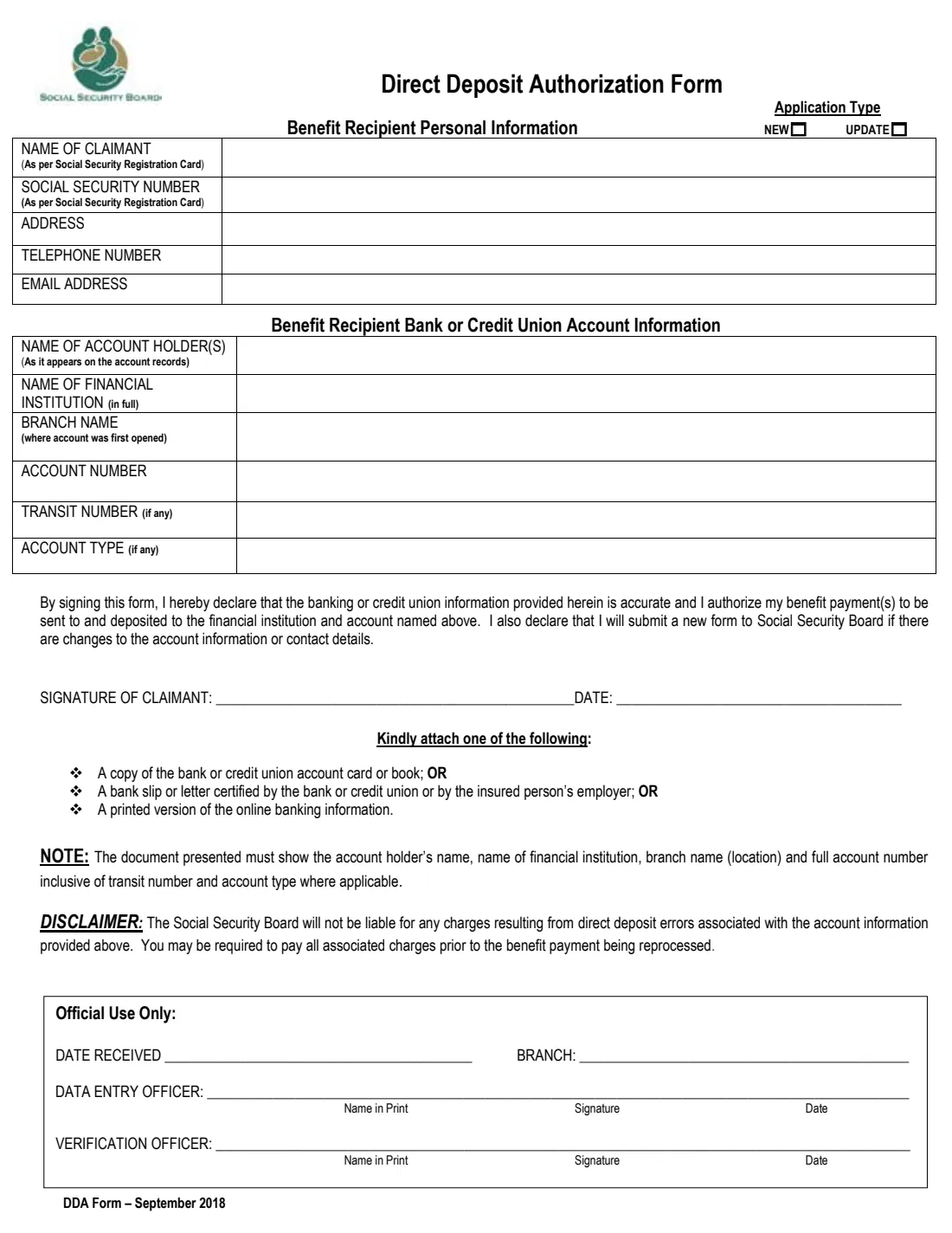
The Direct Deposit Authorization Form (DDA Form, September 2018) is how a person receiving a benefit from the Social Security Board of Belize asks for the payments to go straight into a bank or credit union account. The same form is used the first time you set up direct deposit and whenever you change the account or your contact details: you tick New or Update at the top.
It has two short parts. The first identifies you as the benefit recipient — your name and social security number exactly as on your Social Security registration card, plus your address, phone and email. The second gives the account: the holder's name as the bank records it, the institution's full name, the branch where the account was opened, the account number, and the transit number and account type where they apply. You then sign a short declaration that the details are right and that you will tell SSB about any change.
FileIt turns the PDF into a few plain questions, fills your answers into the Board's own fillable form and saves the finished copy in your vault next to your other benefit papers. You hand it in to SSB yourself with proof of the account — FileIt never sends anything to the Social Security Board.
- Who fills it
- A person who receives, or is about to receive, a Social Security benefit in Belize
- Handed in to
- The Social Security Board, at an SSB branch
- Attach
- Proof of the account: account card or book, a certified bank slip or letter, or an online banking printout
- Signatures
- The claimant signs and dates the declaration
- Edition
- DDA Form – September 2018
- Pages
- 1
Who needs to fill out SSB direct deposit authorization?
- Pensioners and other long-term benefit recipients who want their payments deposited instead of collected in person.
- Someone whose claim for a benefit has just been approved and who is setting up payment for the first time.
- A recipient who has moved their money to a different bank or credit union, or opened a new account.
- A recipient whose phone number, email or address has changed and who needs SSB's records to match.
- Family members helping an older relative organise how their SSB pension is paid.
When to use SSB direct deposit authorization
- When you first want your SSB benefit paid by direct deposit — tick New.
- When the account details on file change, for example after closing an account or switching institutions — tick Update.
- When your contact details change: the declaration commits you to handing in a new form if they do.
What you need before you start
- Your Social Security registration card, so the name and number match it exactly.
- Your current address, telephone number and email address.
- The account holder's name as it appears on the account records.
- The full name of the bank or credit union and the branch where the account was first opened.
- The full account number, plus the transit number and account type if your account has them.
- One supporting document that shows all of those account details (see below).
What’s on SSB direct deposit authorization
The 2018 edition has 1 page. FileIt asks for it in 3 parts, and it is signed by Claimant:
- Benefit recipient personal informationClaimant
- Benefit recipient bank or credit union account informationClaimant
- Declaration and signatureClaimant
How to fill out SSB direct deposit authorization, step by step
1 Application type
Tick New if this is your first direct deposit instruction to SSB, or Update if you are changing an account or contact details the Board already has.
2 Benefit recipient personal information
Your name and social security number as printed on your Social Security registration card, then your address, telephone number and email. The address has a single line on the form, so keep it to the street or house, town or village and district.
3 Bank or credit union account information
The name of the account holder or holders exactly as the bank records it, the full name of the financial institution, the branch where the account was opened, and the account number. Add the transit number and the account type (for example savings or chequing) if your account has them.
4 Declaration and signature
By signing you confirm that the banking details are accurate, authorise SSB to deposit your benefit payments into that account, and promise to hand in a new form if the account or your contact details change. Sign and date on the line at the bottom of the form.
5 Attachments
Attach one of: a copy of the bank or credit union account card or book; a bank slip or letter certified by the bank, the credit union or the insured person's employer; or a printed copy of your online banking information. It must show the holder's name, institution, branch and the full account number, including the transit number and account type where they apply.
Common mistakes to avoid
- Writing your name differently from your Social Security registration card, which makes it harder for SSB to match the form to your record.
- Using an abbreviation for the institution instead of its full name, as the form asks for it in full.
- Giving the branch you use today rather than the branch where the account was first opened.
- Leaving out the transit number or account type when your account has them.
- Attaching a document that does not show every account detail — the note on the form asks for the full account number and branch.
- Forgetting to tick New or Update at the top.
After you fill it out
Check the account number digit by digit against your account card or statement: the Board says it is not liable for charges caused by errors in the account information, and you may have to pay those charges before a payment is reprocessed.
Sign and date the declaration, attach your proof of account and hand the form in to the Social Security Board. The Official Use Only box at the bottom is completed by SSB staff.
FileIt keeps the completed form in your vault, so you have a record of which account you gave SSB and when — handy the next time something changes and you need to send an update.
Fill out SSB direct deposit authorization online with FileIt
- Pick the person. Choose someone from People and FileIt fills in their name, date of birth, address and other details it already knows.
- Answer plain-language questions. One part of the form at a time, with the official help text beside each question — 14 fields in all. Your answers save as you go.
- Check the live preview. Watch your answers land on the real Social Security Board Belize form, and let FileIt do any worksheet arithmetic.
- Generate the official PDF. FileIt prints your answers into the agency’s own PDF and files it in that person’s folder in your vault. Sign it, or send it for e-signature.
FileIt fills the form — it never files or submits anything for you. Deliver the finished form to whoever asked for it, the way the form’s instructions say.
Start SSB direct deposit authorization now — it’s freeSSB direct deposit authorization: frequently asked questions
Can I fill in the SSB direct deposit form online?
Yes. FileIt lets you fill it in online and prints your answers into the Board's official PDF. You still sign it and hand it in to SSB with your proof of account; FileIt does not submit it.
Do I use the same form to change my bank account?
Yes. Tick Update at the top and give the new account's details, with a supporting document for the new account.
Which documents prove my account?
Any one of: a copy of the account card or book, a bank slip or letter certified by the bank or credit union or by the insured person's employer, or a printout of your online banking information showing the full account details.
What is a transit number?
Some banks and credit unions use a transit or routing number to identify the branch. Fill it in only if your account has one; the form marks it 'if any'.
Can the account be in someone else's name?
The form asks for the name of the account holder or holders as it appears on the account records. If you are unsure whether SSB accepts a particular arrangement, ask the Board before you hand the form in.
What if my phone number or email changes later?
The declaration says you will hand in a new form when the account information or your contact details change, so fill in a fresh copy and tick Update.
Official sources
- Blank form (PDF), published by Social Security Board Belize: https://www.socialsecurity.org.bz/wp-content/uploads/2018/11/DD-Form-Editable.pdf
- Official instructions and guidance: https://www.socialsecurity.org.bz/forms/
- Edition shown on this page: DDA Form – September 2018 (checked 2026-10-19).
FileIt is not affiliated with or endorsed by Social Security Board Belize or any government. This page explains the form in general terms and is not legal, tax or immigration advice. Always read the official instructions, and check that you are using the edition the recipient accepts. Page last reviewed 2026-10-19.