What is the supplier quotation (RFQ response) form template?
When you send a request for quotation to several suppliers, the replies rarely come back in a form you can compare. One sends a PDF with prices including delivery, another a spreadsheet in a different currency, a third an email that doesn't mention lead times or how long the price holds. Comparing them means rebuilding every quote by hand.
This supplier quotation template gives each supplier the same structure to answer: company details, the quotation currency, up to five priced lines with quantity, unit price and lead time, the total and what it includes, and how long prices are valid. A terms page covers payment, delivery, minimum order, warranty and whether the quote meets the specification in full, with exceptions spelled out.
The supplier attaches their formal quotation and any data sheets or certificates, then signs a short declaration. Each response lands in your FileIt vault as a signed PDF alongside its attachments, ready to compare side by side.
- Best for
- Buyers and procurement teams comparing quotes from several suppliers
- Filled in by
- Suppliers responding to your request for quotation
- Time to complete
- About 10-15 minutes, depending on the number of lines
- Includes
- Up to five priced lines, file uploads for quotes and certificates, and a signed declaration
Who uses a supplier quotation (RFQ response) form?
- A facilities team comparing three quotes for replacing office furniture
- A manufacturer sourcing components from several new suppliers
- A school or council collecting quotes for a small works or services contract
- A construction firm asking subcontractors and merchants to price a materials list
- A nonprofit that must show it compared quotes before spending grant money
- An IT team collecting hardware quotes with lead times from resellers
Questions on this supplier quotation (RFQ response) form
57 questions over 4 pages · includes signature, file upload, conditional questions, multiple pages, consent checkbox.
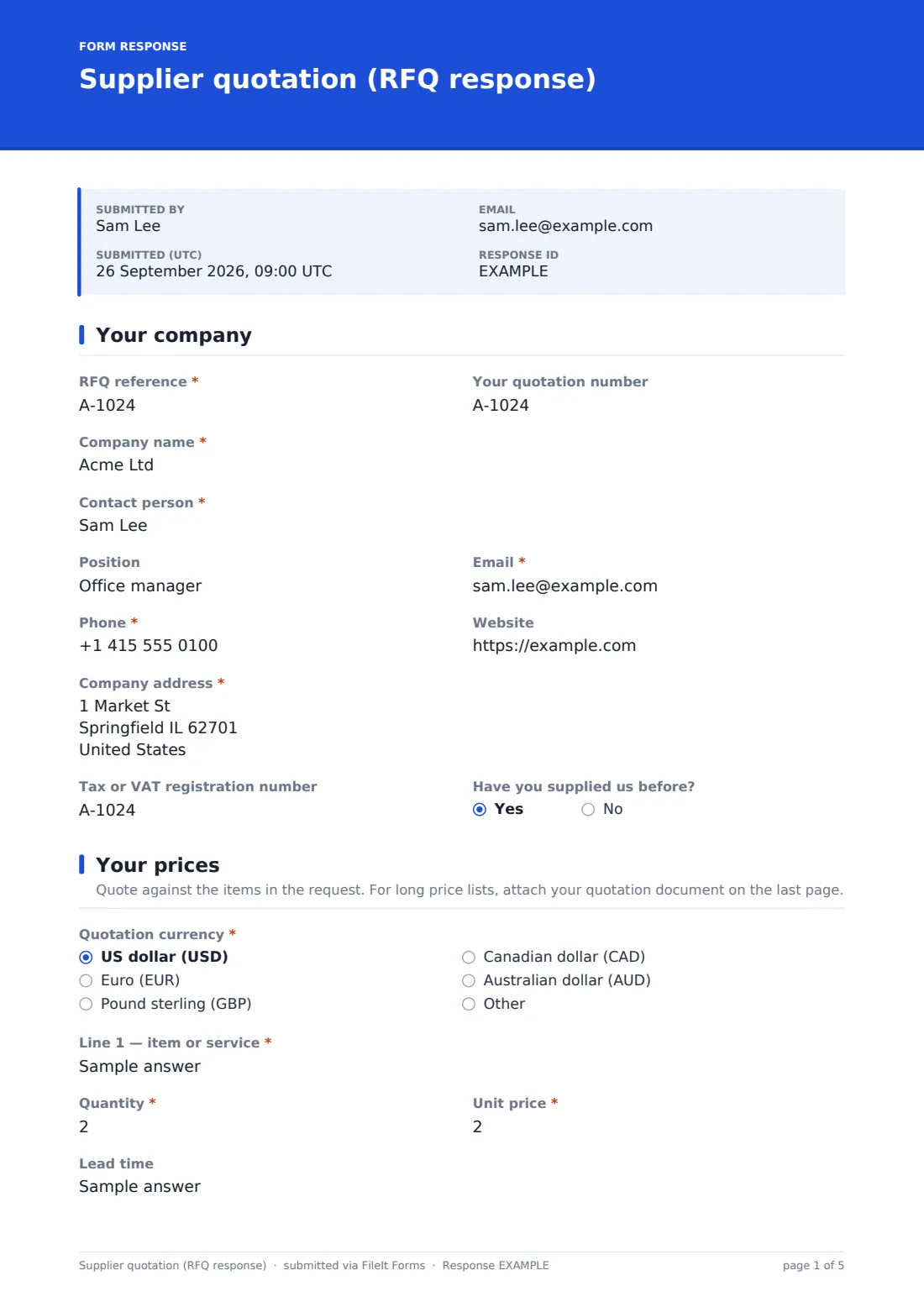
1 Your company
- RFQ reference*
- Your quotation number
- Company name*
- Contact person*
- Position
- Email*
- Phone*
- Website
- Company address*
- Tax or VAT registration number
- Have you supplied us before?
2 Your prices
- Quotation currency* US dollar (USD) · Euro (EUR) · Pound sterling (GBP) · Canadian dollar (CAD) · Australian dollar (AUD) · Other
- Which currency?* asked only when it applies
- Line 1 — item or service*
- Quantity*
- Unit price*
- Lead time
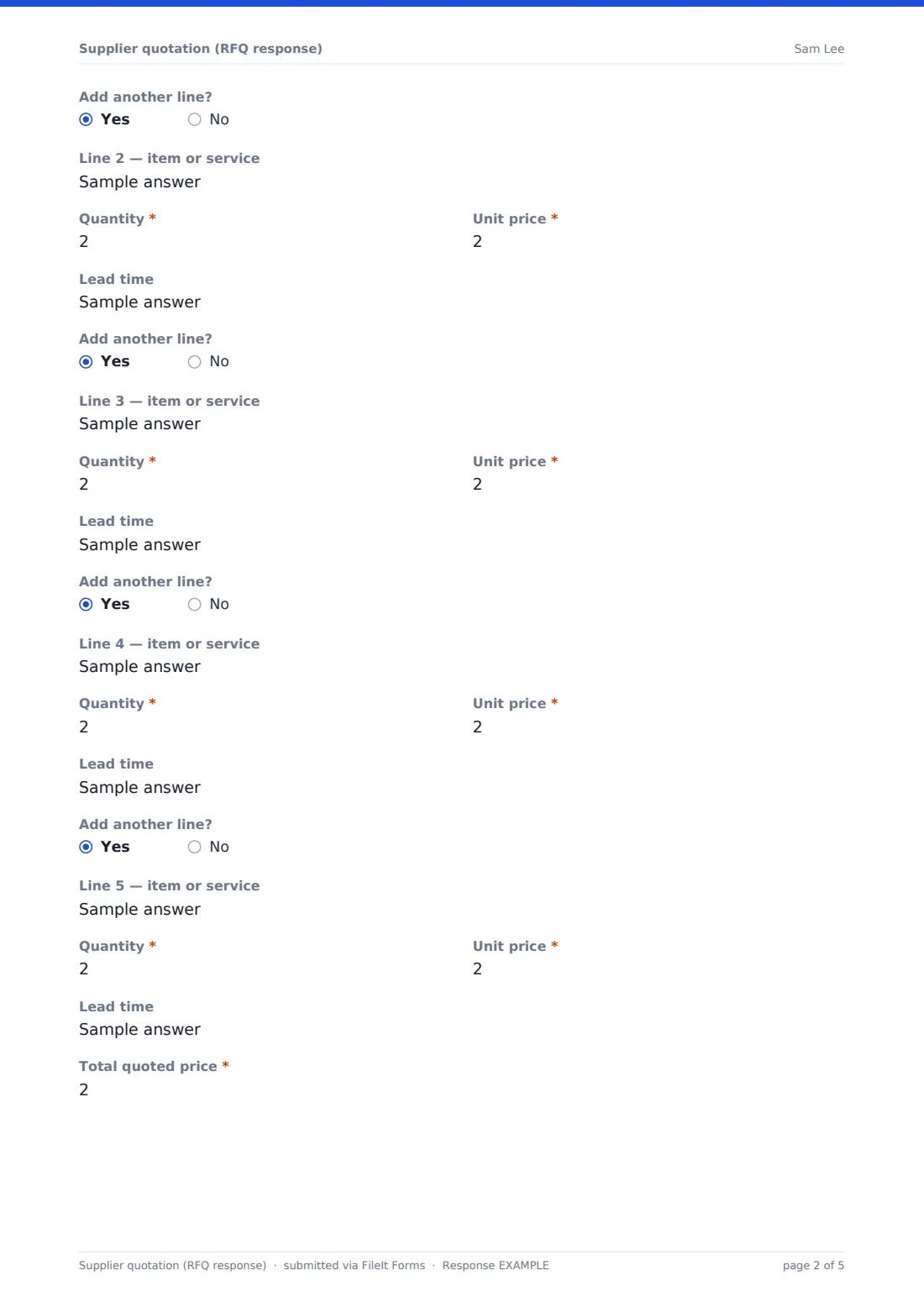
- Add another line? asked only when it applies
- Line 2 — item or service asked only when it applies
- Quantity* asked only when it applies
- Unit price* asked only when it applies
- Lead time asked only when it applies
- Add another line? asked only when it applies
- Line 3 — item or service asked only when it applies
- Quantity* asked only when it applies
- Unit price* asked only when it applies
- Lead time asked only when it applies
- Add another line? asked only when it applies
- Line 4 — item or service asked only when it applies
- Quantity* asked only when it applies
- Unit price* asked only when it applies
- Lead time asked only when it applies
- Add another line? asked only when it applies
- Line 5 — item or service asked only when it applies
- Quantity* asked only when it applies
- Unit price* asked only when it applies
- Lead time asked only when it applies
- Total quoted price*
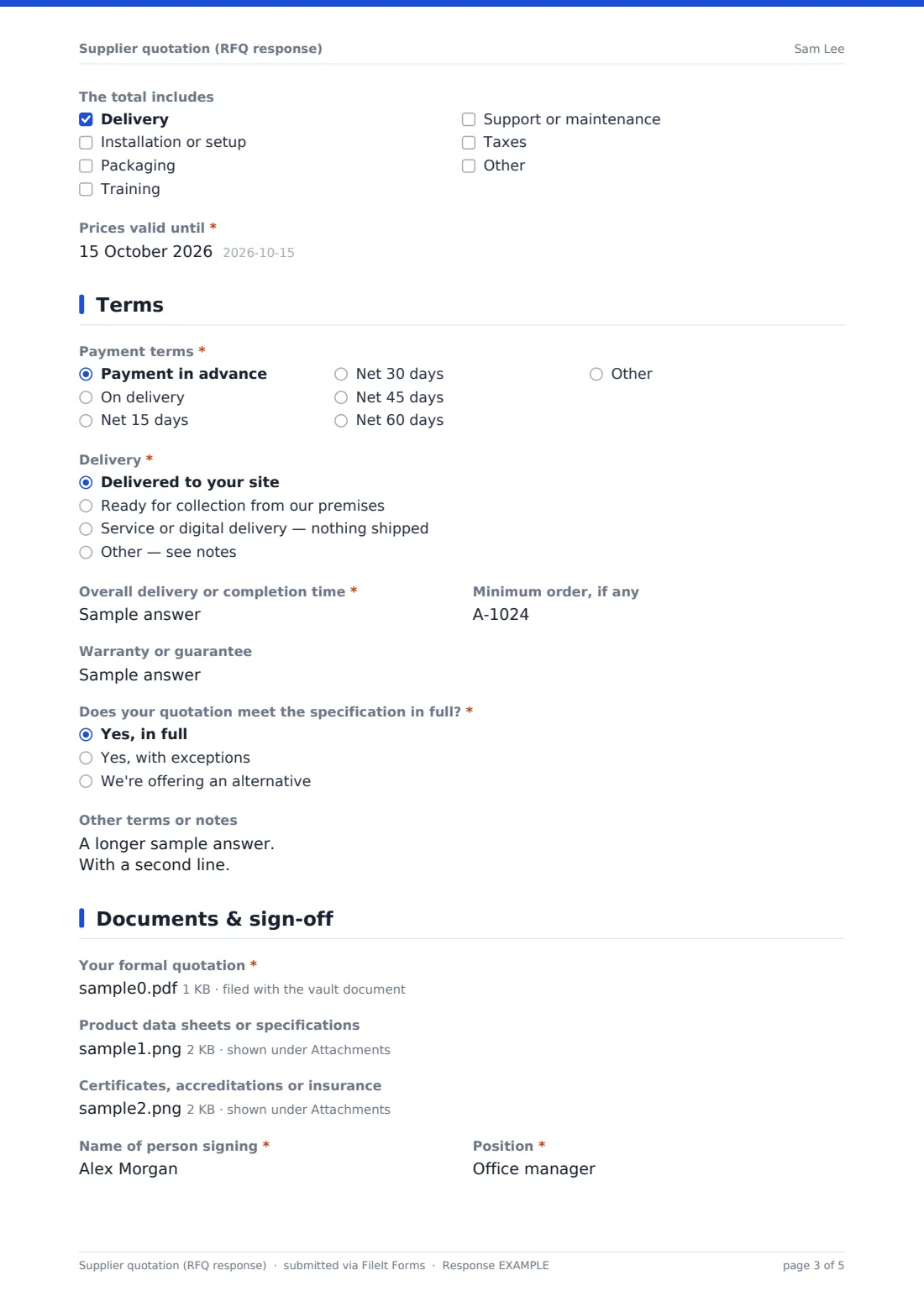
- The total includes Delivery · Installation or setup · Packaging · Training · Support or maintenance · Taxes
- Prices valid until*
3 Terms
- Payment terms* Payment in advance · On delivery · Net 15 days · Net 30 days · Net 45 days · Net 60 days · Other
- Describe your payment terms* asked only when it applies
- Delivery* Delivered to your site · Ready for collection from our premises · Service or digital delivery — nothing shipped · Other — see notes
- Overall delivery or completion time*
- Minimum order, if any
- Warranty or guarantee
- Does your quotation meet the specification in full?* Yes, in full · Yes, with exceptions · We're offering an alternative
- Exceptions or alternatives* asked only when it applies
- Other terms or notes
4 Documents & sign-off
- Your formal quotation*
- Product data sheets or specifications
- Certificates, accreditations or insurance
- Name of person signing*
- Position*
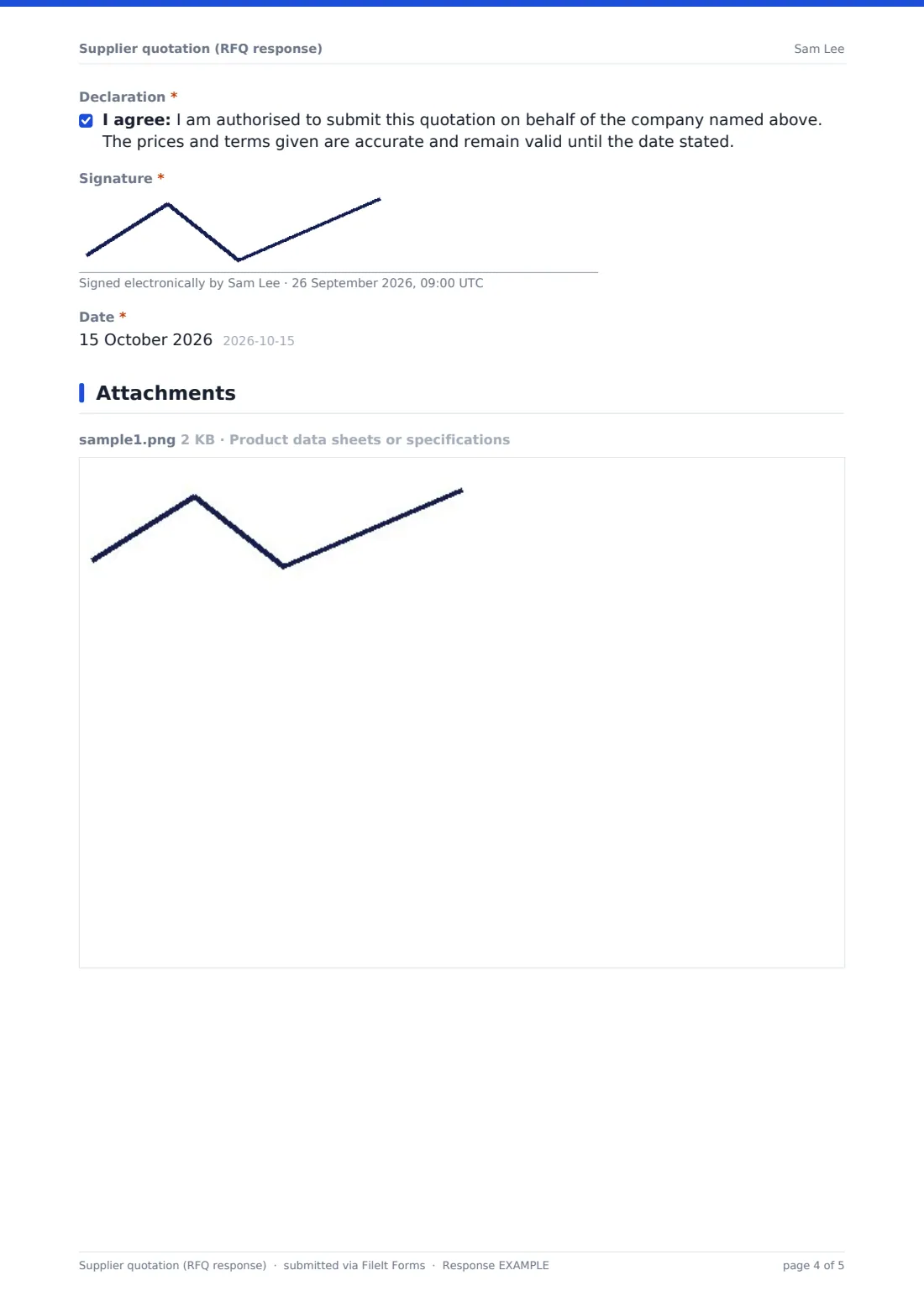
- Declaration*
- Signature*
- Date*
The supplier quotation (RFQ response) form, page by page
1 Your company
The supplier enters your RFQ reference and their own quotation number, then their company name, contact person, position, email, phone, website, address and tax or VAT registration number. A yes/no question asks whether they have supplied you before.
2 Your prices
The supplier chooses the quotation currency (USD, EUR, GBP, CAD, AUD or other, which asks for the code). Line 1 asks for the item or service, quantity, unit price excluding tax and lead time; filling in a line reveals Add another line?, up to five lines in total.
They then give the Total quoted price, tick what it includes — delivery, installation or setup, packaging, training, support or maintenance, taxes — and give the date prices are valid until.
3 Terms
Payment terms range from payment in advance to net 60 days, with Other opening a description box. Delivery can be to your site, ready for collection, service or digital delivery, or other. The supplier gives an overall delivery or completion time, any minimum order and the warranty offered.
A required question asks whether the quote meets the specification in full, with exceptions, or as an alternative — the last two reveal a required box to explain what differs and why. There's room for any other terms or notes.
4 Documents & sign-off
The supplier uploads their formal quotation (required), plus optional data sheets and any certificates, accreditations or insurance the RFQ asked for. They give the name and position of the person signing, agree to a declaration that they're authorised to submit the quotation and that prices remain valid until the date stated, and sign and date it.
Make the template yours
- Put the items you're requesting and the closing date for responses into the cover text
- Rename the line items to match your RFQ's item numbers, or add more lines for longer lists
- Remove currencies you don't accept, or fix the form to a single currency
- Add questions your procurement policy needs, such as sustainability or conflict-of-interest declarations
- Set a closing date on the form so late quotes can't be submitted
- Send each invited supplier a personal link so you know who has responded
Tips for a better supplier quotation (RFQ response) form
- Send the same specification to every supplier so the answers are genuinely comparable
- Check the valid-until date on each quote before you make a decision
- Compare totals on the same basis — some quotes include delivery or tax, others don't
- Read the exceptions box carefully; it's where important differences tend to hide
- Keep unsuccessful quotes as well as the winning one, in case you need to show how you decided
- Thank suppliers who didn't win and, where you can, tell them why
Every response becomes a PDF in your vault
Each supplier response is saved as a signed PDF in your vault with the formal quotation, data sheets and certificates attached. With owner notifications on, the buyer is emailed as each quote comes in.
From the Responses table you can see who has replied, and export all the responses to a CSV to line up totals, lead times, payment terms and validity dates side by side. The form records the quotes; the buying decision and purchase order still happen in your usual process.
- Start from this template. It opens in the FileIt Forms designer — change any question, add pages, set the rules for when questions appear.
- Share it. Turn on a public link, or send it to people by email, each with their own link. They don’t need a FileIt account.
- Get the answers as PDFs. Each response is saved as a PDF in the vault folder you choose, with uploaded files attached — and listed in a Responses table you can export to CSV.
Supplier quotation (RFQ response) form: frequently asked questions
Is this RFQ response form free?
Yes. It's a starter template in the FileIt Forms app, and you can change the lines, terms and declaration to match your request.
Do suppliers need a FileIt account to respond?
No. Suppliers open the link, fill in the form and sign it without creating an account.
Can suppliers quote in their own currency?
Yes. They choose the quotation currency first, and all prices are entered in that currency. You can restrict the list if you only accept one.
What if a supplier has more than five lines?
They can attach their full price list as their formal quotation. You can also add more lines to the form in the designer.
Can we stop accepting quotes after the deadline?
Yes. Set a closing date or turn the form off in its settings, and late submissions are refused.
Does the form compare the quotes for us?
It doesn't score or rank quotes. Because every supplier answers the same questions, exporting the responses to a CSV gives you a ready-made comparison table.