What is Form WH-382?
Once an employer has enough information to decide whether an employee's leave is for an FMLA-qualifying reason, it has five business days to tell the employee in writing whether the leave will be designated as FMLA leave. Form WH-382, the Designation Notice from the Department of Labor's Wage and Hour Division, is the standard way to do that. Using it is optional, but a fully completed WH-382 gives the employee the information required by 29 C.F.R. §§ 825.300(d), 825.301 and 825.305(c).
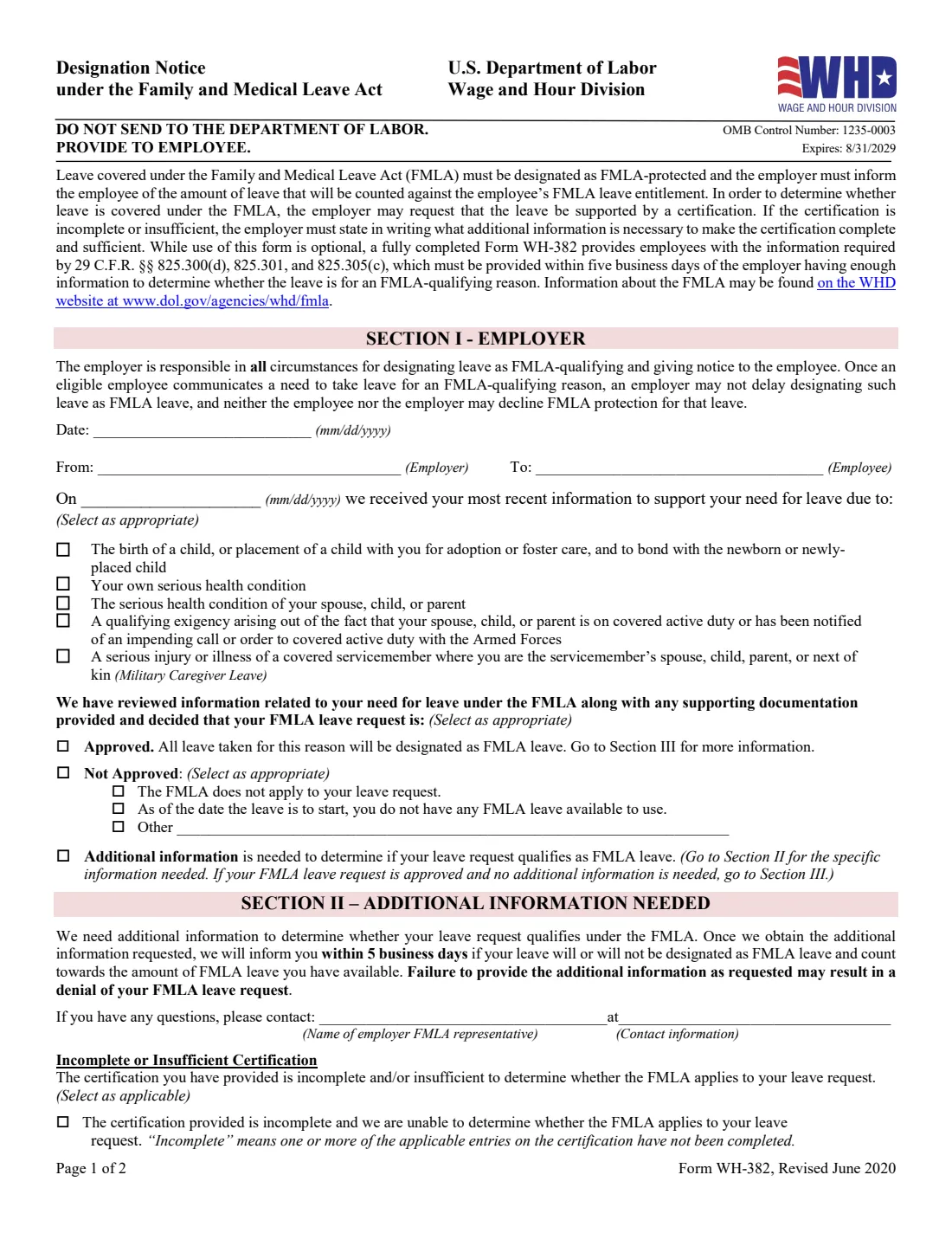
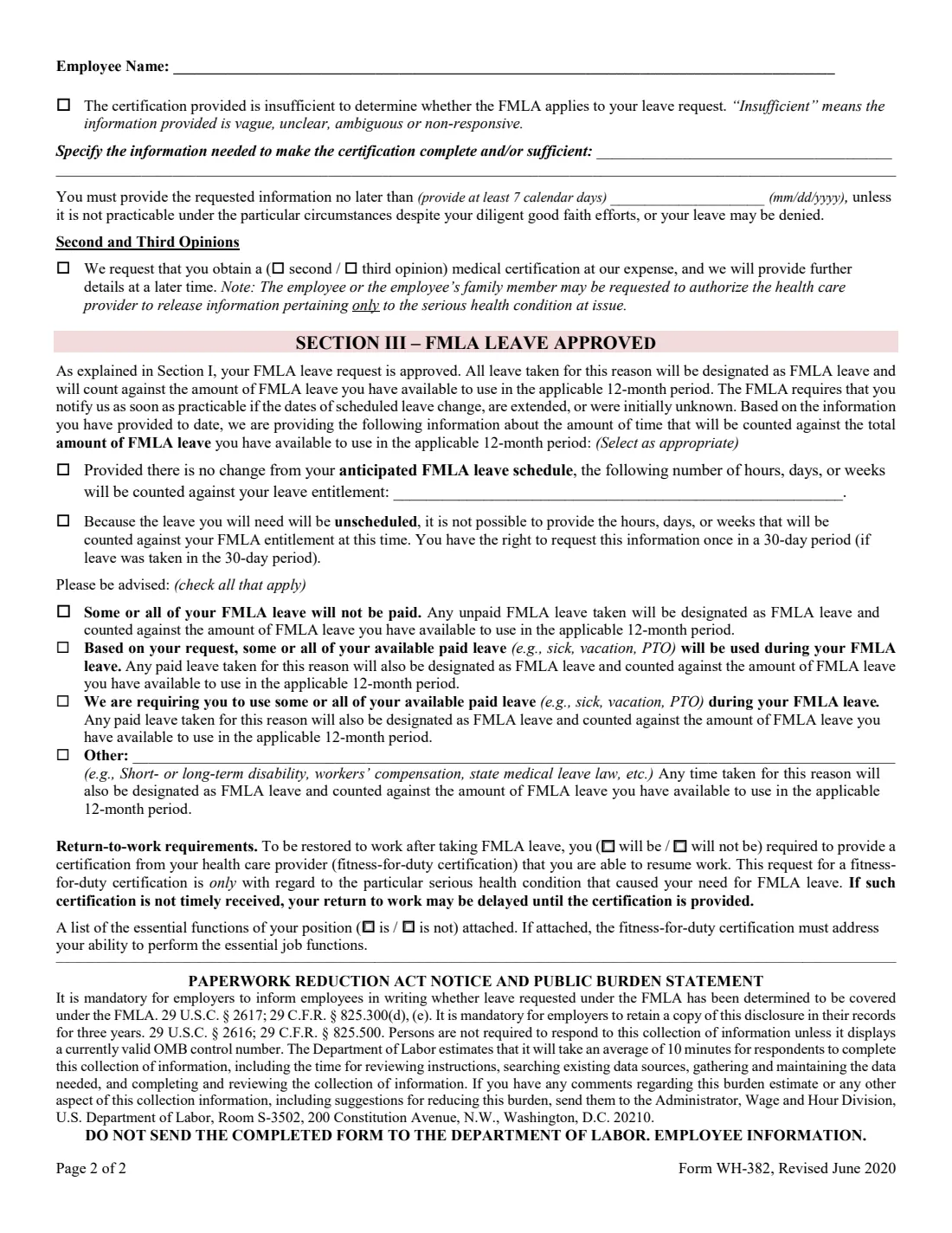
The notice has three sections. Section I records the date, the employer and employee, when the employer received the latest information, the reason for the leave (birth or placement of a child, the employee's own condition, a family member's condition, a military exigency, or military caregiver leave), and the decision: approved, not approved, or more information needed. Section II lists what's missing from an incomplete or insufficient certification and the deadline to provide it, and can request a second or third opinion. Section III, for approved leave, says how much time will be counted, whether paid leave will be used, and whether a fitness-for-duty certification is needed to return.
FileIt lets HR teams and small employers fill in the notice in a guided form, with the employee's name taken from People in your vault and only the sections that apply switched on. The answers are printed into the Department of Labor's own PDF and saved in the vault. The notice goes to the employee, never to the Department of Labor.
- Who fills it
- The employer, usually HR or the FMLA administrator.
- Given to
- The employee. The form says in bold: do not send it to the Department of Labor.
- Deadline
- Within five business days of the employer having enough information to decide whether the leave is FMLA-qualifying.
- Signatures
- None. The form has no signature line.
- Edition
- Revised June 2020 (OMB 1235-0003, expires 8/31/2029)
- Recordkeeping
- Employers must keep a copy for three years, per the form's burden statement.
Who needs to fill out Form WH-382?
- Employers covered by the FMLA responding to an employee's leave request.
- HR staff and benefits administrators who track FMLA leave and need a written record of each designation.
- Small business owners handling an FMLA request for the first time.
- Employers who received an incomplete or insufficient medical certification and must say in writing what's missing.
- Employers approving leave who need to explain how much time is counted, how paid leave applies, and any return-to-work certification.
When to use Form WH-382
- After the employee has given enough information, such as a completed WH-380-E, WH-380-F, WH-384 or WH-385, for you to decide whether the leave qualifies.
- When a certification you received is incomplete or insufficient and you need to tell the employee what is missing, giving at least 7 calendar days to fix it.
- When you want a second or third opinion on a medical certification at your expense.
- Once you have the additional information you asked for: the form says you'll then tell the employee within 5 business days whether the leave is designated.
- When the amount of leave to be counted changes and you need to update the employee.
What you need before you start
- The employee's name and your company's name.
- The date you received the employee's most recent information supporting the leave.
- The FMLA reason the leave falls under.
- Your decision, and if not approved, the reason.
- For more information: the name and contact details of your FMLA representative, what's missing from the certification, and a due date at least 7 days out.
- For approved leave: the hours, days or weeks to be counted (if the schedule is known), how paid leave or other leave policies interact, and whether you'll require a fitness-for-duty certification and attach a list of essential functions.
What’s on Form WH-382
The 2020 edition has 2 pages. FileIt asks for it in 3 parts:
- Section I: EmployerEmployer
- Section II: Additional information neededEmployer
- Section III: FMLA leave approvedEmployer
How to fill out Form WH-382, step by step
1 Section I — Employer details and reason
Enter the date of the notice, your company in the From line and the employee in the To line, and the date you received the employee's most recent information. Then tick the reason for the leave: bonding with a new child, the employee's own serious health condition, a spouse's, child's or parent's condition, a qualifying exigency tied to covered active duty, or military caregiver leave.
2 Section I — Your decision
Choose Approved, Not Approved, or Additional information needed. For Not Approved, say whether the FMLA doesn't apply to the request, the employee has no FMLA leave available as of the start date, or another reason, which you describe. FileIt switches on Section II or Section III to match the decision.
3 Section II — Additional information needed
Name the FMLA representative the employee can contact, with a phone number or email. Tick whether the certification is incomplete (entries left blank) or insufficient (vague, unclear, ambiguous or non-responsive), spell out what's needed, and set a due date that allows at least 7 calendar days. You can also request a second or third opinion at your expense. FileIt fits your description onto the two printed lines.
4 Section III — Leave approved
Say how much time will be counted against the employee's FMLA entitlement if the schedule is known, or that the leave is unscheduled. Tick any notices that apply: unpaid leave, paid leave used at the employee's request, paid leave you require, or another policy such as short-term disability or workers' compensation running at the same time.
5 Section III — Returning to work
State whether the employee will be required to provide a fitness-for-duty certification to return, and whether a list of the position's essential functions is attached. If it is, the certification must address the employee's ability to perform those functions.
Common mistakes to avoid
- Waiting more than five business days after you have enough information to designate the leave.
- Saying a certification is "insufficient" without stating exactly what information would cure it.
- Giving the employee fewer than 7 calendar days to provide missing information.
- Approving leave without saying how much time will count, when the schedule is known.
- Requiring paid leave substitution without ticking the box that tells the employee.
- Asking for a fitness-for-duty certification that covers more than the condition that caused the leave.
- Sending the completed notice to the Department of Labor instead of giving it to the employee.
After you fill it out
Give the notice to the employee, on paper or electronically, and keep a copy: the form's burden statement says employers must keep it in their records for three years. FileIt keeps the filled PDF in your vault.
If you asked for more information, follow up after the due date and, once you have it, tell the employee within 5 business days whether the leave is designated, usually with a new WH-382.
If the leave is approved, track the time against the employee's 12-month entitlement and update the employee if the scheduled dates change.
Fill out Form WH-382 online with FileIt
- Pick the person. Choose someone from People and FileIt fills in their name, date of birth, address and other details it already knows.
- Answer plain-language questions. One part of the form at a time, with the official help text beside each question — 27 fields in all. Your answers save as you go.
- Check the live preview. Watch your answers land on the real U.S. Department of Labor, Wage and Hour Division form, and let FileIt do any worksheet arithmetic.
- Generate the official PDF. FileIt prints your answers into the agency’s own PDF and files it in that person’s folder in your vault.
FileIt fills the form — it never files or submits anything for you. Deliver the finished form to whoever asked for it, the way the form’s instructions say.
Start Form WH-382 now — it’s freeForm WH-382: frequently asked questions
Is Form WH-382 required?
The form itself is optional, but designating FMLA leave and telling the employee in writing is not. A fully completed WH-382 gives the employee what the regulations require.
Who fills out the Designation Notice?
The employer. The form says the employer is responsible in all circumstances for designating leave as FMLA-qualifying and for giving notice to the employee.
How fast do I have to send it?
Within five business days of having enough information to decide whether the leave is for an FMLA-qualifying reason.
What's the difference between WH-381 and WH-382?
WH-381 is the Notice of Eligibility and Rights & Responsibilities, sent when an employee first asks for leave. WH-382 comes later and tells the employee whether the leave is designated as FMLA leave.
Does the employee sign Form WH-382?
No. The form has no signature lines; it's a written notice from the employer to the employee.
Can I fill out Form WH-382 online?
Yes. FileIt guides you through the sections that apply and prints them into the Department of Labor's official PDF, saved in your vault, ready to give to the employee.
Official sources
- Blank form (PDF), published by U.S. Department of Labor, Wage and Hour Division: https://www.dol.gov/sites/dolgov/files/WHD/legacy/files/WH-382.pdf
- Official instructions and guidance: https://www.dol.gov/agencies/whd/fmla
- Edition shown on this page: Revised June 2020 (OMB 1235-0003, expires 8/31/2029) (checked 2026-10-19).
FileIt is not affiliated with or endorsed by U.S. Department of Labor, Wage and Hour Division or any government. This page explains the form in general terms and is not legal, tax or immigration advice. Always read the official instructions, and check that you are using the edition the recipient accepts. Page last reviewed 2026-10-19.