
What is VA Form 21-22a?
VA Form 21-22a appoints an individual as your representative before VA: an attorney, a claims agent, a representative of a service organization, or someone providing representation under 38 CFR 14.630 for a single claim. The instructions recommend checking VA's list of accredited attorneys, agents and VSO representatives before you sign. To appoint a whole service organization instead, VA points to Form 21-22.
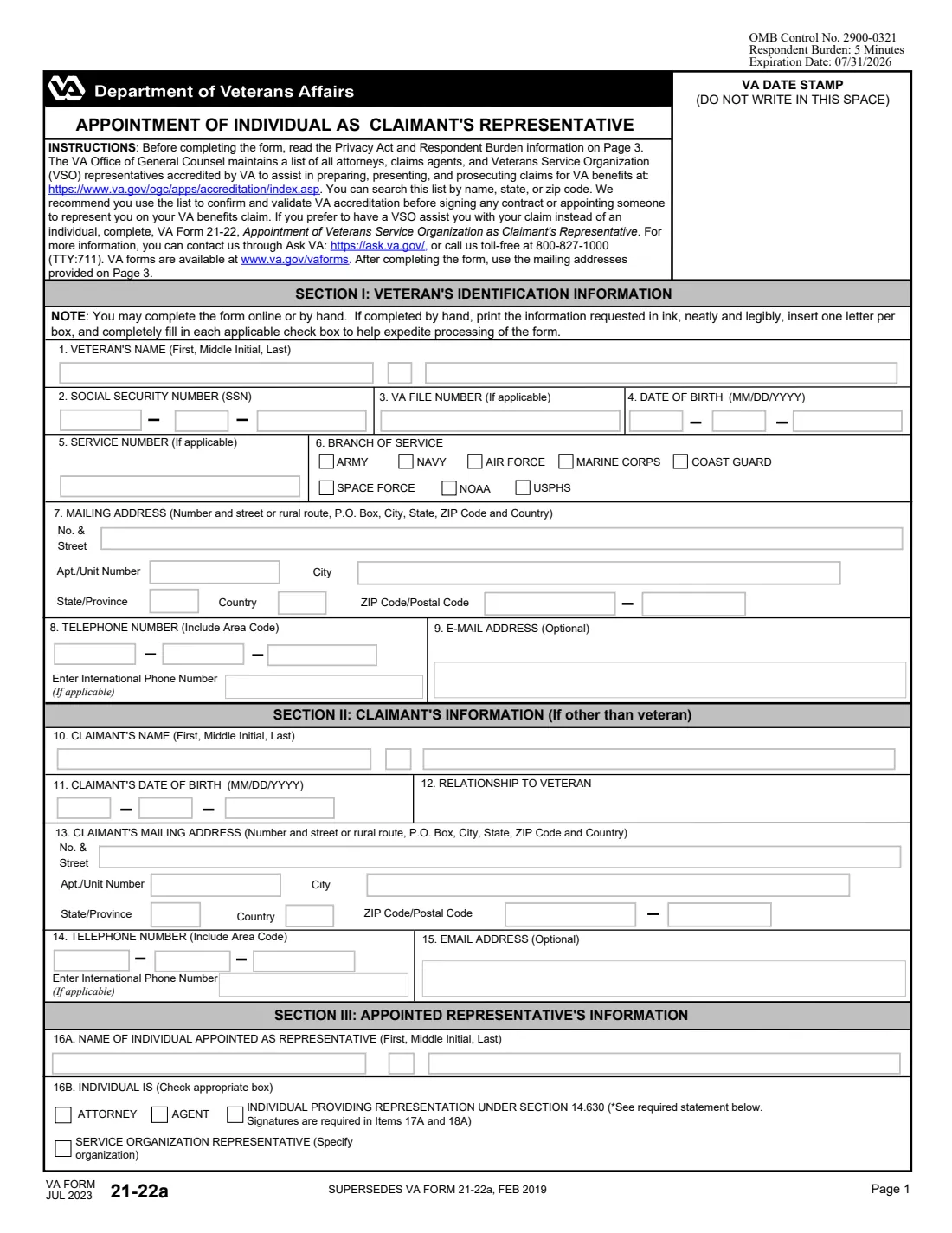
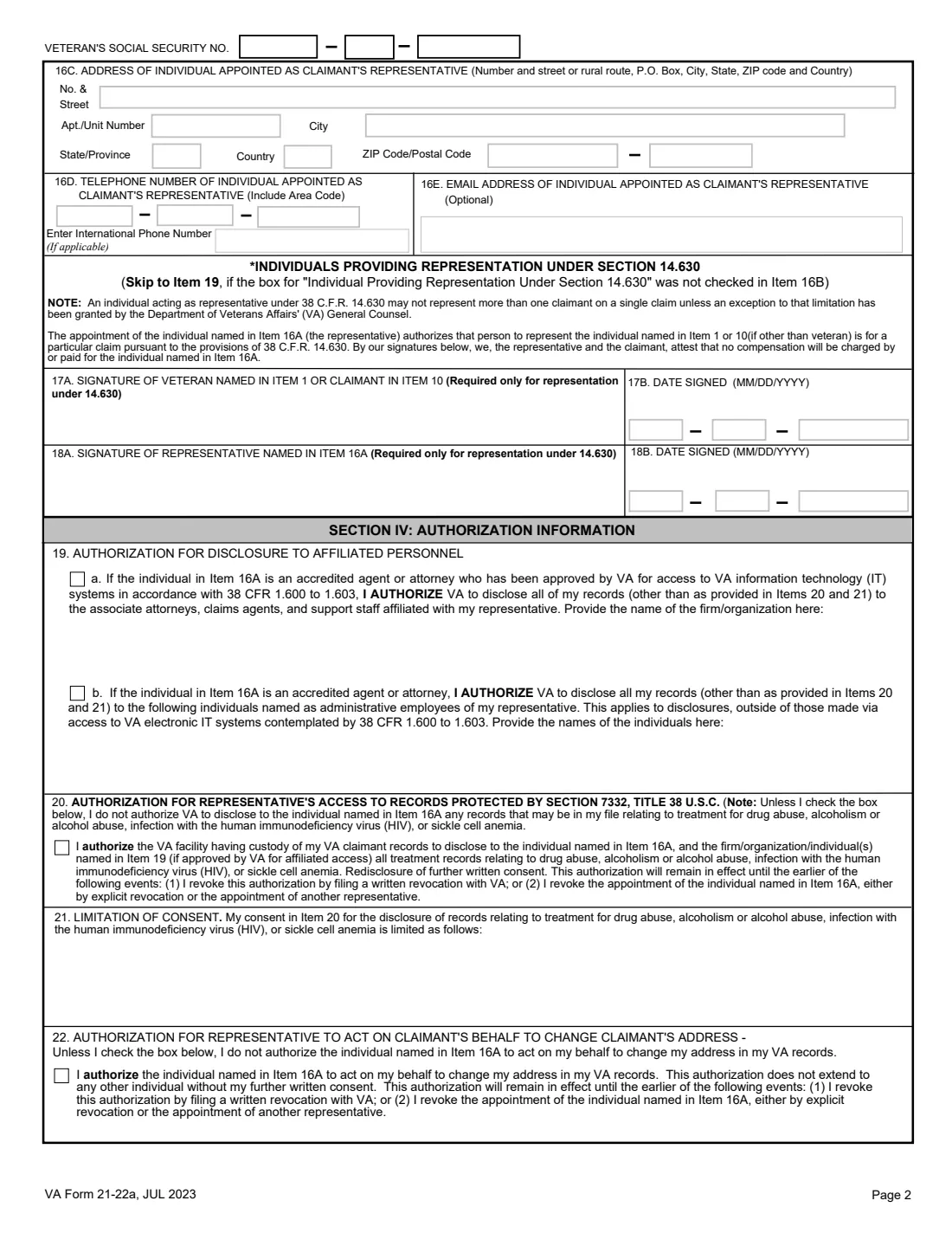
Page 1 covers the veteran (including branch of service), any other claimant, and the representative's name and type. Page 2 has the representative's address and contact details, the extra signatures needed for 14.630 representation, and the authorizations: disclosure to the representative's affiliated staff, access to records about drug or alcohol treatment, HIV or sickle cell anemia, any limit on that, and address changes. Page 3 holds the conditions of appointment, limits on representation and both signatures.
FileIt asks for each detail, pre-fills the veteran's information from your vault, prints capitals one letter per box on VA's own PDF (JUL 2023 edition), and repeats the SSN in the headers. The form is saved to the person's vault folder, and you can send it for eSignature to you and your representative or sign by hand. FileIt never submits it to VA.
- Who fills it
- The veteran or claimant, usually with the person being appointed.
- Who signs
- The veteran or claimant (23A) and the representative (25A); under 14.630 both also sign items 17A and 18A.
- Representative types
- Attorney, claims agent, service organization representative, or an individual under 38 CFR 14.630.
- Effect
- Unless limited by an agent or attorney in item 24, the form says it revokes all earlier powers of attorney.
- Send to
- The intake center for your claim type on page 3 (compensation: Evidence Intake Center, PO Box 4444, Janesville, WI 53547-4444), or upload it.
- Edition
- VA Form 21-22a, JUL 2023 (OMB No. 2900-0321). Its printed OMB date of 07/31/2026 has passed, but VA's form page still links this edition.
Who needs to fill out VA Form 21-22a?
- Veterans hiring a VA-accredited attorney or claims agent for a claim or decision review.
- Survivors and other claimants appointing an individual to act for them.
- Claimants who want a specific person, rather than an organization, to represent them.
- Someone helping a friend or relative on one claim, without accreditation, under 38 CFR 14.630.
When to use VA Form 21-22a
- When you start working with an accredited attorney or agent on a VA claim or appeal.
- When you replace an earlier representative.
- When your attorney or agent wants to limit the scope of representation or have their staff see your records.
What you need before you start
- The veteran's name, SSN, VA file number, date of birth, service number and branch of service.
- Mailing addresses and phone numbers for the veteran and any other claimant.
- The representative's full name, type, address, phone and email, and their organization if they're a VSO representative.
- For item 19, the name of the representative's firm and of any administrative staff who may see your records.
- Your choices on sharing protected treatment records and on address changes.
What’s on VA Form 21-22a
The 2023 edition has 3 pages. FileIt asks for it in 5 parts, and it is signed by Veteran or claimant and Appointed representative:
- Section I: Veteran's identification informationVeteran or claimant
- Section II: Claimant's information (if other than the veteran)Veteran or claimant
- Section III: Appointed representative's informationAppointed representative
- Section IV: Authorization informationVeteran or claimant
- Conditions of appointment and signaturesVeteran or claimant
How to fill out VA Form 21-22a, step by step
1 Section I: Veteran
Name, SSN, VA file number, date of birth, service number, branch of service (Army, Navy, Air Force, Marine Corps, Coast Guard, Space Force, NOAA or USPHS), mailing address, phone and email.
2 Section II: Claimant
Only if the claimant isn't the veteran: name, date of birth, relationship, address, phone and email.
3 Section III: Representative
The representative's name and type, the organization if they're a VSO representative, then their address, phone and email. A 14.630 representative and the claimant also sign items 17A and 18A, attesting that no fee will be charged.
4 Section IV: Authorizations
Item 19 allows disclosure to the attorney's or agent's affiliated attorneys, agents and staff, or to named administrative employees. Item 20 allows access to records protected by 38 U.S.C. 7332, item 21 describes any limit on that, and item 22 lets the representative change your address.
5 Conditions and signatures
You sign 23A to appoint the representative. An agent or attorney may describe limits in item 24. The representative signs 25A.
Common mistakes to avoid
- Appointing someone who isn't accredited without using the 14.630 option, and its extra signatures.
- Using this form to appoint an organization, which needs Form 21-22.
- Ticking item 19 when the representative isn't an attorney or claims agent, since it applies only to them.
- Forgetting that, unless limited in item 24, this appointment replaces any earlier power of attorney.
- Leaving out the representative's signature in 25A, which the form marks as required.
After you fill it out
Collect both signatures, through FileIt eSignature or on paper, and add the 17A and 18A signatures by hand for 14.630 representation.
Send the form to VA or give it to your representative to file, as page 3 describes.
Keep the signed PDF in your vault, so you have a record of who represents you and on what terms.
Fill out VA Form 21-22a online with FileIt
- Pick the person. Choose someone from People and FileIt fills in their name, date of birth, address and other details it already knows.
- Answer plain-language questions. One part of the form at a time, with the official help text beside each question — 57 fields in all. Your answers save as you go.
- Check the live preview. Watch your answers land on the real U.S. Department of Veterans Affairs (VBA) form, and let FileIt do any worksheet arithmetic.
- Generate the official PDF. FileIt prints your answers into the agency’s own PDF and files it in that person’s folder in your vault. Sign it, or send it for e-signature.
FileIt fills the form — it never files or submits anything for you. Deliver the finished form to whoever asked for it, the way the form’s instructions say.
Start VA Form 21-22a now — it’s freeVA Form 21-22a: frequently asked questions
What is 38 CFR 14.630 representation?
It lets a person who isn't accredited represent a claimant on one particular claim. The form says they may not represent more than one claimant on a single claim without an exception from VA's General Counsel, and both of you sign items 17A and 18A attesting that no compensation will be charged.
Can my attorney's staff see my file?
Only if you allow it in item 19: part a covers affiliated attorneys, agents and support staff of a firm approved for VA IT access, and part b covers administrative employees you name.
Does this cancel my existing representative?
The form says that, unless an agent or attorney limits it in item 24, this power of attorney revokes all previously existing powers of attorney.
Can I eSign VA Form 21-22a in FileIt?
FileIt can place eSignature boxes for you at 23A and the representative at 25A. The 14.630 signatures in 17A and 18A are left for ink.
Is there a fee?
The form refers to 38 U.S.C. 5904 on fees charged by agents and attorneys. A 14.630 representative attests that no compensation will be charged.
Official sources
- Blank form (PDF), published by U.S. Department of Veterans Affairs (VBA): https://www.vba.va.gov/pubs/forms/VBA-21-22a-ARE.pdf
- Official instructions and guidance: https://www.va.gov/find-forms/about-form-21-22a/
- Edition shown on this page: VA Form 21-22a, JUL 2023 (OMB No. 2900-0321, printed expiry 07/31/2026) (checked 2026-10-19).
FileIt is not affiliated with or endorsed by U.S. Department of Veterans Affairs (VBA) or any government. This page explains the form in general terms and is not legal, tax or immigration advice. Always read the official instructions, and check that you are using the edition the recipient accepts. Page last reviewed 2026-10-19.