What is PS Form 1583?
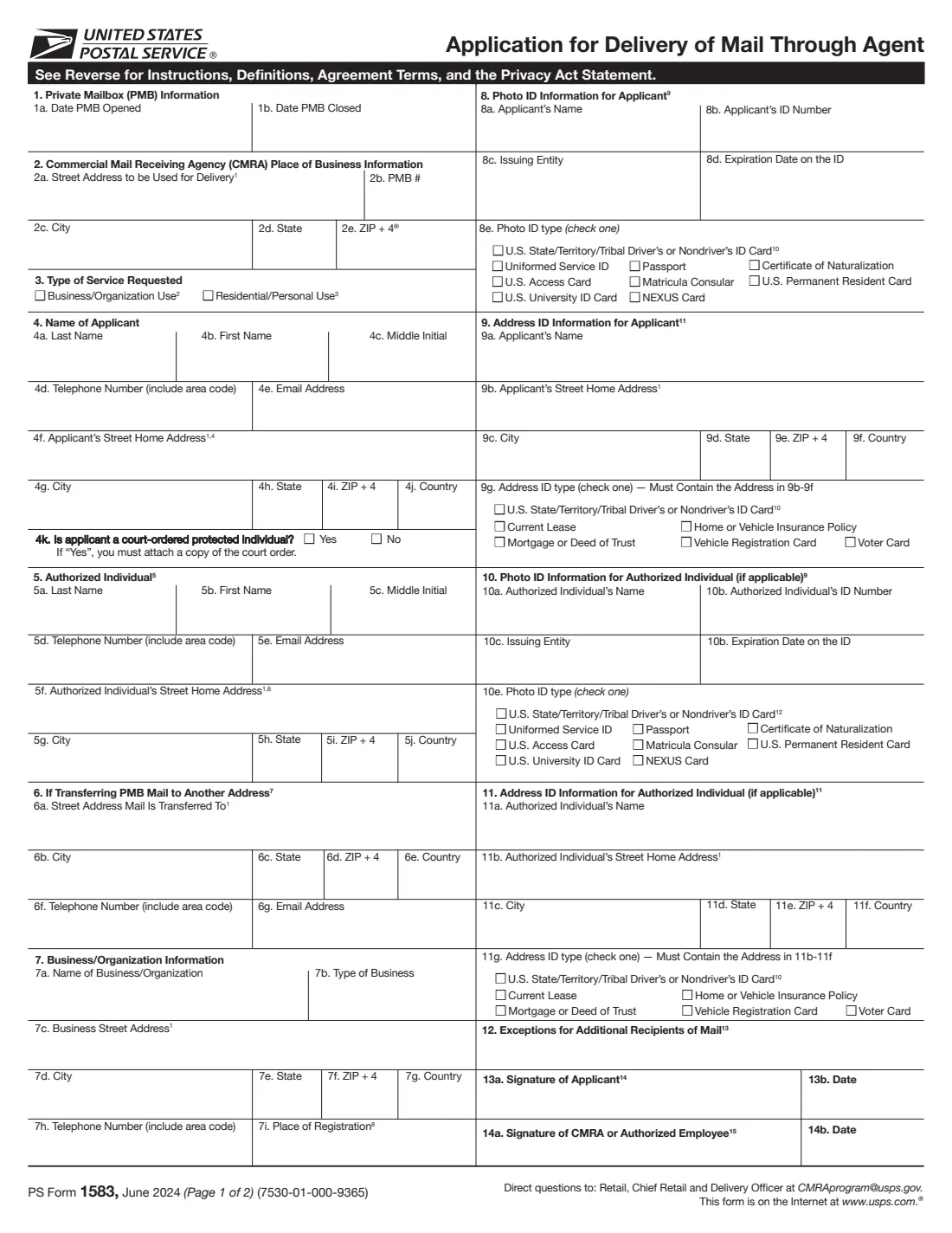
PS Form 1583 authorizes a commercial mail receiving agency (CMRA), such as a mailbox store or a virtual mailbox service, to receive mail for you at a private mailbox (PMB). The agency uploads the signed form to the Postal Service's CMRA registration database and keeps a copy on site, where postal inspectors can examine it.
The form asks who you are, where you live, whether the PMB is for personal or business use, and which two IDs prove it: a government-issued photo ID and a document showing your home address. You can also name an authorized individual who may collect your mail, and an address your mail will be forwarded or emailed to. Each adult using a personal PMB files their own form.
FileIt pre-fills your name and email from your vault, copies your ID name and home address into the address ID section as the form requires, and prints everything onto the USPS's own PDF (June 2024). It checks rules such as not using a driver's license for both IDs, and saves the finished form in your vault folder. You sign in front of the CMRA or a notary, in person or on a live video call, so you print it or bring it to them unsigned.
- Who signs
- The applicant, or an officer with their title for business use, in front of the CMRA or a notary.
- IDs needed
- Two: a government-issued photo ID and an address ID, with copies attached.
- One ID twice?
- A driver's or nondriver's ID card can be the photo ID or the address ID, not both.
- Personal use
- A separate form for each adult using the PMB.
- Edition
- PS Form 1583, June 2024
Who needs to fill out PS Form 1583?
- Anyone opening a private mailbox at a mailbox store or other commercial mail receiving agency.
- Travellers, remote workers and expats signing up for a virtual mailbox or mail scanning service.
- Small businesses using a PMB as their mailing address.
- PMB holders who want someone else to be able to collect their mail.
When to use PS Form 1583
- When you open a new PMB or switch to a different agency.
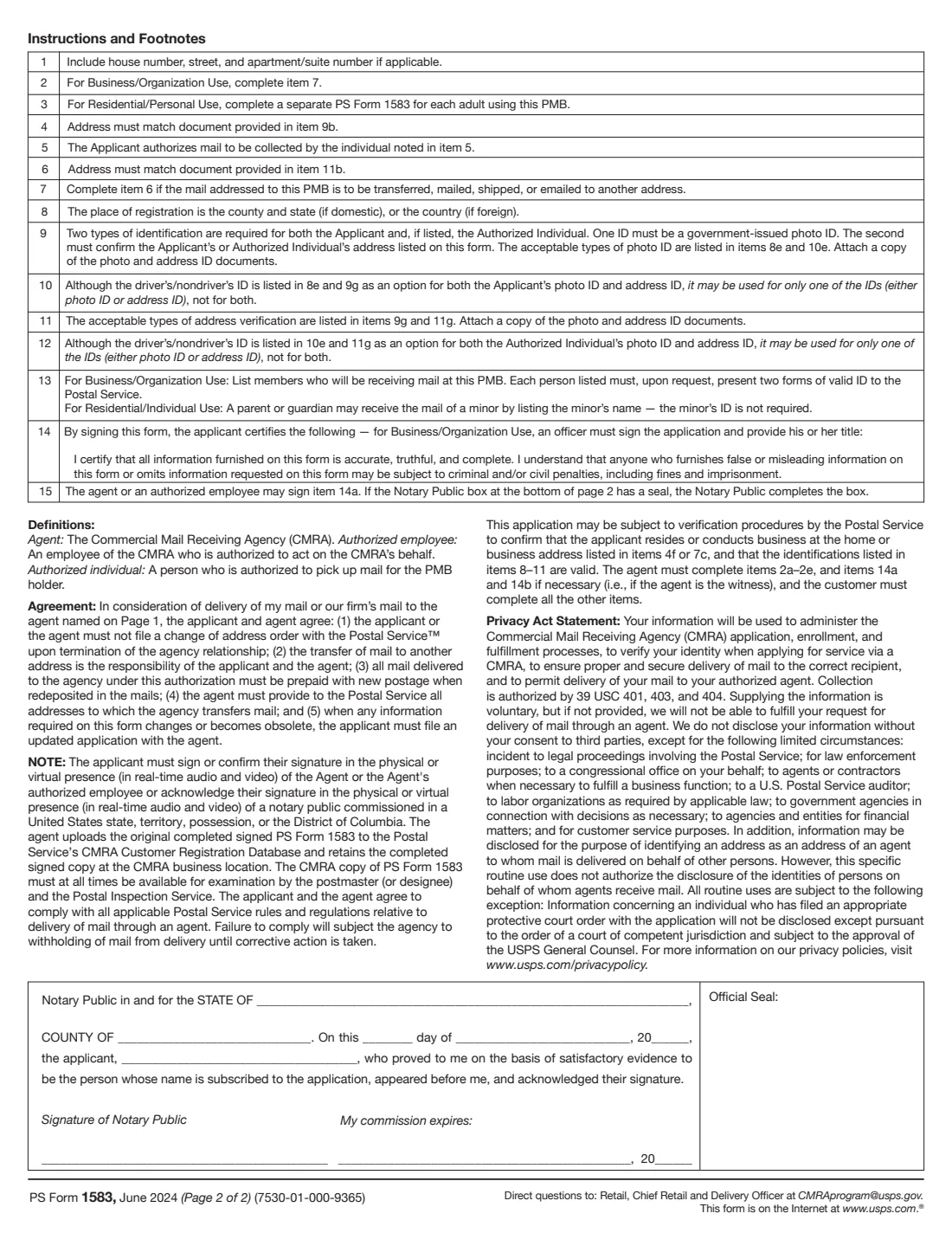
- When information on your form changes: the agreement on page 2 says you must file an updated application with the agent.
- When you add an authorized individual or start forwarding PMB mail to another address.
What you need before you start
- Your name, phone, email and home street address.
- A government-issued photo ID, such as a passport or driver's license, with its number, issuer and expiry date.
- An address document such as a lease, insurance policy, vehicle registration or voter card.
- For business use: the business name, type, address, phone and place of registration.
What’s on PS Form 1583
The 2024 edition has 2 pages. FileIt asks for it in 8 parts:
- 1 and 3. Private mailbox and type of serviceApplicant
- 2. CMRA place of businessApplicant
- 4. Name of applicantApplicant
- 8 and 9. Your photo ID and address IDApplicant
- 5, 10 and 11. Authorized individualApplicant
- 6. If transferring PMB mail to another addressApplicant
- 7. Business or organization informationApplicant
- 12 and 13. Additional recipients and signatureApplicant
How to fill out PS Form 1583, step by step
1 1 to 3. Mailbox, agency and type of service
The dates the PMB opens or closes, the CMRA's address and your PMB number (the agency usually completes these), and whether it's for business or personal use.
2 4. Applicant
Your name, phone, email and home address, and whether you're a court-ordered protected individual (attach the court order if so).
3 5. Authorized individual
Optional: someone who may collect your mail, with their contact details and home address.
4 6 and 7. Forwarding and business details
Where mail is transferred, if it is, and the business or organization details for business use.
5 8 to 11. Identification
The photo ID and address ID for you and any authorized individual. The address ID must show the home address you gave in items 4 and 5.
6 12 to 14. Recipients and signatures
List members receiving mail for a business, or a minor's name for personal use. Then sign in front of the CMRA or a notary.
Common mistakes to avoid
- Using the same driver's license as both the photo ID and the address ID.
- An address ID that doesn't match the home address on the form.
- Signing at home without the CMRA or a notary watching, in person or on a live video call.
- Putting two adults on one form for personal use.
- Forgetting to attach copies of the IDs.
- Not updating the form when your address or other details change.
After you fill it out
Bring or send the form and copies of your two IDs to your CMRA.
Sign item 13a in front of the CMRA or their authorized employee, in person or on a real-time video call, or acknowledge your signature before a notary, who completes the box on page 2.
The CMRA signs item 14a if they witnessed it, uploads the form to the USPS database and keeps the original. FileIt keeps your PDF in your vault folder.
Fill out PS Form 1583 online with FileIt
- Pick the person. Choose someone from People and FileIt fills in their name, date of birth, address and other details it already knows.
- Answer plain-language questions. One part of the form at a time, with the official help text beside each question — 71 fields in all. Your answers save as you go.
- Check the live preview. Watch your answers land on the real United States Postal Service (USPS) form, and let FileIt do any worksheet arithmetic.
- Generate the official PDF. FileIt prints your answers into the agency’s own PDF and files it in that person’s folder in your vault.
FileIt fills the form — it never files or submits anything for you. Deliver the finished form to whoever asked for it, the way the form’s instructions say.
Start PS Form 1583 now — it’s freePS Form 1583: frequently asked questions
Does PS Form 1583 have to be notarized?
Not always. You can sign in the physical or live video presence of the CMRA or their authorized employee, or acknowledge your signature before a notary public commissioned in a U.S. state, territory, possession or the District of Columbia.
Who fills in section 2?
The instructions say the agent completes items 2a to 2e, and items 14a and 14b if they are the witness. You complete the rest.
Can my child's mail come to my PMB?
Yes. A parent or guardian may receive a minor's mail by listing the minor's name in item 12. The minor's ID isn't required.
Can I use my driver's license for both IDs?
No. It can be your photo ID or your address ID, but not both.
Should I file a change of address with USPS when I close my PMB?
No. Under the agreement on page 2, neither you nor the agent may file a change of address order with the Postal Service when the agency relationship ends. Forwarding is up to you and the agent.
Official sources
- Blank form (PDF), published by United States Postal Service (USPS): https://about.usps.com/forms/ps1583.pdf
- Official instructions and guidance: https://about.usps.com/forms/ps1583.pdf
- Edition shown on this page: PS Form 1583, June 2024 (7530-01-000-9365) (checked 2026-10-19).
FileIt is not affiliated with or endorsed by United States Postal Service (USPS) or any government. This page explains the form in general terms and is not legal, tax or immigration advice. Always read the official instructions, and check that you are using the edition the recipient accepts. Page last reviewed 2026-10-19.