What is Form MV-44?
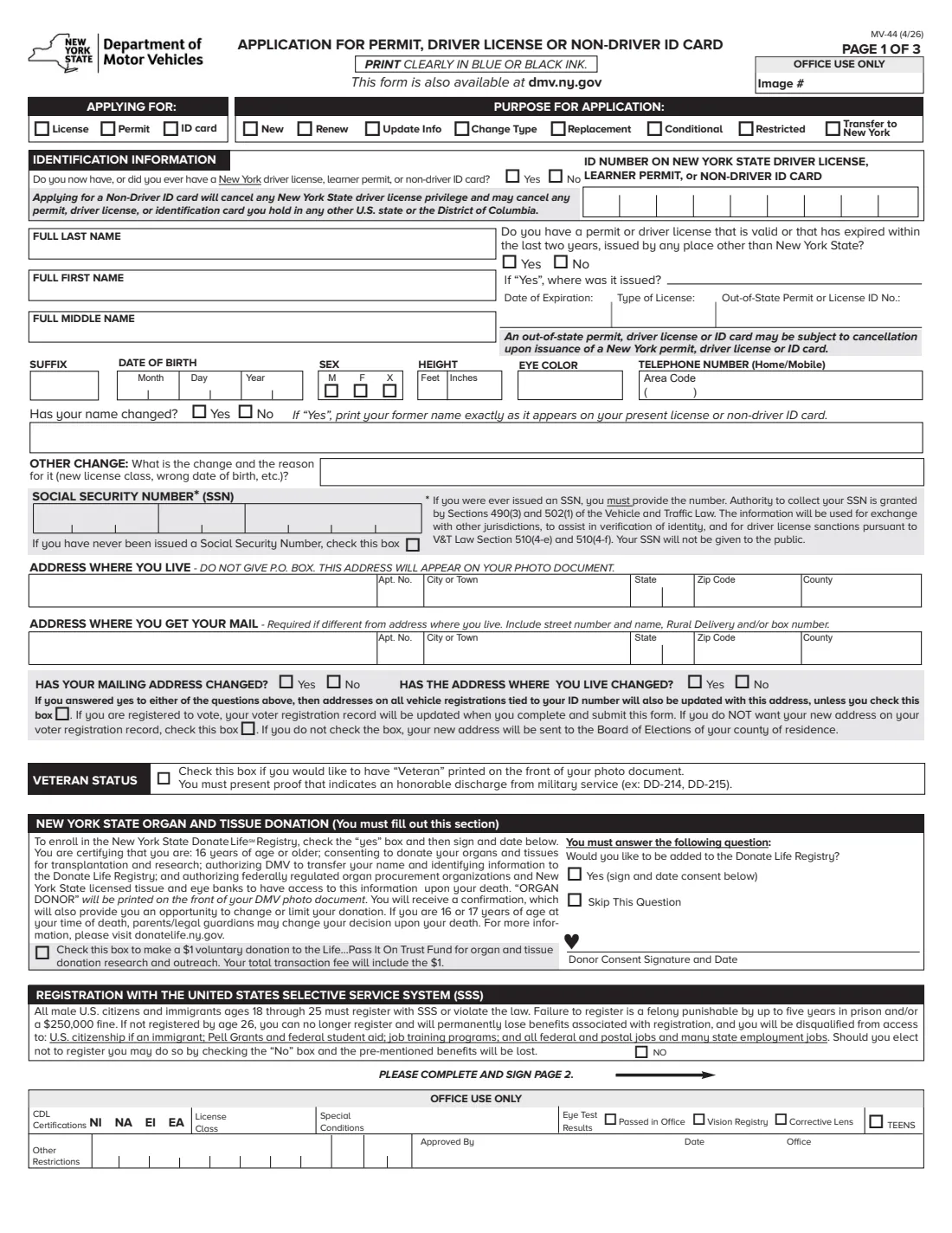
Form MV-44 is the New York State Department of Motor Vehicles' Application for Permit, Driver License or Non-Driver ID Card. It covers new documents, renewals, replacements, a change of type or information, conditional and restricted licenses, and transferring a license from another state to New York. The current edition is MV-44 (4/26).
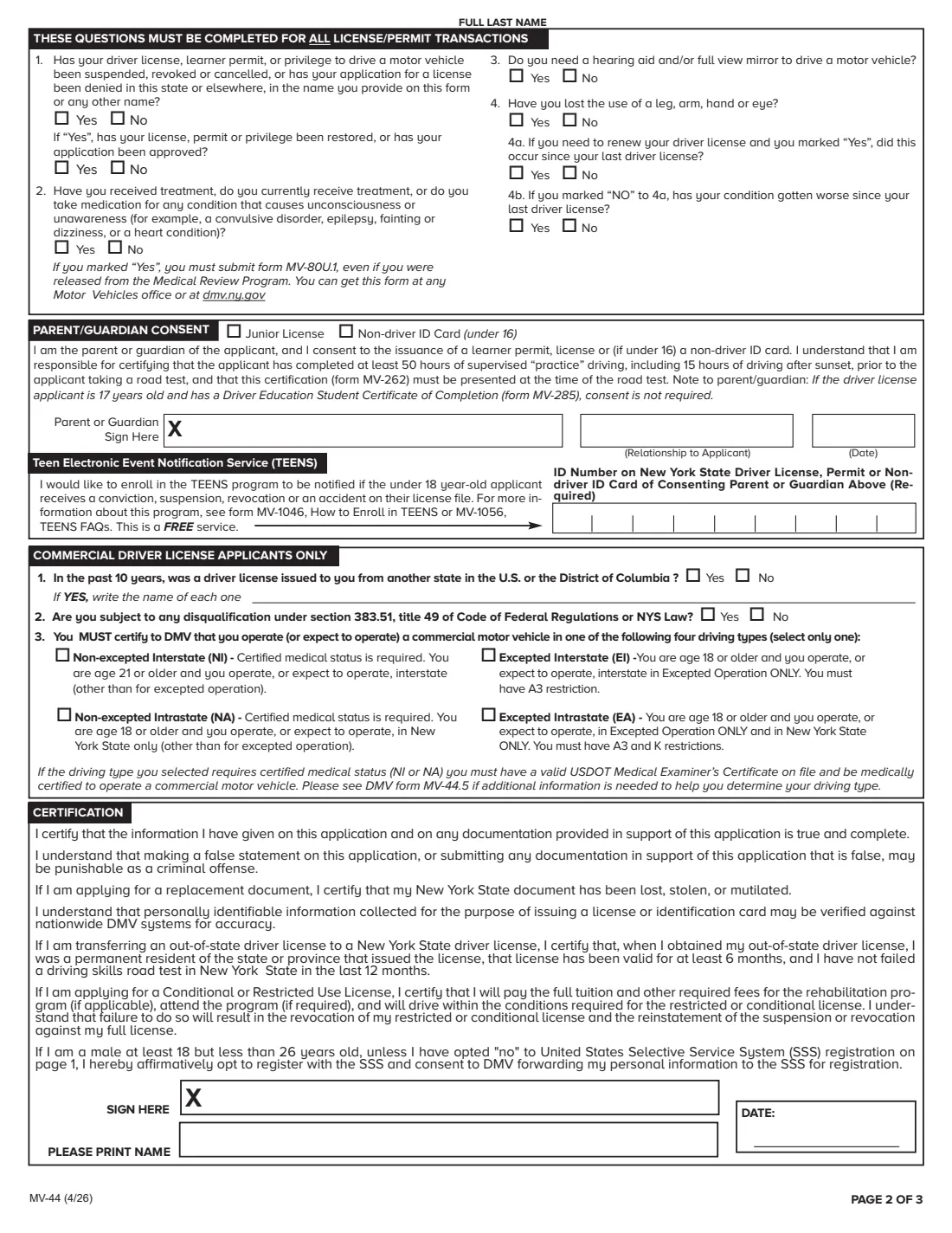
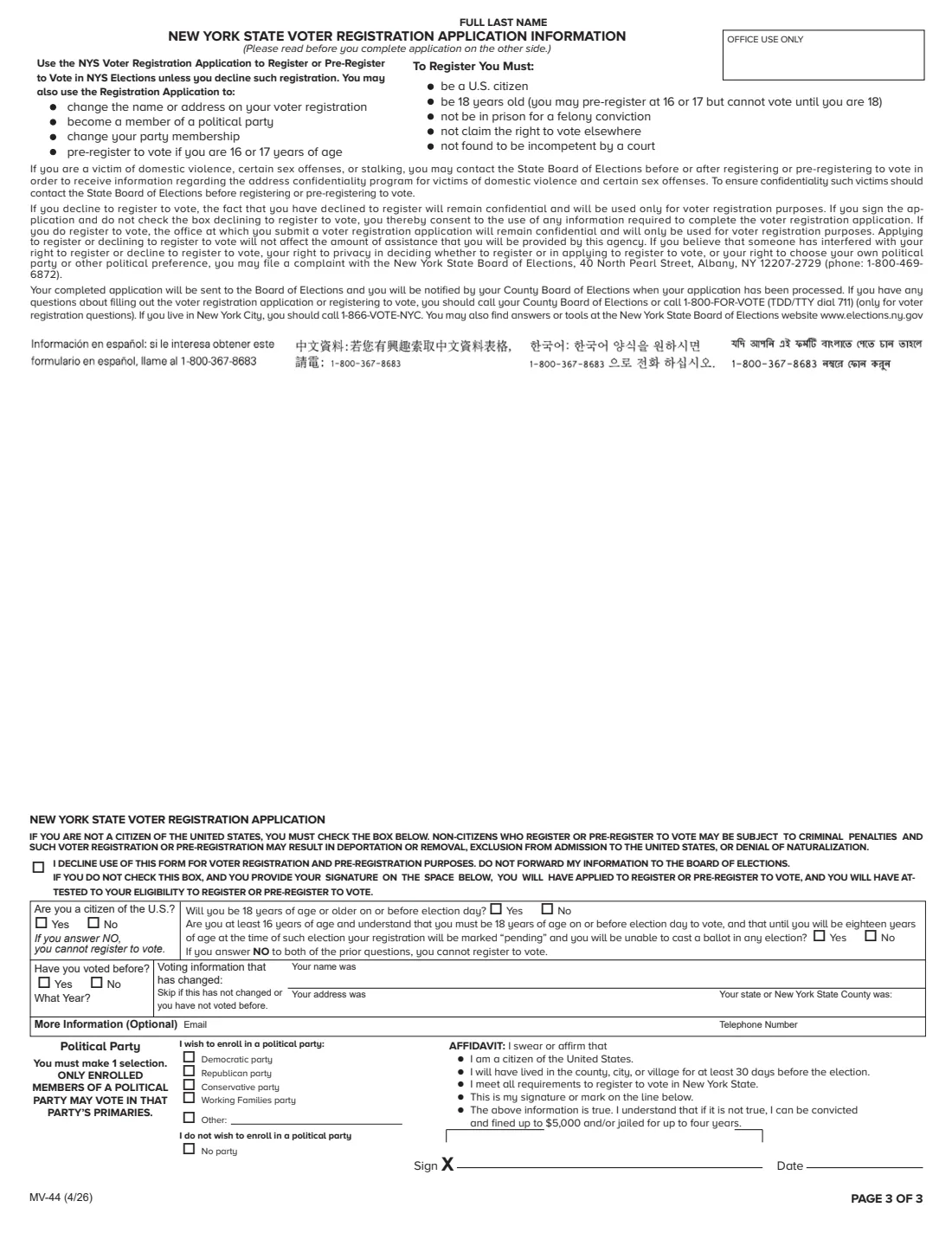
Page 1 has the document and purpose, your identification details, addresses, veteran status, the organ and tissue donation question and Selective Service registration. Page 2 has the medical and history questions every license or permit transaction needs, parent or guardian consent for young applicants, the commercial driver license questions and your certification. Page 3 is a New York State voter registration application, which you can decline.
FileIt lets you fill out the MV-44 online before your DMV visit. It pre-fills your name, date of birth and email from the People records in your vault, splits the date of birth and phone number into their boxes, fills the 9-digit ID and SSN boxes, and repeats your last name at the top of pages 2 and 3. You sign the form at the DMV office, so FileIt doesn't offer e-signature for it. FileIt never submits anything to DMV.
- Who fills it
- Anyone applying for a New York learner permit, driver license or non-driver ID card.
- Where to file
- In person at a DMV office, with your proofs of identity.
- Signatures
- Signed at the DMV office: your certification, parent or guardian consent, donor consent and the voter affidavit.
- Must answer
- The page 2 medical and history questions and the organ and tissue donation question.
- Voter registration
- Page 3 registers or pre-registers you to vote unless you tick the box to decline.
- Edition
- MV-44 (4/26), 3 pages.
Who needs to fill out Form MV-44?
- First-time applicants for a New York learner permit.
- Drivers moving to New York who want to transfer an out-of-state license.
- People who need a non-driver photo ID card.
- License holders renewing, replacing a lost card, or changing their name, class or other details.
- Teens under 18 applying with a parent's or guardian's consent.
- Commercial drivers who must certify their CDL driving type.
When to use Form MV-44
- Before a DMV office visit, so the form is complete and legible when you arrive.
- When you move to New York and transfer your license from another state.
- When your license, permit or ID card is lost, stolen or damaged.
- When your name, address or other details have changed and need updating.
What you need before you start
- Your full name, date of birth, sex, height, eye color and phone number.
- Your New York ID number if you have or ever had a New York license, permit or ID card.
- Your Social Security number, if you were ever issued one.
- Your home address (no PO box) and a mailing address if different.
- Details of any out-of-state license: where it was issued, its type, number and expiration date.
- For a teen applicant: the parent or guardian, their relationship and their New York ID number.
- Proofs of identity, which DMV lists on its document guide.
What’s on Form MV-44
The 2026 edition has 3 pages. FileIt asks for it in 9 parts:
- Applying forApplicant
- Identification informationApplicant
- AddressesApplicant
- Veteran status, organ donation and Selective ServiceApplicant
- Questions for all license and permit transactionsApplicant
- Parent or guardian consentApplicant
- Commercial driver license applicants onlyApplicant
- CertificationApplicant
- New York State voter registration (page 3)Applicant
How to fill out Form MV-44, step by step
1 Applying for and purpose
Choose the document (license, permit or ID card) and the purpose, such as New, Renew, Replacement or Transfer to New York. Applying for a non-driver ID cancels any New York driving privilege.
2 Identification information
Give your New York ID number if you have one, your full name, suffix, date of birth, sex, height, eye color and phone. Answer whether you hold a recent out-of-state license, whether your name has changed (with your former name) and any other change.
3 SSN and addresses
Enter your SSN, or tick the box if you were never issued one. Give the address where you live, a mailing address if different, and whether either has changed. Two boxes let you keep vehicle registrations or your voter record at the old address.
4 Veteran, donation and Selective Service
Choose whether to print 'Veteran' on your card, add a $1 Life Pass It On donation, answer the Donate Life Registry question and, if you wish, opt out of Selective Service registration.
5 Page 2 questions and consent
Answer the questions about suspensions, conditions causing unconsciousness, hearing aids and loss of a limb or eye. A parent or guardian completes the consent block for a young applicant. CDL applicants answer the commercial questions and pick a driving type.
6 Certification and voter registration
Print your name under the certification and sign at the DMV. On page 3, either decline voter registration or answer the citizenship and age questions and choose a party.
Common mistakes to avoid
- Giving a PO box as the address where you live: it appears on your photo document and must be a physical address.
- Skipping the organ and tissue donation question, which the form says you must answer.
- Leaving page 2 unanswered: those questions are required for every license or permit transaction.
- Forgetting the parent or guardian consent for an applicant under 18.
- Leaving page 3 blank when you don't want to register to vote. Tick the decline box instead.
- Answering Yes to the medical condition question without bringing form MV-80U.1.
After you fill it out
Bring the filled form, your proofs of identity and payment to a DMV office, and sign and date it there.
Take the vision test or other tests DMV asks for, if your transaction needs them.
FileIt keeps the filled PDF in your vault. When your license or ID arrives, add it to your vault so FileIt can remind you before it expires.
Fill out Form MV-44 online with FileIt
- Pick the person. Choose someone from People and FileIt fills in their name, date of birth, address and other details it already knows.
- Answer plain-language questions. One part of the form at a time, with the official help text beside each question — 73 fields in all. Your answers save as you go.
- Check the live preview. Watch your answers land on the real New York State Department of Motor Vehicles form, and let FileIt do any worksheet arithmetic.
- Generate the official PDF. FileIt prints your answers into the agency’s own PDF and files it in that person’s folder in your vault.
FileIt fills the form — it never files or submits anything for you. Deliver the finished form to whoever asked for it, the way the form’s instructions say.
Start Form MV-44 now — it’s freeForm MV-44: frequently asked questions
Can I sign Form MV-44 at home?
The form is signed at the DMV office along with your proofs of identity. FileIt leaves the signature lines blank for that reason.
Do I need MV-44 to transfer my out-of-state license?
Yes. Choose 'Transfer to New York' and give the out-of-state license details. The certification covers residency and validity of that license.
Do I have to register to vote with this form?
No. Page 3 is a voter registration application; tick the decline box if you don't want your information sent to the Board of Elections.
What if I have never had a Social Security number?
Tick the box under the SSN field. If you were ever issued one, the form says you must give it.
My teen is applying for a learner permit. What does the parent sign?
The parent or guardian consent block on page 2, with their relationship and their New York ID number. They also certify the 50 hours of supervised practice before the road test.
Can I fill out MV-44 online?
Yes. FileIt fills it out online and prints your answers on the DMV's own PDF, ready to bring to your appointment. FileIt doesn't submit anything to DMV.
Official sources
- Blank form (PDF), published by New York State Department of Motor Vehicles: https://dmv.ny.gov/forms/mv44.pdf
- Official instructions and guidance: https://dmv.ny.gov/forms/mv44.pdf
- Edition shown on this page: MV-44 (4/26) (checked 2026-10-19).
FileIt is not affiliated with or endorsed by New York State Department of Motor Vehicles or any government. This page explains the form in general terms and is not legal, tax or immigration advice. Always read the official instructions, and check that you are using the edition the recipient accepts. Page last reviewed 2026-10-19.