What is Form 8832?
Form 8832, Entity Classification Election, lets an eligible entity choose its classification for federal tax purposes instead of its default classification: an association taxable as a corporation, a partnership (with two or more owners), or an entity disregarded as separate from its single owner. It is used both for a new entity's first classification and to change an existing classification.
Once an entity changes its classification by election, it generally can't change it again by election for 60 months. The election can take effect up to 75 days before it is filed and no more than 12 months after. An entity that missed the deadline may qualify for late election relief under Rev. Proc. 2009-41 in Part II. The current revision is Rev. December 2013; the IRS has since published new mailing addresses, which supplement the instructions.
FileIt walks you through each line, shows Part II only when you ask for late relief, prints the answers into the IRS's own form pages (including names with letters such as ł, ś or ș), and can send the form to each owner or officer for e-signature. Form 8832 is on the IRS list of forms that may be signed electronically.
- Who files
- An eligible entity, such as an LLC or a foreign business entity, that doesn't want its default classification.
- Who signs
- Each owner at the time of filing, or an officer, manager or member authorized to make the election.
- Effective date
- No more than 75 days before, and no more than 12 months after, the date filed.
- Where
- The IRS service center for the entity's state (Kansas City, MO 64999 or Ogden, UT 84201), or Ogden, UT 84201-0023 from a foreign country or U.S. possession.
- Edition
- Rev. December 2013
- Agency
- Internal Revenue Service (IRS), Department of the Treasury
Who needs to fill out Form 8832?
- A single-member LLC that wants to be taxed as a corporation instead of being disregarded.
- A multi-member LLC that wants to be taxed as a corporation instead of a partnership.
- A foreign business entity that wants a classification other than its foreign default, for example a disregarded entity of its U.S. owner.
- An entity that missed the filing deadline and is asking for late election relief under Rev. Proc. 2009-41.
- Not for: an entity happy with its default classification (don't file), or an entity electing S corporation status, which generally files Form 2553 instead.
When to use Form 8832
- When a new eligible entity wants a classification other than its default from the start.
- When an existing entity wants to change its classification, provided it hasn't changed by election in the past 60 months (with the exception the form describes).
- Within 3 years and 75 days of the requested effective date, for late election relief under Rev. Proc. 2009-41.
What you need before you start
- The entity's name, EIN and address. Don't write "Applied For" instead of an EIN.
- Whether this is a first classification or a change, and any election in the past 60 months.
- The number of owners and, for a single owner, its name and identifying number.
- The parent corporation's name and EIN, if the owners file a consolidated return.
- The classification chosen and, for a foreign entity, its country of organization.
- The effective date wanted, a contact person and phone number.
- The title of each person signing, and for late relief the reason the election wasn't filed on time.
What’s on Form 8832
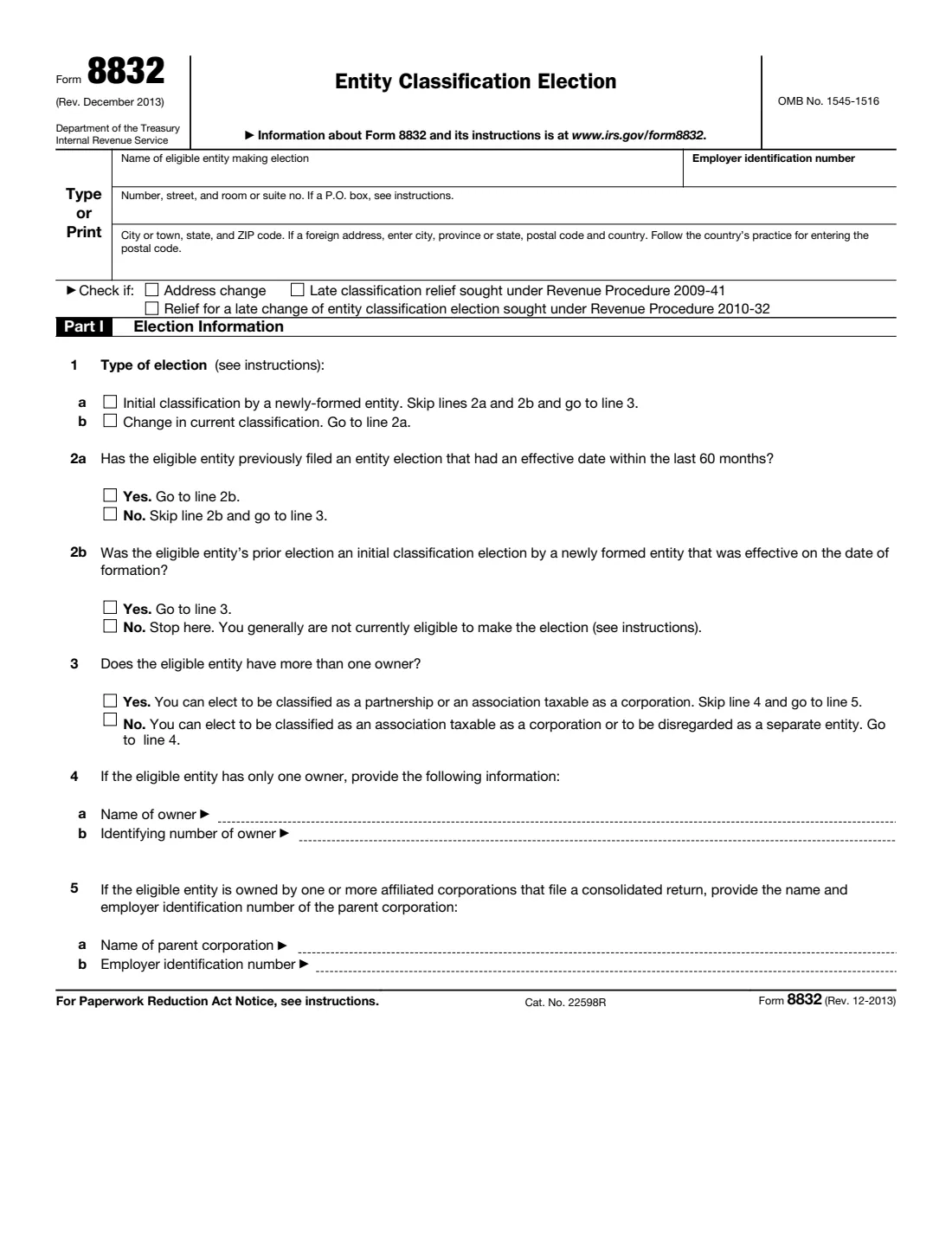
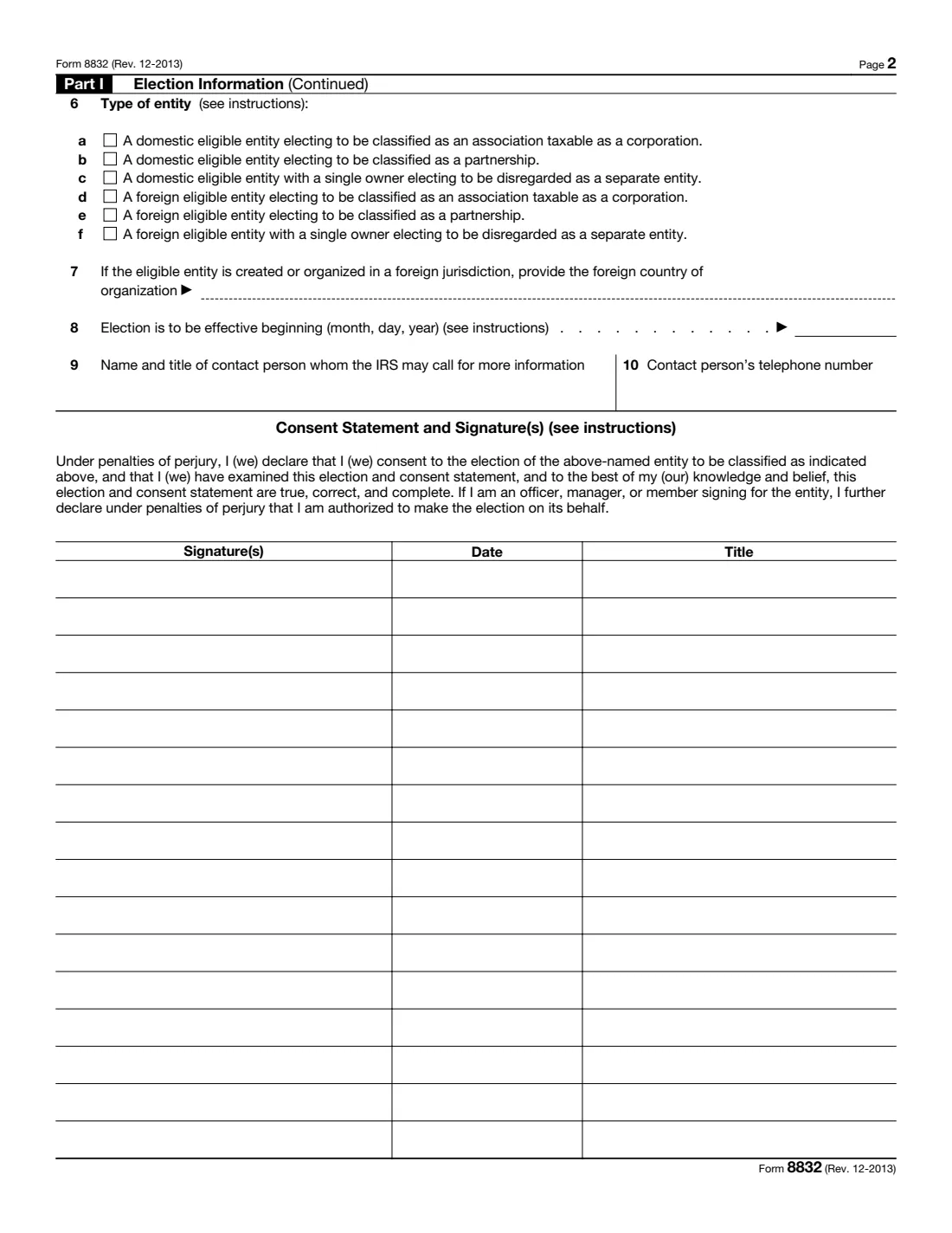
The 2013 edition has 3 pages. FileIt asks for it in 15 parts, and it is signed by Signer 1 (owner, officer, manager or member) and Signer 2 (owner, officer, manager or member) and Signer 3 (owner, officer, manager or member) and Signer 4 (owner, officer, manager or member) and Signer 5 (owner, officer, manager or member) and Signer 6 (owner, officer, manager or member) and Part ii signer 1 (authorized representative) and Part ii signer 2 (affected person) and Part ii signer 3 (affected person) and Part ii signer 4 (affected person) and Part ii signer 5 (affected person) and Part ii signer 6 (affected person):
- The eligible entitySigner 1 (owner, officer, manager or member)
- Part I: Election information (lines 1-5)Signer 1 (owner, officer, manager or member)
- Part I: Classification and effective date (lines 6-10)Signer 1 (owner, officer, manager or member)
- Consent signature 1 (first signer)Signer 1 (owner, officer, manager or member)
- Consent signature 2Signer 2 (owner, officer, manager or member)
- Consent signature 3Signer 3 (owner, officer, manager or member)
- Consent signature 4Signer 4 (owner, officer, manager or member)
- Consent signature 5Signer 5 (owner, officer, manager or member)
- Consent signature 6Signer 6 (owner, officer, manager or member)
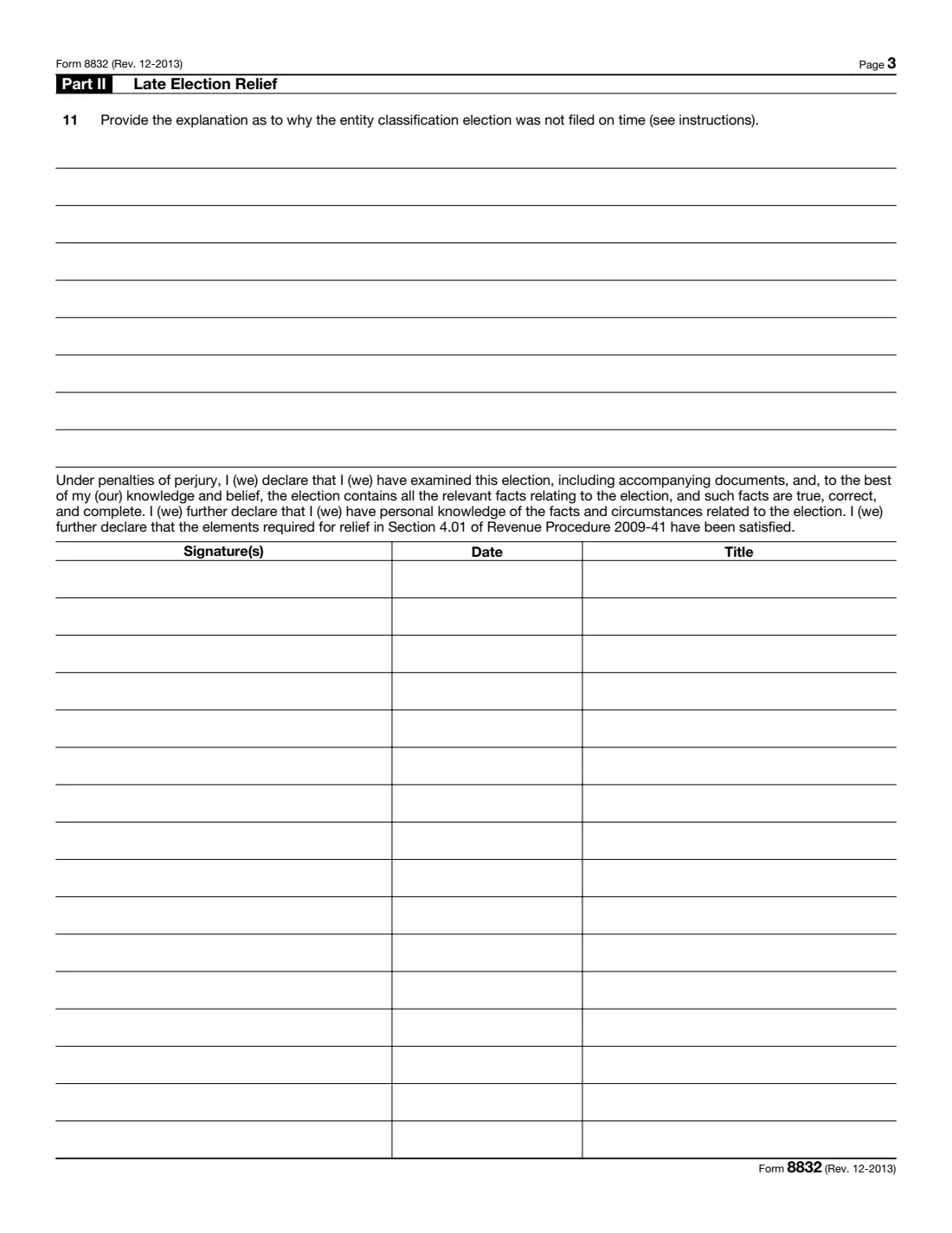
- Part II: Late election relief (Rev. Proc. 2009-41)Part ii signer 1 (authorized representative)
- Part II signature 2 (affected person)Part ii signer 2 (affected person)
- Part II signature 3 (affected person)Part ii signer 3 (affected person)
- Part II signature 4 (affected person)Part ii signer 4 (affected person)
- Part II signature 5 (affected person)Part ii signer 5 (affected person)
- Part II signature 6 (affected person)Part ii signer 6 (affected person)
How to fill out Form 8832, step by step
1 Heading: The entity
Enter the entity's name, EIN and address. Tick Address change if it changed, and Relief for a late change under Rev. Proc. 2010-32 only if that applies.
2 Lines 1-2: Type of election and the 60-month rule
Line 1a is a new entity's first classification; 1b a change. For a change, line 2a asks about an election effective in the last 60 months; if there was one and it wasn't a newly formed entity's initial election (2b No), the form says to stop.
3 Lines 3-5: Owners
Line 3 asks whether the entity has more than one owner. A single owner is named on line 4 with its SSN, ITIN or EIN. Line 5 is the parent corporation if the owners file a consolidated return.
4 Lines 6-7: Classification
Choose one of a-f: corporation, partnership or disregarded entity, domestic or foreign. A foreign entity gives its country of organization on line 7.
5 Lines 8-10: Effective date and contact
Enter the effective date (or leave it blank for the filing date), then the contact person's name, title and phone number.
6 Consent statement and signatures
Each owner, or an authorized officer, manager or member, signs a row with the date and their title.
7 Part II: Late election relief
Only when asking for relief under Rev. Proc. 2009-41: explain on line 11 why the election wasn't filed on time, and have an authorized representative and each affected person sign the declaration.
Common mistakes to avoid
- Filing when the entity wants its default classification anyway.
- Writing "Applied For" instead of an EIN.
- Choosing a classification the entity can't have: a partnership needs two or more owners, a disregarded entity exactly one.
- Changing classification again within 60 months of an earlier election.
- Entering an effective date more than 75 days before the filing date without asking for late relief.
- Missing a signature from an owner who had to consent.
- Using the old mailing address: the IRS has published new addresses for Form 8832.
- Forgetting to attach a copy to the entity's (or owners') federal tax return for the year of the election.
After you fill it out
Have every required person sign and date their row, by hand or with FileIt's e-signature, and mail the form to the IRS service center for the entity's state, or to Ogden, UT 84201-0023 from a foreign country or U.S. possession.
Attach a copy of Form 8832 to the entity's federal tax or information return for the year of the election (or to the owners' returns if the entity files none). The instructions say not to sign the copy you attach.
Keep a copy of the filed form, and any IRS letter about the election, in your FileIt vault.
Fill out Form 8832 online with FileIt
- Pick the person. Choose someone from People and FileIt fills in their name, date of birth, address and other details it already knows.
- Answer plain-language questions. One part of the form at a time, with the official help text beside each question — 42 fields in all. Your answers save as you go.
- Check the live preview. Watch your answers land on the real Internal Revenue Service (IRS) form, and let FileIt do any worksheet arithmetic.
- Generate the official PDF. FileIt prints your answers into the agency’s own PDF and files it in that person’s folder in your vault. Sign it, or send it for e-signature.
FileIt fills the form — it never files or submits anything for you. Deliver the finished form to whoever asked for it, the way the form’s instructions say.
Start Form 8832 now — it’s freeForm 8832: frequently asked questions
Can I fill out Form 8832 online?
Yes. FileIt asks each line in plain language and prints the answers into the official IRS form pages, ready to sign and mail.
Can Form 8832 be signed electronically?
Yes. Form 8832 is on the IRS list of forms that may be signed with an electronic or digital signature. FileIt can send it to each signer for e-signature, or you can sign the printed PDF by hand.
Do I file Form 8832 to elect S corporation status?
Generally no: an eligible entity electing S corporation status files Form 2553, which also covers the election to be taxed as a corporation.
When does the election take effect?
On the date entered on line 8, or the filing date if none. It can't be more than 75 days before the filing date or more than 12 months after it.
Can we change classification again later?
Generally not within 60 months of the effective date of an election that changed the classification, with limited exceptions described in the instructions.
Where do I mail Form 8832?
To the IRS service center for the entity's state: Kansas City, MO 64999 for one group of states and Ogden, UT 84201 for the other, as listed on the IRS update in the form file; Ogden, UT 84201-0023 from a foreign country or U.S. possession.
Official sources
- Blank form (PDF), published by Internal Revenue Service (IRS): https://www.irs.gov/pub/irs-pdf/f8832.pdf
- Official instructions and guidance: https://www.irs.gov/forms-pubs/about-form-8832
- Edition shown on this page: Rev. December 2013 (checked 2026-10-25).
FileIt is not affiliated with or endorsed by Internal Revenue Service (IRS) or any government. This page explains the form in general terms and is not legal, tax or immigration advice. Always read the official instructions, and check that you are using the edition the recipient accepts. Page last reviewed 2026-10-25.