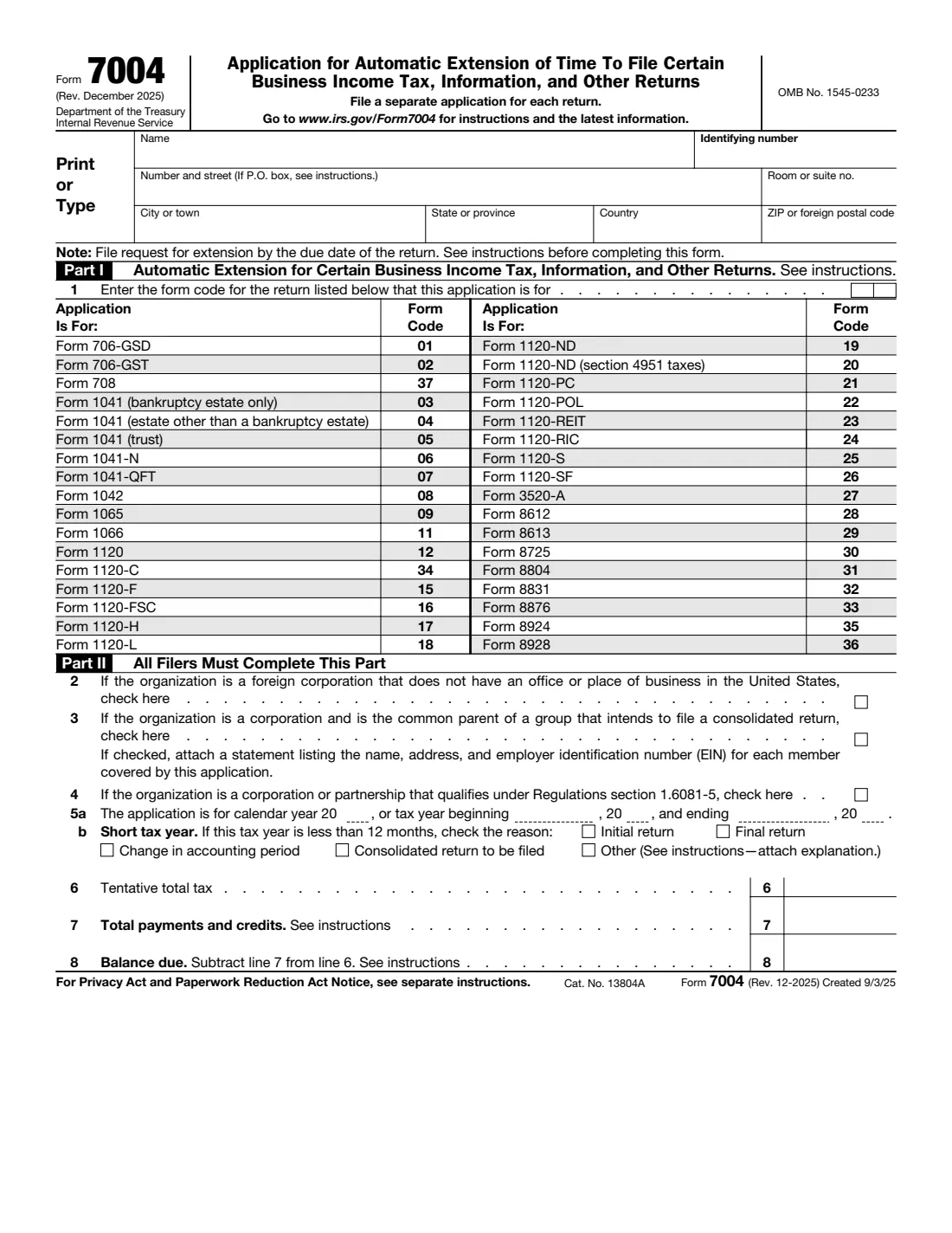
What is Form 7004?
Form 7004 is how a business asks the IRS for the automatic extension of time to file its return: Form 1120 for C corporations, 1120-S for S corporations, 1065 for partnerships, 1041 for estates and trusts, and the other returns listed on the form, such as 1042, 1120-F, 3520-A and 8804. The extension is granted if the form is complete, a proper estimate of the tax is made, it is filed by the due date of the return, and any tax due is paid.
The automatic extension is generally 6 months. The instructions list the exceptions: an estate (other than a bankruptcy estate) or trust filing Form 1041 gets 5½ months, and a C corporation whose tax year ends June 30 and began before January 1, 2026 gets 7 months (6 months for Form 1120-POL). The IRS no longer sends an approval notice and writes only if the request is disallowed. There's no signature line: the instructions say no signature is required.
FileIt walks you through the form, prefills the business name from your vault, picks the right two-digit form code, prints the tax year dates in the form's split boxes and works out the balance due on line 8. The result is the IRS's own PDF, saved in your vault. You file it yourself, on paper or by e-filing through tax software; FileIt never submits anything to the IRS.
- Who fills it
- Corporations, partnerships, estates, trusts and other filers of the returns listed on the form.
- Sent to
- The IRS service center for the return type and location in the instructions' Where To File table, or e-filed.
- When
- On or before the due date of the return the extension is for.
- Signatures
- None. The instructions say no signature is required.
- Edition
- Rev. December 2025
- Agency
- Internal Revenue Service (IRS), Department of the Treasury
Who needs to fill out Form 7004?
- C corporations filing Form 1120 and S corporations filing Form 1120-S that can't file on time.
- Partnerships filing Form 1065 and REMICs filing Form 1066.
- Estates and trusts filing Form 1041, including bankruptcy estates.
- Foreign corporations (Form 1120-F), withholding agents (Form 1042), foreign trusts with a U.S. owner (Form 3520-A) and partnerships filing Form 8804.
- Filers of the other returns in the table, such as Forms 706-GS(D), 706-GS(T), 708, 1120-H, 1120-REIT, 8612, 8613, 8725, 8831, 8876, 8924 and 8928.
- Not individuals filing Form 1040 (use Form 4868), and not trusts filing Form 1041-A (use Form 8868).
When to use Form 7004
- When the business won't be able to file its return by the regular due date. File Form 7004 on or before that date.
- Once for each return: the instructions say no blanket requests, so file a separate Form 7004 for each return.
- For a consolidated return, by the common parent or agent of the group, with a list of every member.
- For a corporation or partnership that qualifies under Regulations section 1.6081-5 and needs more time beyond the 15th day of the 6th month, check line 4 to ask for the additional extension.
What you need before you start
- The business's name exactly as on last year's return, and its EIN (or SSN where the return uses one).
- The mailing address, including any suite or room number.
- The two-digit form code for the return, from the table on the form.
- The tax year: the calendar year, or the beginning and ending dates of a fiscal or short year, and the reason for a short year.
- An estimate of the total tax for the year (line 6) and the payments and refundable credits already made (line 7).
- For a consolidated return, a list of each member's name, address and EIN to attach.
What’s on Form 7004
The 2025 edition has 1 page. FileIt asks for it in 3 parts:
- Name, identifying number and addressFiler (the business, estate or trust)
- Part I: The return this extension is forFiler (the business, estate or trust)
- Part II: All filersFiler (the business, estate or trust)
How to fill out Form 7004, step by step
1 Name, identifying number and address
Enter the name as it appeared on the previous year's return; if the name or number doesn't match the IRS records, the extension isn't valid. Include the suite or room number after the street address, and use a P.O. box only if the post office doesn't deliver to the street address. For a foreign address, fill in the city, province or state, country (not abbreviated) and postal code boxes. A new address on Form 7004 won't update the IRS's records: use Form 8822-B for that.
2 Part I, line 1: Form code
Enter the two-digit code of the return the extension is for, from the table printed on the form: for example 12 for Form 1120, 25 for Form 1120-S, 09 for Form 1065 and 05 for a trust's Form 1041. An association electing to file Form 1120-H uses the form type originally assigned to it.
3 Part II, lines 2 to 4: Special situations
Line 2 is for a foreign corporation without an office or place of business in the United States; it must file Form 7004 by the 15th day of the 6th month after its tax year ends. Line 3 is for the common parent of a group that will file a consolidated return, which attaches a list of members. Line 4 is for a corporation or partnership that already has until the 15th day of the 6th month under Regulations section 1.6081-5 and needs an additional extension to file (3 months for partnerships and S corporations, 4 months for C corporations and Form 1120-POL filers).
4 Line 5a: Tax year
Enter the calendar year, or the beginning and ending dates if the business doesn't use the calendar year.
5 Line 5b: Short tax year
If the tax year is less than 12 months, check the reason: initial return, final return, change in accounting period, consolidated return to be filed, or other (attach a statement explaining it). A change in accounting period generally needs IRS approval first, through Form 1128.
6 Lines 6 to 8: Tax and balance due
Line 6 is the total tax, including any nonrefundable credits, the entity expects to owe; enter 0 if none. Line 7 is the total of payments and refundable credits. Line 8, the balance due, is line 6 minus line 7. Form 7004 doesn't extend the time to pay, so pay the line 8 amount by the original due date; most entities pay by electronic funds transfer, generally through EFTPS.
Common mistakes to avoid
- Thinking it extends the time to pay. It only extends the time to file; interest runs on tax not paid by the regular due date.
- Using a name or EIN that doesn't match the IRS records, which makes the extension invalid.
- Asking for several returns on one form. Each return needs its own Form 7004.
- Entering the wrong form code, so the extension applies to a different return.
- Leaving lines 6 to 8 blank instead of entering 0 when no tax is expected.
- Forgetting the member list for a consolidated return (line 3), or the explanation for a short year marked "Other".
- Using Form 7004 for Form 1040 (that's Form 4868) or Form 1041-A (that's Form 8868).
- Expecting the new address on Form 7004 to update the IRS's records.
After you fill it out
File it by the due date of the return: e-file it with tax software for most returns, or mail the paper form to the IRS address the instructions give for your return type and location. Forms 8612, 8613, 8725, 8831, 8876 and 706-GS(D) can't be filed electronically. No signature is needed.
Pay any balance due by the original due date, usually by electronic funds transfer. The instructions warn that if you file Form 7004 on paper and the return electronically, the return may be processed before the extension is granted, which can cause a penalty notice.
FileIt keeps the finished PDF in your vault so you have a record of exactly what you sent. File the return itself by the extended due date.
Fill out Form 7004 online with FileIt
- Pick the person. Choose someone from People and FileIt fills in their name, date of birth, address and other details it already knows.
- Answer plain-language questions. One part of the form at a time, with the official help text beside each question — 23 fields in all. Your answers save as you go.
- Check the live preview. Watch your answers land on the real Internal Revenue Service (IRS) form, and let FileIt do any worksheet arithmetic.
- Generate the official PDF. FileIt prints your answers into the agency’s own PDF and files it in that person’s folder in your vault.
FileIt fills the form — it never files or submits anything for you. Deliver the finished form to whoever asked for it, the way the form’s instructions say.
Start Form 7004 now — it’s freeForm 7004: frequently asked questions
How long is the Form 7004 extension?
Generally 6 months. A Form 1041 estate (other than a bankruptcy estate) or trust gets 5½ months, and a C corporation with a tax year ending June 30 that began before January 1, 2026 gets 7 months (6 for Form 1120-POL).
Does Form 7004 extend the time to pay?
No. Pay the balance due on line 8 by the original due date. Interest is charged on any tax not paid by then, even with an extension, and a late payment penalty may apply.
Does Form 7004 need a signature?
No. The instructions say no signature is required on this form.
Will the IRS confirm my extension?
No. The IRS no longer sends an approval notice; it writes only if the request is disallowed.
Can I file one Form 7004 for several returns?
No. File a separate Form 7004 for each return. The extension applies only to the return identified on line 1.
Can I e-file Form 7004?
Yes, for most returns. Forms 8612, 8613, 8725, 8831, 8876 and 706-GS(D) can't be filed electronically; send those on paper.
Is Form 7004 for individuals?
No. Individuals filing Form 1040 use Form 4868, and a trust filing Form 1041-A uses Form 8868.
Can I fill out Form 7004 online with FileIt?
Yes. FileIt asks each question in plain English and prints your answers into the official IRS PDF, which you then file yourself. FileIt never files anything with the IRS.
Official sources
- Blank form (PDF), published by Internal Revenue Service (IRS): https://www.irs.gov/pub/irs-pdf/f7004.pdf
- Official instructions and guidance: https://www.irs.gov/forms-pubs/about-form-7004
- Edition shown on this page: Rev. December 2025 (created 9/3/25) (checked 2026-10-25).
FileIt is not affiliated with or endorsed by Internal Revenue Service (IRS) or any government. This page explains the form in general terms and is not legal, tax or immigration advice. Always read the official instructions, and check that you are using the edition the recipient accepts. Page last reviewed 2026-10-25.