What is NSSF voluntary member registration?
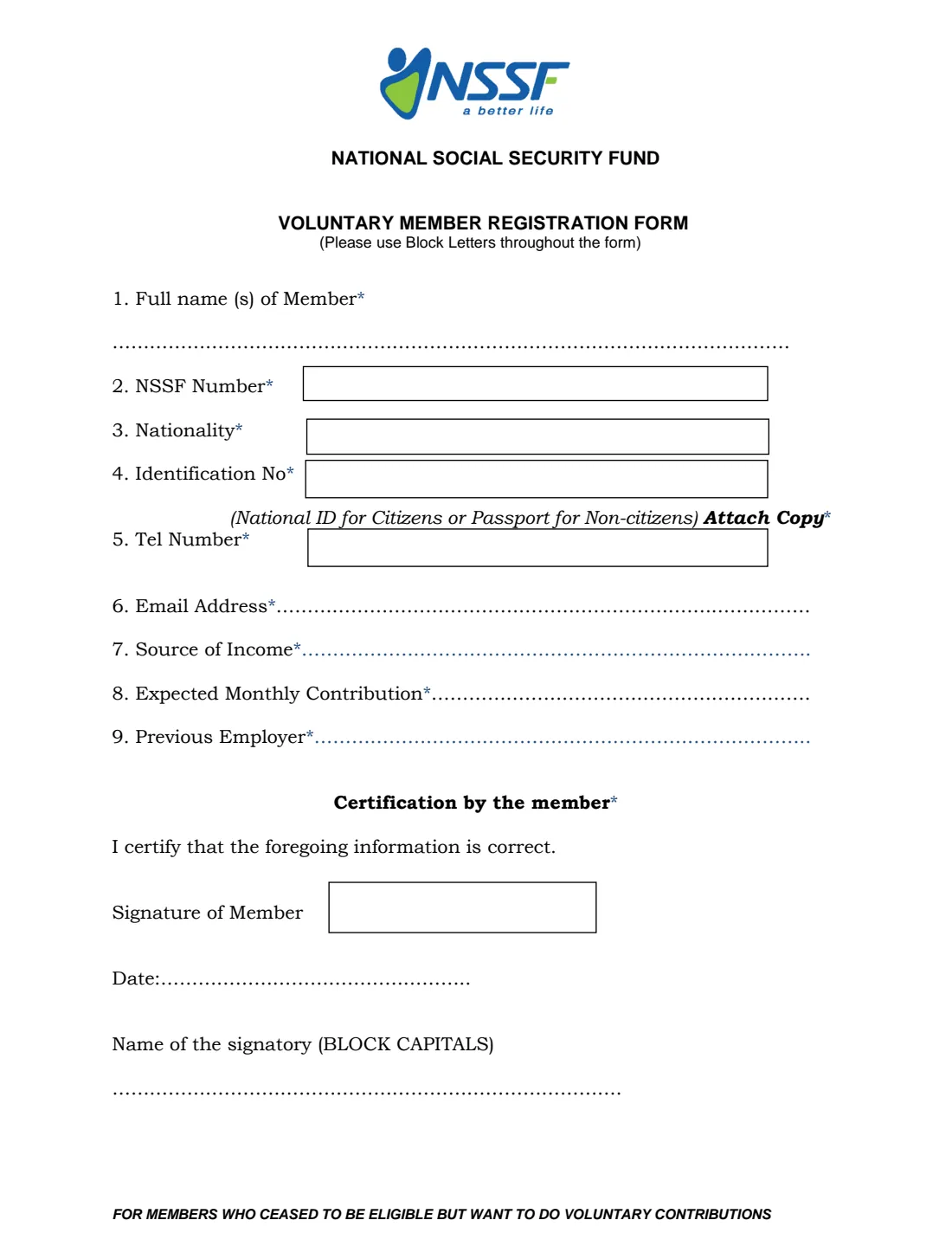
The Voluntary Member Registration Form is the National Social Security Fund (NSSF) of Uganda's paper form for members who want to carry on contributing on their own. The footer printed on the form says who it is for: members who have ceased to be eligible, usually because they have left an employer that paid NSSF contributions for them, but want to make voluntary contributions. You already have an NSSF number, and this form links your voluntary savings to it.
It is a short form with nine questions and a certification. It asks for your NSSF number, your National ID or passport number, how you earn a living now, the employer that last contributed for you, and how much you expect to save each month. You sign it by hand and hand it in at an NSSF branch with a copy of your identification document.
FileIt walks you through each question, pre-fills your name and email from the People in your FileIt vault, checks the shape of a Ugandan National Identification Number, and prints your answers in block capitals into NSSF's own PDF, as the form asks. The finished form is saved in your vault. You print it, sign it and take it to the branch yourself. FileIt never sends anything to NSSF.
- Who fills it
- An existing NSSF member who is no longer contributing through an employer
- Given to
- An NSSF Uganda branch, with a copy of your National ID or passport
- When
- When you want to start voluntary contributions, for example after leaving a job or becoming self-employed
- Signatures
- The member signs by hand in the signature box
- Length
- One page, questions 1 to 9 plus a certification
- Edition
- No edition date printed on the form
Who needs to fill out NSSF voluntary member registration?
- NSSF members who have left formal employment and want to keep adding to their savings.
- People who have become self-employed, such as traders, farmers, transport operators or tailors, after years of employer contributions.
- Members between jobs who do not want gaps in their savings history.
- Non-citizens who are NSSF members and want to continue saving. They give a passport number instead of a National ID number.
- Anyone helping a relative who has retired from a job early to keep their NSSF account active.
When to use NSSF voluntary member registration
- Soon after your last employer stops paying NSSF contributions for you and you want to carry on saving.
- When you start earning in a new way, for example through your own business, and want to put part of it aside regularly.
- When NSSF asks you to register as a voluntary member before it accepts voluntary contributions on your account.
- Whenever your details on the form have changed and NSSF asks you for a fresh registration form.
What you need before you start
- Your NSSF number, from an NSSF statement, your membership card or the NSSF app.
- Your National ID (citizens) or passport (non-citizens), plus a photocopy to attach.
- A working phone number and email address.
- A short description of your current source of income.
- The name of the last employer that paid NSSF contributions for you.
- An idea of how much you plan to contribute each month, in Uganda shillings.
What’s on NSSF voluntary member registration
The 2026 edition has 1 page. FileIt asks for it in 2 parts:
- Member details (questions 1 to 9)Member
- Certification by the memberMember
How to fill out NSSF voluntary member registration, step by step
1 1. Full name(s) of member
Write all your names exactly as they appear on your National ID or passport. The form asks for block letters throughout, so FileIt prints names in capitals.
If your names are in a different order on different documents, use the order on the document you are attaching.
2 2. NSSF number
This is your existing member number. Voluntary registration is for people who are already members, so you should have one from your time in employment. Check an old statement or the NSSF app if you are not sure.
3 3. Nationality
Your nationality, for example Ugandan. Non-citizens write their own nationality and give a passport number in question 4.
4 4. Identification number
Citizens give their National Identification Number (NIN). It has 14 letters and digits and starts with CM or CF. Non-citizens give their passport number. Under the box the form reminds you to attach a copy, so bring a photocopy of the ID or passport page when you hand the form in.
FileIt asks which document you are using so it can check the number's format, but only the number itself prints on the form.
5 5 and 6. Telephone number and email address
NSSF uses these to contact you about your account and contributions. Give a number you actually use, such as your mobile number.
6 7. Source of income
Describe briefly how you earn a living now, for example 'self-employed, retail shop' or 'poultry farming'. There is no list to choose from, so a short phrase is enough.
7 8. Expected monthly contribution
How much you expect to save with NSSF each month. The form has a dotted line with no currency printed, so FileIt prints the amount as 'UGX' followed by the figure. This is your own estimate, not a fixed commitment printed on the form.
8 9. Previous employer
The name of the employer that last paid NSSF contributions for you. It helps NSSF match your voluntary account to your existing contribution history.
9 Certification by the member
You certify that the information is correct, sign in the box, date the form and write your name in block capitals. FileIt prints the date and your name, and leaves the signature box empty for you to sign in ink.
Common mistakes to avoid
- Leaving out the NSSF number. Every question marked with an asterisk is required, and this form is for existing members.
- Forgetting the copy of your National ID or passport. The form says 'Attach Copy' beside question 4.
- Writing a NIN with missing characters. A Ugandan NIN has 14 letters and digits.
- Using a nickname or a different name order from the one on your ID.
- Leaving the expected monthly contribution blank or writing zero.
- Printing the form but forgetting to sign it before going to the branch.
- Giving an email address or phone number you no longer check.
After you fill it out
Print the completed form from your FileIt vault and sign it in the 'Signature of Member' box. The date and your name in capitals are already printed below it.
Take the signed form and a photocopy of your National ID or passport to an NSSF branch. FileIt does not submit the form. NSSF staff at the branch will tell you how voluntary contributions are paid into your account.
Keep the signed copy in your FileIt vault alongside your NSSF statements. If your phone number, email or other details change later, contact NSSF to update them.
Fill out NSSF voluntary member registration online with FileIt
- Pick the person. Choose someone from People and FileIt fills in their name, date of birth, address and other details it already knows.
- Answer plain-language questions. One part of the form at a time, with the official help text beside each question — 12 fields in all. Your answers save as you go.
- Check the live preview. Watch your answers land on the real National Social Security Fund, Uganda (NSSF) form, and let FileIt do any worksheet arithmetic.
- Generate the official PDF. FileIt prints your answers into the agency’s own PDF and files it in that person’s folder in your vault.
FileIt fills the form — it never files or submits anything for you. Deliver the finished form to whoever asked for it, the way the form’s instructions say.
Start NSSF voluntary member registration now — it’s freeNSSF voluntary member registration: frequently asked questions
Who is the NSSF voluntary member registration form for?
The form's own footer says it is for members who have ceased to be eligible but want to make voluntary contributions. In practice that means people who already have an NSSF number from past employment and now want to keep saving on their own.
Do I need an NSSF number to use this form?
Yes. Question 2 asks for your NSSF number and is marked as required. The form is designed for existing members moving to voluntary contributions.
Can I fill in the NSSF voluntary registration form online?
You can fill it in online with FileIt. It guides you through each question and prints your answers into NSSF's official PDF, which is saved in your vault. You still print it, sign it by hand and hand it in yourself, because FileIt does not send forms to NSSF.
Where do I submit the form?
Hand the signed form in at an NSSF branch, together with a copy of your National ID (citizens) or passport (non-citizens).
What ID do non-citizens use?
The form asks for a National ID for citizens or a passport for non-citizens. Non-citizens write their passport number in question 4 and attach a copy of the passport.
How much must I contribute each month?
The form doesn't set an amount. It only asks how much you expect to contribute each month. Ask NSSF about any rules on minimum amounts or how often you can pay.
Why does FileIt print everything in capitals?
The form asks for block letters throughout. FileIt prints names and other text in capitals so the form is easy for NSSF staff to read.
Can I sign the form electronically?
The form has a signature box for the member to sign, and it is handed in at a branch, so sign the printed form by hand.
Official sources
- Blank form (PDF), published by National Social Security Fund, Uganda (NSSF): https://www.nssfug.org/site/assets/files/1527/registration_member.pdf
- Official instructions and guidance: https://www.nssfug.org/media-center/legal/the-nssf-voluntary-contributions-and-benefits-regulations-2024/
- Edition shown on this page: No edition printed (file dated July 2018) (checked 2026-09-26).
FileIt is not affiliated with or endorsed by National Social Security Fund, Uganda (NSSF) or any government. This page explains the form in general terms and is not legal, tax or immigration advice. Always read the official instructions, and check that you are using the edition the recipient accepts. Page last reviewed 2026-09-26.