What is PIT-3 pension and benefit tax statements?
PIT-3 (Oświadczenia / wnioski dla celów obliczania przez organ rentowy miesięcznych zaliczek na podatek dochodowy od osób fizycznych) is the pensioner's counterpart of the PIT-2 employees give their employer. You hand it to the body that pays you — the organ rentowy, usually ZUS or KRUS — and it tells that body how to calculate the income tax it deducts each month. It isn't a tax return and it doesn't go to the tax office.
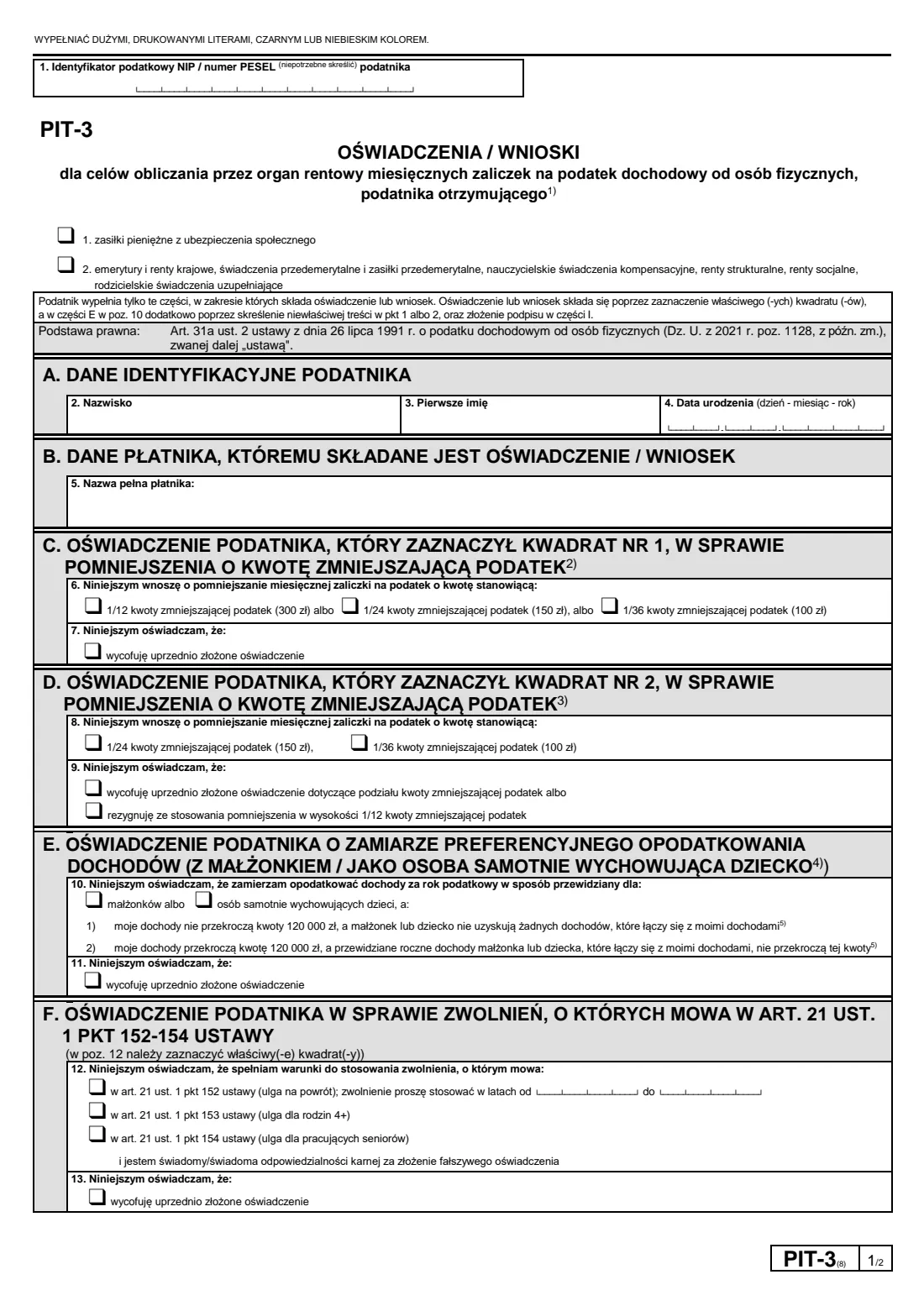
At the top you say what you receive: social insurance cash benefits such as sickness or maternity benefit (box 1), or a pension, disability pension, pre-retirement benefit or similar payment (box 2). The parts that follow let you set or split the monthly share of the tax-reducing amount, say you plan to be taxed jointly with a spouse or as a single parent, claim the return, 4+ family or working-senior exemptions, ask for the relief for young people, or ask for no advances in a year when you expect income within 30 000 zł.
FileIt takes you through each part in plain English, fills in your name and date of birth from the People in your vault, checks your PESEL or NIP and that your PESEL matches your date of birth, and prints your answers in capitals onto the Ministry's own PIT-3(8) PDF. It also crosses out the words the form tells you to strike. The finished PDF is saved in your vault for you to sign and hand over.
- Who fills it
- A taxpayer receiving a Polish pension, disability pension or social insurance cash benefit
- Given to
- The paying body (organ rentowy), such as ZUS or KRUS — not the tax office
- When
- When you start receiving the payment, or whenever you want to change or withdraw an earlier statement
- Signatures
- The taxpayer signs and dates part I
- Edition
- PIT-3(8)
- Pages
- 2 (the second half of page 2 holds the explanations)
Who needs to fill out PIT-3 pension and benefit tax statements?
- Pensioners who also work or have another pension and want ZUS or KRUS to apply only 1/24 or 1/36 of the tax-reducing amount, so the total across all payers stays within 1/12.
- Pensioners who would rather the paying body didn't apply the tax-reducing amount at all, for example because another payer already applies it in full.
- People receiving sickness, maternity or other social insurance cash benefits who want the paying body to reduce their tax advances by part of the tax-reducing amount.
- Recipients who plan to file jointly with a spouse, or as a single parent, and want their advances calculated with that in mind.
- People who qualify for the return relief, the relief for families with four or more children, or the working seniors' relief on payments they receive.
- Anyone who expects their income on the tax scale to stay within 30 000 zł this year and wants no advances deducted.
When to use PIT-3 pension and benefit tax statements
- When you start receiving a pension or benefit and want the payer to know your situation from the start.
- When something changes — a new job alongside your pension, a second pension, marriage, a move back to Poland — because the form says you must change or withdraw a statement when circumstances affecting your advances change.
- When you want to withdraw an earlier statement or request: each part has its own 'withdraw' box.
- At any point in the year. The paying body applies your statement from the second month after the month it receives it at the latest.
What you need before you start
- Your PESEL number, or your NIP if you have one because you run a business or are registered for VAT.
- Your surname, first given name and date of birth.
- The full name of the paying body, including the ZUS branch (Oddział) or KRUS unit that pays you, as on its letters.
- Whether you receive benefits (box 1), a pension (box 2) or both from that body.
- How you want the tax-reducing amount shared between your payers, if you have more than one.
- For part F: which exemption you qualify for, and for the return relief, the years you want it applied.
What’s on PIT-3 pension and benefit tax statements
The 2026 edition has 2 pages. FileIt asks for it in 9 parts, and it is signed by Taxpayer:
- What you receive and your identification (Dane identyfikacyjne podatnika)Taxpayer
- B. The paying body you give it to (Dane płatnika)Taxpayer
- C. Tax-reducing amount on social insurance benefits (box 1)Taxpayer
- D. Splitting the tax-reducing amount on a pension (box 2)Taxpayer
- E. Joint taxation with a spouse or as a single parentTaxpayer
- F. Tax exemptions: return relief, 4+ families, working seniorsTaxpayer
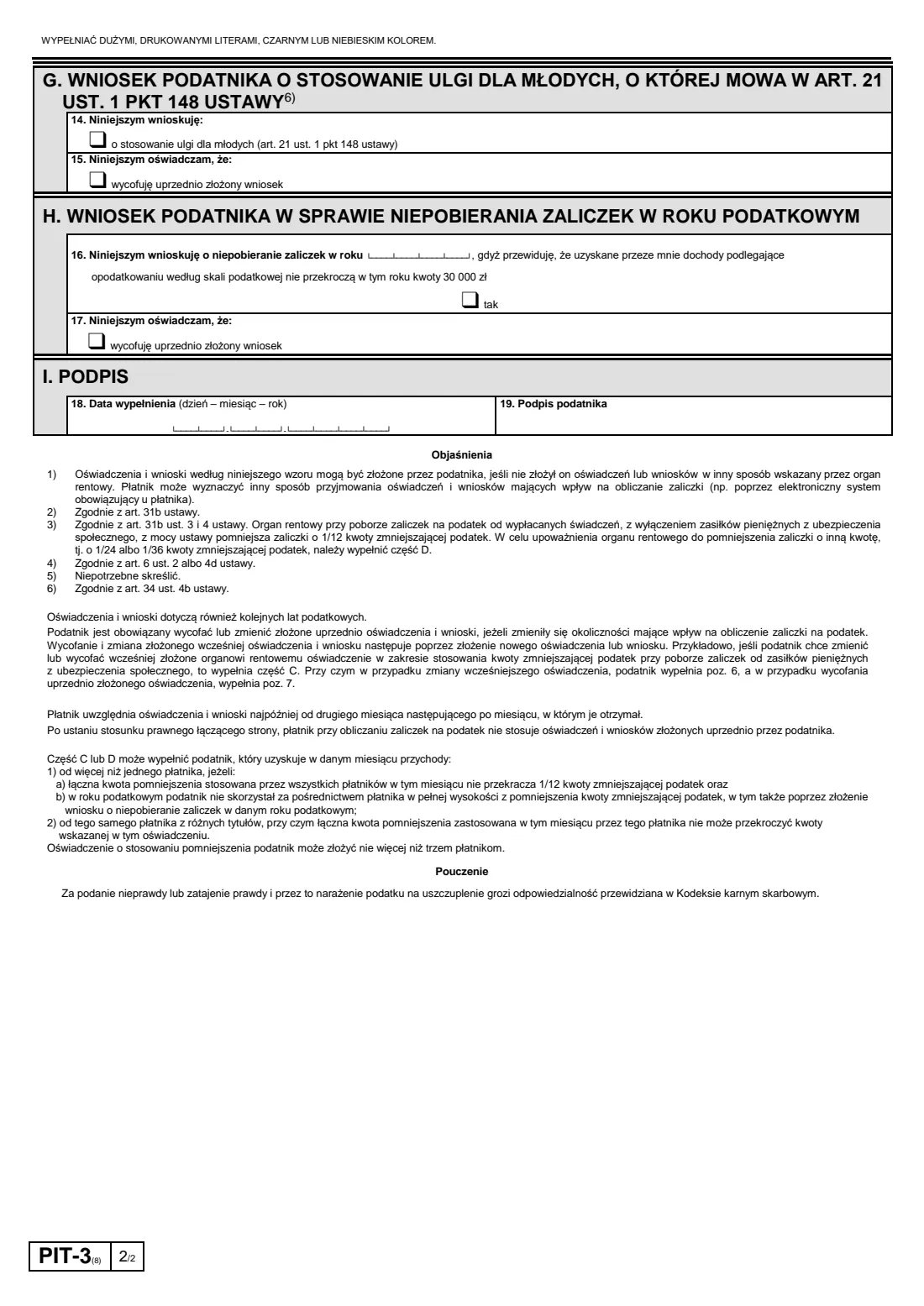
- G. Apply the relief for young peopleTaxpayer
- H. No tax advances this yearTaxpayer
- I. Signature (Podpis)Taxpayer
How to fill out PIT-3 pension and benefit tax statements, step by step
1 1. Tax identifier and what you receive
Write your PESEL (or NIP) in the 11 boxes at the top. The form asks you to cross out whichever of NIP or PESEL you didn't use; FileIt works out which one you entered from its length and strikes the other word. Then tick box 1 if this body pays you social insurance cash benefits, box 2 if it pays you a pension or similar payment, or both.
2 A and B. Your details and the paying body
Your surname, first given name and date of birth, then the full name of the paying body. FileIt prints everything in capitals, keeping Polish letters such as Ł, Ś and Ż, and checks that the date of birth in your PESEL matches the one you enter.
3 C. Tax-reducing amount on benefits (box 1)
If you ticked box 1, item 6 asks the paying body to reduce each monthly advance on your benefits by 1/12 (300 zł), 1/24 (150 zł) or 1/36 (100 zł) of the tax-reducing amount, as printed on this edition. Item 7 withdraws an earlier statement. The total reduction all your payers apply in a month must stay within 1/12.
4 D. Splitting it on a pension (box 2)
On pensions the paying body applies 1/12 automatically, by law. Part D is for changing that: ask for 1/24 or 1/36 instead (item 8), withdraw an earlier split, or give up the 1/12 reduction altogether (item 9). This is how pensioners who also work avoid getting the reduction twice.
5 E. Joint taxation or single parent
Item 10 says you intend to be taxed with your spouse or as a single parent. You then keep one of two income statements and cross out the other: 1) your income won't exceed 120 000 zł and your spouse or child has no combined income, or 2) your income will exceed 120 000 zł but your spouse's or child's expected income combined with yours won't. FileIt strikes out the one that doesn't apply. Item 11 withdraws an earlier statement.
6 F. Exemptions under art. 21(1)(152)-(154)
Tick the return relief (with the years you want it applied, at most four in a row), the relief for families with four or more children, or the working seniors' relief, aware of criminal liability for a false statement. Item 13 withdraws an earlier statement instead.
7 G. Relief for young people
Item 14 asks the paying body to apply the relief for young people, which can matter for a benefit paid to someone under 26. Item 15 withdraws that request.
8 H. No advances this year
Item 16 asks the paying body not to collect advances in the year you enter, because you expect your income on the tax scale to stay within 30 000 zł. Item 17 withdraws the request. If your income turns out higher, the tax is settled in your annual return.
9 I. Signature
Enter the date you filled the form in (item 18) and sign it (item 19). FileIt fills in today's date for you.
Common mistakes to avoid
- Not ticking box 1 or box 2 at the top, or using part C for a pension (part C is for benefits, part D for pensions).
- Letting two payers apply the full 1/12 reduction, so the combined reduction in a month goes over 1/12 and you face a bill in your annual return.
- Leaving both NIP and PESEL showing instead of crossing out the unused one (FileIt does this for you).
- In part E, forgetting to cross out the income statement that doesn't apply.
- Claiming the return relief for more than four years, or with the years in the wrong order.
- Sending the form to the tax office instead of the paying body.
After you fill it out
Sign and date part I, then give the form to the paying body. Footnote 1 lets it take statements another way, so check whether your ZUS or KRUS unit prefers its own online channel. If it accepts an e-signed PDF, you can send it for e-signature from FileIt. FileIt never sends the form anywhere: you hand it over yourself.
The paying body applies your statement from the second month after the month it receives it at the latest, and keeps applying it in later years until you change or withdraw it.
Your filled PIT-3 stays in your FileIt vault, so you can look back at what you told each payer when your situation changes.
Fill out PIT-3 pension and benefit tax statements online with FileIt
- Pick the person. Choose someone from People and FileIt fills in their name, date of birth, address and other details it already knows.
- Answer plain-language questions. One part of the form at a time, with the official help text beside each question — 22 fields in all. Your answers save as you go.
- Check the live preview. Watch your answers land on the real Ministerstwo Finansów — Ministry of Finance of Poland (MF) form, and let FileIt do any worksheet arithmetic.
- Generate the official PDF. FileIt prints your answers into the agency’s own PDF and files it in that person’s folder in your vault. Sign it, or send it for e-signature.
FileIt fills the form — it never files or submits anything for you. Deliver the finished form to whoever asked for it, the way the form’s instructions say.
Start PIT-3 pension and benefit tax statements now — it’s freePIT-3 pension and benefit tax statements: frequently asked questions
What is the difference between PIT-2 and PIT-3?
PIT-2 goes to an employer or another payer of earned income. PIT-3 goes to the body that pays a pension, disability pension or social insurance cash benefit, the organ rentowy, such as ZUS or KRUS. The two forms cover many of the same statements.
Do I need PIT-3 to get the tax-reducing amount on my pension?
Usually not. On pensions the paying body applies 1/12 of the tax-reducing amount automatically, by law. You use part D of PIT-3 only to change that to 1/24 or 1/36, or to stop it, for example because you also work.
Where do I send PIT-3?
To the body that pays you, such as your ZUS branch or KRUS, not to the tax office. The paying body may also accept it through its own online channel.
Can I fill in PIT-3 online?
Yes. FileIt guides you through each part and prints your answers onto the Ministry of Finance's official PIT-3(8) PDF, which is saved in your vault. You then sign it and give it to the paying body yourself.
When does the paying body start applying it?
According to the form, from the second month after the month in which it received your statement, at the latest.
How do I withdraw an earlier PIT-3 statement?
File a new PIT-3 and tick the 'wycofuję' box in the part concerned, for example item 7 in part C or item 9 in part D.
Do I have to file PIT-3 every year?
No. Statements and requests also apply to later tax years. File a new one only when your circumstances change or you want to withdraw something.
Official sources
- Blank form (PDF), published by Ministerstwo Finansów — Ministry of Finance of Poland (MF): https://www.podatki.gov.pl/media/tqgfka2u/pit-3_-8-15.pdf
- Official instructions and guidance: https://www.podatki.gov.pl/pit/formularze-do-druku-pit/
- Edition shown on this page: PIT-3(8) (checked 2026-10-19).
FileIt is not affiliated with or endorsed by Ministerstwo Finansów — Ministry of Finance of Poland (MF) or any government. This page explains the form in general terms and is not legal, tax or immigration advice. Always read the official instructions, and check that you are using the edition the recipient accepts. Page last reviewed 2026-10-19.