What is IR470 Child support administrative review?
New Zealand child support is worked out with a formula. When your situation is out of the ordinary, for example high costs of keeping in contact with a child or supporting someone the assessment doesn't include, you can ask Inland Revenue for an administrative review of the assessment under section 96B of the Child Support Act 1991.
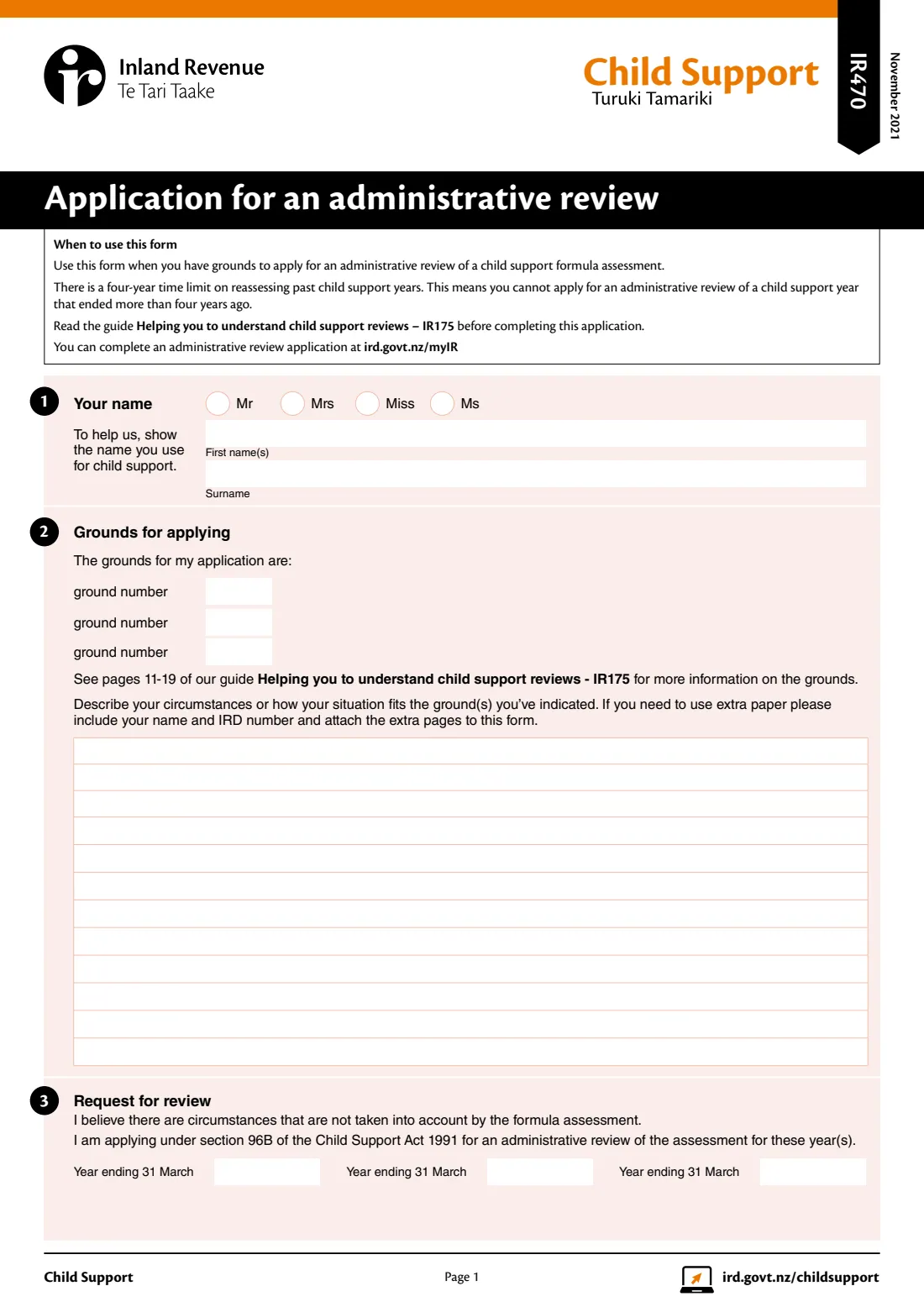
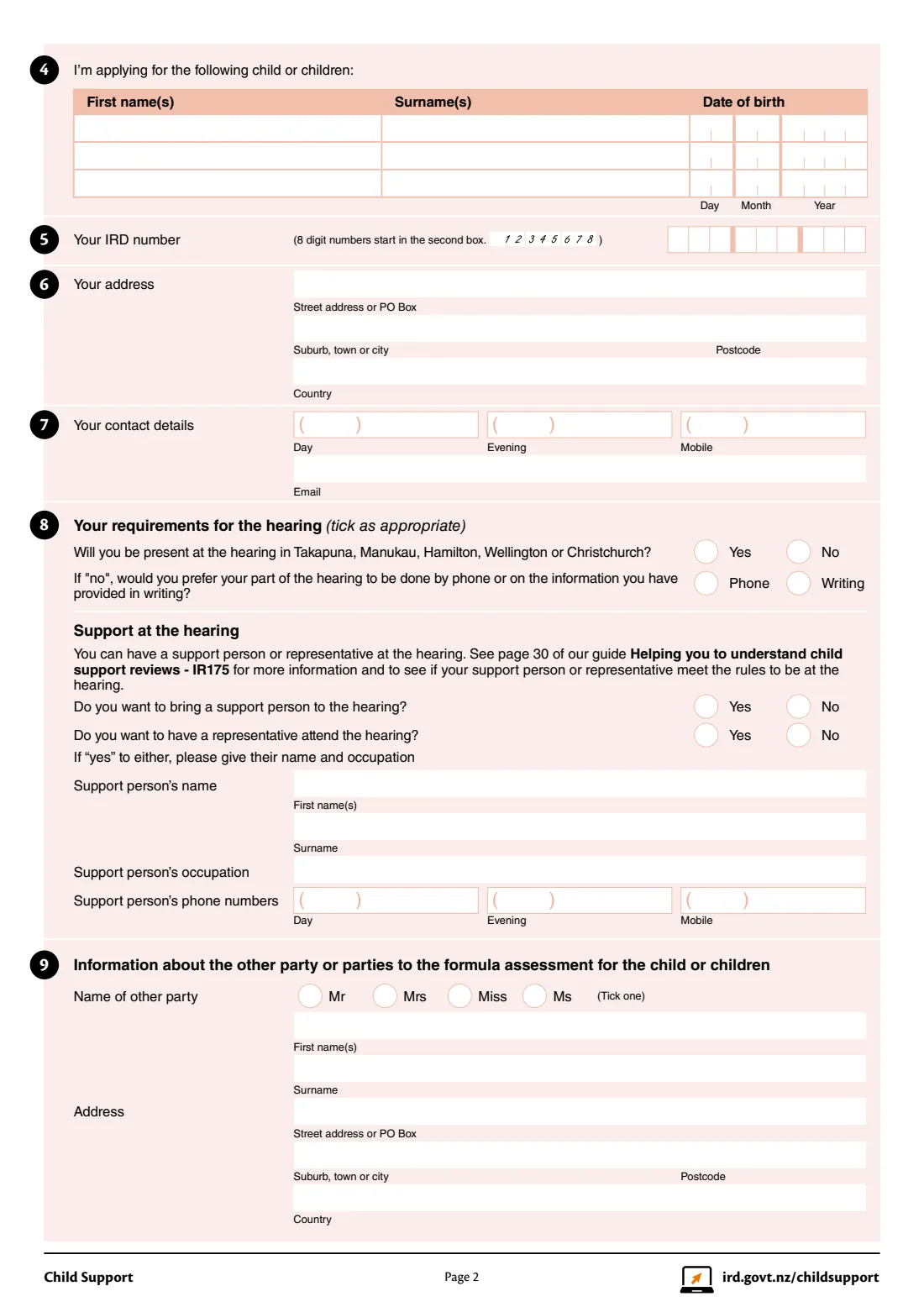
The IR470 is the paper application. You give the number of each ground you rely on (Inland Revenue lists 11), explain how your circumstances fit them, list the child support years and the children, say how you'd like the hearing to run, and give the other parties' details. Either the paying (liable) parent or the receiving carer can apply.
FileIt fills Inland Revenue's own IR470 PDF from a guided form. Your description wraps onto the form's twelve lines, the IRD number starts in the right box, names with macrons and accents print correctly, and the finished form is saved in your FileIt vault ready to sign.
- Who fills it
- A paying parent or a receiving carer in a child support assessment
- Sent to
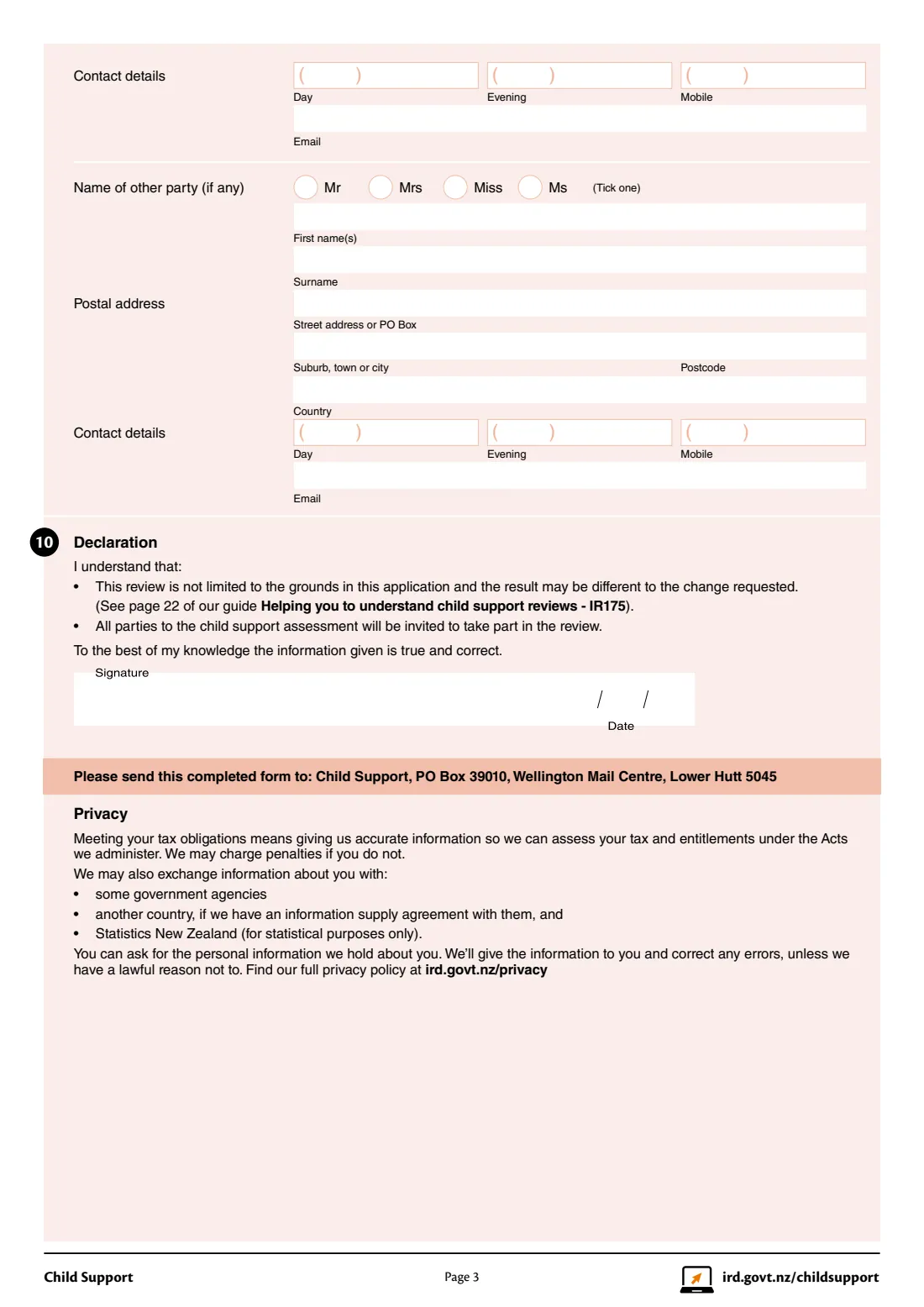
- Child Support, PO Box 39010, Wellington Mail Centre, Lower Hutt 5045
- Legal basis
- Section 96B of the Child Support Act 1991
- Time limit
- Child support years that ended up to four years ago
- Cost
- Child support reviews are free
- Edition
- IR470 November 2021
Who needs to fill out IR470 Child support administrative review?
- Paying parents whose formula assessment doesn't reflect special circumstances, such as supporting another child or high costs of contact.
- Receiving carers who think the other parent's income, earning capacity or property isn't fairly reflected.
- Grandparents and other carers who are parties to a child support assessment.
When to use IR470 Child support administrative review
- When your circumstances fit one or more of Inland Revenue's 11 grounds for a review.
- For the current child support year, or past years that ended no more than four years ago.
- When you'd rather apply on paper than through myIR.
What you need before you start
- Your IRD number, address and contact details.
- The numbers of the grounds you're applying under (see the IR175 guide or Inland Revenue's grounds page).
- The years ending 31 March you want reviewed, and the names and dates of birth of the children.
- The other party's name, address and contact details.
- Evidence for each ground, such as bank statements, receipts or court orders, to attach.
What’s on IR470 Child support administrative review
The 2021 edition has 3 pages. FileIt asks for it in 8 parts, and it is signed by Applicant:
- 1, 5-7 Your name, IRD number and contact detailsApplicant
- 2 Grounds for applyingApplicant
- 3 Request for reviewApplicant
- 4 The child or childrenApplicant
- 8 Your requirements for the hearingApplicant
- 9 The other party to the assessmentApplicant
- 9 A second other party (if any)Applicant
- 10 DeclarationApplicant
How to fill out IR470 Child support administrative review, step by step
1 Your name and IRD number
Give the name you use for child support, your IRD number, address and phone numbers.
2 Grounds
Enter up to three ground numbers, then describe how your situation fits them. FileIt wraps the text onto the twelve lines and tells you if it's too long, so you can attach extra pages.
3 Years and children
List the child support years (each ending 31 March) and each child's name and date of birth.
4 Hearing
Say whether you'll attend in Takapuna, Manukau, Hamilton, Wellington or Christchurch, or prefer a phone hearing or a decision on the papers, and whether a support person or representative will come.
5 Other parties and declaration
Add the other parent or carer, and a second party if there is one. FileIt prints the date; you sign and post the form.
Common mistakes to avoid
- Listing a year that ended more than four years ago.
- Describing your circumstances without saying which ground they fit.
- Sending the form without the evidence for each ground.
- Bringing a lawyer or experienced advocate as a support person: Inland Revenue says a support person can't be one.
- Forgetting that the information you send is shared with the other parties.
After you fill it out
Sign the form and post it to Child Support, PO Box 39010, Wellington Mail Centre, Lower Hutt 5045.
Inland Revenue invites the other parties to respond, then a review officer holds a hearing.
You can't add information after the review starts unless the review officer asks, so attach everything now.
FileIt keeps the completed PDF in your vault with your other child support papers.
Fill out IR470 Child support administrative review online with FileIt
- Pick the person. Choose someone from People and FileIt fills in their name, date of birth, address and other details it already knows.
- Answer plain-language questions. One part of the form at a time, with the official help text beside each question — 85 fields in all. Your answers save as you go.
- Check the live preview. Watch your answers land on the real Inland Revenue (Te Tari Taake) form, and let FileIt do any worksheet arithmetic.
- Generate the official PDF. FileIt prints your answers into the agency’s own PDF and files it in that person’s folder in your vault. Sign it, or send it for e-signature.
FileIt fills the form — it never files or submits anything for you. Deliver the finished form to whoever asked for it, the way the form’s instructions say.
Start IR470 Child support administrative review now — it’s freeIR470 Child support administrative review: frequently asked questions
What is the IR470?
It's Inland Revenue's application for an administrative review of a child support formula assessment, for when special circumstances aren't taken into account.
Who can apply?
Either the paying (liable) parent or the receiving carer in the assessment. The other parties can respond.
How many grounds are there?
Inland Revenue lists 11 grounds for a review. You give the number of each one you apply under and explain how your situation fits.
How far back can a review go?
The form says you can't apply for a child support year that ended more than four years ago.
Does a review cost anything?
No. Inland Revenue says child support reviews are free and can take up to 10 weeks.
Can I apply online instead?
Yes, through myIR. FileIt is for when you want to fill in and keep the official paper form.
Official sources
- Blank form (PDF), published by Inland Revenue (Te Tari Taake): https://www.ird.govt.nz/-/media/project/ir/home/documents/forms-and-guides/ir400---ir499/ir470/ir470-2021.pdf
- Official instructions and guidance: https://www.ird.govt.nz/child-support/disagreeing/reviews/apply
- Edition shown on this page: IR470 November 2021 (checked 2026-10-25).
FileIt is not affiliated with or endorsed by Inland Revenue (Te Tari Taake) or any government. This page explains the form in general terms and is not legal, tax or immigration advice. Always read the official instructions, and check that you are using the edition the recipient accepts. Page last reviewed 2026-10-25.