What is Form ID 645 (lost or damaged travel document)?
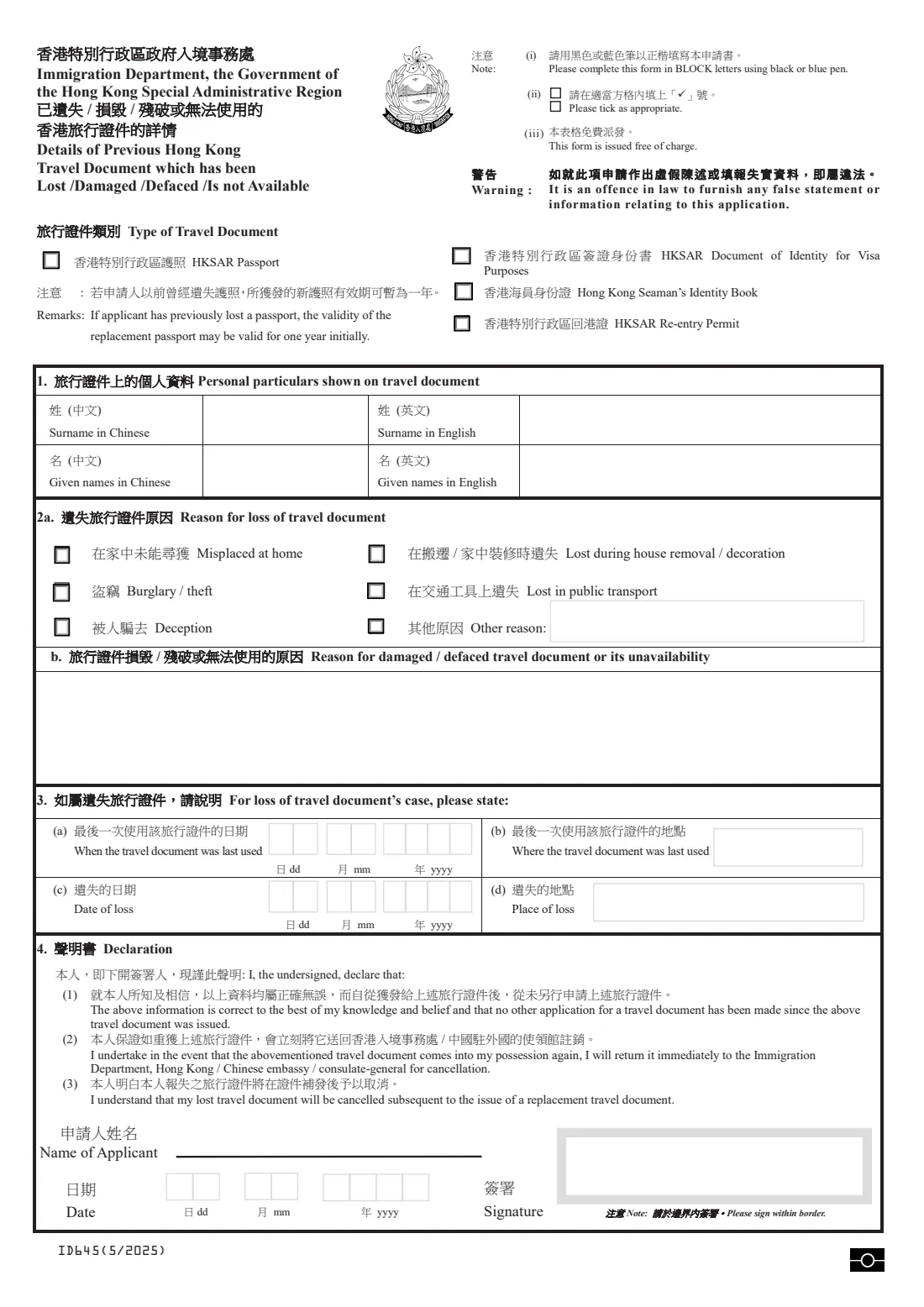
When an HKSAR passport, Document of Identity for Visa Purposes, Hong Kong Seaman's Identity Book or Re-entry Permit is lost, stolen, damaged or can't be used, the Immigration Department (ImmD) wants to know what happened before it issues a replacement. Form ID 645 records those details. ImmD's form page says it is submitted together with the replacement application, not on its own.
For a lost document you choose the reason (misplaced at home, lost during a move, burglary or theft, lost on public transport, deception or another reason) and say when and where it was last used and lost. For a damaged or defaced document you describe what happened. The declaration confirms the details and promises to return the old document if it turns up.
FileIt asks only the questions that fit what happened, prints the answers in capitals into ImmD's own PDF and fills the dates box by box. The form is saved in the person's vault folder, ready to print and sign by hand. FileIt doesn't send anything to ImmD.
- Who fills it
- The holder of the lost or damaged document, who signs the declaration
- Goes with
- The application for the replacement travel document
- Documents covered
- HKSAR passport, Document of Identity for Visa Purposes, Seaman's Identity Book, Re-entry Permit
- Fee
- None for this form; it's issued free of charge
- Edition
- ID 645 (5/2025)
Who needs to fill out Form ID 645 (lost or damaged travel document)?
- HKSAR passport holders whose passport was lost, stolen or damaged.
- Holders of a Document of Identity for Visa Purposes, a Seaman's Identity Book or a Re-entry Permit that is lost or can't be used.
- Anyone whose travel document went through the wash, was torn, or was otherwise defaced.
When to use Form ID 645 (lost or damaged travel document)
- When you apply for a replacement for a lost or damaged Hong Kong travel document.
- After reporting a theft, so the date and place of loss are fresh in mind.
- Abroad, with a passport application such as form ID 843, when the old passport is lost or damaged.
What you need before you start
- The type of travel document and your names in English as shown on it.
- For a loss: the reason, when and where the document was last used, and the date and place of the loss.
- For damage or defacement: a short description of what happened.
- The date you sign.
What’s on Form ID 645 (lost or damaged travel document)
The 2025 edition has 2 pages. FileIt asks for it in 3 parts:
- The previous travel documentApplicant
- What happenedApplicant
- 4. DeclarationApplicant
How to fill out Form ID 645 (lost or damaged travel document), step by step
1 Type of Travel Document
Tick the HKSAR passport, Document of Identity for Visa Purposes, Seaman's Identity Book or Re-entry Permit. The form notes that after an earlier passport loss, a replacement passport may at first be valid for one year only.
2 1. Personal particulars shown on travel document
Surname and given names in English as on the document. Write the Chinese names by hand.
3 2a or 2b. Reason
For a loss, tick the reason (and describe it if it's another reason). For a damaged, defaced or unavailable document, explain what happened in the box.
4 3. For loss of travel document's case
When and where the document was last used, and the date and place of the loss.
5 4. Declaration
Your name and the date, then sign by hand within the border. You declare the information is correct and that no other application has been made since the document was issued. You also undertake to return the document if you get it back, and accept that it will be cancelled.
Common mistakes to avoid
- Sending the form on its own. It goes in with the replacement application.
- Filling in both 2a and 2b. Use 2a for a loss and 2b for damage. FileIt shows only the part that applies.
- A date of loss earlier than the date the document was last used.
- Signing outside the bordered box.
- Keeping a lost passport you later find. The declaration says you will return it to ImmD or a Chinese embassy or consulate.
After you fill it out
Print the PDF, write the Chinese names by hand, and sign within the border.
Submit it with the application for the replacement travel document, in Hong Kong or through a Chinese embassy or consulate abroad, as that application says.
Keep a copy in your FileIt vault, and file the new travel document there with its expiry date so FileIt can remind you before it runs out.
Fill out Form ID 645 (lost or damaged travel document) online with FileIt
- Pick the person. Choose someone from People and FileIt fills in their name, date of birth, address and other details it already knows.
- Answer plain-language questions. One part of the form at a time, with the official help text beside each question — 13 fields in all. Your answers save as you go.
- Check the live preview. Watch your answers land on the real Immigration Department, the Government of the Hong Kong Special Administrative Region (ImmD) form, and let FileIt do any worksheet arithmetic.
- Generate the official PDF. FileIt prints your answers into the agency’s own PDF and files it in that person’s folder in your vault.
FileIt fills the form — it never files or submits anything for you. Deliver the finished form to whoever asked for it, the way the form’s instructions say.
Start Form ID 645 (lost or damaged travel document) now — it’s freeForm ID 645 (lost or damaged travel document): frequently asked questions
What do I do if my HKSAR passport is lost?
Apply for a replacement passport and include form ID 645 explaining the loss. ImmD's form page says the details are submitted with the replacement application.
Will my replacement passport be valid for the full period?
The form notes that if you have lost a passport before, the replacement passport may be valid for one year at first.
What if I find the old passport later?
The declaration says you will return it right away to the Immigration Department or a Chinese embassy or consulate for cancellation.
Can I use this form for a damaged passport?
Yes. Part 2b is for a document that is damaged, defaced or not available for another reason. Describe what happened there.
Can I sign it electronically?
FileIt leaves the signature to you: the form asks you to sign within the bordered box, so print it and sign by hand.
Does FileIt send the form to ImmD?
No. FileIt fills the official PDF; you hand it in with your application.
Official sources
- Blank form (PDF), published by Immigration Department, the Government of the Hong Kong Special Administrative Region (ImmD): https://www.immd.gov.hk/pdforms/ID645n.pdf
- Official instructions and guidance: https://www.immd.gov.hk/eng/forms/forms/id645.html
- Edition shown on this page: ID 645 (5/2025) (checked 2026-10-19).
FileIt is not affiliated with or endorsed by Immigration Department, the Government of the Hong Kong Special Administrative Region (ImmD) or any government. This page explains the form in general terms and is not legal, tax or immigration advice. Always read the official instructions, and check that you are using the edition the recipient accepts. Page last reviewed 2026-10-19.