What is PO-E Postal vote (England)?
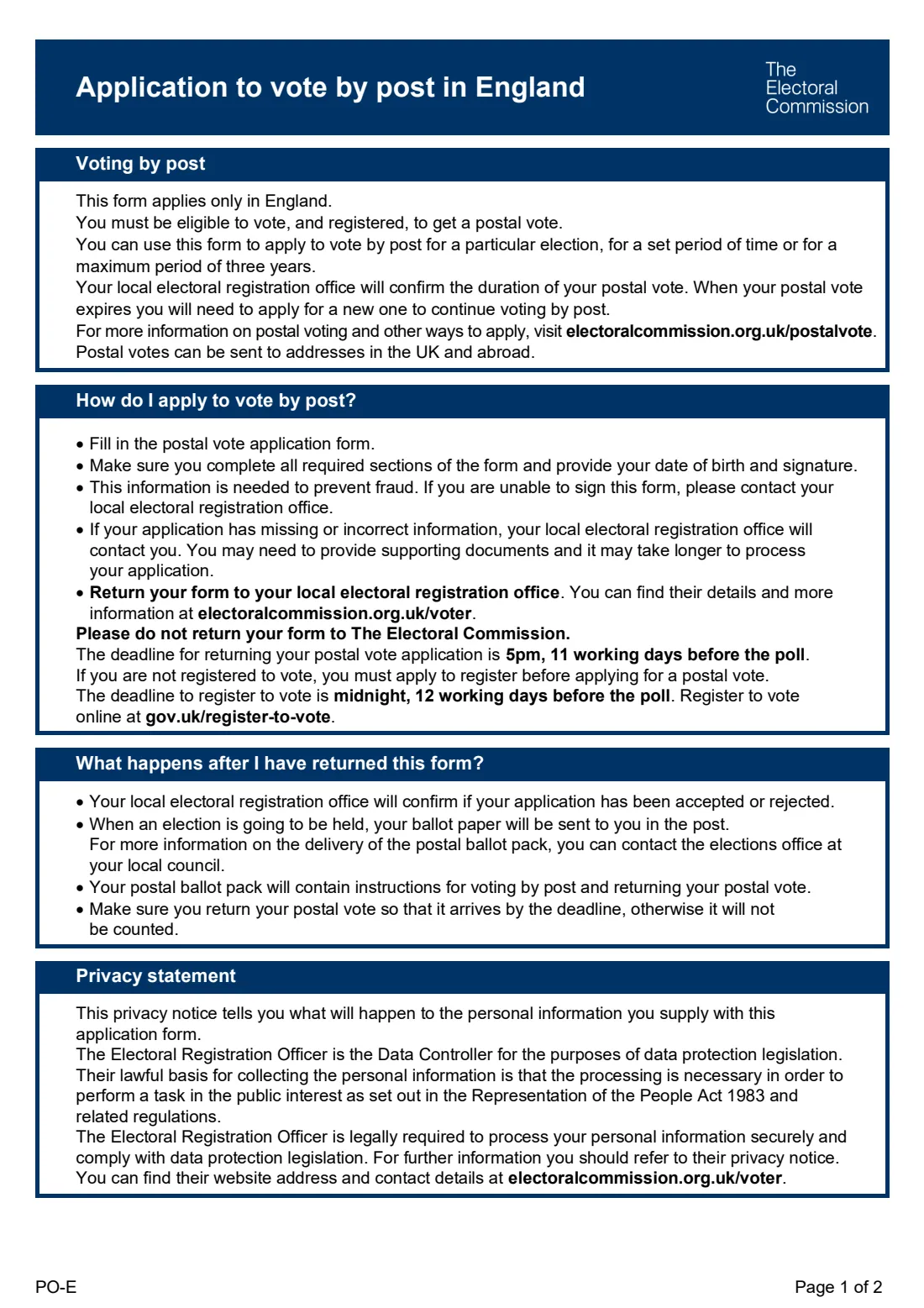
If you can't get to your polling station, or simply prefer to vote from home, you can apply for a postal vote. Form PO-E is the paper application for England. You must be eligible to vote and registered to get one, and Scotland, Wales and voters living overseas have their own forms.
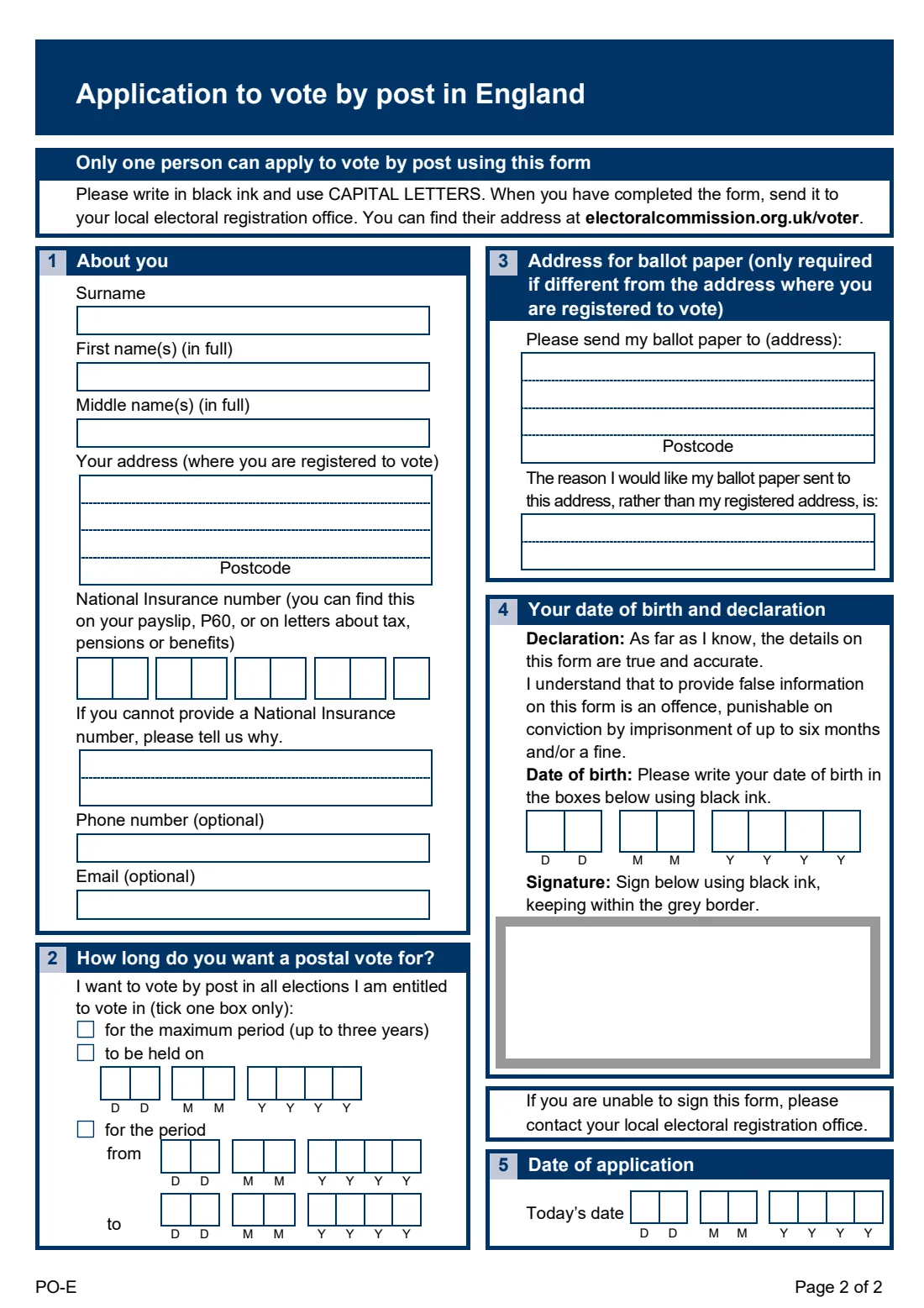
The form asks for your name, the address where you're registered, your National Insurance number (or why you can't give one), optional phone and email, how long you want a postal vote for, any other address the ballot paper should go to and why, and your date of birth. You then sign inside the grey box. Your date of birth and signature are used to prevent fraud.
FileIt asks the questions one at a time, prints names and addresses in the capital letters the form asks for, fills the National Insurance and date cells for you, and places everything on the official PO-E form. You sign it by hand in black ink and send it to your local electoral registration office. FileIt never sends anything for you.
- Who fills it
- A registered voter in England
- Sent to
- Your local electoral registration office
- How long
- One election, a set period, or up to three years
- Deadline
- 5pm, 11 working days before the poll
- Signature
- By hand, in black ink, inside the grey border
- Edition
- PO-E (v2, January 2026)
Who needs to fill out PO-E Postal vote (England)?
- A voter in England who wants to vote by post rather than at a polling station.
- Someone who'll be away, working or studying elsewhere on polling day.
- A voter who wants the ballot paper sent to a different address in the UK or abroad.
- Not for voters in Scotland or Wales, or overseas voters, who have their own forms.
When to use PO-E Postal vote (England)
- Once you're registered to vote. If you're not, register first at gov.uk/register-to-vote (the deadline is midnight, 12 working days before the poll).
- In time to reach your electoral registration office by 5pm, 11 working days before the poll.
- Again when your postal vote expires, if you want to keep voting by post.
What you need before you start
- Your full name and the address where you're registered to vote.
- Your National Insurance number, from a payslip, P60 or a letter about tax, pensions or benefits.
- Your date of birth.
- The dates of the election or period, if you don't want the maximum period.
- Any other address for the ballot paper, and the reason you want it sent there.
What’s on PO-E Postal vote (England)
The 2026 edition has 2 pages. FileIt asks for it in 5 parts:
- 1. About youApplicant
- 2. How long do you want a postal vote for?Applicant
- 3. Address for ballot paperApplicant
- 4. Your date of birth and declarationApplicant
- 5. Date of applicationApplicant
How to fill out PO-E Postal vote (England), step by step
1 1. About you
Give your surname, first and middle names in full, your registered address and postcode, your National Insurance number (or why you can't provide it), and an optional phone number and email.
2 2. How long
Tick one box: the maximum period (up to three years), a single election on a given date, or a period from one date to another.
3 3. Another address
Only if you want the ballot paper sent somewhere other than your registered address. Give that address and say why.
4 4 and 5. Declaration
Give your date of birth, sign inside the grey border in black ink, and add today's date. The form warns that giving false information is an offence.
Common mistakes to avoid
- Signing outside the grey border, or in a colour other than black.
- Leaving out your date of birth, which is needed to prevent fraud.
- Sending it to the Electoral Commission. It goes to your local electoral registration office.
- Missing the deadline of 5pm, 11 working days before the poll.
- Applying before you're registered to vote.
After you fill it out
Print the filled form and sign it inside the grey box in black ink.
Send it to your local electoral registration office. You can find their details at electoralcommission.org.uk/voter. FileIt doesn't send it.
The office will confirm whether your application has been accepted and how long your postal vote lasts. Keep a copy in your FileIt vault and note the end date.
Fill out PO-E Postal vote (England) online with FileIt
- Pick the person. Choose someone from People and FileIt fills in their name, date of birth, address and other details it already knows.
- Answer plain-language questions. One part of the form at a time, with the official help text beside each question — 27 fields in all. Your answers save as you go.
- Check the live preview. Watch your answers land on the real Electoral Registration Officer (form by the UK Government and the Electoral Commission) form, and let FileIt do any worksheet arithmetic.
- Generate the official PDF. FileIt prints your answers into the agency’s own PDF and files it in that person’s folder in your vault.
FileIt fills the form — it never files or submits anything for you. Deliver the finished form to whoever asked for it, the way the form’s instructions say.
Start PO-E Postal vote (England) now — it’s freePO-E Postal vote (England): frequently asked questions
How long does a postal vote last?
You can apply for a particular election, a set period, or a maximum of three years. Your local electoral registration office confirms the duration.
Can my postal vote be sent abroad?
Yes. The form says postal votes can be sent to addresses in the UK and abroad. Give the address in section 3.
What if I don't have a National Insurance number?
Tell the office why in the box provided. They may contact you, and it may take longer to process your application.
Why do they need my date of birth and signature?
The form says this information is needed to prevent fraud.
I can't sign. What should I do?
The form asks you to contact your local electoral registration office.
Does FileIt submit the form?
No. FileIt places your answers on the official PO-E form. You sign it and send it to your local electoral registration office.
Official sources
- Blank form (PDF), published by Electoral Registration Officer (form by the UK Government and the Electoral Commission): https://assets.publishing.service.gov.uk/media/695b9e2fe8f9a8d94d8d194c/PO_E_Postal_England_v2.pdf
- Official instructions and guidance: https://www.gov.uk/government/publications/apply-for-a-postal-vote-paper-form
- Edition shown on this page: PO-E Postal vote application form (England), v2 (January 2026) (checked 2026-10-19).
FileIt is not affiliated with or endorsed by Electoral Registration Officer (form by the UK Government and the Electoral Commission) or any government. This page explains the form in general terms and is not legal, tax or immigration advice. Always read the official instructions, and check that you are using the edition the recipient accepts. Page last reviewed 2026-10-19.