What is PA8A Caveat (stop a grant of probate)?
A caveat is a notice to the Probate Registry that stops a grant of representation (probate, or letters of administration) being issued for a person's estate while it's in force. People enter one when they have concerns about a will, or about who is applying, and need time to look into it. Form PA8A is the paper application, for posting or, for practitioners with a fee account, emailing.
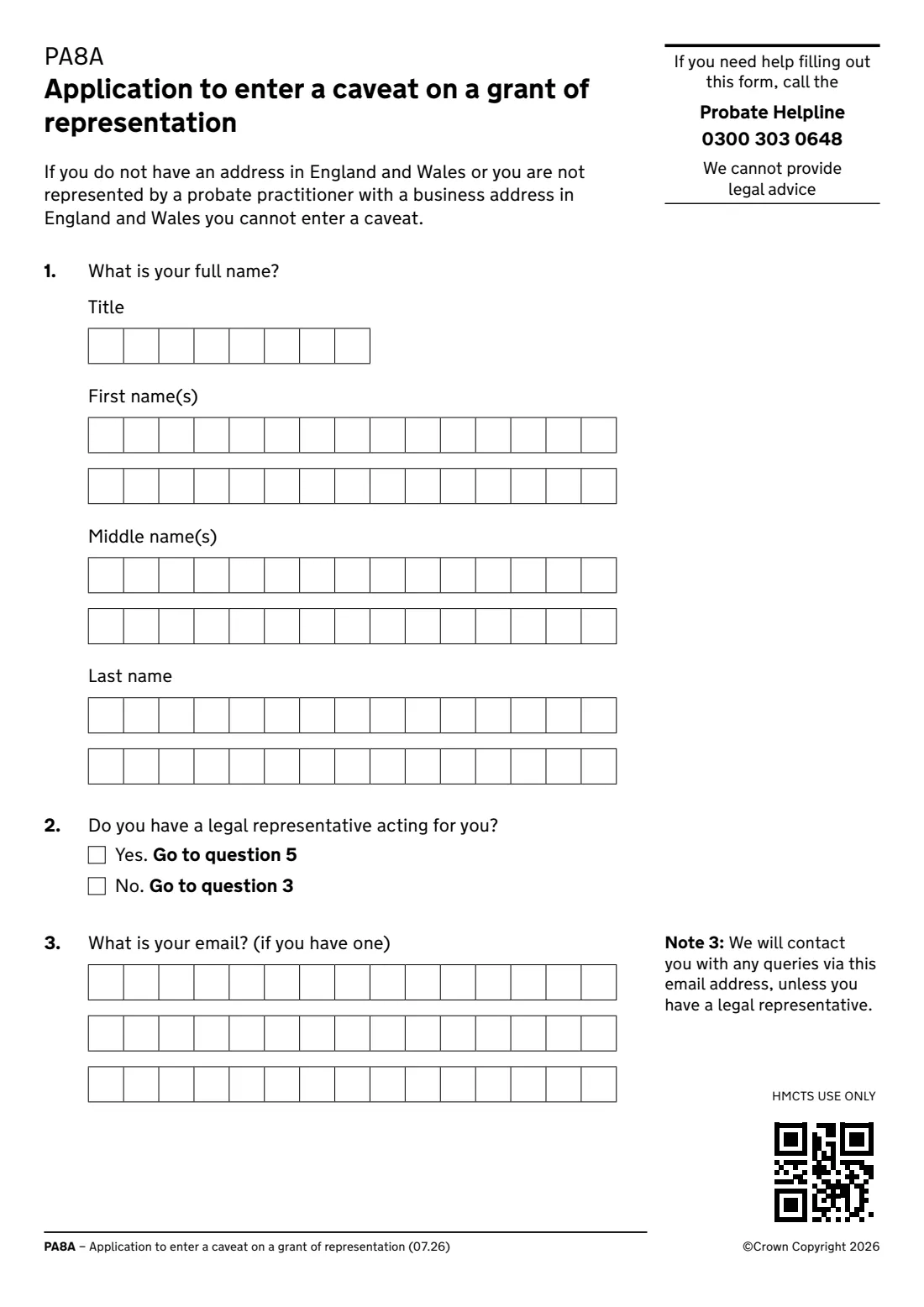
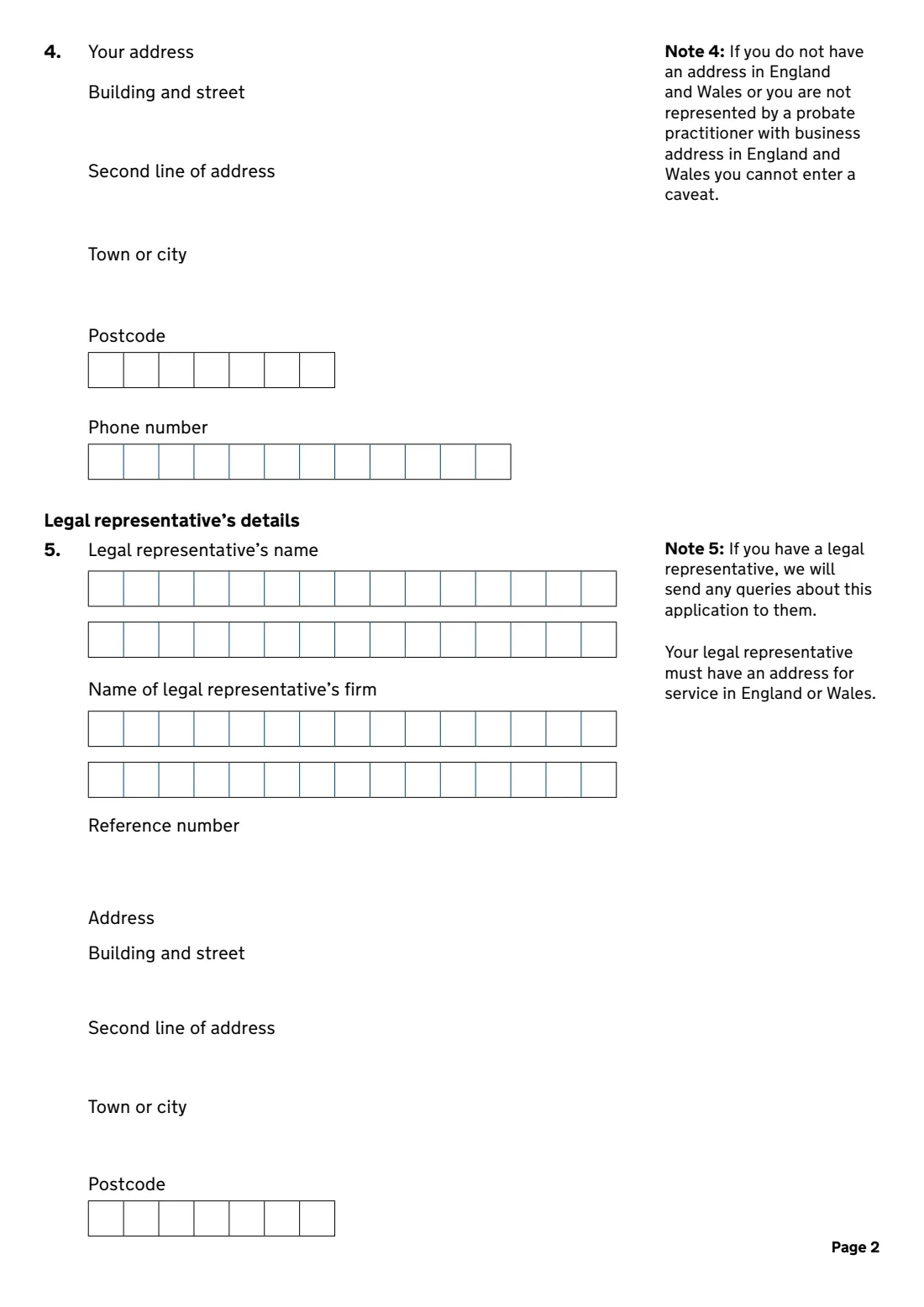
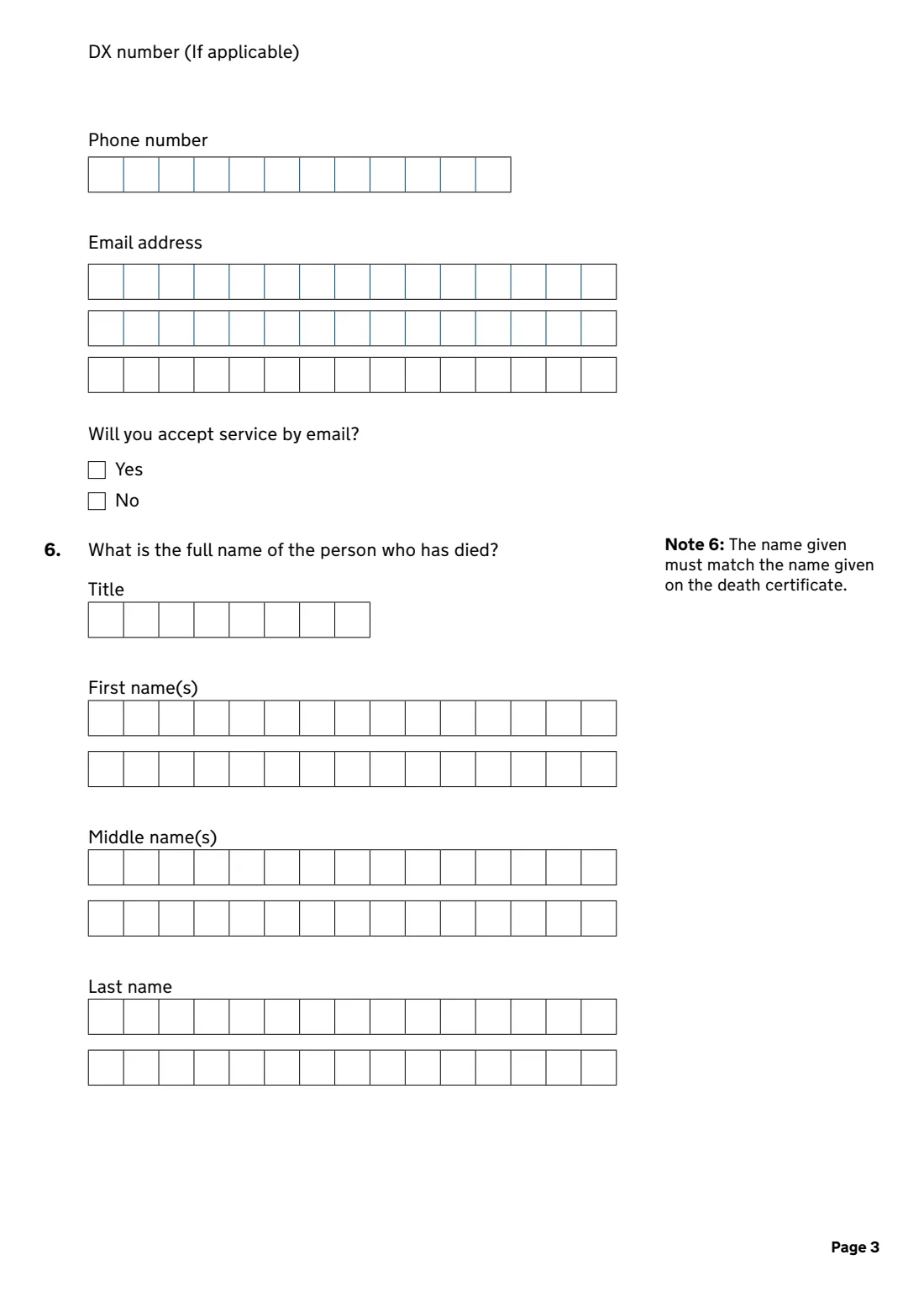
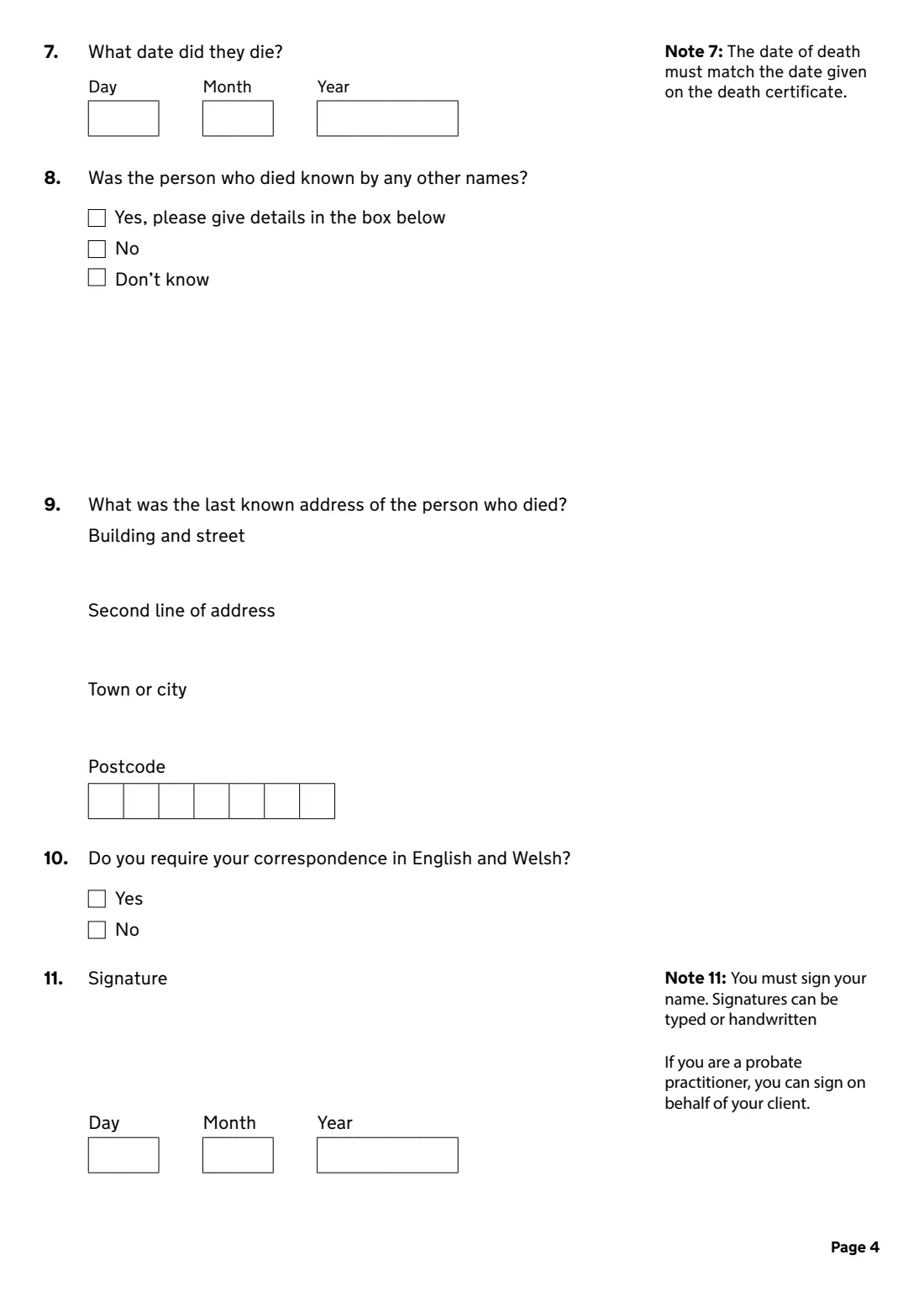
The form asks for your name, whether a legal representative acts for you, your email, address and phone, your representative's details if you have one, the name and date of death of the person who died, any other names they were known by, their last address, whether you want correspondence in English and Welsh, and how you're paying the fee. You need an address in England and Wales, or a probate practitioner with a business address there.
FileIt fills every letter box for you, ticks the right options, shows the payment choices including Help with Fees, and prints your answers into HMCTS's own PA8A PDF (07.26 edition). You sign it, typed or by hand, as the form allows, and send it yourself.
- Who fills it
- Anyone with an interest in an estate, or their probate practitioner
- What it does
- Stops a grant of probate or letters of administration being issued
- Fee on this edition
- £4.00, with Help with Fees available
- Sent to
- HMCTS Probate, Leeds District Probate Registry (by post)
- Signature
- Typed or handwritten
- Edition
- PA8A (07.26)
Who needs to fill out PA8A Caveat (stop a grant of probate)?
- A family member who has doubts about whether a will is valid.
- Someone who believes they should be the one to apply for the grant.
- A person who needs time to find out more before anyone deals with the estate.
- A solicitor or other probate practitioner entering a caveat for a client.
- Not for applying for probate yourself, or for giving up your rights (PA15 or PA16).
When to use PA8A Caveat (stop a grant of probate)
- Before a grant of representation has been issued for the estate.
- As soon as you have a genuine concern and need to stop a grant while you look into it.
- Only if you have an address in England and Wales, or are represented by a probate practitioner with a business address there.
What you need before you start
- Your full name, address, phone number and email.
- Your legal representative's name, firm, reference, address, DX, phone and email, if you have one.
- The full name of the person who died and their date of death, both matching the death certificate.
- Any other names they were known by, and their last known address.
- The fee, or your Help with Fees reference, or a fee account number for practitioners.
What’s on PA8A Caveat (stop a grant of probate)
The 2026 edition has 5 pages. FileIt asks for it in 6 parts, and it is signed by Applicant:
- About you (1-4)Applicant
- Legal representative's details (5)Applicant
- The person who has died (6-9)Applicant
- Language (10)Applicant
- Probate feeApplicant
- Signature (11)Applicant
How to fill out PA8A Caveat (stop a grant of probate), step by step
1 About you (1 to 4)
Give your title and names, say whether a legal representative acts for you, then your email, address and phone number.
2 Your legal representative (5)
If you have one, give their name, firm, reference, address, DX number, phone and email, and whether they accept service by email. The Registry sends any queries to them.
3 The person who has died (6 to 9)
Give their title and names and the date they died exactly as on the death certificate, any other names they used, and their last known address.
4 Language, signature and fee (10 and 11)
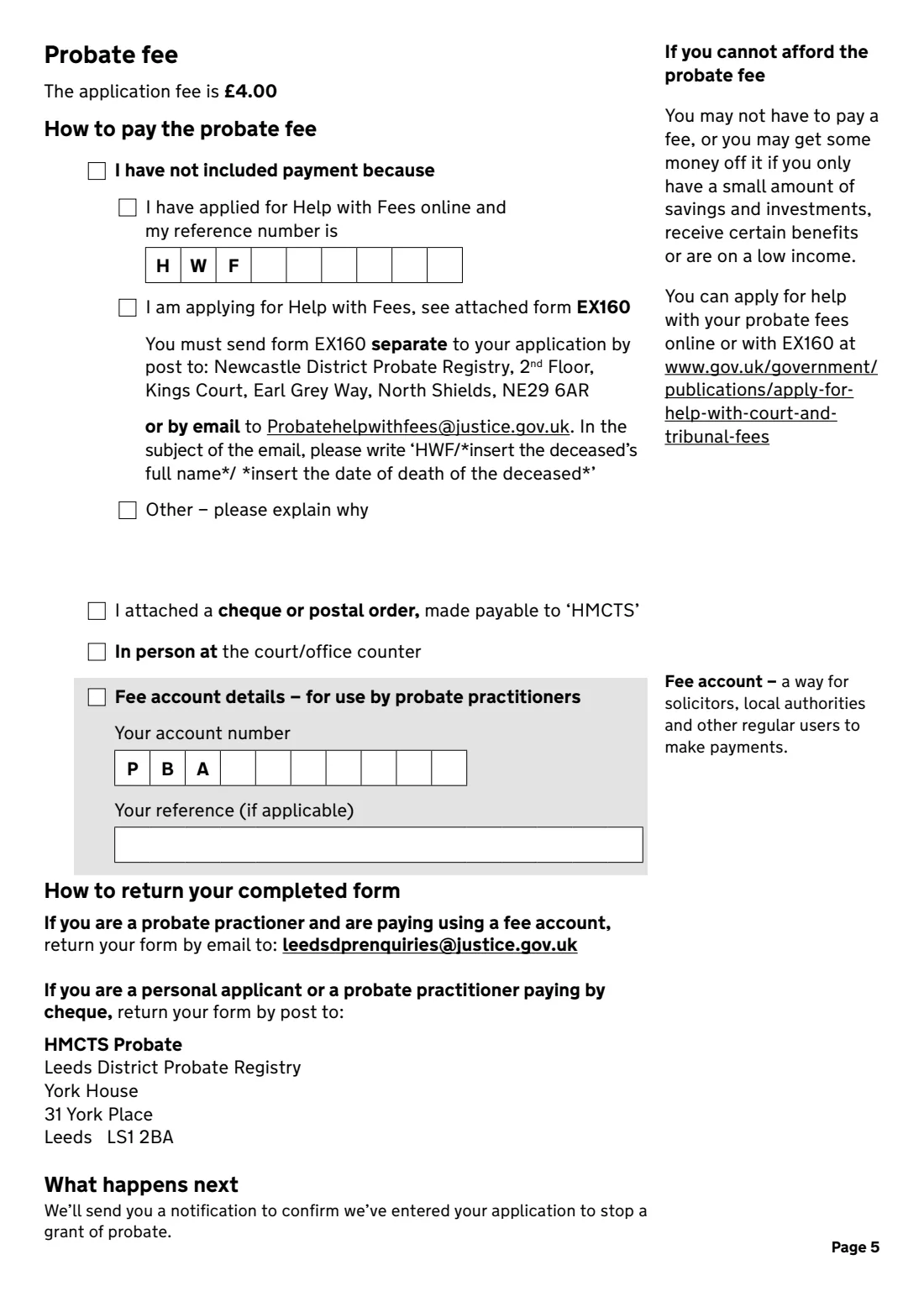
Choose English and Welsh correspondence if you want it, sign and date the form, then choose how to pay: Help with Fees, cheque or postal order to 'HMCTS', in person, or a fee account.
Common mistakes to avoid
- Spelling the name, or giving a date of death, that doesn't match the death certificate.
- Applying without an address in England and Wales or a practitioner with a business address there.
- Forgetting the Help with Fees reference, or not sending form EX160 separately as the form explains.
- Sending it to the wrong place. The last page says where personal applicants and practitioners return it.
- Leaving the 'other names' question unanswered.
After you fill it out
Check the filled PDF, then sign it: the form says signatures can be typed or handwritten, and you can use FileIt's eSignature.
Post it with your payment to HMCTS Probate, Leeds District Probate Registry, or, as a practitioner paying by fee account, email it as the form explains. FileIt doesn't send it.
Keep your copy and the Registry's confirmation in your FileIt vault.
Fill out PA8A Caveat (stop a grant of probate) online with FileIt
- Pick the person. Choose someone from People and FileIt fills in their name, date of birth, address and other details it already knows.
- Answer plain-language questions. One part of the form at a time, with the official help text beside each question — 82 fields in all. Your answers save as you go.
- Check the live preview. Watch your answers land on the real HM Courts & Tribunals Service (HMCTS) — Probate form, and let FileIt do any worksheet arithmetic.
- Generate the official PDF. FileIt prints your answers into the agency’s own PDF and files it in that person’s folder in your vault. Sign it, or send it for e-signature.
FileIt fills the form — it never files or submits anything for you. Deliver the finished form to whoever asked for it, the way the form’s instructions say.
Start PA8A Caveat (stop a grant of probate) now — it’s freePA8A Caveat (stop a grant of probate): frequently asked questions
What does a caveat do?
It stops a grant of representation, such as a grant of probate, being issued for the estate while it's in place.
How much does it cost?
This edition of the form gives the application fee as £4.00. You may not have to pay, or may pay less, if you have little in savings, receive certain benefits or are on a low income.
Can I apply if I live abroad?
Only through a probate practitioner with a business address in England and Wales. The form says you can't enter a caveat otherwise.
Can I sign it electronically?
The form's note says signatures can be typed or handwritten, and a probate practitioner can sign for their client.
What happens next?
The form says you'll get a notification confirming that your application to stop a grant of probate has been entered.
Does FileIt send the form?
No. FileIt fills in the official PA8A PDF. You sign it and send it yourself.
Official sources
- Blank form (PDF), published by HM Courts & Tribunals Service (HMCTS) — Probate: https://assets.publishing.service.gov.uk/media/6a479195045e1108aaa5ea62/PA8A_0726.pdf
- Official instructions and guidance: https://www.gov.uk/government/publications/apply-to-stop-a-grant-of-probate-by-post
- Edition shown on this page: PA8A – Application to enter a caveat on a grant of representation (07.26) (checked 2026-10-19).
FileIt is not affiliated with or endorsed by HM Courts & Tribunals Service (HMCTS) — Probate or any government. This page explains the form in general terms and is not legal, tax or immigration advice. Always read the official instructions, and check that you are using the edition the recipient accepts. Page last reviewed 2026-10-19.