What is Form TD4?
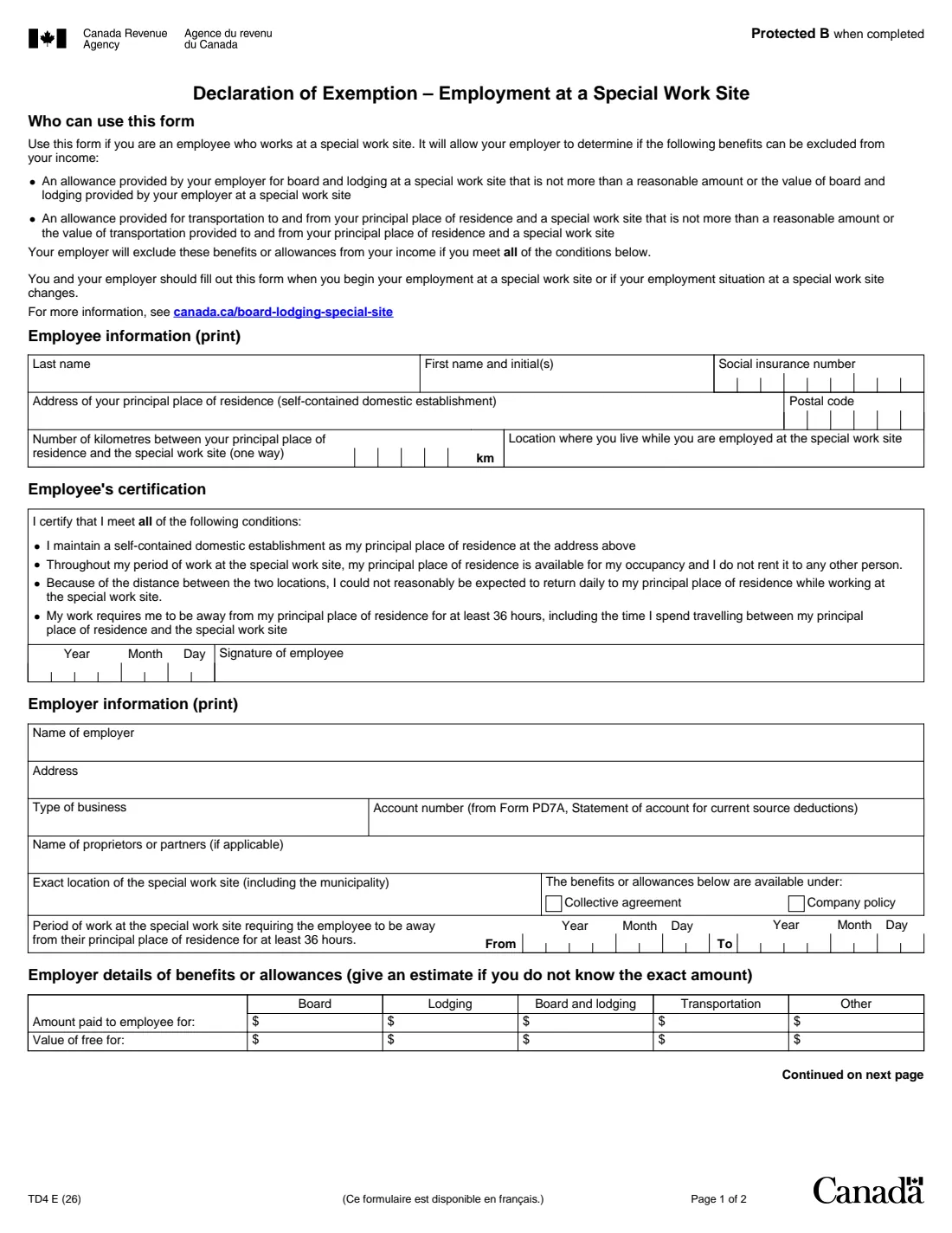
Form TD4 is for employees who work at a special work site, such as a remote camp or project too far from home to return every day. It lets the employer determine whether an allowance or the value of board and lodging at the site, and of transportation between the employee's principal place of residence and the site, can be excluded from the employee's income. The form says the employer excludes these benefits if all of the conditions on it are met.
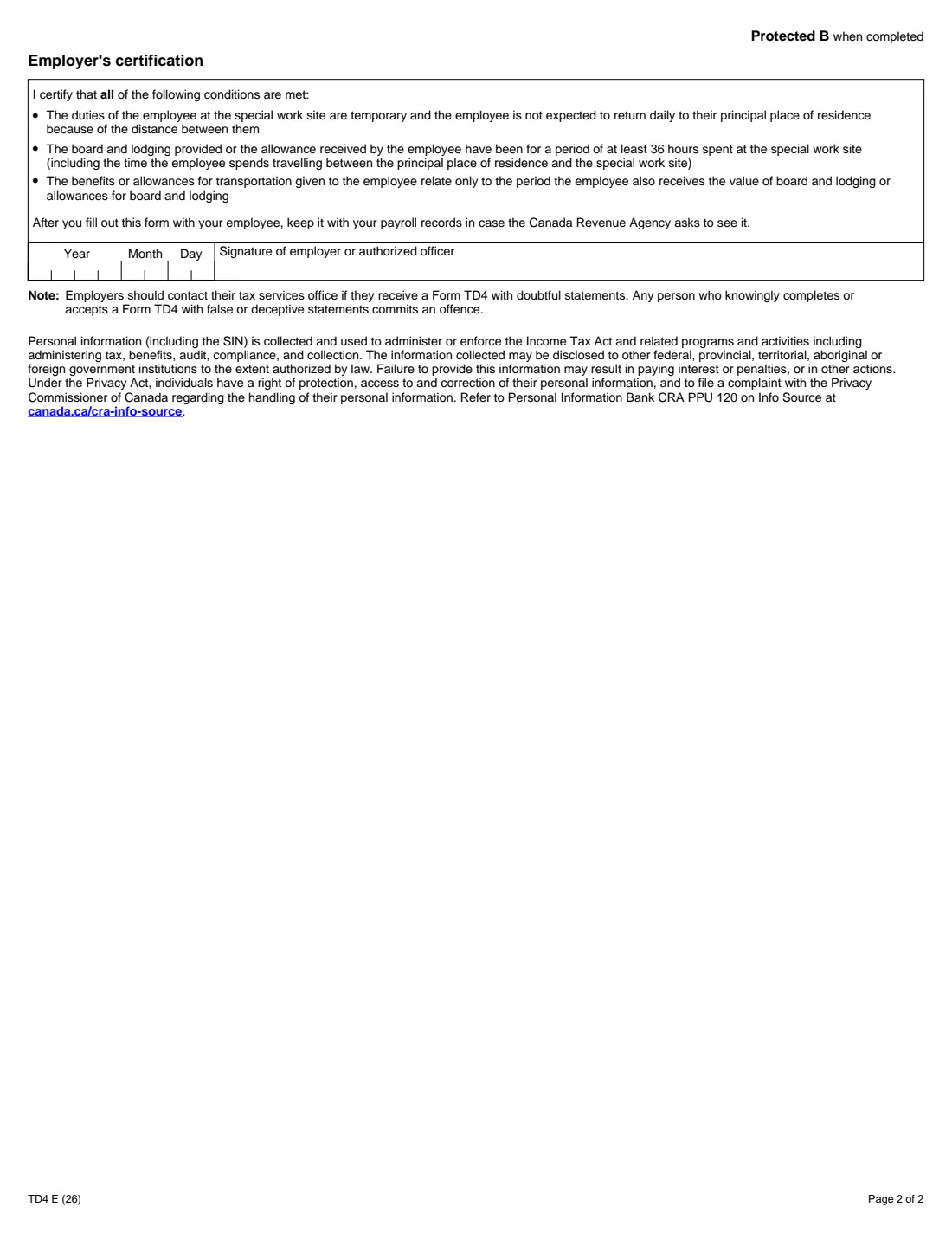
The employee gives their name, social insurance number, home address, the distance from home to the site and where they live while working there, and certifies four conditions: they keep a self-contained domestic establishment as their principal place of residence, it stays available to them and isn't rented out, they couldn't reasonably return home daily, and the work keeps them away for at least 36 hours including travel. The employer adds its details, the period of work at the site and the amounts paid or the value of free board, lodging and transportation, and certifies its own three conditions on page 2.
FileIt asks the questions in plain English and prints the answers onto the CRA's own PDF (edition TD4 E (26)). The finished PDF is saved to the employee's vault folder, and both parties can sign it with FileIt's optional e-signature or by hand. FileIt never files anything with the CRA. Filling forms is free on every plan.
- Who fills it
- The employee and the employer, together
- Kept by
- The employer, with its payroll records, in case the CRA asks to see it
- When
- When employment at a special work site begins, or when the situation there changes
- Signatures
- The employee (page 1) and the employer or an authorized officer (page 2)
- Edition
- TD4 E (26)
- Pages
- 2
Who needs to fill out Form TD4?
- Employees at remote camps, mines, oil and gas sites, construction projects or other special work sites who keep a home elsewhere.
- Employers who provide board and lodging, or an allowance for it, at a special work site.
- Employers who provide or pay for transportation between the employee's home and the site.
When to use Form TD4
- When the employee begins employment at a special work site.
- When the employee's employment situation at the special work site changes.
What you need before you start
- The employee's name, social insurance number and the address and postal code of their principal place of residence.
- The one-way distance in kilometres between the home and the special work site, and where the employee lives while working there.
- The employer's name, address, type of business and the payroll account number from Form PD7A.
- The names of the proprietors or partners, if applicable, and the exact location of the site including the municipality.
- Whether the benefits are under a collective agreement or company policy, the period of work at the site, and the amounts or values of board, lodging, transportation and other benefits (an estimate if not exact).
What’s on Form TD4
The 2026 edition has 2 pages. FileIt asks for it in 2 parts, and it is signed by Employee and Employer:
- Employee information and certificationEmployee
- Employer information, benefits and certificationEmployer
How to fill out Form TD4, step by step
1 Employee information
Last name, first name and initials, social insurance number, the address and postal code of your principal place of residence, the kilometres between your home and the site (one way), and where you live while employed at the site.
2 Employee's certification
You certify all four conditions: your home is a self-contained domestic establishment, it stays available and isn't rented to anyone else, you couldn't reasonably return home daily, and the work keeps you away from home for at least 36 hours including travel. Date and sign.
3 Employer information
Name, address, type of business, PD7A account number, proprietors or partners, the exact location of the site, whether the benefits come under a collective agreement or company policy, and the period of work that requires the employee to be away for at least 36 hours.
4 Benefits or allowances
The amounts paid to the employee for board, lodging, board and lodging, transportation and other, and the value of anything provided free. Give an estimate if you don't know the exact amount.
5 Employer's certification (page 2)
The employer certifies the site duties are temporary and the employee isn't expected to return home daily, the board and lodging or allowance covered at least 36 hours at the site, and the transportation relates only to the same period. Date and sign.
Common mistakes to avoid
- Using the form when the employee rents out their home while away: the certification requires that it stays available to them.
- Leaving the period of work at the site blank.
- Not filling out a new form when the employee's situation at the site changes.
- Filing the form with the CRA instead of keeping it with the payroll records.
After you fill it out
The employee signs page 1 and the employer or an authorized officer signs page 2, with FileIt's optional e-signature or by hand.
The employer keeps the form with its payroll records in case the CRA asks to see it.
The form's note says employers should contact their tax services office if they receive a TD4 with doubtful statements.
A copy stays in the employee's FileIt vault folder.
Fill out Form TD4 online with FileIt
- Pick the person. Choose someone from People and FileIt fills in their name, date of birth, address and other details it already knows.
- Answer plain-language questions. One part of the form at a time, with the official help text beside each question — 28 fields in all. Your answers save as you go.
- Check the live preview. Watch your answers land on the real Canada Revenue Agency (CRA) form, and let FileIt do any worksheet arithmetic.
- Generate the official PDF. FileIt prints your answers into the agency’s own PDF and files it in that person’s folder in your vault. Sign it, or send it for e-signature.
FileIt fills the form — it never files or submits anything for you. Deliver the finished form to whoever asked for it, the way the form’s instructions say.
Start Form TD4 now — it’s freeForm TD4: frequently asked questions
Can I fill out Form TD4 online?
Yes. FileIt guides the employee and the employer through the form and prints the answers onto the CRA's official PDF, saved to the vault. It is free on every FileIt plan.
Does the TD4 get sent to the CRA?
No. The form says the employer keeps it with the payroll records in case the CRA asks to see it.
What is a special work site?
A work location where the duties are temporary and the employee can't reasonably be expected to return daily to their principal place of residence because of the distance. The CRA explains it further at canada.ca/board-lodging-special-site.
What if we don't know the exact value of the board and lodging?
The form asks the employer to give an estimate if the exact amount isn't known.
What does the 36 hours mean?
The employee's work must keep them away from their principal place of residence for at least 36 hours, including the time spent travelling between home and the site.
Official sources
- Blank form (PDF), published by Canada Revenue Agency (CRA): https://www.canada.ca/content/dam/cra-arc/formspubs/pbg/td4/td4-fill-26e.pdf
- Official instructions and guidance: https://www.canada.ca/en/revenue-agency/services/forms-publications/forms/td4.html
- Edition shown on this page: TD4 E (26) (checked 2026-10-25).
FileIt is not affiliated with or endorsed by Canada Revenue Agency (CRA) or any government. This page explains the form in general terms and is not legal, tax or immigration advice. Always read the official instructions, and check that you are using the edition the recipient accepts. Page last reviewed 2026-10-25.