What is Form RC720?
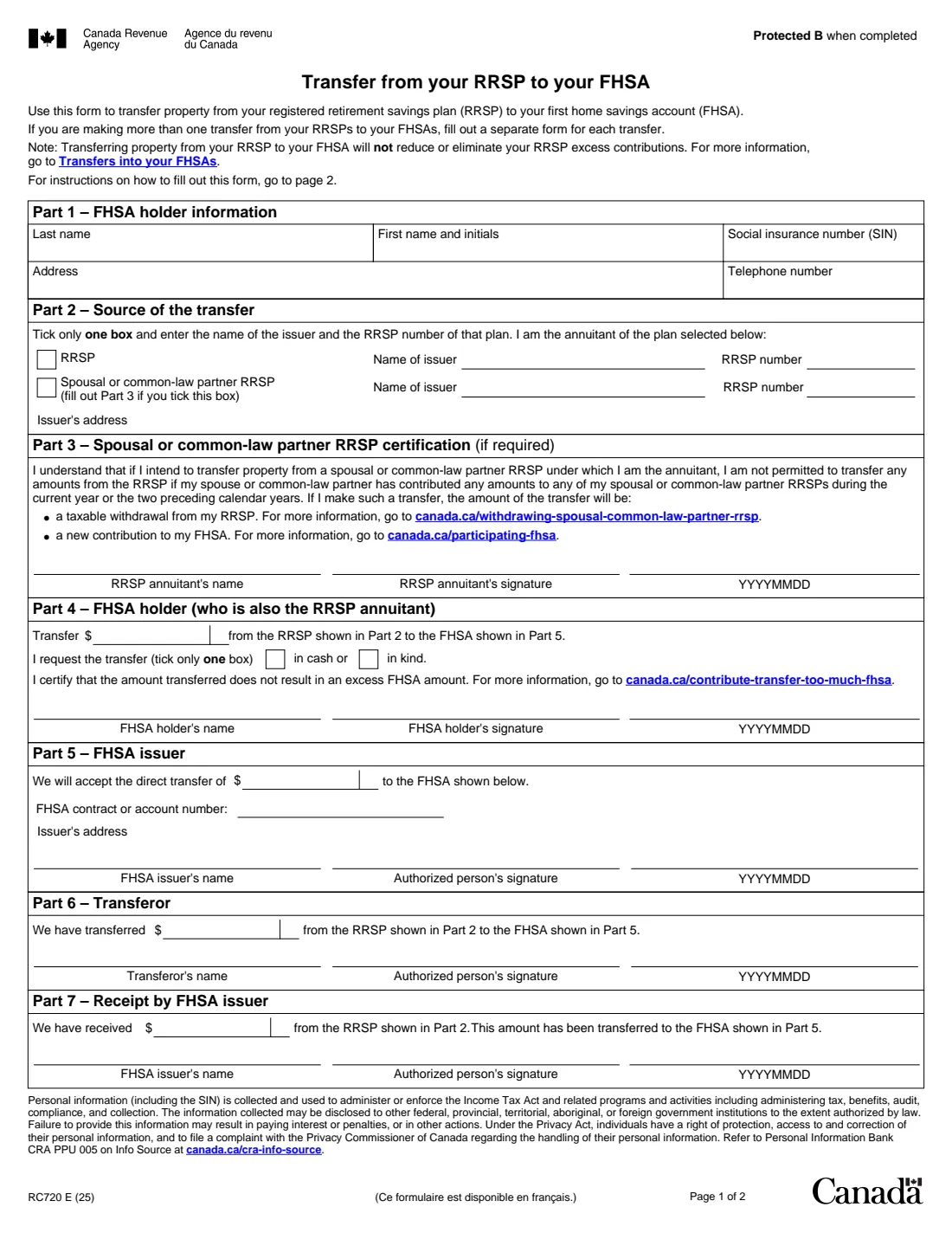
Form RC720 is the Canada Revenue Agency (CRA) form for a direct transfer from your registered retirement savings plan (RRSP) to your first home savings account (FHSA). You use one form for each transfer, and you must be the annuitant of the RRSP the property leaves. The current edition is RC720 E (25).
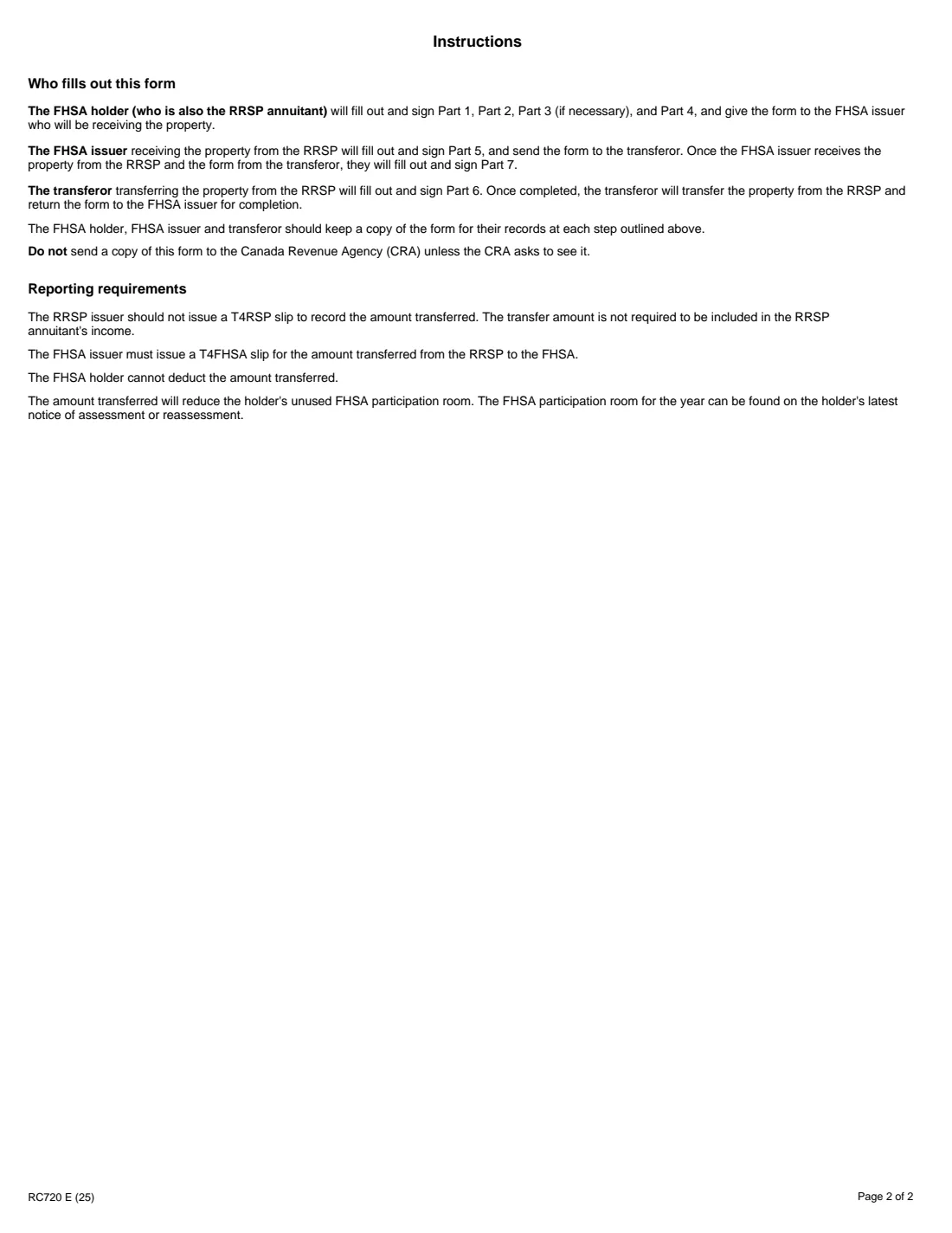
You fill out Parts 1 to 4: your details, the RRSP the property comes from, the amount and whether it moves in cash or in kind, and a certification that the transfer doesn't create an excess FHSA amount. Part 3 is only for a spousal or common-law partner RRSP. The FHSA issuer then completes Part 5, the transferor Part 6, and the FHSA issuer Part 7 once the property arrives. The form isn't sent to the CRA unless it asks to see it.
FileIt walks you through your parts, keeps Part 3 out of the way unless you pick a spousal RRSP, prints the amount with its cents in the form's own dollars-and-cents box, and fills the CRA's official PDF. The finished form is saved in the person's vault folder, ready to print and sign or to send for signature. FileIt never sends it to your bank for you.
- Who fills it
- The FHSA holder (who is also the RRSP annuitant); then the institutions
- Given to
- The FHSA issuer receiving the property, not the CRA
- One form per
- Transfer from an RRSP to an FHSA
- Reporting
- The FHSA issuer issues a T4FHSA slip; no T4RSP slip, and no deduction
- Signatures
- The holder signs Part 4 (and Part 3 for a spousal RRSP)
- Edition
- RC720 E (25)
Who needs to fill out Form RC720?
- FHSA holders who want to move savings already in their own RRSP into their FHSA toward a first home.
- Annuitants of a spousal or common-law partner RRSP who want to transfer from it to their FHSA, after reading the Part 3 rules.
- Anyone making several RRSP-to-FHSA transfers: each one needs its own form.
When to use Form RC720
- When you want the transfer done directly between the plans rather than withdrawing from the RRSP yourself.
- When you have enough unused FHSA participation room for the amount, since the transfer uses it up.
- Before the FHSA issuer and the transferor start their parts: they complete Parts 5 to 7 after you hand the form over.
What you need before you start
- Your name, social insurance number (SIN), address and telephone number.
- The name and address of your RRSP issuer and the RRSP number.
- The amount to transfer, and whether you want it moved in cash or in kind.
- Your FHSA participation room, from your latest notice of assessment or reassessment.
- For a spousal or common-law partner RRSP: whether your spouse or partner contributed to any of your spousal RRSPs this year or in the two years before.
What’s on Form RC720
The 2025 edition has 2 pages. FileIt asks for it in 5 parts, and it is signed by Fhsa holder and Rrsp annuitant (spousal plan) and Fhsa issuer:
- Part 1 – FHSA holder informationFhsa holder
- Part 2 – Source of the transferFhsa holder
- Part 3 – Spousal or common-law partner RRSP certificationRrsp annuitant (spousal plan)
- Part 4 – FHSA holder (who is also the RRSP annuitant)Fhsa holder
- Part 5 – FHSA issuerFhsa issuer
How to fill out Form RC720, step by step
1 Part 1 – FHSA holder information
Your last name, first name and initials, SIN, address and telephone number.
2 Part 2 – Source of the transfer
Tick one box: your own RRSP, or a spousal or common-law partner RRSP of which you're the annuitant. Give the issuer's name, the RRSP number and the issuer's address.
3 Part 3 – Spousal or common-law partner RRSP certification
Only for a spousal or common-law partner RRSP. The annuitant confirms they understand that if their spouse or partner contributed to any of their spousal RRSPs in the current year or the two years before, the transfer is treated as a taxable RRSP withdrawal and a new FHSA contribution. In FileIt you switch this part on when you pick the spousal RRSP.
4 Part 4 – FHSA holder
The amount to transfer from the RRSP in Part 2 to the FHSA in Part 5, and whether it's in cash or in kind. You certify that it doesn't create an excess FHSA amount, then print your name, sign and date.
5 Parts 5 to 7 – The institutions
The FHSA issuer confirms the amount it will accept and the FHSA account number (Part 5). The RRSP side confirms what it transferred (Part 6), and the FHSA issuer confirms receipt (Part 7). An FHSA issuer using FileIt can fill Part 5 as an optional part; Parts 6 and 7 are completed on the form afterwards.
Common mistakes to avoid
- Transferring more than your unused FHSA participation room, which creates an excess FHSA amount.
- Expecting the transfer to fix RRSP excess contributions; the form says it won't reduce or eliminate them.
- Using a spousal RRSP without reading Part 3: recent contributions by your spouse or partner make it a taxable withdrawal.
- Ticking both the RRSP and the spousal RRSP box, or both cash and in kind; tick only one of each.
- Putting two transfers on one form.
- Mailing the form to the CRA instead of giving it to the FHSA issuer.
After you fill it out
Print the PDF from your FileIt vault, sign Part 4 (and Part 3 if it applies), and give it to the FHSA issuer that will receive the property. FileIt doesn't send it for you.
Each institution signs its part and passes the form along; keep a copy at each step, as the instructions say.
Expect a T4FHSA slip for the amount. You can't deduct it, and it lowers your unused FHSA participation room.
Fill out Form RC720 online with FileIt
- Pick the person. Choose someone from People and FileIt fills in their name, date of birth, address and other details it already knows.
- Answer plain-language questions. One part of the form at a time, with the official help text beside each question — 24 fields in all. Your answers save as you go.
- Check the live preview. Watch your answers land on the real Canada Revenue Agency (CRA) form, and let FileIt do any worksheet arithmetic.
- Generate the official PDF. FileIt prints your answers into the agency’s own PDF and files it in that person’s folder in your vault. Sign it, or send it for e-signature.
FileIt fills the form — it never files or submits anything for you. Deliver the finished form to whoever asked for it, the way the form’s instructions say.
Start Form RC720 now — it’s freeForm RC720: frequently asked questions
Is a transfer from my RRSP to my FHSA taxable?
The form's instructions say the RRSP issuer shouldn't issue a T4RSP slip and the amount isn't included in your income. The FHSA issuer issues a T4FHSA slip, and you can't deduct the amount transferred.
Does it use my FHSA participation room?
Yes. The amount transferred reduces your unused FHSA participation room, which is shown on your latest notice of assessment or reassessment.
Can I transfer from a spousal RRSP?
Yes, if you're its annuitant, but you also fill out Part 3. If your spouse or common-law partner contributed to any of your spousal RRSPs this year or in the two previous years, the transfer counts as a taxable RRSP withdrawal and a new FHSA contribution.
Where do I send Form RC720?
To the FHSA issuer receiving the property. Don't send it to the CRA unless the CRA asks to see it.
Can I fill out RC720 online?
Yes. FileIt guides you through Parts 1 to 4 and prints your answers on the CRA's official RC720 PDF, saved in your vault. You then sign it and hand it to your FHSA issuer.
Official sources
- Blank form (PDF), published by Canada Revenue Agency (CRA): https://www.canada.ca/content/dam/cra-arc/formspubs/pbg/rc720/rc720-fill-25e.pdf
- Official instructions and guidance: https://www.canada.ca/en/revenue-agency/services/forms-publications/forms/rc720.html
- Edition shown on this page: RC720 E (25) (checked 2026-10-19).
FileIt is not affiliated with or endorsed by Canada Revenue Agency (CRA) or any government. This page explains the form in general terms and is not legal, tax or immigration advice. Always read the official instructions, and check that you are using the edition the recipient accepts. Page last reviewed 2026-10-19.