What is VA Form 21-8940?
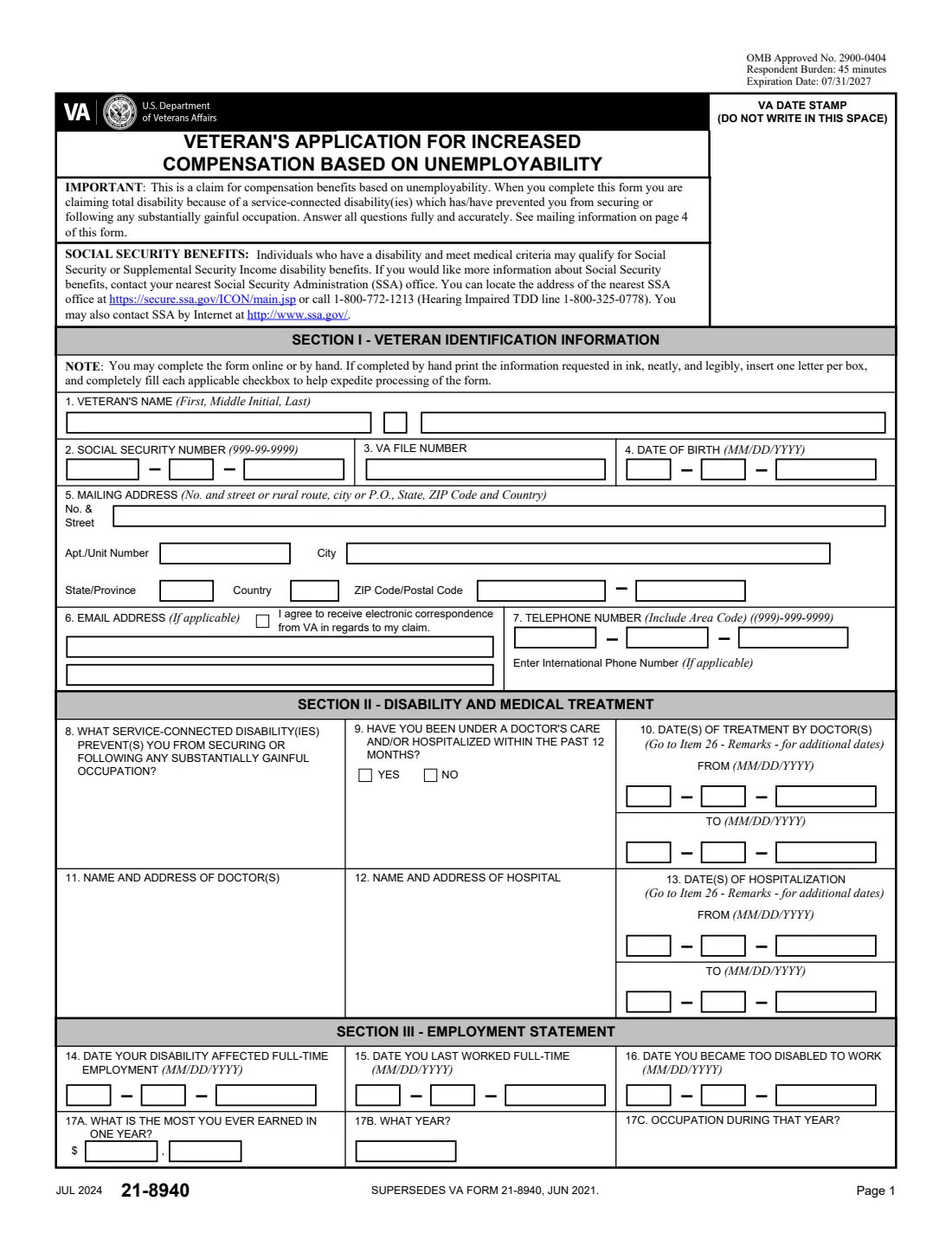
VA Form 21-8940 is how a veteran applies for total disability individual unemployability (TDIU): disability compensation at the 100 percent rate when service-connected disabilities prevent you from securing or following a substantially gainful occupation, even if your combined rating is lower.
The form asks which disabilities keep you from working, your recent treatment, when your disability affected your work, your employment for the last five years you worked, your income, your attempts to find work since, and your education and training. VA's 21-526EZ instructions list it with VA Form 21-4192, which your last employer completes.
FileIt fills VA's own PDF (JUL 2024 edition), printing amounts digit by digit in the form's boxes, and files the result in your vault folder. FileIt never submits anything to VA.
- Who fills it
- The veteran claiming individual unemployability.
- Given to
- Mailed to the Department of Veterans Affairs, Evidence Intake Center, PO Box 4444, Janesville, WI 53547-4444.
- Goes with
- VA Form 21-4192, completed by your employers, as listed in VA's 21-526EZ instructions.
- Signatures
- The veteran signs item 27; two witnesses sign if you sign with an "X".
- Edition
- VA Form 21-8940, JUL 2024 (supersedes JUN 2021), OMB 2900-0404
- Pages
- 4
Who needs to fill out VA Form 21-8940?
- Veterans whose service-connected disabilities keep them from holding a steady job.
- Veterans rated below 100 percent who believe they can't work because of service-connected conditions.
- Veterans asked by VA to complete the form during a claim for increased compensation.
- Accredited representatives helping a veteran prepare a TDIU claim.
When to use VA Form 21-8940
- When your service-connected disabilities have stopped you from working full time.
- With a disability compensation claim, or on its own when VA asks for it.
- After you have gathered your employment history and treatment dates.
What you need before you start
- Your name, Social Security number, VA file number, date of birth, address and contact details.
- The service-connected disabilities that keep you from working, and your doctors and hospital stays in the past 12 months.
- The dates your disability affected full-time work, you last worked full time and you became too disabled to work.
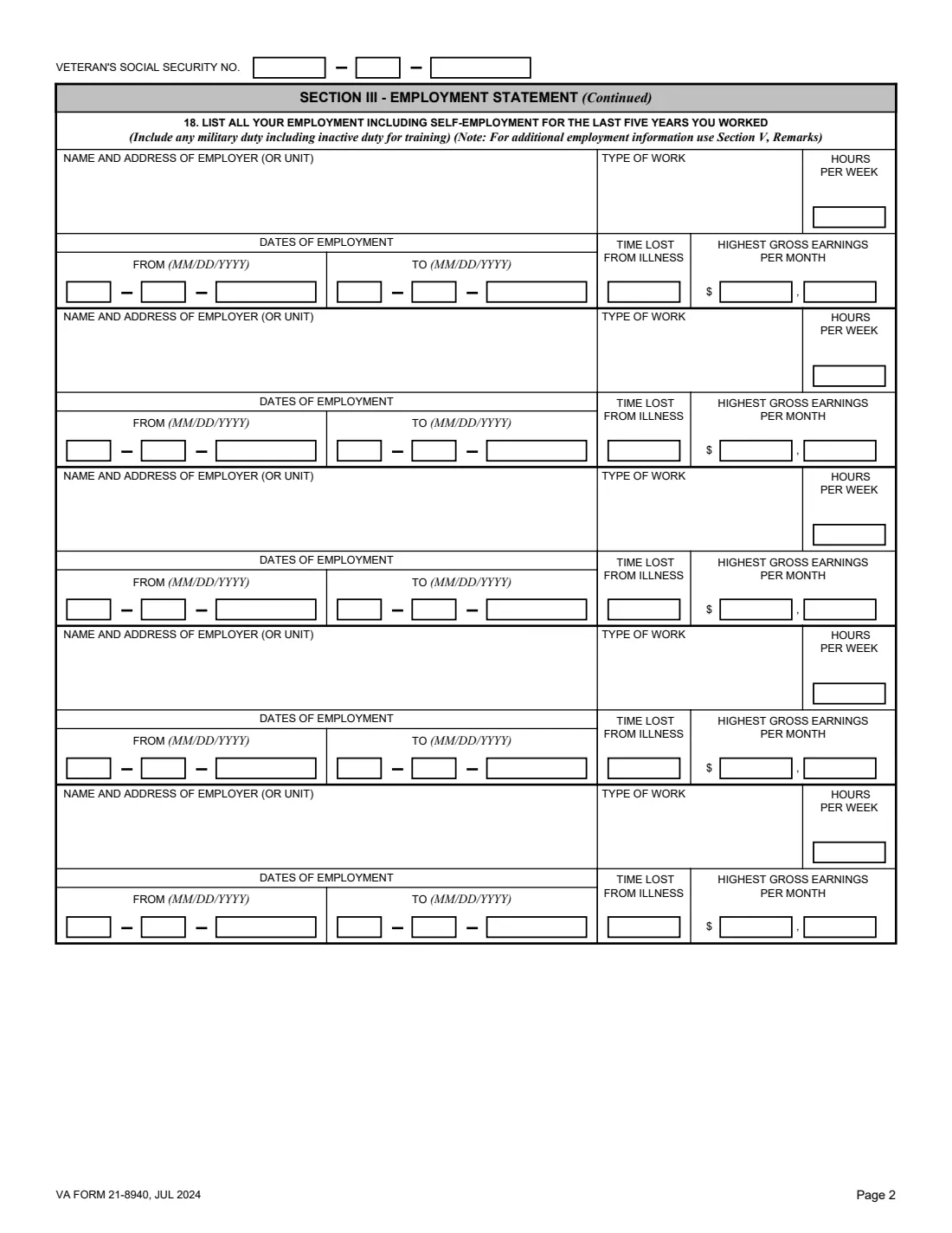
- Every employer in the last five years you worked: name and address, type of work, hours, dates, time lost and highest monthly earnings.
- Your income for the past 12 months, any jobs you applied for since, and your education and training.
What’s on VA Form 21-8940
The 2024 edition has 4 pages. FileIt asks for it in 13 parts, and it is signed by Veteran:
- Section I: Veteran identification informationVeteran
- Section II: Disability and medical treatmentVeteran
- Section III: Employment statementVeteran
- 18. Employment 1 of 5 (most recent)Veteran
- 18. Employment 2 of 5Veteran
- 18. Employment 3 of 5Veteran
- 18. Employment 4 of 5Veteran
- 18. Employment 5 of 5Veteran
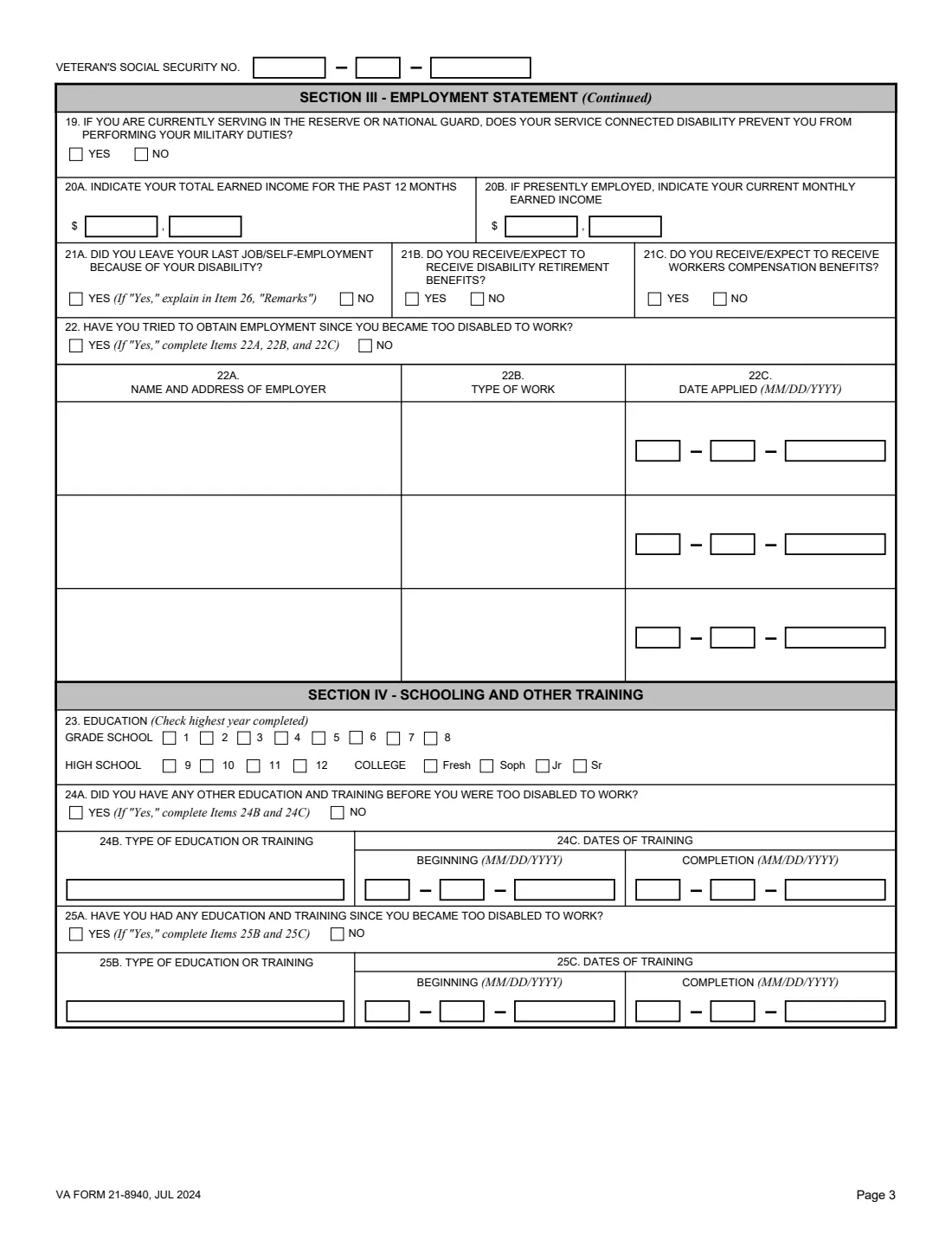
- Section III (continued): Income and work since your disabilityVeteran
- Section IV: Schooling and other trainingVeteran
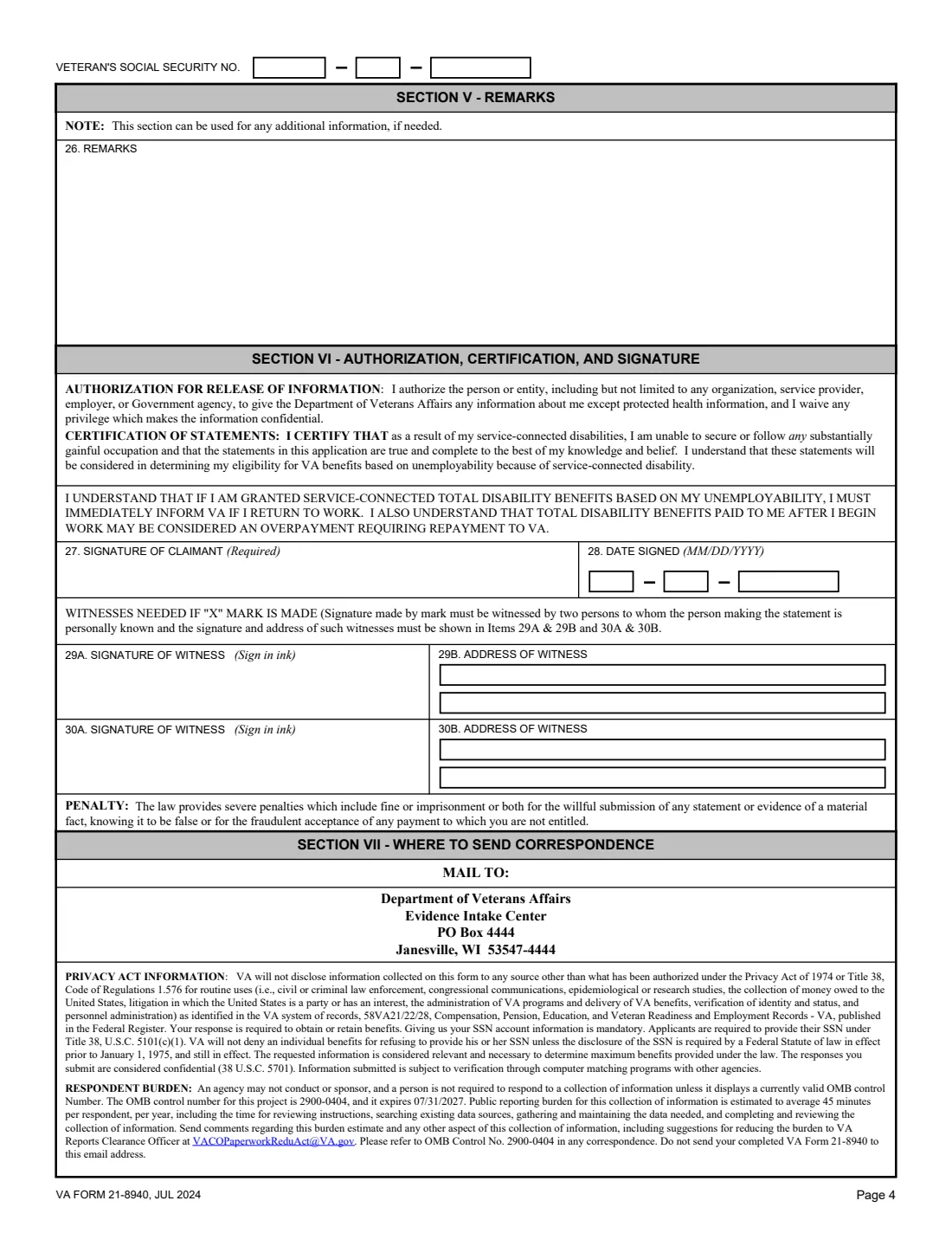
- Section V: RemarksVeteran
- Section VI: Authorization, certification and signatureVeteran
- Witnesses (only if you sign with an "X")Veteran
How to fill out VA Form 21-8940, step by step
1 Sections I and II: You and your treatment
Items 1 to 7 identify you. Item 8 names the service-connected disabilities that prevent work, and items 9 to 13 cover doctors and hospitals in the past 12 months.
2 Section III: Employment statement
Items 14 to 17 give the key dates and your highest yearly earnings. Item 18 lists up to five employers from the last five years you worked, and items 19 to 22 cover Reserve or Guard duty, your recent income, why you left your last job, disability retirement, workers compensation and jobs you applied for.
3 Section IV: Schooling and training
Item 23 is the highest year of education completed. Items 24 and 25 cover training before and since you became too disabled to work.
4 Sections V and VI: Remarks and signature
Item 26 is for anything more, such as why you left your last job. You sign item 27 and date item 28, certifying the statements and authorizing employers to give VA information.
Common mistakes to avoid
- Leaving gaps in the five-year employment history in item 18.
- Answering Yes to item 21A without explaining in item 26 why you left your job.
- Dates that don't line up, such as a last day of full-time work after the date you became too disabled.
- Not telling VA promptly about a return to work after benefits are granted.
- Forgetting that employers complete VA Form 21-4192.
After you fill it out
Sign item 27 and mail the form to the Evidence Intake Center, PO Box 4444, Janesville, WI 53547-4444.
VA may contact the employers you list; VA Form 21-4192 is the employer's part.
Keep the filed PDF in your FileIt vault. If you are granted benefits, the form says to tell VA at once if you return to work.
Fill out VA Form 21-8940 online with FileIt
- Pick the person. Choose someone from People and FileIt fills in their name, date of birth, address and other details it already knows.
- Answer plain-language questions. One part of the form at a time, with the official help text beside each question — 104 fields in all. Your answers save as you go.
- Check the live preview. Watch your answers land on the real U.S. Department of Veterans Affairs, Veterans Benefits Administration (VBA) form, and let FileIt do any worksheet arithmetic.
- Generate the official PDF. FileIt prints your answers into the agency’s own PDF and files it in that person’s folder in your vault. Sign it, or send it for e-signature.
FileIt fills the form — it never files or submits anything for you. Deliver the finished form to whoever asked for it, the way the form’s instructions say.
Start VA Form 21-8940 now — it’s freeVA Form 21-8940: frequently asked questions
What is TDIU?
Total disability individual unemployability: VA compensation at the 100 percent rate for a veteran whose service-connected disabilities prevent them from securing or following a substantially gainful occupation.
What employment do I list?
Item 18 asks for all employment, including self-employment, for the last five years you worked, including military duty and inactive duty for training.
Do my employers fill out anything?
VA's 21-526EZ instructions list VA Form 21-8940 together with VA Form 21-4192, Request for Employment Information, which employers complete.
What if I need more space?
Use item 26 (remarks) for additional dates, employers or explanations.
Where do I send VA Form 21-8940?
Mail it to the Department of Veterans Affairs, Evidence Intake Center, PO Box 4444, Janesville, WI 53547-4444.
Does FileIt send it to VA?
No. FileIt fills VA's own PDF and keeps it in your vault. You sign it and mail it yourself.
Official sources
- Blank form (PDF), published by U.S. Department of Veterans Affairs, Veterans Benefits Administration (VBA): https://www.vba.va.gov/pubs/forms/VBA-21-8940-ARE.pdf
- Official instructions and guidance: https://www.va.gov/find-forms/about-form-21-8940/
- Edition shown on this page: VA Form 21-8940, JUL 2024 (OMB No. 2900-0404, expires 07/31/2027) (checked 2026-10-19).
FileIt is not affiliated with or endorsed by U.S. Department of Veterans Affairs, Veterans Benefits Administration (VBA) or any government. This page explains the form in general terms and is not legal, tax or immigration advice. Always read the official instructions, and check that you are using the edition the recipient accepts. Page last reviewed 2026-10-19.