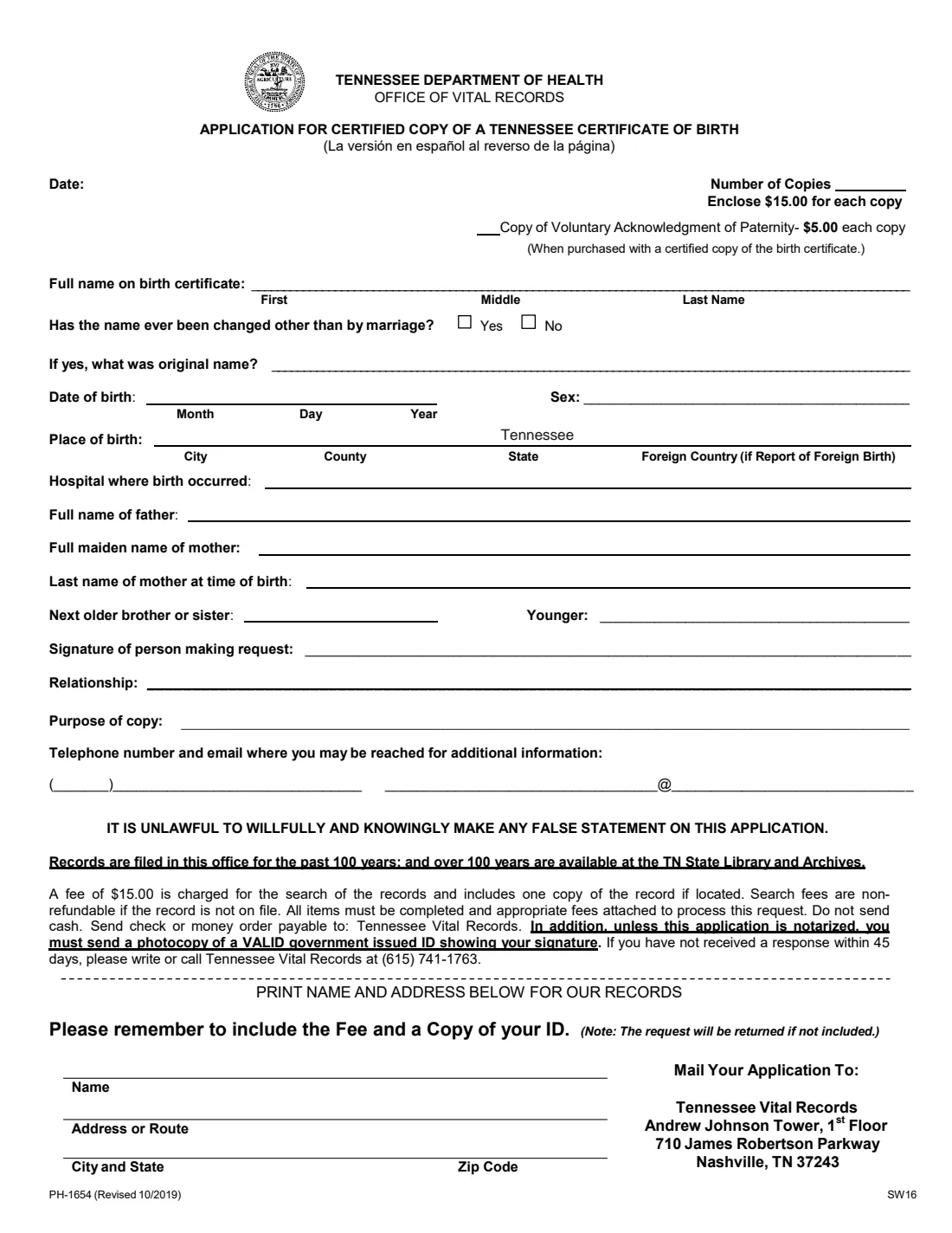
What is Form PH-1654?
Form PH-1654 is the Tennessee Department of Health's application for a certified copy of a Tennessee certificate of birth. You give the details as they appear on the birth record (the full name, date and place of birth, the hospital, the parents' names and the next older and younger brother or sister), say how you are related to the person and why you need the copy, and mail it to Tennessee Vital Records in Nashville.
The form says the Office of Vital Records keeps records for the past 100 years; older records are at the Tennessee State Library and Archives. It also lets you order copies of a Voluntary Acknowledgment of Paternity together with the birth certificate.
FileIt pre-fills the name and date of birth from your vault, prints the month in words under the form's Month column, and fills in the Office of Vital Records' own PDF. The finished form is saved in the person's vault folder. Because the application must be signed in ink and sent with a copy of your ID (or notarized), you print it, sign it and mail it yourself.
- Issued by
- Tennessee Department of Health, Office of Vital Records
- Fee printed on the form
- $15.00 for each certified copy, which includes the search; $5.00 for each copy of a Voluntary Acknowledgment of Paternity bought with a certified copy.
- Pay by
- Check or money order payable to Tennessee Vital Records. Do not send cash.
- Send with
- A photocopy of a valid government-issued ID showing your signature, unless the application is notarized.
- Mail to
- Tennessee Vital Records, Andrew Johnson Tower, 1st Floor, 710 James Robertson Parkway, Nashville, TN 37243
- Edition
- PH-1654 (Revised 10/2019)
Who needs to fill out Form PH-1654?
- Anyone born in Tennessee who needs a certified copy of their birth certificate, for example for a passport, a driver license or Social Security.
- Parents ordering a copy of their child's Tennessee birth certificate.
- Family members or legal representatives who need a copy for another person, giving their relationship on the form.
When to use Form PH-1654
- When you need a certified copy and prefer to order by mail.
- When an agency or school asks you for a certified copy, for example for a passport application.
- When you also need a copy of a Voluntary Acknowledgment of Paternity, which can be bought with the birth certificate.
What you need before you start
- The full name on the birth certificate, and the original name if it was changed other than by marriage.
- The date of birth, the city and county of birth (or the country, for a Report of Foreign Birth) and the hospital.
- The father's full name, the mother's full maiden name and her last name at the time of birth.
- The names of the next older and younger brother or sister, if any.
- Your relationship to the person, the purpose of the copy, a phone number and an email address.
- A check or money order for the fee and a photocopy of your valid government-issued ID.
What’s on Form PH-1654
The 2019 edition has 1 page. FileIt asks for it in 3 parts:
- What you are orderingPerson making the request
- The birth recordPerson making the request
- About you (the person making the request)Person making the request
How to fill out Form PH-1654, step by step
1 Date and number of copies
Date the application and enter how many certified copies you want, plus any copies of the Voluntary Acknowledgment of Paternity.
2 The birth record
Give the full name exactly as on the birth certificate (first, middle and last), whether the name has been changed other than by marriage, the date of birth (month, day, year), sex, city, county and state of birth, and the hospital.
3 Parents and siblings
Enter the father's full name, the mother's full maiden name and her last name at the time of birth, and the next older and younger brother or sister. These help the office find the right record.
4 About you
Sign on the signature line, give your relationship to the person, the purpose of the copy and how to reach you by phone and email.
5 Your name and address
Print your name and mailing address at the bottom of the form for the office's records.
Common mistakes to avoid
- Leaving items blank: the form says all items must be completed.
- Forgetting the fee or the copy of your ID: the form says the request will be returned if they are not included.
- Sending cash instead of a check or money order payable to Tennessee Vital Records.
- Asking this office for a record older than 100 years, which is held by the Tennessee State Library and Archives.
After you fill it out
Print the form, sign it in ink and enclose the check or money order and a photocopy of your valid government-issued ID (or have the application notarized).
Mail it to Tennessee Vital Records, Andrew Johnson Tower, 1st Floor, 710 James Robertson Parkway, Nashville, TN 37243.
The form says that if you have not received a response within 45 days, write or call Tennessee Vital Records at (615) 741-1763.
FileIt keeps the filled PDF in the person's vault folder, so you can add the certificate there when it arrives.
Fill out Form PH-1654 online with FileIt
- Pick the person. Choose someone from People and FileIt fills in their name, date of birth, address and other details it already knows.
- Answer plain-language questions. One part of the form at a time, with the official help text beside each question — 33 fields in all. Your answers save as you go.
- Check the live preview. Watch your answers land on the real Tennessee Department of Health - Office of Vital Records form, and let FileIt do any worksheet arithmetic.
- Generate the official PDF. FileIt prints your answers into the agency’s own PDF and files it in that person’s folder in your vault.
FileIt fills the form — it never files or submits anything for you. Deliver the finished form to whoever asked for it, the way the form’s instructions say.
Start Form PH-1654 now — it’s freeForm PH-1654: frequently asked questions
How much does a Tennessee birth certificate cost?
The form says to enclose $15.00 for each copy. The $15.00 is charged for the search and includes one copy if the record is found, and it is not refunded if the record is not on file.
Do I need to send a copy of my ID?
Yes, unless the application is notarized. The form asks for a photocopy of a valid government-issued ID showing your signature.
Can I sign this form electronically?
Not with FileIt. The signature has to match the one on the ID you send, so you print the form and sign it in ink.
What if the birth was more than 100 years ago?
The form says records over 100 years old are available at the Tennessee State Library and Archives.
What is a Voluntary Acknowledgment of Paternity?
A document parents sign to establish the father's legal parentage. The form lets you buy copies for $5.00 each together with a certified copy of the birth certificate.
Official sources
- Blank form (PDF), published by Tennessee Department of Health - Office of Vital Records: https://www.tn.gov/content/dam/tn/health/documents/vital-records/PH-1654-Application-For-Certificate-of-Birth.pdf
- Official instructions and guidance: https://www.tn.gov/health/health-program-areas/vital-records.html
- Edition shown on this page: PH-1654 (Revised 10/2019) (checked 2026-10-25).
FileIt is not affiliated with or endorsed by Tennessee Department of Health - Office of Vital Records or any government. This page explains the form in general terms and is not legal, tax or immigration advice. Always read the official instructions, and check that you are using the edition the recipient accepts. Page last reviewed 2026-10-25.