What is Virginia Form PAR 101?
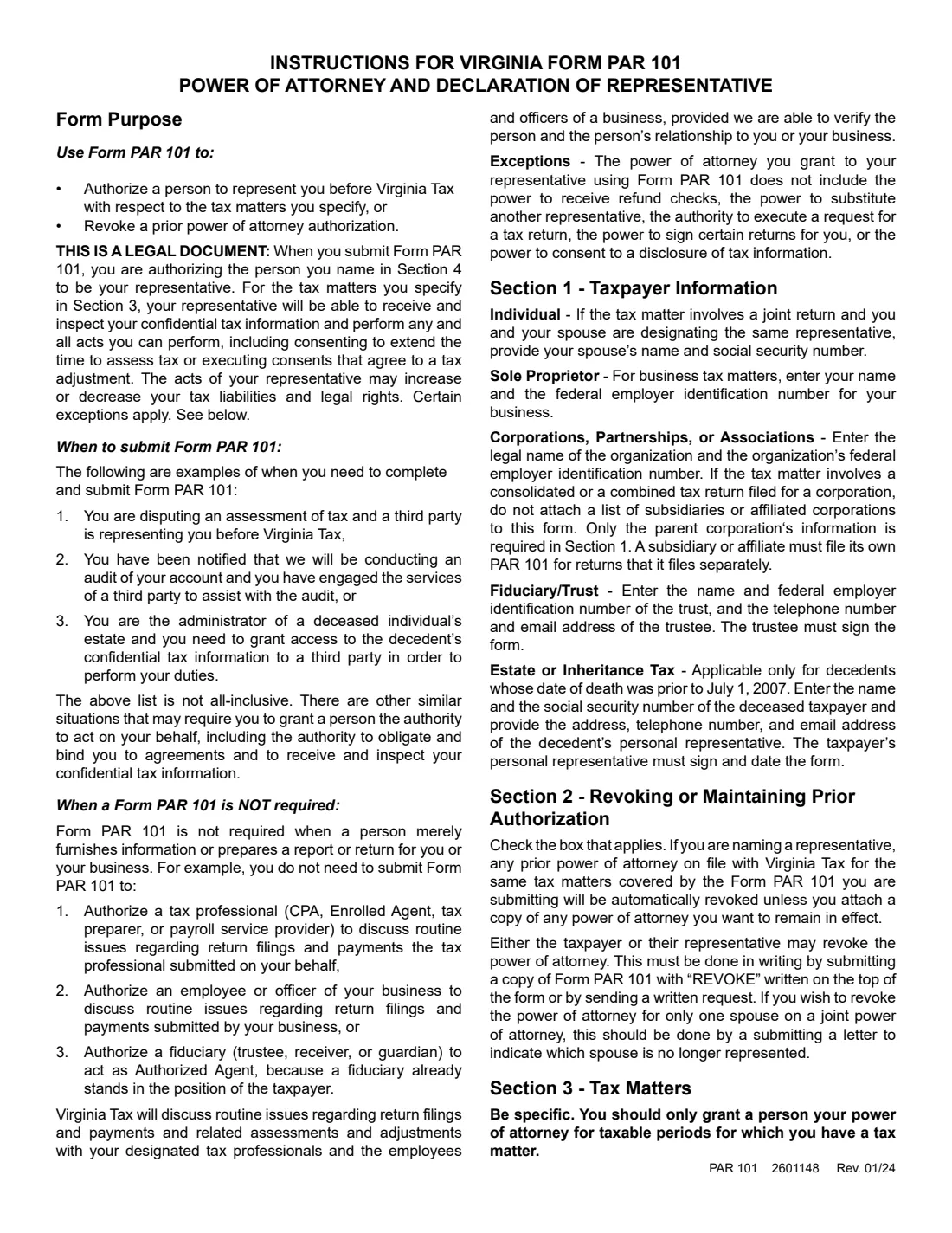
Form PAR 101, Virginia Power of Attorney and Declaration of Representative, authorizes a person to represent you before the Virginia Department of Taxation (Virginia Tax) for the tax matters you list. For those matters, your representative can receive and inspect your confidential tax information and perform any act you can perform, including consenting to extend the time to assess tax and agreeing to a tax adjustment. The form can also revoke a prior power of attorney.
It does not include the power to receive refund checks, substitute another representative, request a tax return, sign certain returns, or consent to a disclosure of tax information. You don't need it just for a tax professional, payroll provider, employee or officer to discuss routine return filings and payments. The form pages carry no revision date; the instructions attached to the current file read Rev. 01/24.
FileIt guides you through PAR 101 in plain English and prints your answers into Virginia Tax's own PDF. It keeps each representative's details and declaration together, checks the tax-matter rows (including the 15-character Virginia Tax Account Number the business rows need) and saves the finished PDF to your vault. Virginia Tax requires handwritten signatures, so you print it, sign it and mail or fax it yourself: FileIt never files anything with Virginia Tax.
- Who fills it
- The taxpayer (Sections 1 to 5) and each representative (the Section 6 declaration).
- Given to
- Virginia Tax, P. O. Box 1114, Richmond, VA 23218-1114, or by fax to (804) 254-6115.
- Signatures
- The taxpayer (and spouse, for joint representation) and every representative sign and date by hand. Electronic signatures and rubber stamps aren't accepted.
- Timing
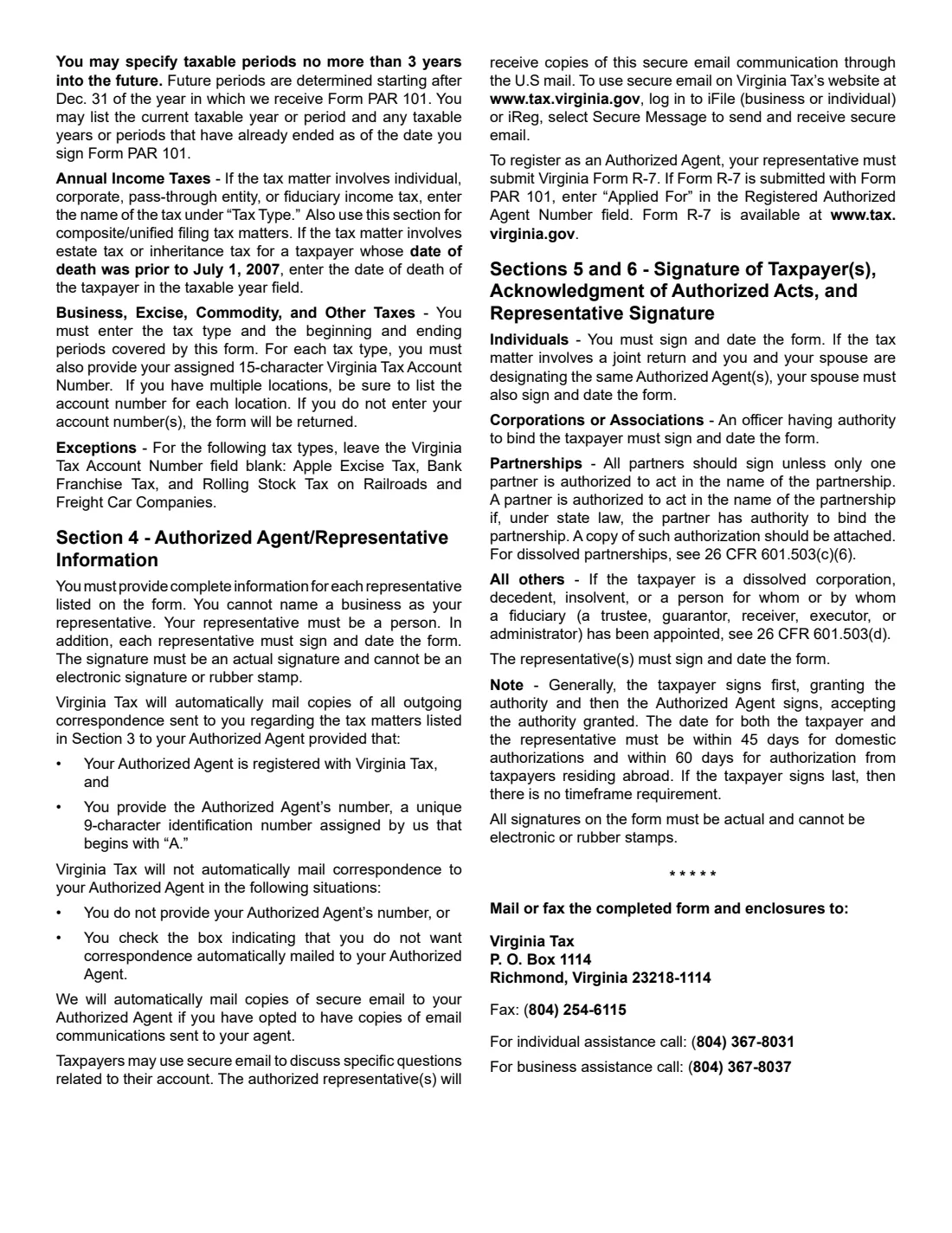
- If the taxpayer signs first, the representative's date must be within 45 days (60 days for a taxpayer abroad).
- Edition
- Rev. 01/24 (the instructions page; the form pages are undated)
- Agency
- Virginia Department of Taxation (Virginia Tax)
Who needs to fill out Virginia Form PAR 101?
- Taxpayers disputing a Virginia tax assessment with a third party representing them.
- Businesses notified of a Virginia Tax audit that have engaged someone to help.
- Administrators of a deceased person's estate who need a third party to access the decedent's confidential tax information.
- Married couples who want the same representative for a joint return.
- Anyone who wants to revoke a power of attorney already on file with Virginia Tax.
When to use Virginia Form PAR 101
- When a person needs to act for you before Virginia Tax and bind you to agreements on specific tax matters.
- When you want a representative to receive copies of Virginia Tax correspondence about those matters.
- When you want to revoke a prior power of attorney (tick Section 2).
- Not needed just for your tax preparer, CPA, enrolled agent, payroll provider, employee or officer to discuss routine return filings and payments they handled.
What you need before you start
- The taxpayer's name, SSN, ITIN or FEIN, address, phone numbers and email.
- Your spouse's name and SSN or ITIN for joint representation.
- The tax types and specific years or periods. Business, excise and other taxes also need the beginning and ending month (MM/YYYY) and your 15-character Virginia Tax Account Number.
- Each representative's name, address, phone, fax, email and, if registered, their Authorized Agent Number (9 characters starting with A).
- Details of any earlier power of attorney you want to keep (with a copy) or revoke.
What’s on Virginia Form PAR 101
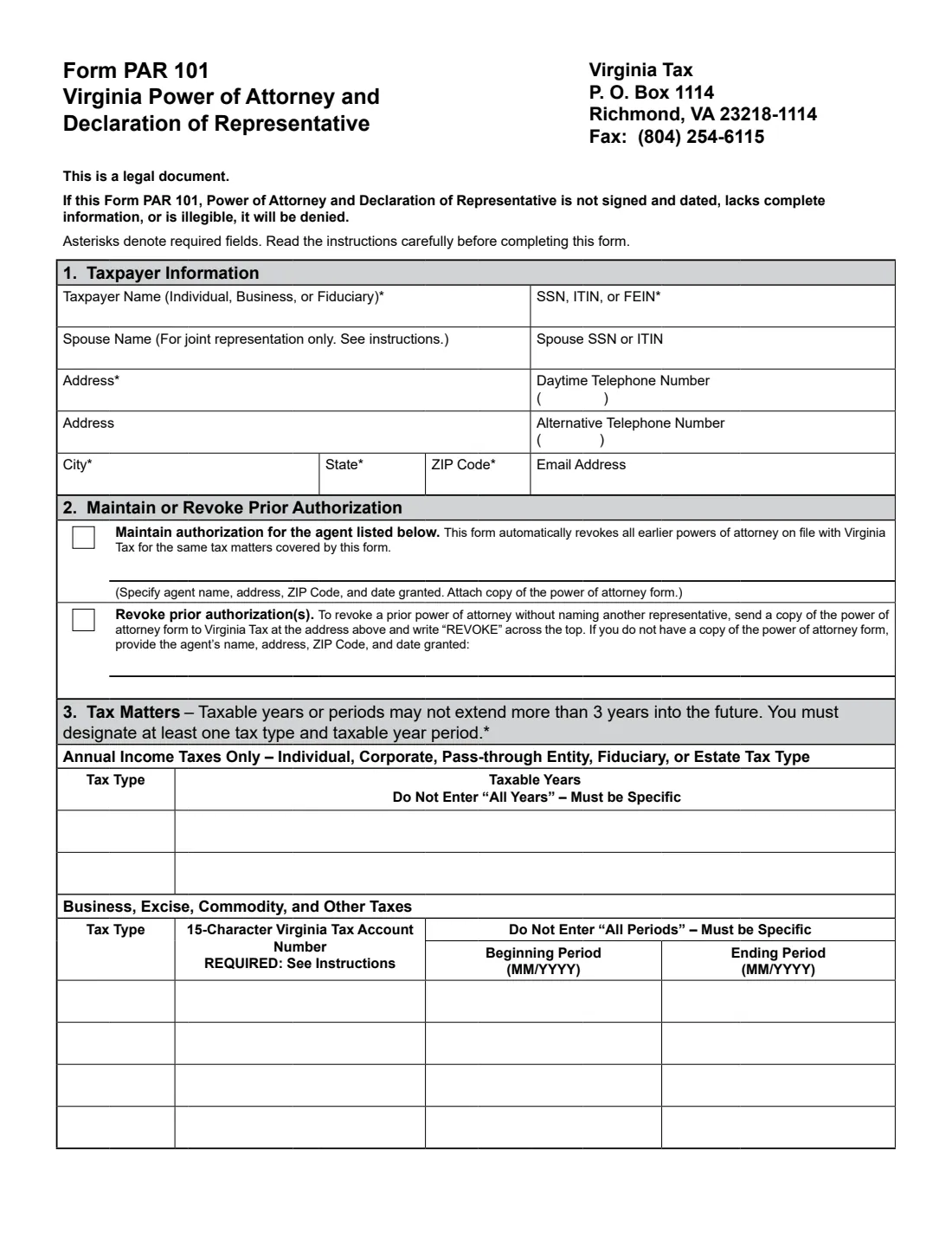
The 2024 edition has 4 pages. FileIt asks for it in 9 parts, and it is signed by Taxpayer and Spouse / second signer and Primary representative and Additional representative:
- Section 1: Taxpayer informationTaxpayer
- Section 1: Spouse (joint representation)Spouse / second signer
- Section 2: Maintain or revoke prior authorizationTaxpayer
- Section 3: Tax mattersTaxpayer
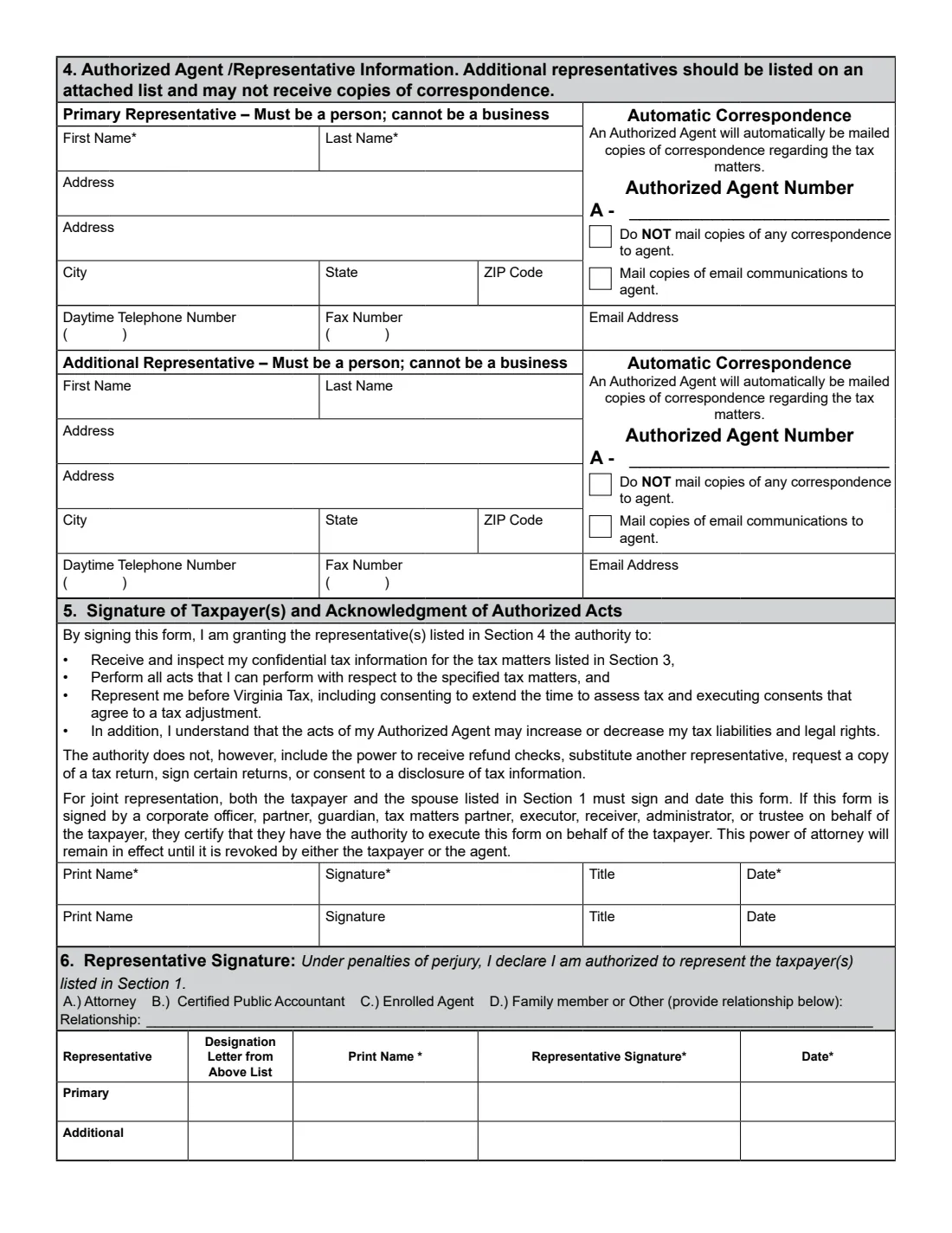
- Section 4: Primary representativePrimary representative
- Section 4: Additional representativeAdditional representative
- Section 5: Signature of taxpayer(s)Taxpayer
- Section 5: Spouse or second signerSpouse / second signer
- Section 6: Representative declarationPrimary representative
How to fill out Virginia Form PAR 101, step by step
1 Section 1: Taxpayer information
Individuals give their name and SSN or ITIN, plus the spouse's for joint representation. A sole proprietor with business tax matters uses the business's FEIN. A corporation, partnership or association uses its legal name and FEIN, and for a consolidated or combined return gives only the parent's details. A trust gives its name and FEIN with the trustee's phone and email.
2 Section 2: Maintain or revoke prior authorization
This form automatically revokes earlier powers of attorney for the same tax matters. To keep one, tick the first box, name the agent and attach a copy. To revoke one, tick the second box and give the agent's name, address, ZIP code and date granted.
3 Section 3: Tax matters
List at least one tax type with specific years; "all years" isn't accepted. Periods may go no more than 3 years into the future, counted from December 31 of the year Virginia Tax receives the form. Business rows need the 15-character Virginia Tax Account Number, except Apple Excise Tax, Bank Franchise Tax and Rolling Stock Tax. Without it the form is returned.
4 Section 4: Representatives
Name a primary representative and optionally one more. Each must be a person, not a business. If a representative is a registered Authorized Agent and you give their number, Virginia Tax mails them copies of correspondence automatically, unless you tick "Do NOT mail". Enter "Applied For" if they are sending Form R-7 with this form.
5 Sections 5 and 6: Signatures
The taxpayer signs, prints their name, adds a title if signing for an entity, and dates Section 5; a spouse signs too for joint representation. Each representative gives a designation (A Attorney, B CPA, C Enrolled Agent, D Family member or other, with the relationship), prints their name, and signs and dates Section 6.
Common mistakes to avoid
- Signing electronically or with a stamp. All signatures on PAR 101 must be handwritten.
- Leaving out the 15-character Virginia Tax Account Number for a business tax row. The form is returned.
- Writing "all years" or "all periods". Periods must be specific.
- Naming a business as representative. The representative must be a person.
- Letting more than 45 days pass between the taxpayer's and the representative's signatures when the taxpayer signs first.
- Forgetting that a new PAR 101 revokes earlier powers of attorney for the same matters unless you attach the ones to keep.
After you fill it out
Print the PDF and sign it by hand. The taxpayer (and spouse, if joint) signs Section 5 and each representative signs Section 6. Virginia Tax doesn't accept electronic signatures on this form.
Mail or fax the completed form and any attachments to Virginia Tax, P. O. Box 1114, Richmond, VA 23218-1114, fax (804) 254-6115. For help, Virginia Tax lists (804) 367-8031 for individuals and (804) 367-8037 for businesses. FileIt doesn't send it.
The power of attorney stays in effect until you or the agent revoke it. The finished PDF stays in your vault as a record.
Fill out Virginia Form PAR 101 online with FileIt
- Pick the person. Choose someone from People and FileIt fills in their name, date of birth, address and other details it already knows.
- Answer plain-language questions. One part of the form at a time, with the official help text beside each question — 69 fields in all. Your answers save as you go.
- Check the live preview. Watch your answers land on the real Virginia Department of Taxation (Virginia Tax) form, and let FileIt do any worksheet arithmetic.
- Generate the official PDF. FileIt prints your answers into the agency’s own PDF and files it in that person’s folder in your vault. Sign it, or send it for e-signature.
FileIt fills the form — it never files or submits anything for you. Deliver the finished form to whoever asked for it, the way the form’s instructions say.
Start Virginia Form PAR 101 now — it’s freeVirginia Form PAR 101: frequently asked questions
Can I fill out Virginia Form PAR 101 online?
Yes. FileIt asks each question in plain English and prints your answers into Virginia Tax's official PAR 101 PDF. You then print it, sign it by hand, and mail or fax it yourself.
Can I e-sign Form PAR 101?
No. The instructions say all signatures must be actual signatures and cannot be electronic or rubber stamps.
What can my representative not do?
The power of attorney doesn't include receiving refund checks, substituting another representative, requesting a copy of a tax return, signing certain returns, or consenting to a disclosure of tax information.
How do I revoke a Virginia power of attorney?
Tick the revoke box in Section 2 on a new form, or send Virginia Tax a copy of the old PAR 101 with REVOKE written across the top, or a written request. To revoke it for only one spouse on a joint power of attorney, send a letter saying which spouse is no longer represented.
What is an Authorized Agent Number?
A unique 9-character number Virginia Tax assigns to registered agents, beginning with A. Representatives register with Form R-7; if it is sent with the PAR 101, write "Applied For".
Does my spouse need to sign?
Only for joint representation, when you and your spouse name the same representative for a joint return. Then both of you sign and date the form.
Official sources
- Blank form (PDF), published by Virginia Department of Taxation (Virginia Tax): https://www.tax.virginia.gov/sites/default/files/taxforms/miscellaneous/any/par-101-any.pdf
- Official instructions and guidance: https://www.tax.virginia.gov/sites/default/files/taxforms/miscellaneous/any/par-101-any.pdf
- Edition shown on this page: Rev. 01/24 (PAR 101 2601148) (checked 2026-09-28).
FileIt is not affiliated with or endorsed by Virginia Department of Taxation (Virginia Tax) or any government. This page explains the form in general terms and is not legal, tax or immigration advice. Always read the official instructions, and check that you are using the edition the recipient accepts. Page last reviewed 2026-09-28.