What is Form IR21?
Form IR21, the 'Notification of a Non-Citizen Employee's Cessation of Employment or Departure from Singapore', is how an employer tells the Inland Revenue Authority of Singapore (IRAS) that a non-Singapore-citizen employee is leaving, so that the employee's income tax can be settled before they go. This process is called tax clearance. It applies to foreigners and Singapore Permanent Residents (SPRs), and it is the employer's job, not the employee's: the employer fills in the form, signs it, and withholds the money it owes the employee until IRAS says what to do with it.
The form matters because the rules are strict. IRAS asks employers to file it at least one month before the employee's last day, and to hold back all monies due to the employee from the day they learn of the resignation, termination or posting. An employer who files late without a valid reason may be fined up to $5,000, and one who fails to withhold may become liable for the tax the employee owes.
FileIt guides you through Form IR21 section by section and prints your answers into IRAS's own PDF (the 2026 edition, IRIN 112/1/2026), including Appendices 1, 2 and 3 when you need them. It pre-fills the employee's name, date of birth and email and your company name from the People records in your vault, works out the calendar-year periods, subtotals and totals, the benefits-in-kind schedule and share-plan gains for you, files the finished PDF in the employee's folder, and can send it for e-signature. You then post it to IRAS yourself — FileIt never files anything with IRAS.
- Who fills it
- The employer, about a non-citizen employee (a foreigner or Singapore Permanent Resident)
- Given to
- IRAS, by post to 55 Newton Road, Singapore 307987 — or the same details e-filed at myTax Portal
- When
- At least one month before the employee ceases employment, is posted overseas or leaves Singapore for more than three months
- Signatures
- An authorised person for the employer, such as a director, company secretary or manager, signs page 2 and any appendix attached
- Edition
- IRIN 112/1/2026 (6 pages including Appendices 1–3)
- Cost
- No filing fee is printed on the form
Who needs to fill out Form IR21?
- Singapore employers whose foreign employee is resigning, being terminated or reaching the end of a contract.
- Employers of a Singapore Permanent Resident who is leaving Singapore permanently, or being posted to work overseas.
- Employers sending a non-citizen employee on an overseas posting, even if they stay on the payroll.
- Employers whose non-citizen employee plans to leave Singapore for more than three months.
- Employers who need to send IRAS an additional or amended IR21 after one has already been filed.
- Not every departing non-citizen needs tax clearance — IRAS provides a Tax Clearance Calculator on its website to check first.
When to use Form IR21
- As soon as you know a non-citizen employee will cease employment with you in Singapore, and at least one month before their last day of service.
- Before an overseas posting starts — the 'date of cessation' is the last day of service before the posting.
- When an employee resigns with immediate effect, absconds or doesn't return from leave: file anyway and give the reason for the short notice in item 16.
- To report extra income paid after your first IR21, file an 'Additional' form; to correct the income details, file an 'Amended' form, which supersedes every earlier one.
- If only the amount of money you have withheld changes, IRAS asks you to email the details through myTax Mail at myTax Portal instead of filing an amended form.
What you need before you start
- Your company's tax reference number (for a company, normally its UEN), registered name and address.
- The employee's full name as on their NRIC or FIN card, their NRIC or FIN, and a Malaysian IC number if they have one.
- Their date of birth, citizenship, marital status, contact number, email and a mailing address — overseas if they are leaving.
- Key dates: arrival in Singapore (if known), commencement, cessation or overseas posting, departure (if known) and the date notice was given.
- Payroll records for the year of cessation and, unless already sent through the Auto-Inclusion Scheme (AIS), the year before — salary, bonuses, director's fees, allowances, commissions and other payments.
- Details of the last salary paid: the date, amount and the period it covered, plus the bank the salary goes to.
- The amount of money you have withheld pending tax clearance.
- Housing, hotel and other benefits-in-kind provided, with rent or annual values, for Appendix 1.
- Share option or share award details (grant dates, prices, market values and number of shares) for Appendix 2 or 3.
- If claiming dependants' relief: the spouse's and children's names, dates of birth and identification numbers.
What’s on Form IR21
The 2026 edition has 6 pages. FileIt asks for it in 12 parts, and it is signed by Employer:
- A. Type of Form IR21Employer
- B. Employer's particularsEmployer
- C. Employee's personal particularsEmployee
- D. Employee's employment recordsEmployer
- E. Spouse's particularsEmployee
- E7. Children's particularsEmployee
- F. Income — year of cessationEmployer
- F. Income — year before the year of cessationEmployer
- G. DeclarationEmployer
- Appendix 1 — Value of benefits-in-kindEmployer
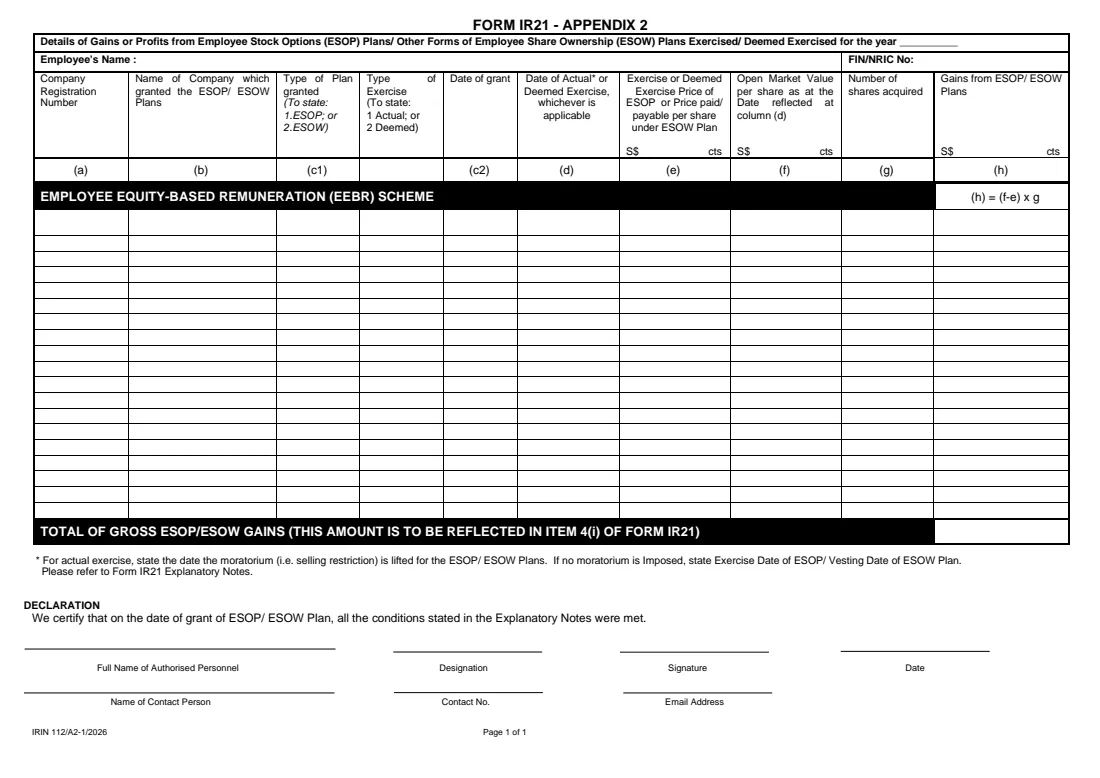
- Appendix 2 — Gains from ESOP / ESOW plansEmployer
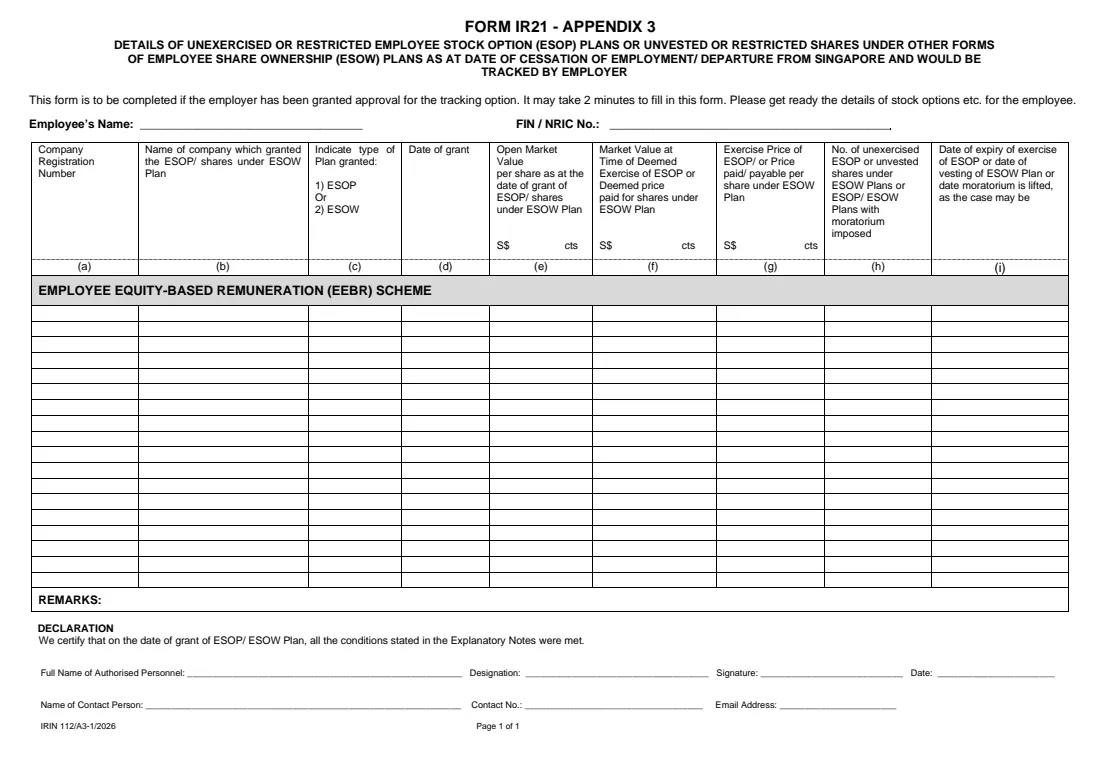
- Appendix 3 — Unexercised or restricted ESOP / ESOW tracked by the employerEmployer
How to fill out Form IR21, step by step
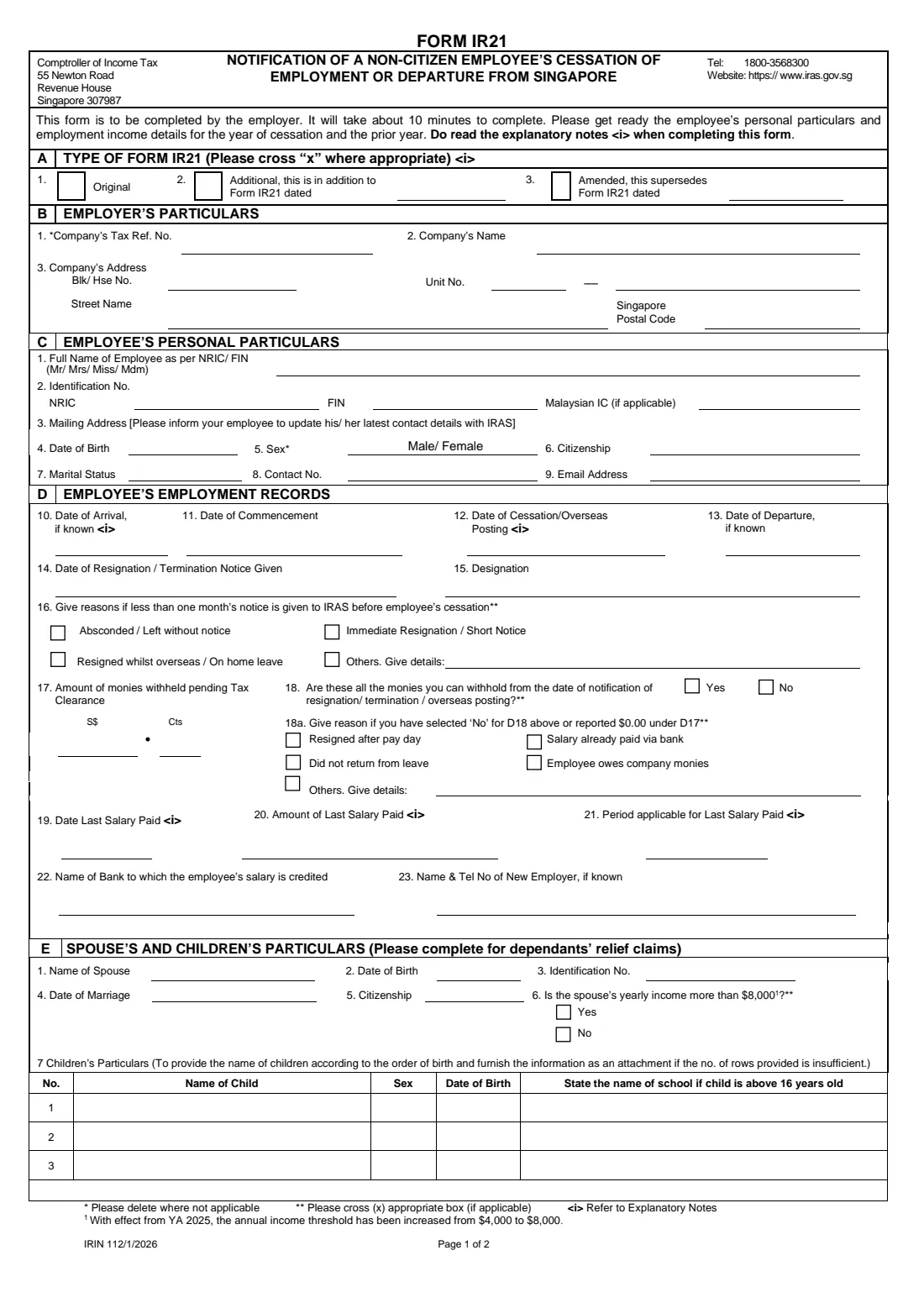
1 A. Type of Form IR21
Cross one box. 'Original' is the first IR21 you send for this employee. 'Additional' reports income paid or payable on top of an earlier IR21, together with the additional money withheld, and needs the date of that earlier form. 'Amended' repeats the entire filing with the revised monies withheld and supersedes every IR21 sent before for the employee.
In FileIt you pick one option and, for an additional or amended form, enter the earlier form's date; FileIt puts the cross in the right box.
2 B. Employer's Particulars
Give the company's tax reference number, its name and its address in the Singapore format the form uses: block or house number, unit number (level and unit, as in #05-123), street name and the six-digit postal code. FileIt pre-fills the company name from the employer linked to the employee in your vault.
3 C. Employee's Personal Particulars
Enter the employee's full name exactly as it appears on their NRIC or FIN card, with Mr, Mrs, Miss or Mdm, and their identification number — an NRIC for a Singapore Permanent Resident, or a FIN for a foreigner on a work pass. There is a separate box for a Malaysian IC number where it applies.
The form also asks for a mailing address, date of birth, sex, citizenship, marital status, phone number and email. Use an address where IRAS can reach the employee after they leave, and remind them to keep their contact details with IRAS up to date. The form prints 'Male/ Female' and asks you to delete one; FileIt strikes out the word that doesn't apply.
4 D. Employee's Employment Records
This is the heart of the notification. The date of cessation is the official last day of service with your company — not the work pass cancellation date, and not an earlier date reached by using up leave. For an overseas posting it is the last day of service before the posting. The arrival date can be left blank if the employee was already working in Singapore before joining you and the date is unknown.
If IRAS will get less than one month's notice, tick the reason in item 16. Item 17 is the amount of money you have withheld pending tax clearance, item 18 asks whether that is everything you could withhold from the date you were notified, and item 18a asks why if you answered No or withheld nothing — for example, the salary had already been paid into the bank. Items 19 to 21 describe the last salary paid; IRAS's own example is a salary paid on 26/05/2025 for the period 01/05/2025 to 31/05/2025.
5 E. Spouse's and Children's Particulars
Complete this part if the employee is married or has children and wants dependants' relief considered. IRAS explains that giving these details lets it include the relevant reliefs in the tax assessment, which can reduce the tax and the need to revise the clearance directive later. Item 6 asks whether the spouse's yearly income is more than $8,000 — the form notes the threshold rose from $4,000 with effect from YA 2025. There are three rows for children, listed in order of birth; attach a sheet for more.
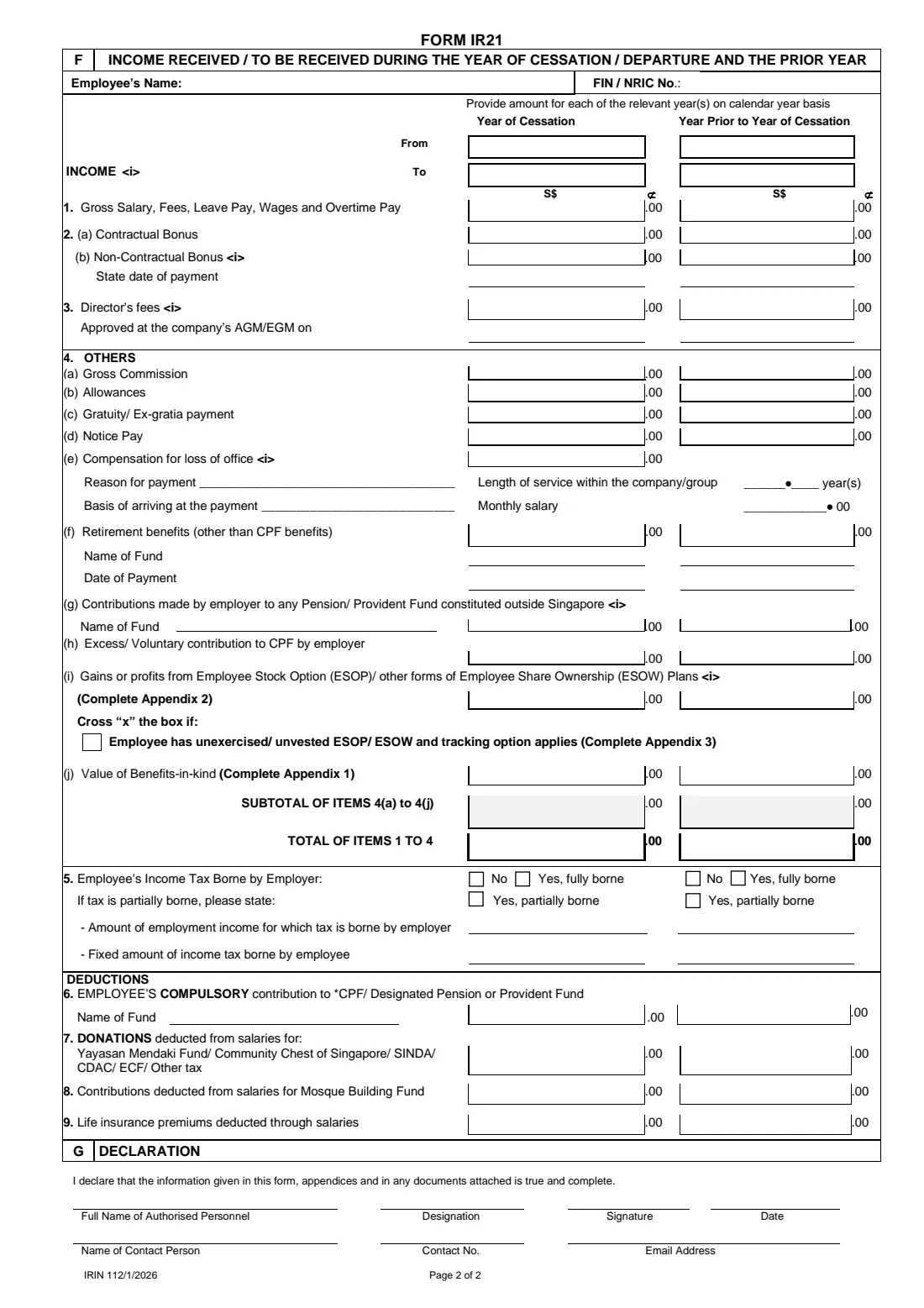
6 F. Income Received / To Be Received
Report the employee's income in Singapore dollars and per calendar year: one column for the year of cessation and one for the year before. If the prior year's income has already reached IRAS through the Auto-Inclusion Scheme, you don't report it again.
The lines cover gross salary and overtime, contractual and non-contractual bonuses, director's fees, and a list of 'Others': commission, allowances, gratuity, notice pay, compensation for loss of office, retirement benefits, employer contributions to overseas pension funds, excess CPF contributions, share-plan gains and benefits-in-kind. Item 5 asks whether the employer bears the employee's tax, and items 6 to 9 cover CPF or pension contributions, donations, Mosque Building Fund contributions and life insurance premiums deducted from salary.
The amount boxes print '.00', so enter whole dollars. FileIt fills in the From and To dates, adds up the subtotal of items 4(a) to 4(j) and the total of items 1 to 4, and carries the Appendix 1 and Appendix 2 totals into items 4(j) and 4(i).
7 G. Declaration
The authorised person declares that the information in the form, its appendices and any attached documents is true and complete, and gives their name, designation, signature and date, plus a contact person, phone number and email. IRAS lists who may sign: the company secretary or a director, a precedent partner, a sole-proprietor, a manager, an honorary secretary or treasurer, a representative of a non-resident company, or another person the employer authorises.
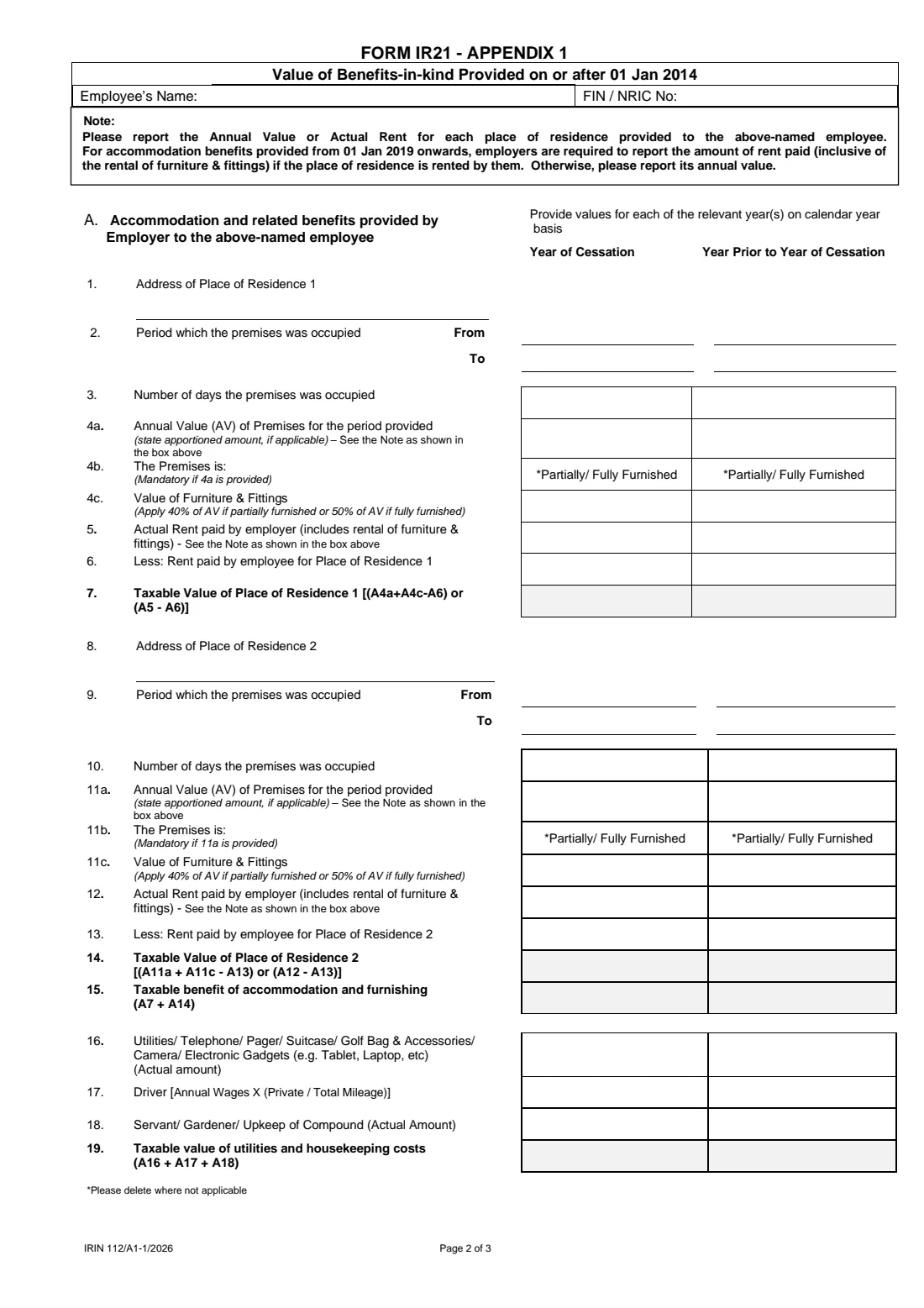
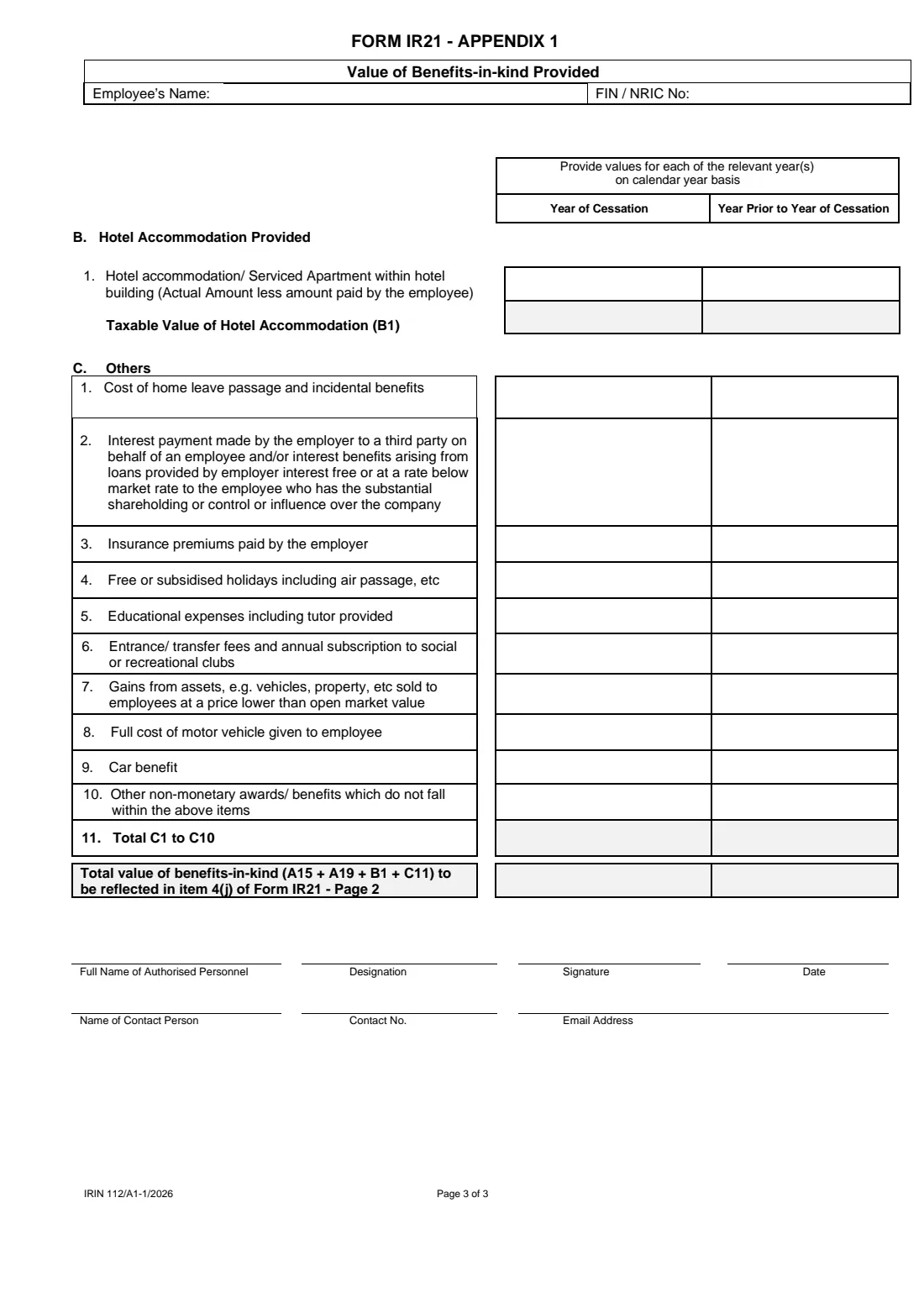
8 Appendix 1 — Value of Benefits-in-kind
Use this when the employer provided housing or other benefits. For each place of residence you give the period occupied and either the annual value (for premises the employer doesn't rent) or the actual rent the employer paid, including furniture and fittings, less any rent the employee paid. Furniture and fittings are valued at 40% of the annual value if partially furnished or 50% if fully furnished.
Further lines cover utilities and gadgets, a driver, servants and upkeep, hotel accommodation, home leave passage, interest benefits, insurance premiums, holidays, education, club fees, assets sold below market value, motor vehicles and car benefits. FileIt works out the days occupied, each taxable value and the grand total that goes into item 4(j).
9 Appendix 2 — Gains from ESOP / ESOW Plans
List share options and share awards exercised, or deemed exercised, in the year. Under the 'deemed exercise' rule, a non-citizen employee who ceases employment with unexercised options or unvested shares is treated as having gained from them at that point. For each plan you give the company, the type of plan and of exercise, the dates, the exercise price, the open market value per share and the number of shares; the gain is (f − e) × g. FileIt calculates each row and the total that goes into item 4(i).
10 Appendix 3 — Unexercised or Restricted Plans Tracked by the Employer
Only for employers that IRAS has approved for the tracking option. Instead of the deemed exercise rule, the employer tracks the actual gains when the options are exercised or the shares vest. Tick the tracking box under item 4(i) of the main form, list the plans in Appendix 3, and furnish the Letter of Undertaking to collect and pay the tax.
Common mistakes to avoid
- Using the work pass cancellation date, or a date shortened by leave, as the date of cessation — it must be the official last day of service.
- Filing late without explaining why: if IRAS gets less than a month's notice, state the reason in item 16.
- Paying out final salary, leave pay or bonuses before clearance — withhold all monies from the day you know the employee is leaving, or explain in item 18a why you couldn't.
- Reporting income for the whole employment period in one figure instead of splitting it by calendar year.
- Leaving item 4(i) out of step with Appendix 2, or item 4(j) with Appendix 1 — the totals must tally.
- Treating tax you merely deduct from salary, or salary you withhold for clearance, as 'tax borne by the employer' in item 5.
- Filing an amended IR21 just to change the amount withheld, when IRAS asks for an email through myTax Mail instead.
After you fill it out
Have the authorised person sign and date page 2, and each appendix you are attaching. With FileIt you can send the PDF for e-signature, or print it and sign by hand; IRAS asks for black ink on handwritten entries. If there is no income to declare, IRAS asks for the reasons in a separate letter sent with the form, and for compensation for loss of office it may ask for the termination letter and related documents.
Post the signed form and appendices to the Inland Revenue Authority of Singapore at 55 Newton Road, Singapore 307987. Alternatively, the same details can be e-filed at myTax Portal by someone authorised through Corppass. IRAS says paper forms are usually processed within 21 days and e-filed ones faster. You will then receive either a Directive to Pay Tax — pay the amount from the withheld money within 10 days of the directive — or a Notification to Release Monies, after which you can pay the employee what you held back.
FileIt keeps the completed PDF in the employee's vault folder, so you have the exact copy you posted when the clearance directive arrives or if you later need to file an additional or amended IR21.
Fill out Form IR21 online with FileIt
- Pick the person. Choose someone from People and FileIt fills in their name, date of birth, address and other details it already knows.
- Answer plain-language questions. One part of the form at a time, with the official help text beside each question — 334 fields in all. Your answers save as you go.
- Check the live preview. Watch your answers land on the real Inland Revenue Authority of Singapore (IRAS) form, and let FileIt do any worksheet arithmetic.
- Generate the official PDF. FileIt prints your answers into the agency’s own PDF and files it in that person’s folder in your vault. Sign it, or send it for e-signature.
FileIt fills the form — it never files or submits anything for you. Deliver the finished form to whoever asked for it, the way the form’s instructions say.
Start Form IR21 now — it’s freeForm IR21: frequently asked questions
What is Form IR21 used for?
Form IR21 is the tax clearance notification a Singapore employer sends IRAS when a non-citizen employee — a foreigner or a Singapore Permanent Resident — ceases employment, is posted overseas, or plans to leave Singapore for more than three months. It reports the employee's income so IRAS can assess their tax before they leave.
Who has to file IR21, the employer or the employee?
The employer. The form is completed and signed by the employer's authorised person, such as a director, company secretary or manager. The employee doesn't file it, though they should keep their contact details with IRAS up to date.
How early must I file Form IR21?
At least one month before the employee's date of cessation, overseas posting or departure. The Explanatory Notes mention a 10-day grace period, and if you can't give a month's notice you should give the reason in item 16. Unless there is a valid reason, late or non-filing may lead to a fine of up to $5,000.
Do I have to withhold the employee's salary?
Yes. From the day you know of the resignation, termination or overseas posting, you must withhold all monies due to the employee — salary, leave pay, allowances, bonuses and so on — until IRAS issues its clearance directive. If you can't, explain why in item 18a, otherwise you may be liable for the tax the employee owes.
Can I fill in Form IR21 online with FileIt?
Yes. FileIt walks you through each part, pre-fills details from your People records, does the totals and appendix calculations, and produces IRAS's official PDF with your answers printed in. Filling forms is available on every FileIt account, including the free plan.
Where do I send the paper Form IR21?
Post it to the Inland Revenue Authority of Singapore, 55 Newton Road, Singapore 307987. FileIt doesn't send it for you. IRAS also accepts the same information e-filed at myTax Portal.
What happens to unexercised share options?
Under the 'deemed exercise' rule, a non-citizen employee who stops working for the company that granted them options or share awards is treated as having gained from any that are unexercised or unvested; report these in Appendix 2. If IRAS has approved your company for the tracking option, use Appendix 3 and the tracking box instead.
Can Form IR21 be signed electronically?
The form asks for the signature of an authorised person and IRAS's paper-filing guidance doesn't specify handwriting. FileIt lets you send the PDF for e-signature before you print and post it, or you can sign it by hand.
Official sources
- Blank form (PDF), published by Inland Revenue Authority of Singapore (IRAS): https://www.iras.gov.sg/docs/default-source/individual-income-tax/non-residents/formir21.pdf
- Official instructions and guidance: https://www.iras.gov.sg/taxes/individual-income-tax/employers/tax-clearance-for-foreign-spr-employees-(ir21)/filing-tax-clearance
- Edition shown on this page: IRIN 112/1/2026 (Appendix 1 IRIN 112/A1-1/2026, Appendix 2 IRIN 112/A2-1/2026, Appendix 3 IRIN 112/A3-1/2026) (checked 2026-09-25).
FileIt is not affiliated with or endorsed by Inland Revenue Authority of Singapore (IRAS) or any government. This page explains the form in general terms and is not legal, tax or immigration advice. Always read the official instructions, and check that you are using the edition the recipient accepts. Page last reviewed 2026-09-25.