What is Form BDR 41 (death record search)?
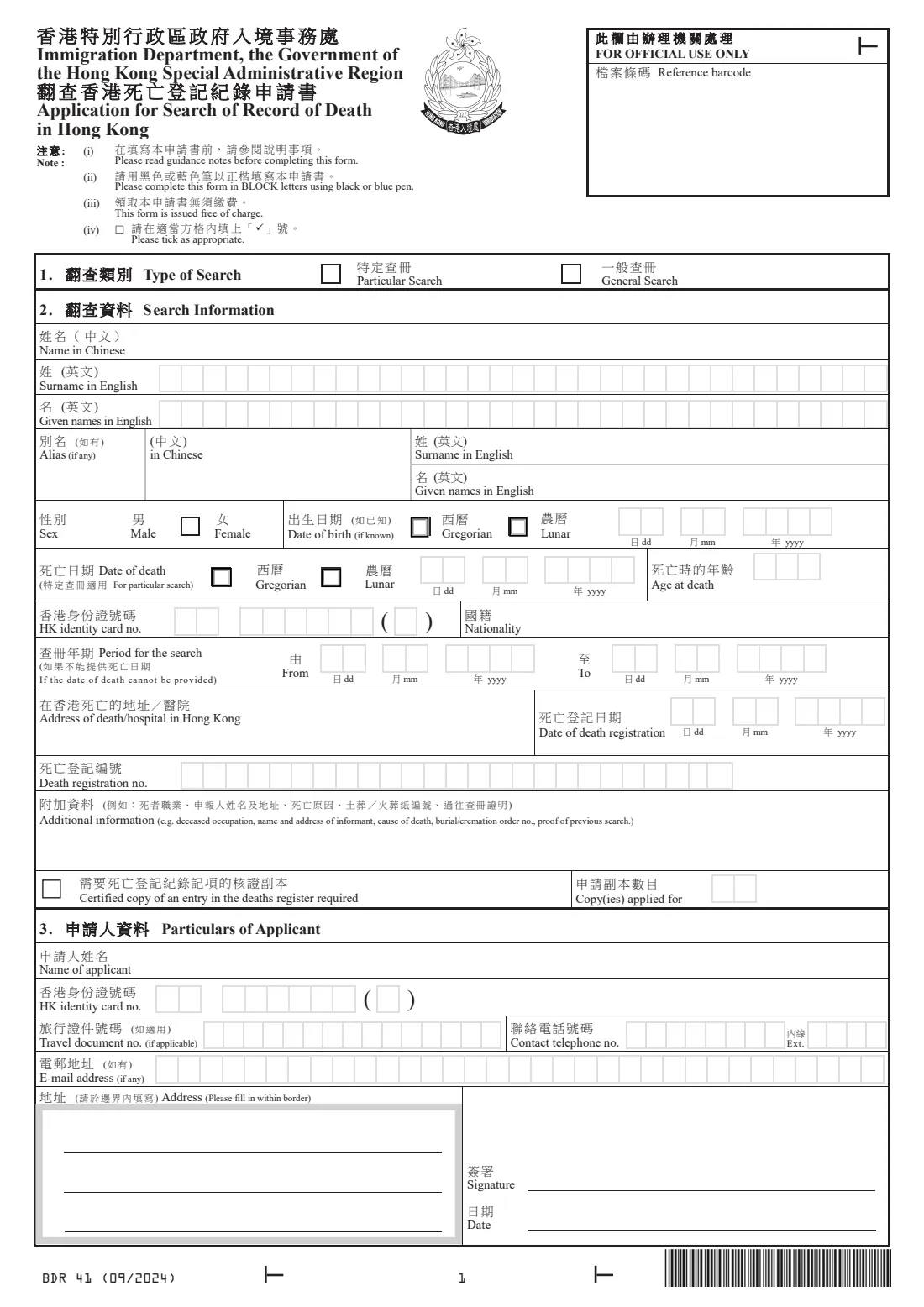
Form BDR 41 asks the Births and Deaths General Register Office to search the Hong Kong deaths register. Families use it when they need a death certificate but don't have the registration number, when an insurer or bank asks for proof of death, or when researching a relative who died in Hong Kong.
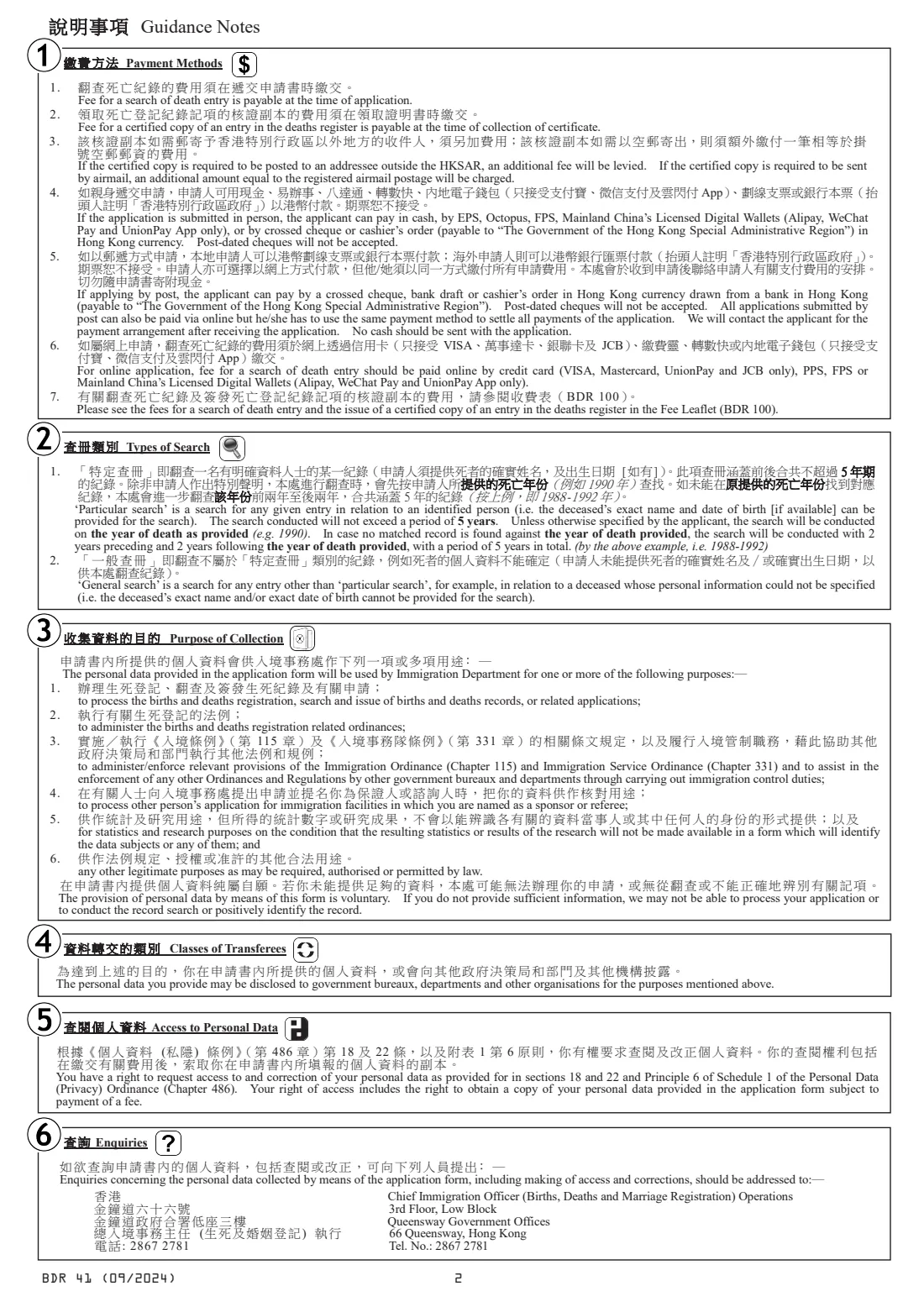
As with birth records, a particular search is for an identified person whose exact name and date of death you can give; ImmD looks at the year of death and the two years either side. A general search covers anything else. The form also lets you ask for certified copies of the entry once it is found.
FileIt walks you through the form in plain English, prints every answer in capitals into ImmD's own boxes and splits identity card numbers into the form's groups. The filled PDF is saved in your vault, ready to print and sign. FileIt doesn't send it anywhere.
- Who fills it
- The person asking for the search, often a relative or executor
- Given to
- The Births and Deaths General Register Office by post or in person, or a deaths or births registry listed on ImmD's page
- Fee
- Search fees are in ImmD's Fees Leaflet (BDR 100), paid when you apply; certified copies are paid for on collection
- Search types
- Particular search (up to 5 years) or general search
- Edition
- BDR 41 (09/2024), issued free of charge
Who needs to fill out Form BDR 41 (death record search)?
- Relatives or executors who need a Hong Kong death certificate but don't know the death registration number.
- People dealing with insurance, pensions, bank accounts or property after a death in Hong Kong.
- Family historians looking for the record of a relative who died in Hong Kong.
- Anyone whose earlier search result or certificate has been lost.
When to use Form BDR 41 (death record search)
- When you need the death record found before a certified copy can be issued.
- When you know the approximate time of death but not the exact date, using a general search over a period.
- If you already have the registration number or an earlier certified copy, form BDR 62 asks for a certified copy directly.
What you need before you start
- The deceased's surname and given names in English, any alias and sex.
- Their date of birth (if known) and date of death, each marked Gregorian or lunar, and their age at death.
- Their Hong Kong identity card number and nationality, if known.
- The address or hospital where they died, and the date and number of the death registration if you have them.
- Anything else that helps, such as their occupation, the informant's name and address, the cause of death or a burial or cremation order number.
- Your own name, identity card or travel document number, telephone, e-mail and address.
What’s on Form BDR 41 (death record search)
The 2024 edition has 2 pages. FileIt asks for it in 3 parts, and it is signed by Applicant:
- 1. Type of searchApplicant
- 2. Search information: the person who diedApplicant
- 3. Particulars of applicantApplicant
How to fill out Form BDR 41 (death record search), step by step
1 1. Type of Search
Particular Search if you can give the exact name and date of death; General Search otherwise.
2 2. Search Information
Names in English one letter per box, alias, sex, date of birth and date of death (each with the Gregorian or Lunar box), age at death, identity card number and nationality. If the date of death can't be given, the period to search. Then the place of death, the date and number of registration and additional information.
Write any Chinese name by hand on the printed form.
3 Certified copy
Tick the box and give the number of copies if you also want certified copies of the entry.
4 3. Particulars of Applicant
Your name, identity card or travel document number, contact telephone and extension, e-mail address and postal address within the border. Then sign and date the form.
Common mistakes to avoid
- Ticking a particular search without an exact date of death.
- Giving a lunar date without ticking Lunar.
- An age at death that doesn't match the dates. FileIt checks this when both dates are given.
- Leaving out details such as the hospital or informant that would help ImmD find the record.
- Sending cash by post. ImmD's page says postal applications are paid by crossed cheque or cashier's order, or online.
After you fill it out
Print the PDF, write any Chinese name by hand, and sign and date it.
Post it to the Births and Deaths General Register Office, 3/F, Low Block, Queensway Government Offices, 66 Queensway, Hong Kong, or hand it in there or at a registry listed on ImmD's form page (including the Hong Kong Island and Kowloon deaths registries). Faxes aren't accepted.
Keep the form in the deceased's or your own FileIt vault folder with the other estate papers, and add the search result when it arrives.
Fill out Form BDR 41 (death record search) online with FileIt
- Pick the person. Choose someone from People and FileIt fills in their name, date of birth, address and other details it already knows.
- Answer plain-language questions. One part of the form at a time, with the official help text beside each question — 38 fields in all. Your answers save as you go.
- Check the live preview. Watch your answers land on the real Immigration Department, Births and Deaths General Register Office, the Government of the Hong Kong Special Administrative Region (ImmD) form, and let FileIt do any worksheet arithmetic.
- Generate the official PDF. FileIt prints your answers into the agency’s own PDF and files it in that person’s folder in your vault. Sign it, or send it for e-signature.
FileIt fills the form — it never files or submits anything for you. Deliver the finished form to whoever asked for it, the way the form’s instructions say.
Start Form BDR 41 (death record search) now — it’s freeForm BDR 41 (death record search): frequently asked questions
Do I need BDR 41 or BDR 62?
BDR 41 is for a search of the deaths register. BDR 62 is for a certified copy when you can identify the entry, for example from an earlier copy or a search result slip.
How many years does a particular search cover?
ImmD's notes say it covers the year of death given and, if nothing matches, two years before and after, so 5 years in all.
Is there a fee?
Yes. The search fee is in ImmD's Fees Leaflet (BDR 100) and is paid when you apply. Certified copies are paid for on collection, with extra postage if they are sent abroad or by airmail.
What if the date of birth is in the lunar calendar?
Enter the date in the same boxes and tick Lunar. The form has a Gregorian or Lunar choice for both the date of birth and the date of death.
Does FileIt fill in Chinese names?
No. FileIt prints English only, so write Chinese names by hand on the printed form.
Will FileIt submit the form?
No. FileIt fills ImmD's PDF. You print, sign and post or deliver it yourself.
Official sources
- Blank form (PDF), published by Immigration Department, Births and Deaths General Register Office, the Government of the Hong Kong Special Administrative Region (ImmD): https://www.immd.gov.hk/pdforms/bdr41.pdf
- Official instructions and guidance: https://www.immd.gov.hk/eng/forms/forms/bdr41.html
- Edition shown on this page: BDR 41 (09/2024) (checked 2026-10-19).
FileIt is not affiliated with or endorsed by Immigration Department, Births and Deaths General Register Office, the Government of the Hong Kong Special Administrative Region (ImmD) or any government. This page explains the form in general terms and is not legal, tax or immigration advice. Always read the official instructions, and check that you are using the edition the recipient accepts. Page last reviewed 2026-10-19.