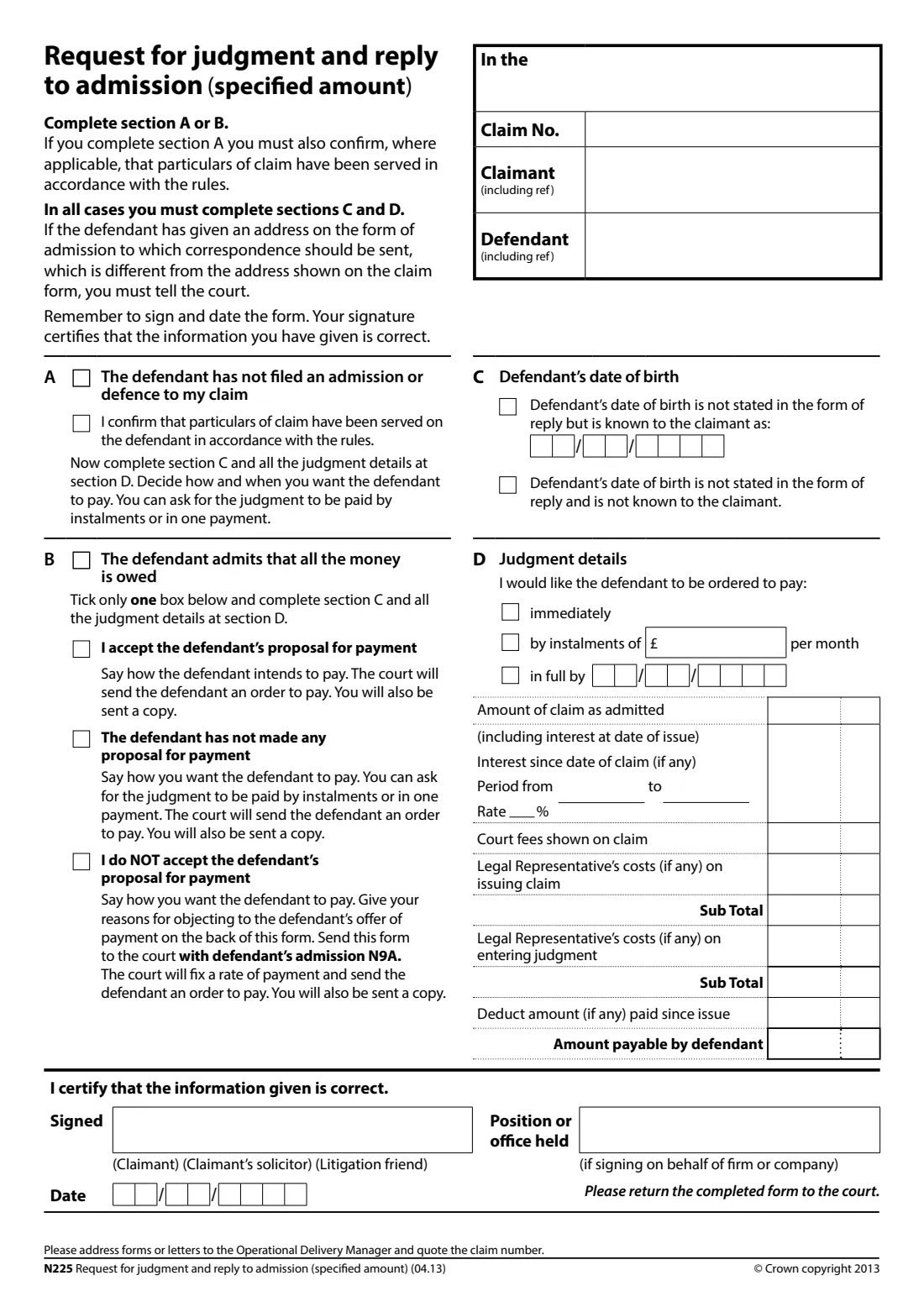
What is N225 Request for judgment?
If you've made a claim for a specified amount of money in the County Court in England and Wales, form N225 is how you ask the court to enter judgment. It covers two situations: section A, where the defendant hasn't filed an admission or a defence in time (judgment in default), and section B, where the defendant has admitted they owe all the money. In section B you also say whether you accept the defendant's proposal for paying.
Whichever applies, you give the defendant's date of birth if you know it and it isn't on their reply, say how you want them to be ordered to pay (immediately, by monthly instalments or in full by a date), and set out the amount: the claim, any further interest since you issued it, the court fee and legal costs shown on the claim, less anything already paid.
FileIt works out both sub totals and the amount payable and prints every figure with the pounds and pence either side of the form's dotted divider, in HMCTS's own N225 PDF (04.13 edition, still the current one). You sign it by hand or with FileIt's eSignature and send it to the court yourself. FileIt never files anything for you, and doesn't supply fee figures: use the ones on your claim form.
- Who fills it
- The claimant, their solicitor or litigation friend
- Given to
- The court dealing with the claim
- Claim type
- A specified (fixed) amount of money
- Signature
- Signed certificate that the information is correct
- Edition
- N225 (04.13)
Who needs to fill out N225 Request for judgment?
- A claimant whose defendant hasn't filed an admission or a defence to a claim for a fixed sum.
- A claimant whose defendant has admitted owing the whole amount, on form N9A or otherwise.
- A claimant who wants to reject the defendant's proposed payment terms and ask the court to fix them.
- Solicitors and litigation friends acting for a claimant.
When to use N225 Request for judgment
- After the time for the defendant to respond has passed without an admission or defence.
- After receiving the defendant's admission of the full amount.
- Not for a claim for an unspecified amount (damages to be assessed), which has its own forms, and not if the defendant has filed a defence.
What you need before you start
- The court name, claim number and the parties' names and references, from the claim form.
- Whether the defendant has responded, and if they've admitted the claim, their payment proposal.
- The defendant's date of birth, if it's not on their reply but you know it.
- How you want the defendant to pay: immediately, a monthly instalment, or a date for payment in full.
- The amount of the claim, any interest since the date of claim with its period and rate, the court fee and legal costs shown on the claim, and anything paid since issue.
What’s on N225 Request for judgment
The 2013 edition has 1 page. FileIt asks for it in 5 parts, and it is signed by Claimant:
- The claimClaimant
- A or B. Why you are asking for judgmentClaimant
- C. Defendant's date of birthClaimant
- D. Judgment detailsClaimant
- SignatureClaimant
How to fill out N225 Request for judgment, step by step
1 Court and parties
Copy the court name, claim number, and claimant and defendant (with references) from the claim form.
2 Section A: no admission or defence
Tick A if the defendant hasn't filed an admission or a defence. Where it applies, also confirm that the particulars of claim have been served in accordance with the rules.
3 Section B: the defendant admits it all
Tick B and one of: you accept the defendant's proposal for payment; the defendant hasn't made a proposal; or you don't accept it. If you don't accept it, give your reasons on the back of the form and send it to the court with the defendant's admission (N9A). The court will then fix a rate of payment.
4 Section C: date of birth
If the defendant's date of birth isn't stated in their reply, say whether you know it, and give it if you do.
5 Section D: judgment details
Choose how you'd like the defendant to be ordered to pay, then fill in the amounts. FileIt adds up the first sub total (claim, interest since the claim, court fees, costs on issue), the second (plus costs on entering judgment) and the amount payable (less anything paid since issue).
6 Sign and date
Sign to certify the information is correct, and say whether you're the claimant, the claimant's solicitor or a litigation friend. Someone signing for a firm or company gives their position.
Common mistakes to avoid
- Completing both section A and section B. Use one.
- Claiming interest since the date of claim without the period and rate.
- Using a court fee that's different from the one shown on the claim form.
- Forgetting to deduct payments the defendant has made since the claim was issued.
- Rejecting the defendant's offer without giving reasons or without sending their admission N9A.
After you fill it out
Sign the form, add your reasons on the back if you're rejecting the defendant's offer, and send it to the court dealing with the claim. FileIt doesn't send it for you.
The form says the court will send the defendant an order to pay and send you a copy. If you rejected the defendant's offer, the court fixes the rate of payment first.
Keep a copy of the request, the claim and any admission in the case's FileIt folder.
Fill out N225 Request for judgment online with FileIt
- Pick the person. Choose someone from People and FileIt fills in their name, date of birth, address and other details it already knows.
- Answer plain-language questions. One part of the form at a time, with the official help text beside each question — 38 fields in all. Your answers save as you go.
- Check the live preview. Watch your answers land on the real HM Courts & Tribunals Service form, and let FileIt do any worksheet arithmetic.
- Generate the official PDF. FileIt prints your answers into the agency’s own PDF and files it in that person’s folder in your vault. Sign it, or send it for e-signature.
FileIt fills the form — it never files or submits anything for you. Deliver the finished form to whoever asked for it, the way the form’s instructions say.
Start N225 Request for judgment now — it’s freeN225 Request for judgment: frequently asked questions
What's the difference between section A and section B?
Section A is for when the defendant hasn't filed an admission or a defence (judgment in default). Section B is for when the defendant has admitted that all the money is owed.
Can I ask for payment by instalments?
Yes. Section D lets you ask for the defendant to be ordered to pay immediately, by monthly instalments of an amount you give, or in full by a date.
What if I don't accept the defendant's offer to pay?
Tick 'I do NOT accept the defendant's proposal for payment', say how you want them to pay, give your reasons on the back of the form and send it with the defendant's admission N9A. The court will fix a rate of payment.
Does FileIt calculate the interest?
No. You enter the interest since the date of claim, with its period and rate. FileIt adds up the sub totals and the amount payable.
Can I sign N225 electronically?
FileIt places a signature box for its eSignature. The Civil Procedure Rules (CPR 5.3) allow a required signature to be printed by computer or other mechanical means, but check with the court if you're unsure. You can always print and sign by hand.
Official sources
- Blank form (PDF), published by HM Courts & Tribunals Service: https://assets.publishing.service.gov.uk/media/602a58e9d3bf7f031ce135cd/n225-eng.pdf
- Official instructions and guidance: https://www.gov.uk/government/publications/form-n225-request-for-judgment-and-reply-to-admission-specified-amount
- Edition shown on this page: N225 (04.13) (checked 2026-10-01).
FileIt is not affiliated with or endorsed by HM Courts & Tribunals Service or any government. This page explains the form in general terms and is not legal, tax or immigration advice. Always read the official instructions, and check that you are using the edition the recipient accepts. Page last reviewed 2026-10-01.