What is Form M-5008-R?
Form M-5008-R, Appointment of Taxpayer Representative, designates one or two representatives and gives them authority to obligate, bind and appear for you before the New Jersey Division of Taxation. Unless you limit it, the representatives can receive and inspect your confidential tax records and do anything you could do for the tax matters you list, such as consenting to extend the time to assess tax or agreeing to a tax adjustment. They can't endorse a refund check, and they can't sign returns or delegate authority unless the form specifically authorizes it.
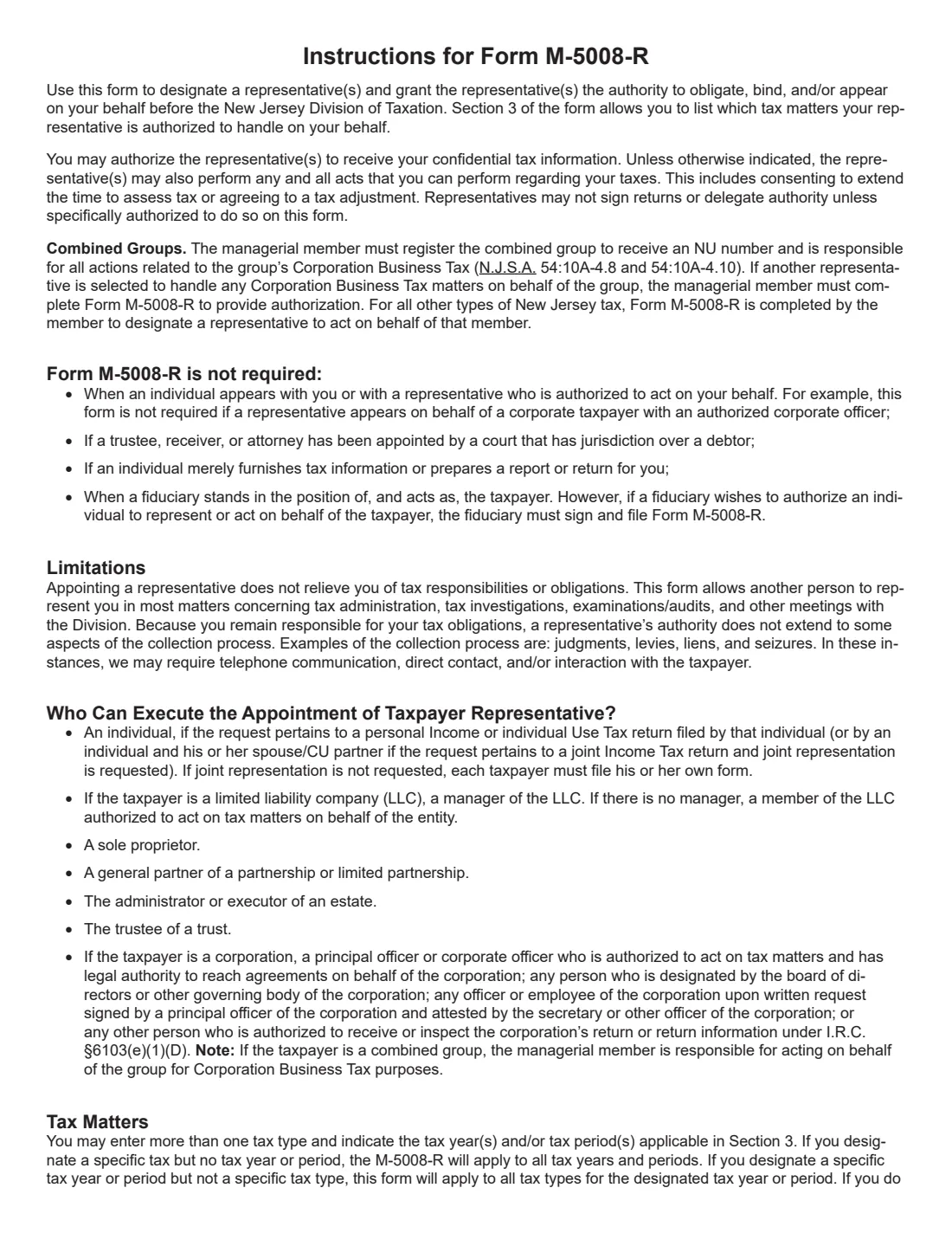
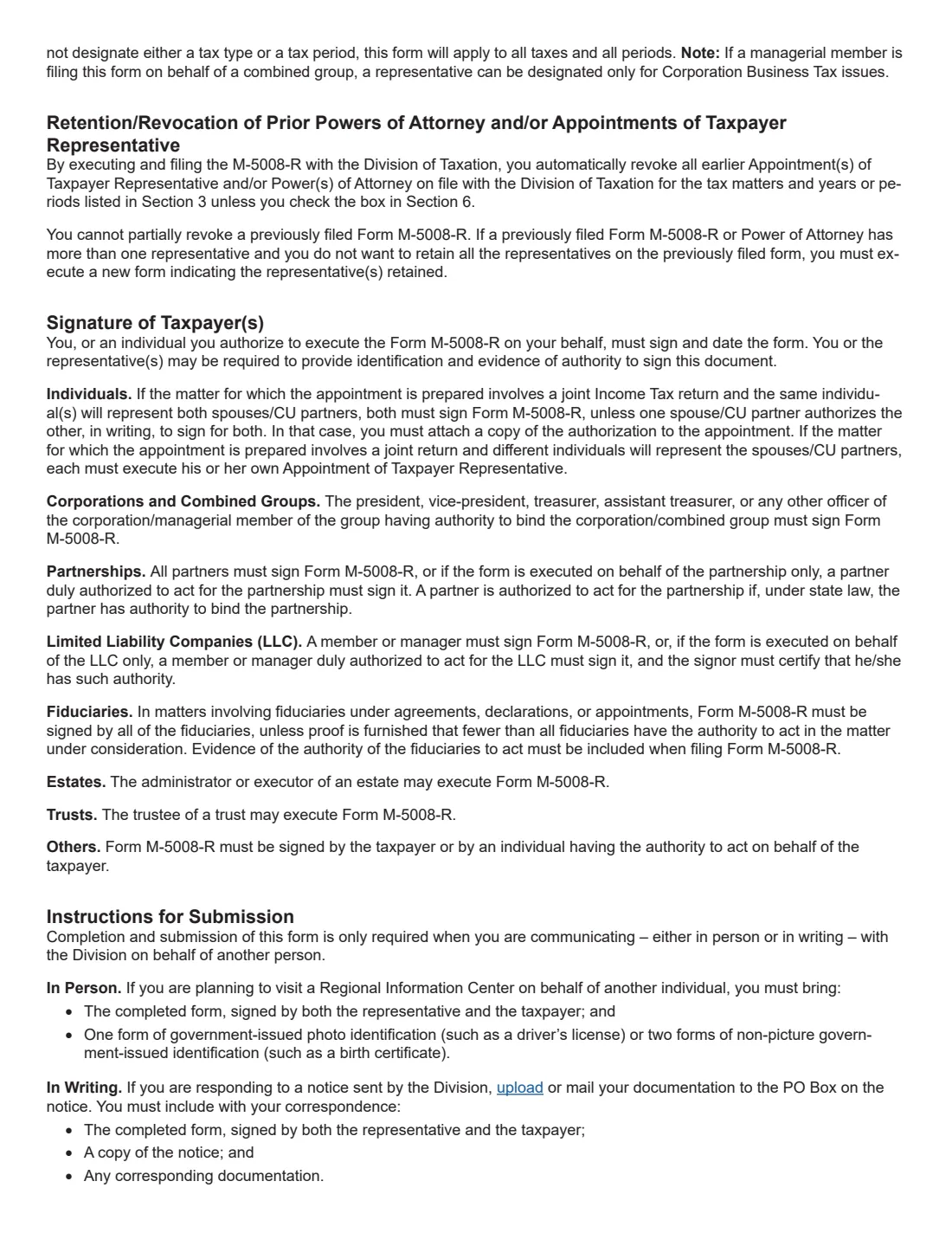
The form covers individuals, corporations, sole proprietorships, LLCs, estates, partnerships, trusts and combined groups. Filing it automatically revokes earlier appointments and powers of attorney for the same tax matters and periods unless you check the box to keep them. The current edition is M-5008-R (6/26), with the instructions on pages 3 and 4.
FileIt guides you through all eight sections and prints your answers into the Division's own PDF. It pre-fills the taxpayer's name and email from the People records in your vault, shows only the parts that apply to your taxpayer type, keeps the finished PDF in your vault and can send it for e-signature by the taxpayer and each representative. You then give it to the Division yourself: FileIt never files anything for you.
- Who fills it
- The taxpayer, or someone with authority to act for them (officer, partner, LLC member or manager, executor, administrator or trustee).
- Given to
- The New Jersey Division of Taxation: brought to a Regional Information Center, or uploaded or mailed with your response to a notice.
- Signatures
- The taxpayer (both spouses or civil union partners for joint representation) in Section 7, and each representative in Section 8.
- Representatives
- One or two.
- Edition
- M-5008-R (6/26)
- Agency
- New Jersey Division of Taxation
Who needs to fill out Form M-5008-R?
- Taxpayers who want a tax preparer, attorney or relative to deal with the Division of Taxation for them.
- Spouses or civil union partners who want one representative for a joint Gross Income Tax return.
- Corporations, partnerships and LLCs appointing someone for Corporation Business, Sales and Use, Employment or other New Jersey taxes.
- A combined group's managerial member authorizing a representative for Corporation Business Tax matters.
- Executors, administrators and trustees who want someone else to represent an estate or trust.
When to use Form M-5008-R
- When someone will communicate with the Division, in person or in writing, on another person's behalf.
- When responding to a notice from the Division through a representative.
- When visiting a Regional Information Center on behalf of another individual.
- When you change or add representatives. A new form revokes earlier ones for the same matters unless you keep them in Section 6.
What you need before you start
- The taxpayer's name, SS number, NJ Taxpayer ID or Unitary ID number, mailing address, email and phone.
- For a joint return, the spouse's or civil union partner's name and Social Security number.
- For an estate or trust, the trustee's or executor's name, address, email and phone.
- Each representative's name, PTIN (or Social Security number if they don't have one), address, email, phone and fax.
- The tax types and years or periods to cover, or a decision to cover all tax matters.
- Any limits on the representatives' power, and copies of earlier appointments you want to keep.
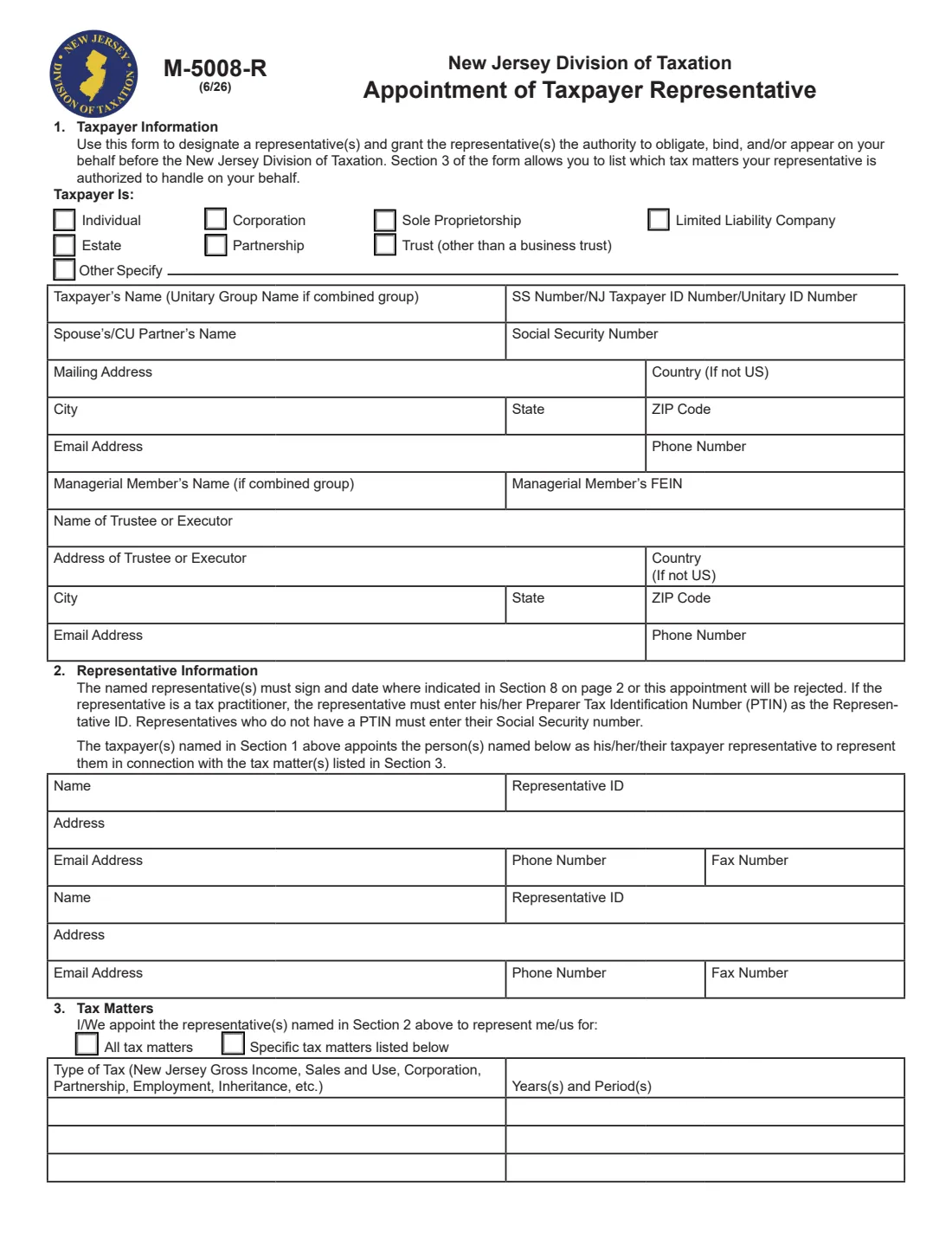
What’s on Form M-5008-R
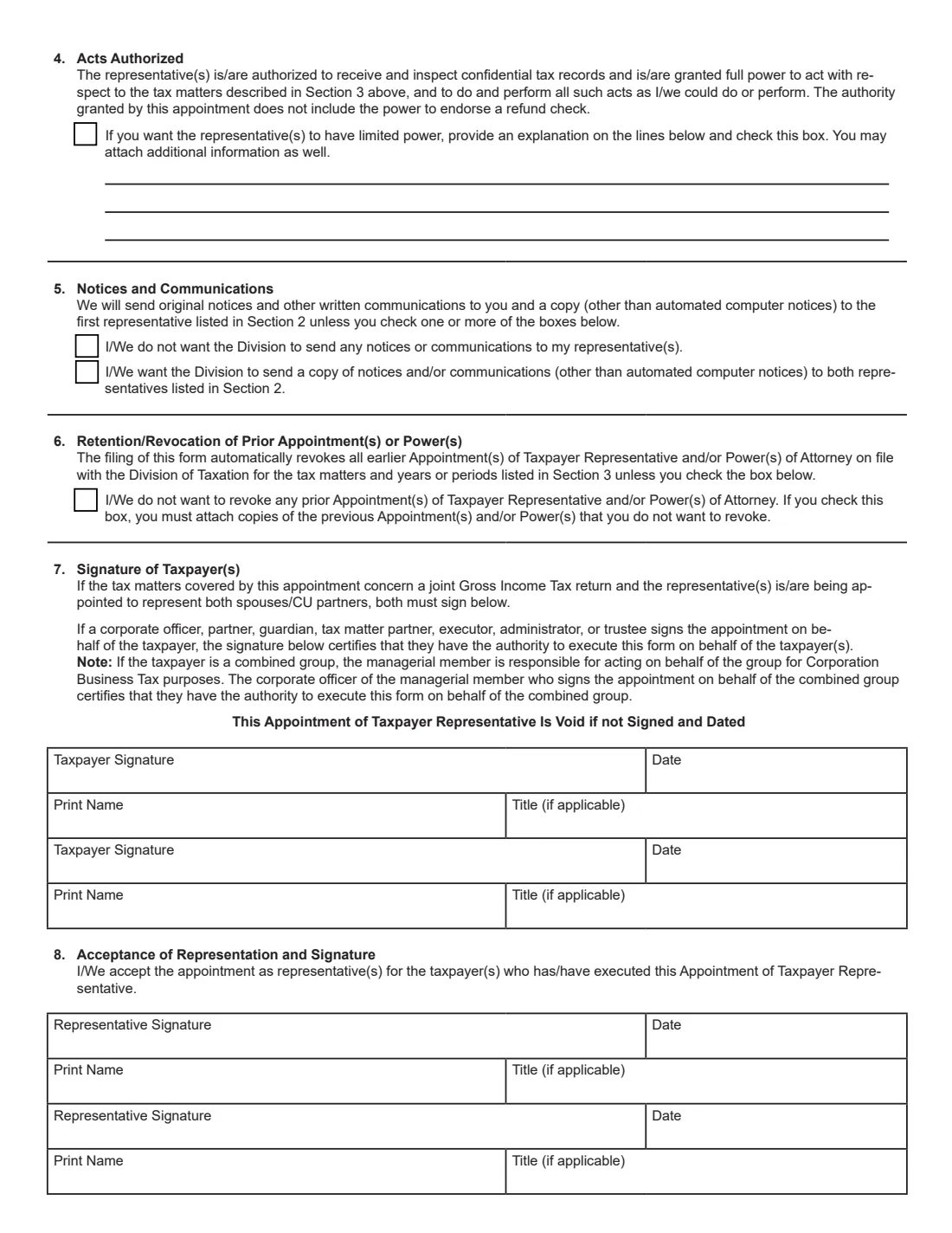
The 2026 edition has 4 pages. FileIt asks for it in 8 parts, and it is signed by Taxpayer and Second taxpayer and Representative 1 and Representative 2:
- Section 1: Taxpayer informationTaxpayer
- Section 1: Trustee or executorTaxpayer
- Section 2: Representative 1Representative 1
- Section 2: Representative 2Representative 2
- Section 3: Tax mattersTaxpayer
- Sections 4 to 6: Acts, notices and earlier appointmentsTaxpayer
- Section 7: Taxpayer signatureTaxpayer
- Section 7: Second taxpayer signatureSecond taxpayer
How to fill out Form M-5008-R, step by step
1 Section 1: Taxpayer information
Tick the taxpayer type and give the taxpayer's name (the unitary group name for a combined group), ID number, spouse or civil union partner for joint representation, mailing address, email and phone. A combined group adds the managerial member's name and FEIN; an estate or trust adds the trustee's or executor's details.
2 Section 2: Representative information
Name up to two representatives. A tax practitioner enters their Preparer Tax Identification Number (PTIN) as the Representative ID; a representative without a PTIN enters their Social Security number. Each representative must sign and date Section 8, or the appointment is rejected.
3 Section 3: Tax matters
Choose all tax matters, or list specific tax types with their years and periods. A tax type with no year covers all years and periods; a year with no tax type covers all taxes for that year. If you list neither, the form applies to all taxes and all periods.
4 Section 4: Acts authorized
By default the representatives can receive and inspect confidential tax records and act fully for the matters in Section 3, except endorsing a refund check. Tick the box and explain on the lines to limit their power; you can attach more.
5 Section 5: Notices and communications
The Division sends original notices to you and a copy (other than automated computer notices) to the first representative. Tick a box to stop copies to your representatives, or to send copies to both.
6 Section 6: Earlier appointments
Filing this form revokes earlier appointments and powers of attorney for the same tax matters and periods. To keep them, tick the box and attach copies. You can't partially revoke an earlier M-5008-R: file a new one naming the representatives you keep.
7 Sections 7 and 8: Signatures
The taxpayer signs and dates Section 7 (both spouses or civil union partners for joint representation). An officer, partner, guardian, executor, administrator or trustee signing for the taxpayer certifies their authority. Each representative accepts the appointment by signing and dating Section 8. The appointment is void if not signed and dated.
Common mistakes to avoid
- Leaving a representative's Section 8 acceptance unsigned. The appointment is rejected.
- Entering a Social Security number for a tax practitioner who has a PTIN.
- Only one spouse signing when both are to be represented on a joint return (unless one authorized the other in writing, attached).
- Forgetting that the new form revokes earlier appointments for the same matters. Tick Section 6 and attach copies to keep them.
- Listing a period without a tax type when you meant one tax. It then covers all taxes for that period.
After you fill it out
The taxpayer signs Section 7 and each representative signs Section 8. Sign the printed PDF by hand, or use FileIt's optional e-signature, which places the signature and date boxes for each signer.
Then use it the way the instructions describe. In person at a Regional Information Center: bring the completed form signed by the representative and the taxpayer, plus one government-issued photo ID or two non-photo government IDs. In writing: upload or mail it to the PO Box on the notice with a copy of the notice and any supporting documents. FileIt doesn't send it.
FileIt keeps the completed PDF in your vault. File a new M-5008-R to change representatives or tax matters.
Fill out Form M-5008-R online with FileIt
- Pick the person. Choose someone from People and FileIt fills in their name, date of birth, address and other details it already knows.
- Answer plain-language questions. One part of the form at a time, with the official help text beside each question — 55 fields in all. Your answers save as you go.
- Check the live preview. Watch your answers land on the real New Jersey Division of Taxation form, and let FileIt do any worksheet arithmetic.
- Generate the official PDF. FileIt prints your answers into the agency’s own PDF and files it in that person’s folder in your vault. Sign it, or send it for e-signature.
FileIt fills the form — it never files or submits anything for you. Deliver the finished form to whoever asked for it, the way the form’s instructions say.
Start Form M-5008-R now — it’s freeForm M-5008-R: frequently asked questions
Can I fill out Form M-5008-R online?
Yes. FileIt guides you through each section and prints your answers into the official New Jersey Division of Taxation PDF, ready to sign.
Is M-5008-R a power of attorney?
It is New Jersey's Appointment of Taxpayer Representative: it grants your representatives authority to act for you before the Division of Taxation on the tax matters you list. Filing it revokes earlier appointments and powers of attorney on file for the same matters unless you keep them.
How many representatives can I appoint?
The form has room for two. You can choose to have notices copied to the first, to both, or to neither.
When don't I need Form M-5008-R?
The instructions list cases such as when an individual appears with you or with an authorized representative, a court-appointed trustee, receiver or attorney, someone who only furnishes information or prepares a return for you, and a fiduciary acting as the taxpayer.
Can my representative sign my tax return?
Not unless the form specifically authorizes it. Representatives also can never endorse a refund check.
Does the representative's authority cover collections?
Not all of it. The instructions say a representative's authority doesn't extend to some aspects of collection, such as judgments, levies, liens and seizures, where the Division may need to deal with you directly.
Official sources
- Blank form (PDF), published by New Jersey Division of Taxation: https://www.nj.gov/treasury/taxation/pdf/other_forms/misc/m5008r.pdf
- Official instructions and guidance: https://www.nj.gov/treasury/taxation/pdf/other_forms/misc/m5008r.pdf
- Edition shown on this page: M-5008-R (6/26) (checked 2026-09-28).
FileIt is not affiliated with or endorsed by New Jersey Division of Taxation or any government. This page explains the form in general terms and is not legal, tax or immigration advice. Always read the official instructions, and check that you are using the edition the recipient accepts. Page last reviewed 2026-09-28.