What is Form 14039-B?
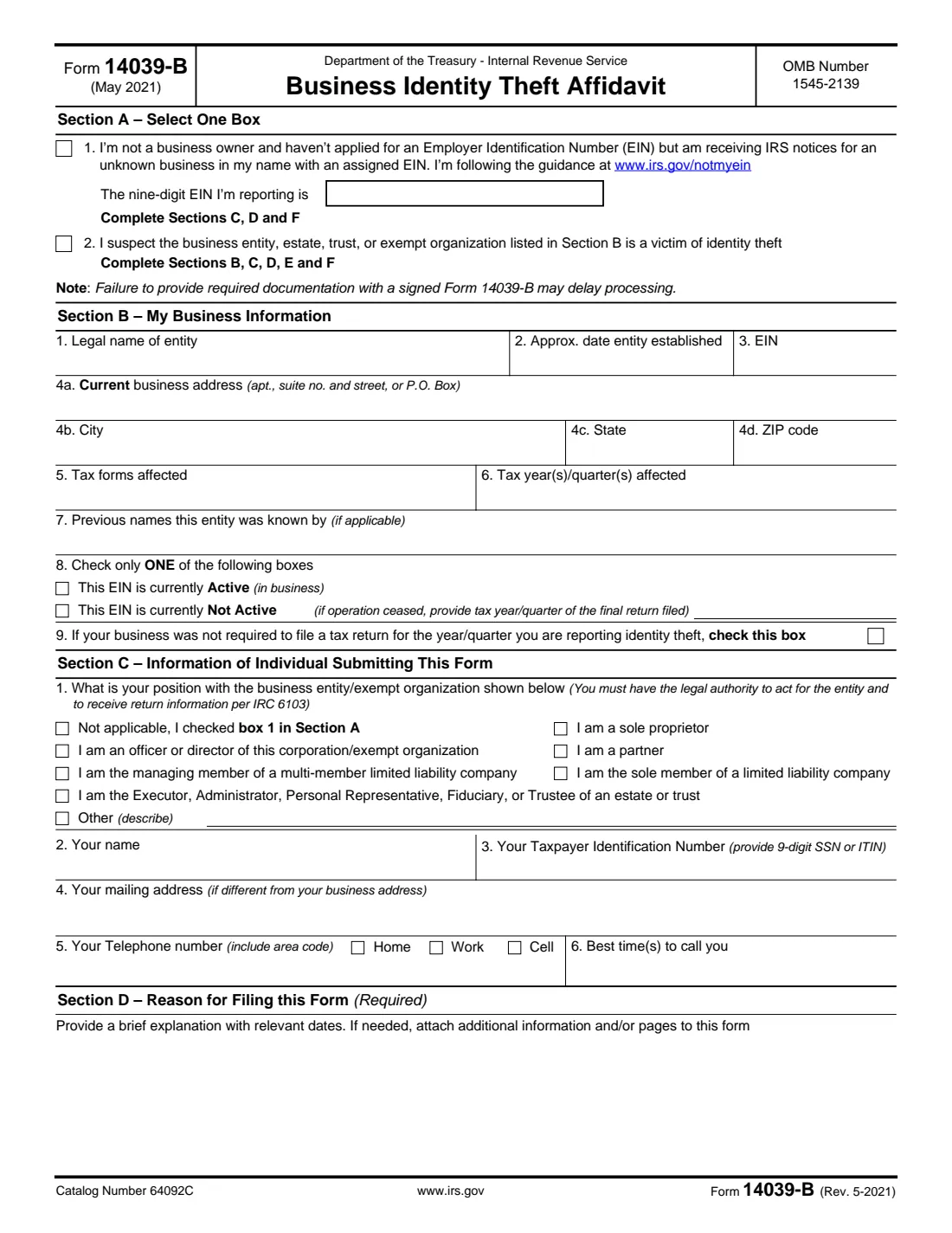
Form 14039-B, Business Identity Theft Affidavit, tells the IRS that someone may be misusing a business's identity: for example, filing employment tax returns or business returns under its EIN that the business didn't file. It covers businesses, estates, trusts and exempt organizations. It also covers a second situation: you're not a business owner and never applied for an EIN, but you're getting IRS notices for an unknown business in your name with an EIN assigned to it. The current edition is Rev. May 2021.
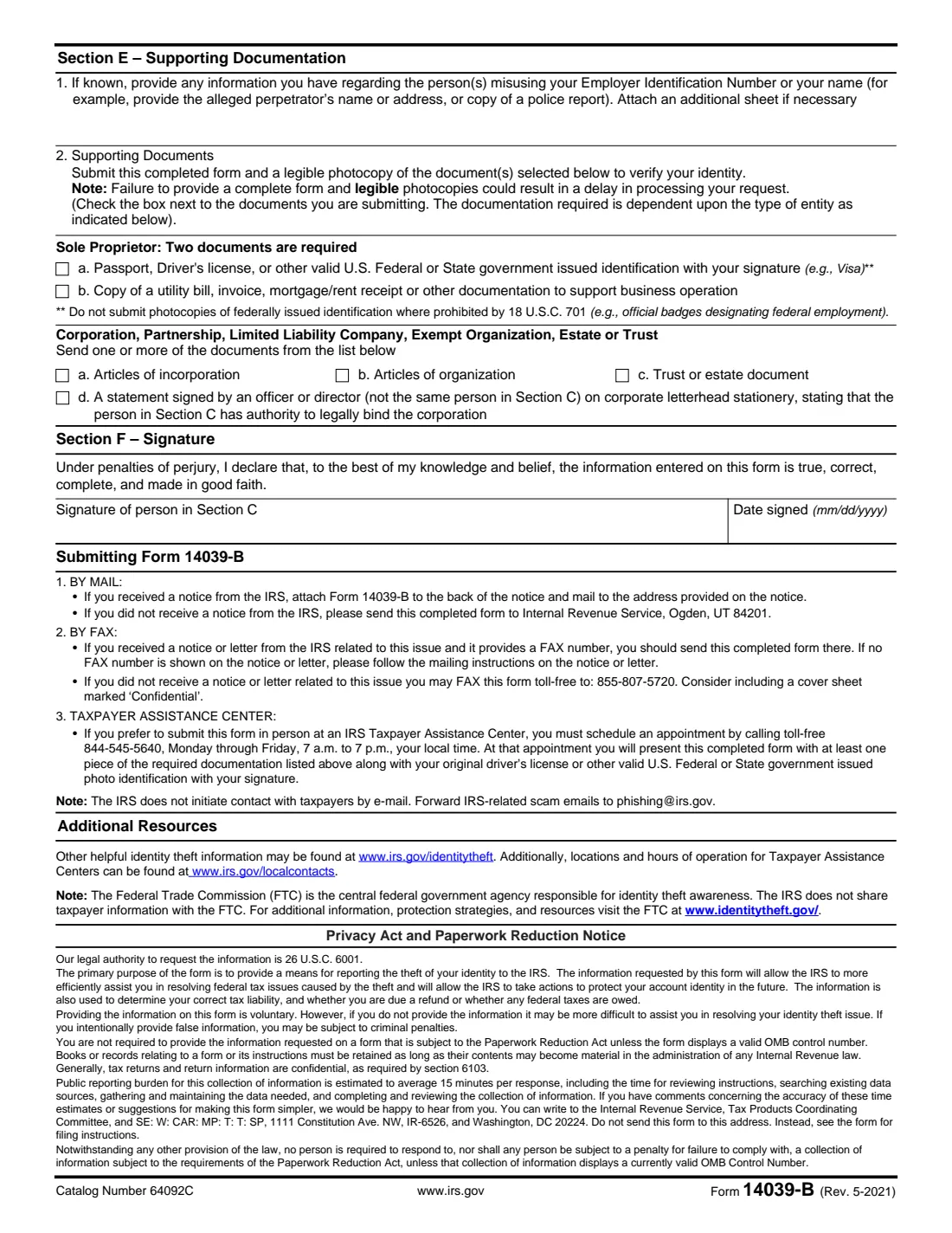
Which sections you complete depends on that first choice. If an EIN was obtained in your name (box 1), you complete Sections C, D and F. If your business may be a victim (box 2), you complete Sections B to F, including supporting documents that show you have authority to act for the entity: two documents for a sole proprietor, and one or more organizing or authorizing documents for other entities.
FileIt shows only the questions that apply to your situation, checks the documents against the form's rules, and prints everything into the IRS's official PDF, saved in your vault. You sign it and send it with your documents yourself; FileIt never sends anything to the IRS. (For individual identity theft, the IRS uses Form 14039.)
- Who fills it
- An owner, officer, partner, member, fiduciary or other person with legal authority for the entity, or an individual with an EIN opened in their name.
- Sent to
- The IRS: to the address or fax number on the IRS notice if you got one; otherwise by mail or fax as page 2 describes, or in person at a Taxpayer Assistance Center by appointment.
- Documents
- Sole proprietor: two (ID and proof of business operation). Other entities: one or more organizing or authorizing documents.
- Signatures
- The person in Section C, under penalties of perjury.
- Edition
- Rev. May 2021
- Agency
- Internal Revenue Service (IRS), Department of the Treasury
Who needs to fill out Form 14039-B?
- Business owners whose company's EIN was used to file returns they didn't file, such as fake Forms 941.
- Officers, partners and LLC members acting for an entity that may be a victim of identity theft.
- Executors, administrators and trustees of an estate or trust whose identity may be misused.
- Individuals receiving IRS notices about a business they don't own, with an EIN obtained in their name.
When to use Form 14039-B
- When an IRS notice mentions returns, wages or an EIN your business doesn't recognize.
- When your business's legitimate return is rejected because one was already filed under its EIN.
- When you receive IRS notices for an unknown business in your name: the form points to the IRS guidance at irs.gov/notmyein.
What you need before you start
- The entity's legal name, approximate date established, EIN, address, the tax forms and periods affected, and any previous names.
- Whether the EIN is active, or the period of the final return if it isn't.
- Your position with the entity, your name, SSN or ITIN, mailing address and phone.
- A brief explanation with relevant dates, and any information about who is misusing the EIN (for example a police report).
- Legible photocopies of the supporting documents for your type of entity.
- Any IRS notice you received, since the form goes back with it.
What’s on Form 14039-B
The 2021 edition has 2 pages. FileIt asks for it in 5 parts, and it is signed by Person submitting (section c):
- Section A: Why you're filingPerson submitting (section c)
- Section B: Business information (box 2 only)Person submitting (section c)
- Section C: You (the person submitting)Person submitting (section c)
- Section D: Reason for filing (required)Person submitting (section c)
- Section E: Supporting documentation (box 2 only)Person submitting (section c)
How to fill out Form 14039-B, step by step
1 Section A: Select one box
Box 1 if you're not a business owner, haven't applied for an EIN, but get IRS notices for an unknown business in your name with an EIN (enter that nine-digit EIN). Box 2 if you suspect the business, estate, trust or exempt organization in Section B is a victim of identity theft.
2 Section B: Business information (box 2)
Enter the entity's legal name, approximate date established, EIN, current address, the tax forms and years or quarters affected, and any previous names. Say whether the EIN is active or not (with the final return's period if operations ceased), and check line 9 if the business wasn't required to file for the period you're reporting.
3 Section C: You
Choose your position (sole proprietor, officer or director, partner, managing or sole LLC member, executor or trustee, or other; "not applicable" for box 1). You must have legal authority to act for the entity and receive its return information. Then give your name, SSN or ITIN, mailing address if different, phone and best time to call.
4 Section D: Reason for filing
A brief explanation with relevant dates: which notices you got, what returns you didn't file, and when you found out. Attach pages if needed.
5 Section E: Supporting documentation (box 2)
Give any information about who is misusing the EIN or your name, such as a police report. Then tick the documents you're sending: a sole proprietor sends a government-issued ID with a signature and a document supporting the business operation; other entities send articles of incorporation or organization, a trust or estate document, or a statement from another officer on letterhead confirming your authority.
6 Section F: Sign
The person in Section C signs and dates under penalties of perjury.
Common mistakes to avoid
- Using Form 14039-B for personal identity theft. Individuals use Form 14039.
- Checking both boxes in Section A. Choose one.
- Sending the form without the supporting documents for your entity type, which may delay processing.
- Sending illegible photocopies, or photocopies of federally issued identification where 18 U.S.C. 701 prohibits it.
- Having the officer who signs the authority statement be the same person as in Section C.
After you fill it out
Sign and date Section F. If you received an IRS notice, attach the form to the back of the notice and mail it to the address on the notice (or fax it to the number on the notice, if one is given). Without a notice, page 2 says to mail it to Internal Revenue Service, Ogden, UT 84201, or fax it to the number printed there.
To deliver it in person at a Taxpayer Assistance Center you need an appointment, and you bring the form, at least one required document and your original photo ID.
FileIt keeps a copy in your vault. The IRS doesn't contact taxpayers by email; forward scam emails to [email protected], as the form notes.
Fill out Form 14039-B online with FileIt
- Pick the person. Choose someone from People and FileIt fills in their name, date of birth, address and other details it already knows.
- Answer plain-language questions. One part of the form at a time, with the official help text beside each question — 31 fields in all. Your answers save as you go.
- Check the live preview. Watch your answers land on the real Internal Revenue Service (IRS) form, and let FileIt do any worksheet arithmetic.
- Generate the official PDF. FileIt prints your answers into the agency’s own PDF and files it in that person’s folder in your vault. Sign it, or send it for e-signature.
FileIt fills the form — it never files or submits anything for you. Deliver the finished form to whoever asked for it, the way the form’s instructions say.
Start Form 14039-B now — it’s freeForm 14039-B: frequently asked questions
What is Form 14039-B used for?
To report that a business, estate, trust or exempt organization may be a victim of identity theft, or that you're receiving IRS notices for an unknown business with an EIN in your name.
Is Form 14039-B the same as Form 14039?
No. Form 14039 is the Identity Theft Affidavit for individuals; Form 14039-B is for business identity theft.
What documents do I send with it?
A sole proprietor sends two: a government-issued ID with your signature and a document supporting the business operation, such as a utility bill or invoice. Corporations, partnerships, LLCs, exempt organizations, estates and trusts send one or more of articles of incorporation, articles of organization, a trust or estate document, or a signed authority statement from another officer.
Where do I send Form 14039-B?
If you received an IRS notice, attach the form to the back of it and mail it to the address on the notice. Otherwise, page 2 gives a mailing address in Ogden, Utah and a fax number, or you can make an appointment at a Taxpayer Assistance Center.
Someone got an EIN in my name. Which box do I check?
Box 1 in Section A. Enter the EIN, then complete Sections C, D and F.
Does the IRS share this with the FTC?
The form says the IRS doesn't share taxpayer information with the Federal Trade Commission, which runs identitytheft.gov.
Official sources
- Blank form (PDF), published by Internal Revenue Service (IRS): https://www.irs.gov/pub/irs-pdf/f14039b.pdf
- Official instructions and guidance: https://www.irs.gov/forms-pubs/about-form-14039-b
- Edition shown on this page: Rev. May 2021 (checked 2026-10-01).
FileIt is not affiliated with or endorsed by Internal Revenue Service (IRS) or any government. This page explains the form in general terms and is not legal, tax or immigration advice. Always read the official instructions, and check that you are using the edition the recipient accepts. Page last reviewed 2026-10-01.