What is PAYG voluntary agreement?
Tax is normally withheld from an employee's wages, but not from payments to a contractor who quotes an ABN. The contractor pays their own tax later, often through PAYG instalments. A voluntary agreement changes that: the payer (the business) and the payee (an individual contractor with an ABN) agree that tax is withheld from the payments, as it would be for an employee.
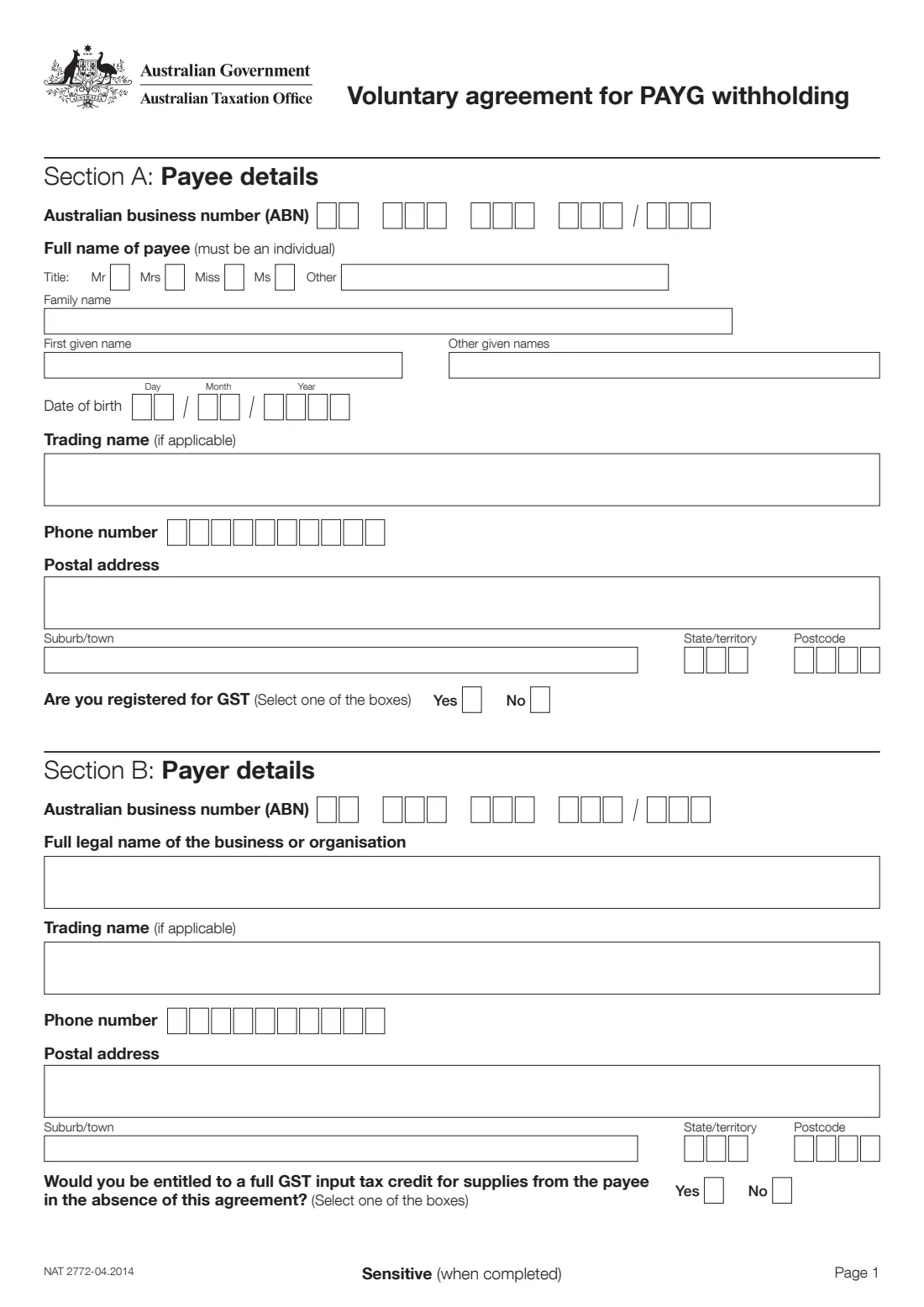
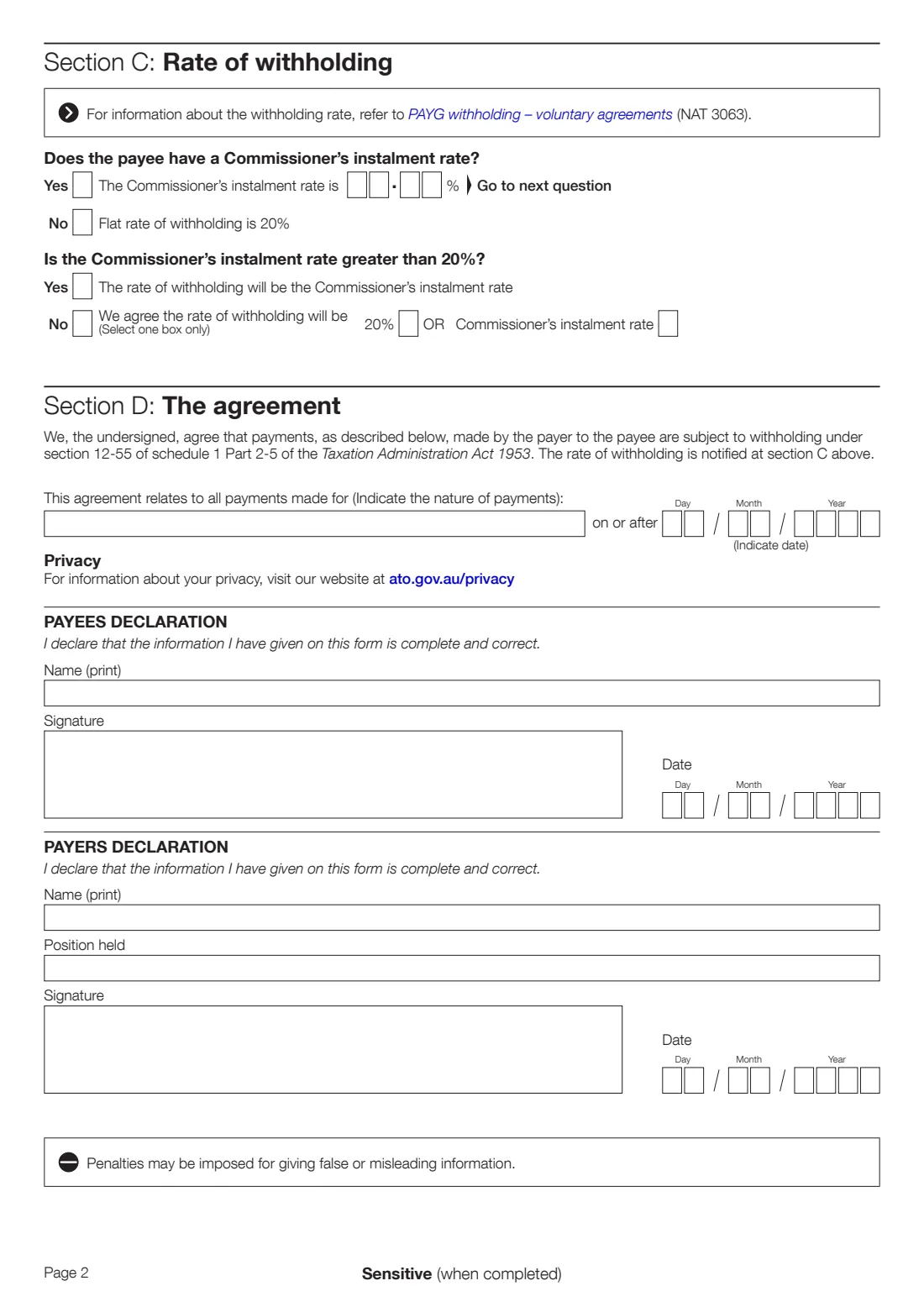
The Voluntary agreement for PAYG withholding, NAT 2772, is the ATO's form for that agreement. It records both parties' details, the rate of withholding (a flat 20%, or the payee's Commissioner's instalment rate), the kind of payments it covers and the date it starts. Both parties sign it. The ATO's guide PAYG withholding – voluntary agreements (NAT 3063) explains the rate.
FileIt walks you through the questions and prints the answers into the ATO's own PDF (edition NAT 2772-04.2014), including names with any accents. Both of you then sign it by hand or with FileIt's optional eSignature. FileIt never sends anything to the ATO.
- Issued by
- Australian Taxation Office (ATO)
- Parties
- The payee (an individual contractor with an ABN) and the payer
- Rate
- 20%, or the payee's Commissioner's instalment rate (Section C)
- Signatures
- Payee and payer each sign a declaration
- More information
- PAYG withholding – voluntary agreements (NAT 3063)
- Edition
- NAT 2772-04.2014
- Pages
- 2
Who needs to fill out PAYG voluntary agreement?
- Contractors and sole traders with an ABN who would rather have tax taken out of each payment than face a bill at the end of the year.
- Businesses that pay such a contractor and have agreed to withhold tax from those payments.
- Bookkeepers and payroll staff who set up the agreement for a business.
When to use PAYG voluntary agreement
- Before the first payment you want covered. The agreement applies to payments made on or after the date you write in Section D.
- When the payee is an individual. The form says the payee must be an individual.
- When the payee has an ABN. Without an ABN, the separate no-ABN withholding rules apply instead.
What you need before you start
- Both ABNs, and any ABN branch numbers.
- The payee's full name, title and date of birth.
- Trading names, postal addresses and phone numbers for both parties.
- Whether the payee is registered for GST, and whether the payer would be entitled to a full GST input tax credit for the payee's supplies without the agreement.
- Whether the payee has a Commissioner's instalment rate, and what it is. It appears on the payee's instalment notice.
- A short description of the payments the agreement covers, and the date it starts.
- The payer's signatory's name and position.
What’s on PAYG voluntary agreement
The 2014 edition has 2 pages. FileIt asks for it in 6 parts, and it is signed by Payee (contractor) and Payer:
- Section A: Payee detailsPayee (contractor)
- Section B: Payer detailsPayer
- Section C: Rate of withholdingPayer
- Section D: The agreementPayer
- Payee's declarationPayee (contractor)
- Payer's declarationPayer
How to fill out PAYG voluntary agreement, step by step
1 Section A: Payee details
The contractor's ABN, title, family name, given names and date of birth. The payee must be an individual. Add a trading name if there is one, a phone number (with the area code unless it's a mobile), the postal address, and whether the payee is registered for GST.
2 Section B: Payer details
The business's ABN, full legal name, trading name, phone number and postal address. Then answer whether the payer would be entitled to a full GST input tax credit for the payee's supplies in the absence of this agreement.
3 Section C: Rate of withholding
If the payee has no Commissioner's instalment rate, tick No and the flat rate of 20% applies. If they have one, tick Yes and enter it.
Then say whether that rate is greater than 20%. If it is, the rate of withholding is the Commissioner's instalment rate. If not, you both agree which of the two applies: 20% or the Commissioner's instalment rate. Select one only.
4 Section D: The agreement
Describe the payments the agreement covers, for example 'graphic design services', and the date from which it applies. By signing, both parties agree that these payments are subject to withholding under section 12-55 of schedule 1 to the Taxation Administration Act 1953.
5 Declarations
The payee prints their name, signs and dates. The payer's representative prints their name and position, signs and dates. Both declare the information is complete and correct. The form warns that penalties may be imposed for giving false or misleading information.
Common mistakes to avoid
- Using the form for a payee who isn't an individual, such as a company or trust.
- Answering the 'greater than 20%' question in a way that doesn't match the rate entered.
- Ticking both 20% and the Commissioner's instalment rate. The form says to select one box only.
- Leaving out the start date or the description of the payments.
- Only one party signing. Both declarations need a signature.
After you fill it out
Both parties sign and date their declaration, by hand or with FileIt's eSignature.
Each party keeps a copy with their tax records.
The payer then withholds at the agreed rate from payments covered by the agreement. See NAT 3063 for the rules.
FileIt saves the finished PDF in your vault.
Fill out PAYG voluntary agreement online with FileIt
- Pick the person. Choose someone from People and FileIt fills in their name, date of birth, address and other details it already knows.
- Answer plain-language questions. One part of the form at a time, with the official help text beside each question — 38 fields in all. Your answers save as you go.
- Check the live preview. Watch your answers land on the real Australian Taxation Office (ATO) form, and let FileIt do any worksheet arithmetic.
- Generate the official PDF. FileIt prints your answers into the agency’s own PDF and files it in that person’s folder in your vault. Sign it, or send it for e-signature.
FileIt fills the form — it never files or submits anything for you. Deliver the finished form to whoever asked for it, the way the form’s instructions say.
Start PAYG voluntary agreement now — it’s freePAYG voluntary agreement: frequently asked questions
What is a voluntary agreement for PAYG withholding?
An agreement between a business and an individual contractor with an ABN to have tax withheld from the contractor's payments, as it would be from an employee's wages.
What rate is withheld?
A flat 20%, or the payee's Commissioner's instalment rate. If the payee has no instalment rate, the form sets the rate at 20%. If the instalment rate is above 20%, that rate applies. Otherwise both parties choose 20% or the instalment rate.
Can a company be the payee?
No. The form says the payee must be an individual.
Where is the Commissioner's instalment rate?
On the payee's PAYG instalment notice from the ATO. The payer and payee can find more in the ATO's guide PAYG withholding – voluntary agreements (NAT 3063).
Can I fill in NAT 2772 online?
Yes. FileIt prints your answers into the official ATO PDF, and both parties can sign it with FileIt's optional eSignature or by hand.
Does FileIt send the agreement to the ATO?
No. FileIt fills the official PDF and saves it in your vault. It never sends anything to the ATO.
Official sources
- Blank form (PDF), published by Australian Taxation Office (ATO): https://www.ato.gov.au/api/public/content/768e8b7f-7d4c-48a4-a0ad-3aad4970831d_BUS_16223_NAT2772_pdf
- Official instructions and guidance: https://www.ato.gov.au/forms-and-instructions
- Edition shown on this page: NAT 2772-04.2014 (checked 2026-09-28).
FileIt is not affiliated with or endorsed by Australian Taxation Office (ATO) or any government. This page explains the form in general terms and is not legal, tax or immigration advice. Always read the official instructions, and check that you are using the edition the recipient accepts. Page last reviewed 2026-09-28.