What is Request for the employer's annual tax reconciliation (žiadosť o ročné zúčtovanie, ŽIA38)?
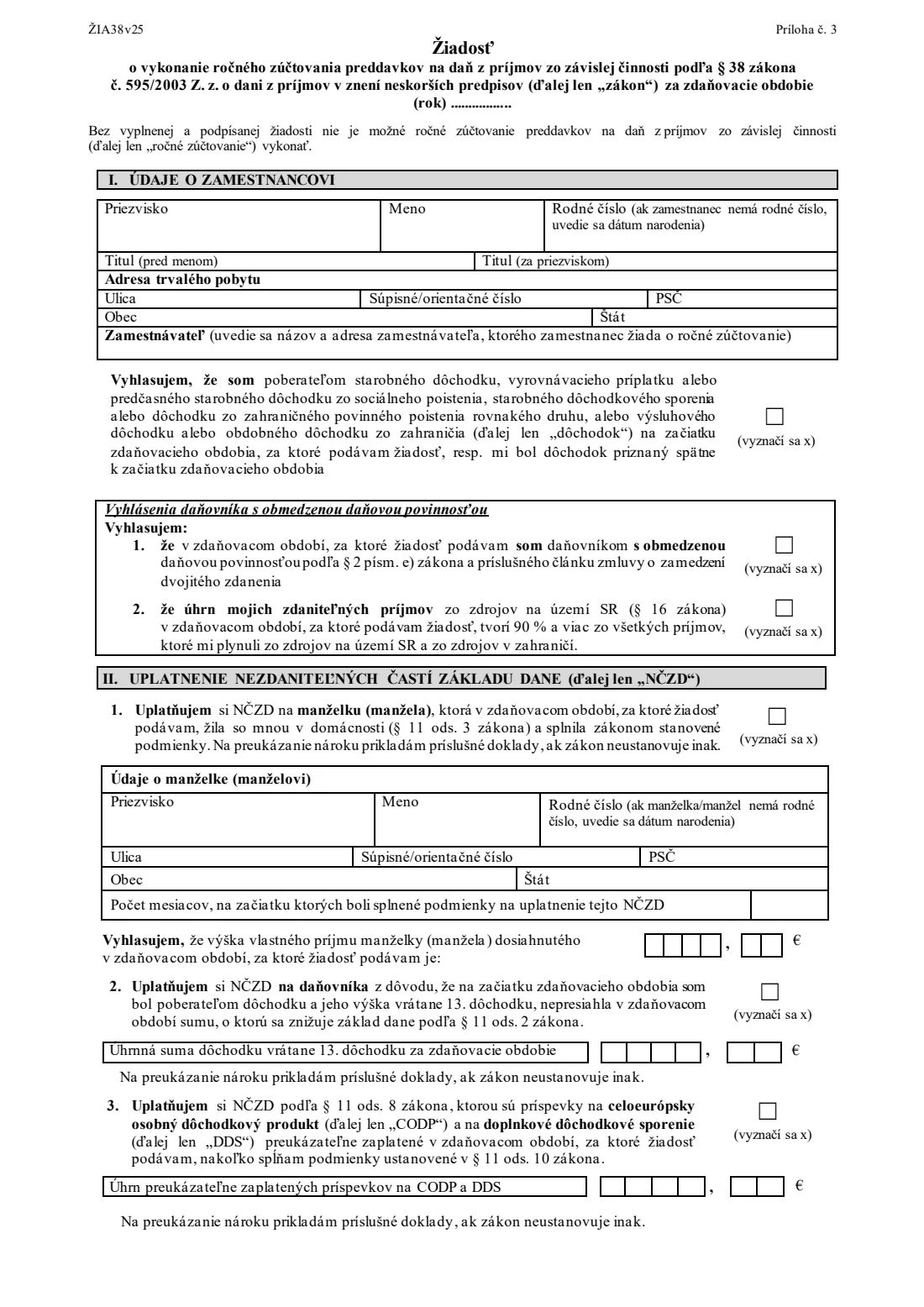
The Žiadosť o vykonanie ročného zúčtovania preddavkov na daň z príjmov zo závislej činnosti (form ŽIA38) is the Slovak Financial Administration's (Finančná správa, FS SR) request an employee gives their employer after the end of the tax year. With it, the employer does the annual reconciliation (ročné zúčtovanie): it works out the year's tax on your employment income, compares it with the monthly advances already withheld and settles the difference. The form itself says the reconciliation can't be done without a completed and signed request. It suits employees whose taxable income was only from employment (§ 5) and who don't have to file a tax return.
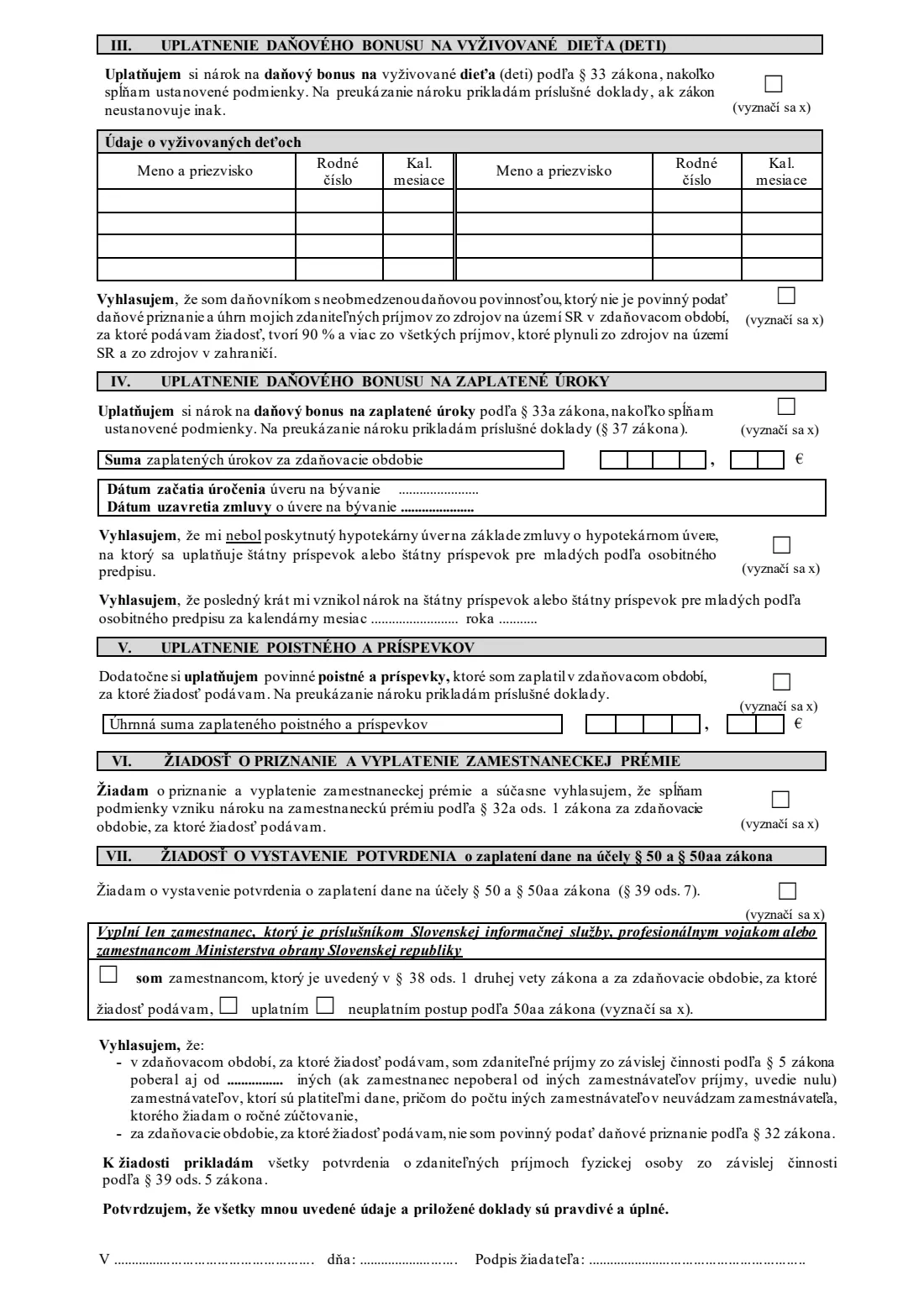
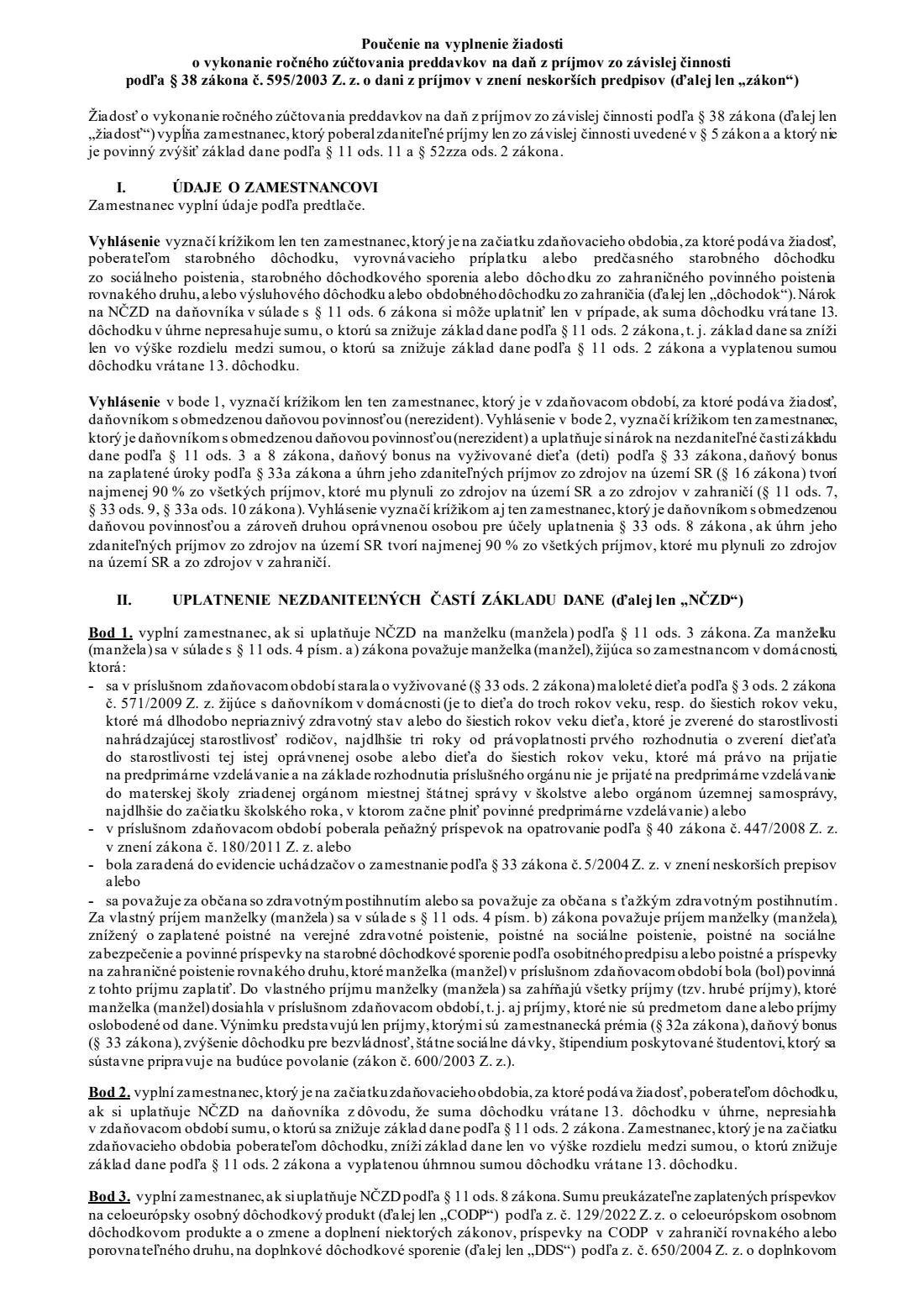
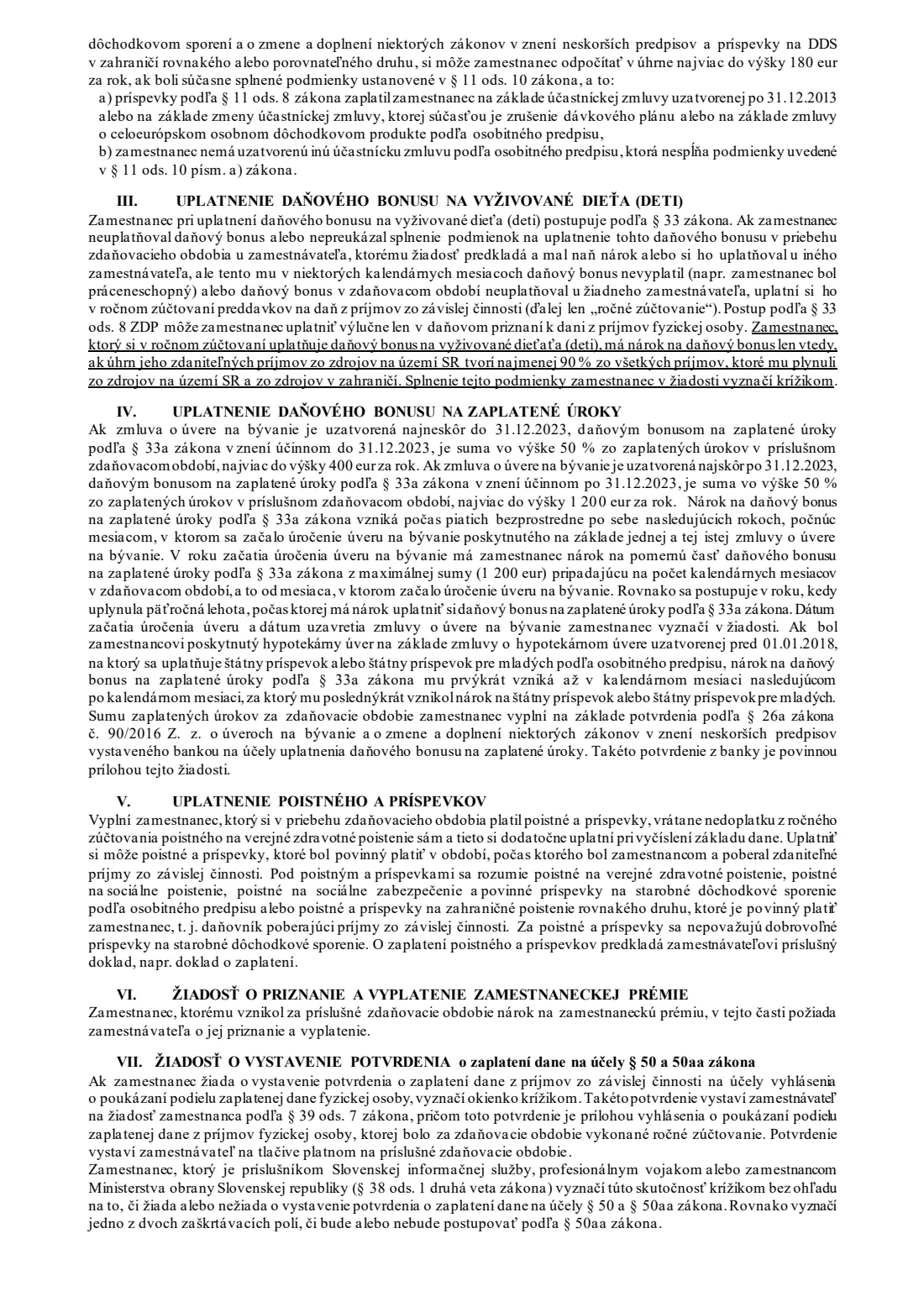
The request is also where you claim the tax reliefs your employer didn't apply during the year: the allowance on your spouse, the allowance on the taxpayer for certain pensioners, contributions to a pan-European personal pension product (CODP) or supplementary pension savings (DDS), the tax bonus for dependent children, the tax bonus on housing-loan interest, compulsory insurance you paid yourself and the employee premium. Part VII lets you ask for the confirmation of tax paid you need to assign 2 % of your tax. This edition, ŽIA38 v25, was published for the 2025 tax year; pages 3 and 4 of the PDF are the official instructions (poučenie).
FileIt takes you through every part in English with the Slovak terms alongside and prints your answers into the official PDF, including the amounts in the euro and cent boxes. It checks every birth number (rodné číslo) you enter, checks that the reliefs you claim fit together, and pre-fills your name, date of birth and employer from the People records in your vault. The finished PDF is saved in your FileIt vault and can be sent for e-signature. FileIt doesn't submit anything: you give the request to your employer yourself.
- Who fills it
- An employee with taxable income only from employment who doesn't have to file a tax return
- Given to
- The employer you ask to do the annual reconciliation — not the tax office
- When
- After the tax year ends, for the year just finished
- Attachments
- Certificates of taxable income from any other employers, and the documents proving each relief claimed
- Signatures
- You sign it (Podpis žiadateľa)
- Edition
- ŽIA38 v25, for the 2025 tax year
Who needs to fill out Request for the employer's annual tax reconciliation (žiadosť o ročné zúčtovanie, ŽIA38)?
- Employees in Slovakia whose only taxable income in the year was from employment and who want their employer to settle their tax instead of filing a return.
- Employees who had more than one employer in the year, as long as they aren't required to file a return; they attach the other employers' certificates of taxable income.
- Employees who want to claim the child tax bonus for months it wasn't paid during the year.
- Employees paying interest on a housing loan who want the mortgage-interest tax bonus.
- Employees who want the allowance on a spouse who cared for a small child, received the carer's allowance, was a registered jobseeker or is disabled.
- Employees who want the confirmation of tax paid so they can assign 2 % of their tax to a recipient or to their parents.
- Non-residents working in Slovakia, who declare their limited tax liability and, for the reliefs, the 90 % income test.
When to use Request for the employer's annual tax reconciliation (žiadosť o ročné zúčtovanie, ŽIA38)
- After the tax year ends, for the year just finished — for example in early 2026 for the 2025 tax year.
- Only if you don't have to file a tax return for the year; if you do, you claim the reliefs in the return instead.
- When you want reliefs or bonuses that weren't applied, or not fully applied, in your monthly payroll.
- Before asking for the confirmation of tax paid needed for the 2 % declaration, which you can request in part VII.
What you need before you start
- Your birth number (or date of birth), permanent address and your employer's name and address.
- Certificates of taxable income (potvrdenie o zdaniteľných príjmoch, § 39(5)) from every other employer you had during the year.
- For the spouse allowance: your spouse's birth number, address, the number of months the conditions were met, their own income for the year and the documents proving the claim.
- For the pensioner allowance: the total pension received in the year, including the 13th pension.
- For CODP / DDS: proof of the contributions you paid in the year.
- For the child bonus: each child's name, birth number and the months you claim for.
- For the interest bonus: the bank's confirmation of interest paid, the date interest began and the date of the loan contract.
- For insurance you paid yourself: proof of payment of the compulsory insurance and contributions.
What’s on Request for the employer's annual tax reconciliation (žiadosť o ročné zúčtovanie, ŽIA38)
The 2025 edition has 4 pages. FileIt asks for it in 10 parts, and it is signed by Employee (zamestnanec):
- I. Employee's details (údaje o zamestnancovi)Employee (zamestnanec)
- Declarations of a non-resident (daňovník s obmedzenou daňovou povinnosťou)Employee (zamestnanec)
- II.1 Allowance on your spouse (NČZD na manželku / manžela)Employee (zamestnanec)
- II.2 Allowance on the taxpayer for a pensioner (NČZD na daňovníka)Employee (zamestnanec)
- II.3 Pension product and supplementary pension savings (CODP a DDS, § 11(8))Employee (zamestnanec)
- III. Tax bonus for dependent children (daňový bonus na vyživované dieťa, § 33)Employee (zamestnanec)
- IV. Tax bonus on mortgage interest (daňový bonus na zaplatené úroky, § 33a)Employee (zamestnanec)
- V. Insurance and contributions you paid yourself (poistné a príspevky)Employee (zamestnanec)
- VI.–VII. Employee premium and confirmation of tax paidEmployee (zamestnanec)
- Declaration and signature (vyhlásenie, podpis)Employee (zamestnanec)
How to fill out Request for the employer's annual tax reconciliation (žiadosť o ročné zúčtovanie, ŽIA38), step by step
1 I. Údaje o zamestnancovi (employee's details)
Write the tax year at the top, then your surname, first name, birth number (or date of birth if you don't have one), titles, permanent address and the name and address of the employer you ask to do the reconciliation.
Tick the pensioner statement below it only if you received an old-age, early old-age, service or similar foreign pension at the start of the tax year, or one was granted back to the start of the year. It matters for the allowance on the taxpayer in part II.
2 Vyhlásenia daňovníka s obmedzenou daňovou povinnosťou (non-residents)
Only for non-residents. Statement 1 says you had limited tax liability in Slovakia under § 2(e) and the relevant double-taxation treaty. Statement 2 says your taxable income from Slovak sources was at least 90 % of all your income from Slovak and foreign sources — tick it if you claim the spouse or pension-product allowances or a tax bonus as a non-resident.
3 II. Uplatnenie nezdaniteľných častí základu dane (allowances)
Point 1 is the allowance on your spouse who lived with you and met one of the conditions in § 11(4), such as caring for a young child, receiving the carer's allowance, being a registered jobseeker or being disabled. Give their details, the number of months at whose start the conditions were met and their own income for the year; the instructions explain which income counts.
Point 2 is the allowance on the taxpayer for someone who received a pension at the start of the year that, including the 13th pension, didn't exceed the allowance; give the total pension. Point 3 is contributions to a CODP or supplementary pension savings under § 11(8) and (10); the instructions say the deduction is at most 180 euros a year. Attach the documents proving each claim.
4 III. Uplatnenie daňového bonusu na vyživované dieťa (child tax bonus)
Claim the child bonus here if you didn't get it, or didn't get it for some months, during the year. List each child with their birth number and the calendar months you claim (the table has eight rows). Tick the statement that you are a resident taxpayer whose Slovak income was at least 90 % of your total income; the instructions say you are entitled to the bonus only then. The shared procedure under § 33(8) is only possible in a tax return.
5 IV. Uplatnenie daňového bonusu na zaplatené úroky (mortgage-interest bonus)
Give the interest paid in the year from the bank's confirmation, which must be attached, the date interest on the housing loan began and the date the loan contract was made. The instructions set the bonus at 50 % of the interest, up to 400 euros a year for contracts made by 31 December 2023 and up to 1,200 euros for later contracts, for five consecutive years.
Tick the statement that you didn't have a mortgage with the state contribution for young people, or give the last month you were entitled to it.
6 V. Uplatnenie poistného a príspevkov (insurance paid yourself)
If during the year you paid compulsory health or social insurance or contributions yourself while employed, including a health-insurance underpayment, claim the total here and attach proof of payment. Voluntary pension-saving contributions don't count.
7 VI. Zamestnanecká prémia (employee premium)
Tick this if you are entitled to the employee premium under § 32a(1) for the year and want your employer to grant and pay it.
8 VII. Potvrdenie o zaplatení dane (confirmation for the 2 % assignment)
Tick this to ask your employer for the confirmation of tax paid, which you attach to the declaration assigning 2 % of your tax. Members of the Slovak Information Service, professional soldiers and Ministry of Defence employees also tick their own box and say whether they will use the § 50aa procedure for parents.
9 Vyhlasujem / signature
Give the number of other employers who paid you employment income in the year (0 if none), confirm you don't have to file a tax return, and sign with the place and date. Attach all certificates of taxable income from the other employers.
Common mistakes to avoid
- Using the request when you have to file a tax return, for example because you had other income besides employment.
- Forgetting the certificates of taxable income from other employers, or giving the wrong number of other employers.
- Claiming the pensioner allowance without ticking the pensioner statement in part I.
- Claiming the child bonus without ticking the 90 % statement (or, as a non-resident, statement 2).
- Leaving out the bank's confirmation of interest paid, which is a mandatory attachment for the interest bonus.
- Entering the spouse's income without deducting their compulsory insurance, or including income the instructions exclude.
- Forgetting to ask for the confirmation of tax paid in part VII if you want to assign 2 % of your tax.
After you fill it out
Sign the request (by hand, or by e-signature if your employer accepts it) and give it to the employer you ask to do the reconciliation, with all the attachments. Your employer then does the annual reconciliation and settles any overpayment or underpayment. FileIt doesn't send anything to your employer or to the tax office.
Keep a copy of the request and the attachments. FileIt stores the finished PDF in the person's folder in your vault, which helps when you fill in next year's request.
If you asked for the confirmation of tax paid, you can then fill in the declaration assigning 2 % of your tax.
Fill out Request for the employer's annual tax reconciliation (žiadosť o ročné zúčtovanie, ŽIA38) online with FileIt
- Pick the person. Choose someone from People and FileIt fills in their name, date of birth, address and other details it already knows.
- Answer plain-language questions. One part of the form at a time, with the official help text beside each question — 83 fields in all. Your answers save as you go.
- Check the live preview. Watch your answers land on the real Finančná správa Slovenskej republiky (FS SR), the Financial Administration of the Slovak Republic form, and let FileIt do any worksheet arithmetic.
- Generate the official PDF. FileIt prints your answers into the agency’s own PDF and files it in that person’s folder in your vault. Sign it, or send it for e-signature.
FileIt fills the form — it never files or submits anything for you. Deliver the finished form to whoever asked for it, the way the form’s instructions say.
Start Request for the employer's annual tax reconciliation (žiadosť o ročné zúčtovanie, ŽIA38) now — it’s freeRequest for the employer's annual tax reconciliation (žiadosť o ročné zúčtovanie, ŽIA38): frequently asked questions
What is ročné zúčtovanie?
It is the annual reconciliation of income tax advances that an employer does for an employee after the year ends: the year's tax is calculated and compared with the advances withheld each month, and the difference is settled through payroll.
Do I have to ask for the annual reconciliation?
The form says the reconciliation can't be done without a completed and signed request. If you don't ask and you don't have to file a return, your employer doesn't reconcile your tax.
Who can't use ŽIA38?
Anyone who must file a tax return for the year, for example because they had taxable income other than from employment. They claim the reliefs in the return instead.
Who do I give the request to?
To the employer you ask to do the reconciliation, not to the tax office. If you had several employers, you choose one and attach certificates of taxable income from the others.
Can I claim the child tax bonus in the request?
Yes, in part III, if you didn't get it (or not for every month) during the year. You list the children and months and tick the 90 % income statement.
What is the limit for the mortgage-interest bonus?
According to the official instructions for this edition: 50 % of the interest paid, up to 400 euros a year for loan contracts made by 31 December 2023 and up to 1,200 euros a year for later contracts.
How do I get the confirmation to assign 2 % of my tax?
Tick part VII of this request. Your employer then issues the confirmation of tax paid, which you attach to the declaration on assigning a share of your tax.
Can I fill in ŽIA38 online with FileIt?
Yes. FileIt explains each part in English, checks birth numbers and how the claims fit together, and prints your answers into the official PDF for free. You sign it and give it to your employer yourself.
Official sources
- Blank form (PDF), published by Finančná správa Slovenskej republiky (FS SR), the Financial Administration of the Slovak Republic: https://www.financnasprava.sk/_img/pfsedit/Dokumenty_PFS/Zverejnovanie_dok/Vzory_tlaciv/Zavisla_cinnost_5ZD/2025/2025.12.09_ziadost.pdf
- Official instructions and guidance: https://www.financnasprava.sk/sk/obcania/dane/dan-z-prijmov/informovanie-dan-prijem#ZavislaCinnost
- Edition shown on this page: ŽIA38 v25 (Príloha č. 3, published 9 December 2025, for the 2025 tax year) (checked 2026-09-26).
FileIt is not affiliated with or endorsed by Finančná správa Slovenskej republiky (FS SR), the Financial Administration of the Slovak Republic or any government. This page explains the form in general terms and is not legal, tax or immigration advice. Always read the official instructions, and check that you are using the edition the recipient accepts. Page last reviewed 2026-09-26.