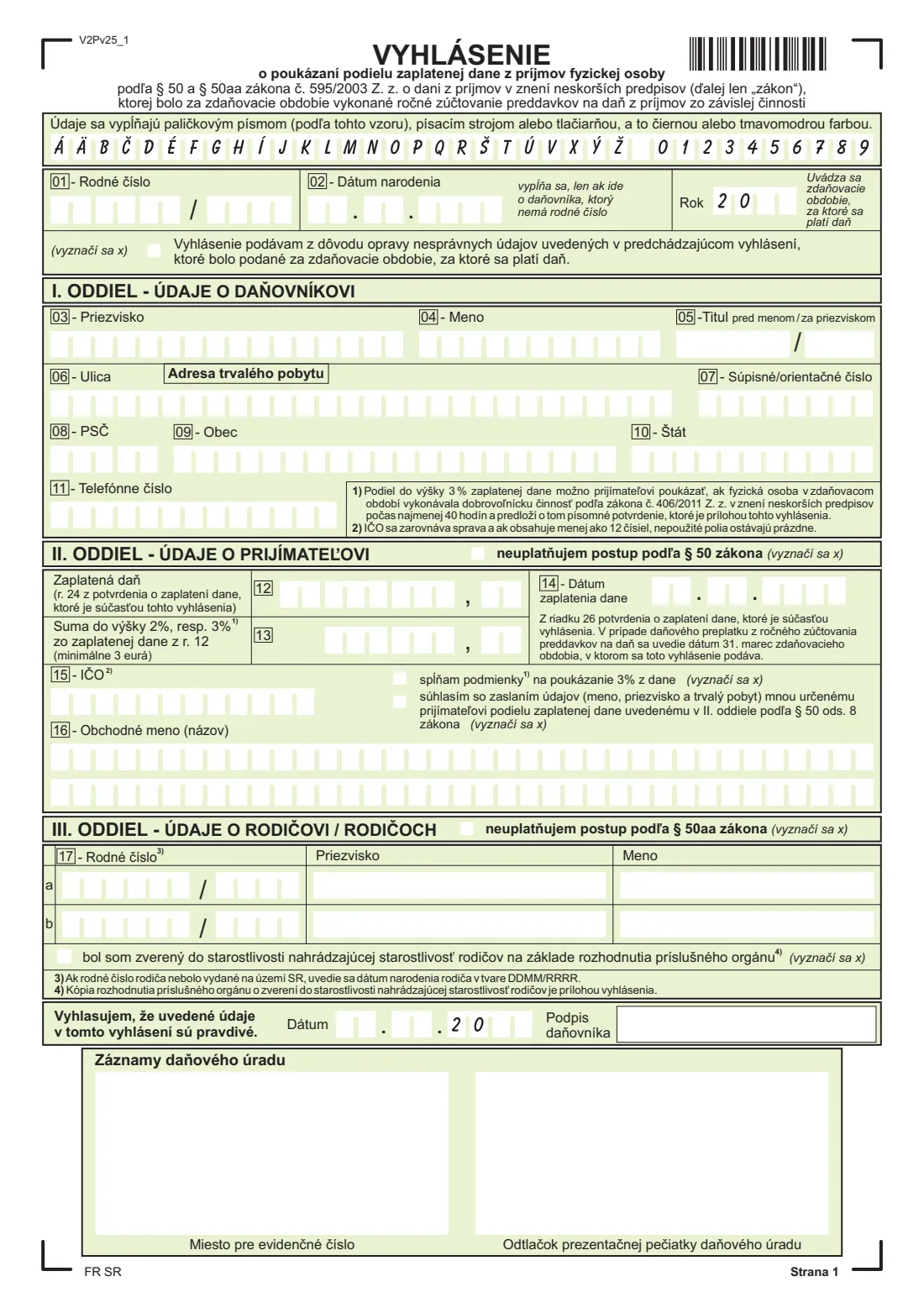
What is Assigning 2 % of your tax — employee's declaration (vyhlásenie o poukázaní podielu dane)?
The Vyhlásenie o poukázaní podielu zaplatenej dane z príjmov fyzickej osoby is the Slovak Financial Administration's (Finančná správa, FS SR) form for assigning part of the income tax you have already paid. Under § 50 of the Income Tax Act (Act 595/2003) you can send up to 2 % of your paid tax to one recipient on the official list of recipients, such as a civic association or foundation, or up to 3 % if you did at least 40 hours of volunteering during the year. Under § 50aa you can also have 2 % paid to each of your parents who receive a pension. This declaration is for employees whose employer did the annual reconciliation of tax advances (ročné zúčtovanie); if you file your own tax return, you make the assignment in the return instead.
The form has three parts after your identification: I. your details and permanent address, II. the recipient under § 50 with the tax paid, the amount assigned, the date the tax was paid and the recipient's identification number (IČO), and III. up to two parents under § 50aa. The figures come from the confirmation of tax paid (potvrdenie o zaplatení dane) that your employer issues on request, which is attached to the declaration. This edition (V2Pv25) is the one published for the 2025 tax year.
FileIt walks you through each line in English with the Slovak terms alongside and prints your answers into the official PDF's boxes: block capitals, euros right-aligned with the cents, and the recipient's IČO right-aligned as the form requires. It works out the largest share you can assign, rounded to cents the way the instructions say, checks the birth numbers (rodné číslo) and the IČO check digit, and pre-fills your name from the People records in your vault. The finished PDF is saved in your FileIt vault. FileIt never files it: you print, sign and deliver it to a tax office yourself.
- Who fills it
- An employee whose employer did the annual reconciliation (ročné zúčtovanie) of their tax for the year
- Given to
- A tax office (daňový úrad), with the employer's confirmation of tax paid attached
- Deadline
- By 30 April after the end of the tax year (per the official instructions)
- How much
- Up to 2 % of the tax paid (3 % with 40+ hours of volunteering), at least 3 euros; plus 2 % for each pensioner parent
- Signatures
- You sign it by hand
- Edition
- V2Pv25, for the 2025 tax year
Who needs to fill out Assigning 2 % of your tax — employee's declaration (vyhlásenie o poukázaní podielu dane)?
- Employees in Slovakia whose employer did the annual reconciliation of their tax advances and who want to assign 2 % of their paid tax to a non-profit recipient.
- Volunteers who did at least 40 hours of volunteering under Act 406/2011 during the tax year and can assign up to 3 %.
- Employees who want 2 % of their paid tax to go to a parent (or both parents) receiving an old-age pension, or an invalidity or service pension paid after pension age.
- People who were placed in the substitute care of a person by a decision of the competent authority and want to assign the parent share to that person.
- Anyone who filed this declaration and found a mistake in it before the deadline, and needs to file a corrected one.
When to use Assigning 2 % of your tax — employee's declaration (vyhlásenie o poukázaní podielu dane)
- After your employer has done the annual reconciliation for the year and given you the confirmation of tax paid (you ask for it in part VII of the ŽIA38 request).
- Between the start of the year and 30 April after the tax year ends — for the 2025 tax year, by 30 April 2026.
- Once per tax year; a corrected declaration within the deadline replaces an earlier one with wrong details.
- Not when you file your own tax return: then you assign the share in the return.
What you need before you start
- Your birth number (rodné číslo), or your date of birth if you don't have one.
- Your permanent address (street, house number, postcode, town, country).
- The confirmation of tax paid from your employer: line 24 (tax paid) and line 26 (date of payment).
- The recipient's IČO and exact name from the list of recipients published by the Notary Chamber of the Slovak Republic.
- For the 3 % share: the written confirmation of your volunteering from the organisation you volunteered for.
- For parents: each parent's birth number (or date of birth if it wasn't issued in Slovakia), surname and first name.
- If you were in substitute care: a copy of the decision placing you in that person's care.
What’s on Assigning 2 % of your tax — employee's declaration (vyhlásenie o poukázaní podielu dane)
The 2025 edition has 1 page. FileIt asks for it in 6 parts:
- Taxpayer and tax year (daňovník)Taxpayer (daňovník)
- II. Recipient of 2 % or 3 % (prijímateľ, § 50)Taxpayer (daňovník)
- III. Parents (rodičia, § 50aa)Taxpayer (daňovník)
- III. 17a Parent 1 (rodič)Taxpayer (daňovník)
- III. 17b Parent 2 (rodič)Taxpayer (daňovník)
- Date and signature (dátum, podpis daňovníka)Taxpayer (daňovník)
How to fill out Assigning 2 % of your tax — employee's declaration (vyhlásenie o poukázaní podielu dane), step by step
1 01–02 Birth number, date of birth and year (Rok)
Write your birth number in line 01, with six digits before the pre-printed slash and the rest after it. Line 02, the date of birth, is only for taxpayers who don't have a birth number. In the 'Rok' boxes, where '20' is pre-printed, add the last two digits of the tax year your employer reconciled, for example 25 for 2025.
Tick the correction box only if you already filed a declaration for the year with wrong or incomplete details and are filing a new one before the deadline.
2 I. oddiel — Údaje o daňovníkovi (your details)
Lines 03 to 05 take your surname, first name and any titles before and after your name. Lines 06 to 10 are your permanent address on the day you file, in Slovakia or abroad. Line 11, your phone number, is optional. The form asks for block capitals, so FileIt prints the boxed lines in capitals.
3 II. oddiel — Údaje o prijímateľovi (the recipient, § 50)
Line 12 is the tax paid, taken from line 24 of the confirmation of tax paid (the tax reduced by tax bonuses). Line 13 is the share you assign: up to 2 % of line 12, or up to 3 % if you tick 'spĺňam podmienky na poukázanie 3 % z dane' and attach the volunteering confirmation. The instructions say the result is rounded to two decimal places, rounding a following 5 or more up. The share must be at least 3 euros. FileIt fills in the maximum unless you enter a smaller amount.
Line 14 is the date the tax was paid, from line 26 of the confirmation; if the reconciliation gave you a refund, write 31 March of the year you file. Lines 15 and 16 are the recipient's IČO (right-aligned, with unused boxes left empty) and name, exactly as on the list of recipients. Tick the consent box if you want the tax office to pass your name and address to the recipient.
If you don't want to assign anything to a recipient, tick 'neuplatňujem postup podľa § 50 zákona' and leave this part empty.
4 III. oddiel — Údaje o rodičovi / rodičoch (parents, § 50aa)
Lines 17a and 17b take up to two parents: birth number, surname and first name. If a parent's birth number wasn't issued in Slovakia, write their date of birth as DDMM/RRRR, with DDMM right-aligned before the slash (the first two boxes stay empty). A parent counts only if, on 31 December of the tax year, they receive an old-age pension or an invalidity or service pension paid after pension age, and you are their own or adopted child or were placed in their substitute care by a decision of the competent authority.
Tick 'bol som zverený do starostlivosti…' in that last case and attach a copy of the decision. If you don't assign anything to your parents, tick 'neuplatňujem postup podľa § 50aa zákona'.
5 Dátum and Podpis daňovníka
Write the date (the year boxes have '20' pre-printed) and sign in the 'Podpis daňovníka' box to confirm the details are true. The bottom box is for the tax office's records.
Common mistakes to avoid
- Using this declaration when you file your own tax return — the assignment then goes in the return.
- Copying the wrong line from the confirmation of tax paid: line 12 takes line 24 and line 14 takes line 26.
- Assigning more than 2 % (or 3 %) of the tax paid, or less than 3 euros.
- Ticking the 3 % box without attaching the written volunteering confirmation.
- Writing the IČO left-aligned; the form wants it right-aligned with unused boxes left empty.
- Naming a recipient that isn't on the current list of recipients published by the Notary Chamber.
- Listing a parent who didn't receive a qualifying pension on 31 December of the tax year.
- Missing the 30 April deadline.
After you fill it out
Print the declaration, sign it by hand and attach your employer's confirmation of tax paid, plus the volunteering confirmation or the care decision if they apply. Deliver it to a tax office by 30 April after the tax year. FileIt does not file or send it; how and where you deliver it is up to you, following the Financial Administration's instructions.
Keep a copy with the confirmation. FileIt saves the finished PDF in the person's folder in your vault, so next year you can start from last year's answers.
If you find a mistake before the deadline, file a new declaration with the correction box ticked.
Fill out Assigning 2 % of your tax — employee's declaration (vyhlásenie o poukázaní podielu dane) online with FileIt
- Pick the person. Choose someone from People and FileIt fills in their name, date of birth, address and other details it already knows.
- Answer plain-language questions. One part of the form at a time, with the official help text beside each question — 39 fields in all. Your answers save as you go.
- Check the live preview. Watch your answers land on the real Finančná správa Slovenskej republiky (FS SR), the Financial Administration of the Slovak Republic form, and let FileIt do any worksheet arithmetic.
- Generate the official PDF. FileIt prints your answers into the agency’s own PDF and files it in that person’s folder in your vault.
FileIt fills the form — it never files or submits anything for you. Deliver the finished form to whoever asked for it, the way the form’s instructions say.
Start Assigning 2 % of your tax — employee's declaration (vyhlásenie o poukázaní podielu dane) now — it’s freeAssigning 2 % of your tax — employee's declaration (vyhlásenie o poukázaní podielu dane): frequently asked questions
What is the '2 percentá' declaration?
It's the vyhlásenie o poukázaní podielu zaplatenej dane: the form employees use to assign 2 % of the income tax they paid to a registered recipient, such as an NGO, when their employer did the annual tax reconciliation.
When can I assign 3 % instead of 2 %?
When you did at least 40 hours of volunteering under Act 406/2011 during the tax year and attach the written confirmation from the organisation. You then tick the 3 % box.
What is the minimum amount?
The share must be at least 3 euros, so a 2 % share needs at least 150 euros of tax paid.
Can I give 2 % to my parents as well?
Yes, under § 50aa you can assign 2 % to each of up to two parents who receive a qualifying pension on 31 December of the tax year, in part III. This is separate from the recipient in part II.
Where do I get the confirmation of tax paid?
From your employer. You can ask for it in part VII of the request for the annual reconciliation (ŽIA38). It is attached to this declaration.
What is the deadline and where do I send it?
The official instructions say by 30 April after the tax year ends. The declaration goes to a tax office (daňový úrad), not to your employer or the recipient.
Can I fill in the vyhlásenie online with FileIt?
Yes. FileIt guides you in English, calculates the maximum share, checks birth numbers and the IČO, and prints everything into the official PDF for free. You then print, sign and deliver it yourself; FileIt never files it.
How do I write a parent's date of birth?
Only when their birth number wasn't issued in Slovakia: as DDMM/RRRR, with DDMM right-aligned before the slash and the year after it.
Official sources
- Blank form (PDF), published by Finančná správa Slovenskej republiky (FS SR), the Financial Administration of the Slovak Republic: https://www.financnasprava.sk/_img/pfsedit/Dokumenty_PFS/Zverejnovanie_dok/Vzory_tlaciv/Zavisla_cinnost_5ZD/2025/2025.12.09_vyhlasenie.pdf
- Official instructions and guidance: https://www.financnasprava.sk/_img/pfsedit/Dokumenty_PFS/Zverejnovanie_dok/Vzory_tlaciv/Zavisla_cinnost_5ZD/2025/2025.12.09_pouc_vyhlas.pdf
- Edition shown on this page: V2Pv25 (model for the 2025 tax year, published 9 December 2025) (checked 2026-09-26).
FileIt is not affiliated with or endorsed by Finančná správa Slovenskej republiky (FS SR), the Financial Administration of the Slovak Republic or any government. This page explains the form in general terms and is not legal, tax or immigration advice. Always read the official instructions, and check that you are using the edition the recipient accepts. Page last reviewed 2026-09-26.